
An autoresponder is software that sends an email automatically when something happens, such as a person joining your list, filling in a form or writing to you while you are away. You write the message once, set the trigger, and the tool sends it every time that trigger fires. It matters because it lets a small team reply to every new lead at once, day or night, without typing a single email by hand.
Key Takeaways
- An autoresponder sends a pre-written email when a trigger fires, such as a sign-up, a purchase or an incoming message.
- There are two broad kinds: marketing autoresponders that follow up with leads, and personal replies such as out-of-office notices.
- Email platforms such as Mailchimp and Klaviyo now call these “automations” or “flows”, but the idea is the same.
- The internet standard for automatic replies, RFC 3834, asks responders to label their messages and avoid replying to other robots.
- A good autoresponder is short, useful and expected. A bad one feels like spam and hurts your sender reputation.
What Is an Autoresponder?
Think of an autoresponder as a reply you prepare in advance. You decide what should happen when someone takes an action, and the software takes care of the rest. For example, when a visitor downloads your free guide, an autoresponder can deliver the guide and say thank you within seconds.
The term covers more than marketing. The internet standard on automatic email replies lists several types. These include “out of office” or “vacation” notices, change of address notices, and email-based information services that answer requests by email. Mail filters, such as virus scanners, can also send automatic responses.
In marketing, though, the word usually means a follow-up email, or a short series of emails, sent to new subscribers. Older tools sold “autoresponders” as a product. Today, most platforms fold them into a wider automation builder. So when a job advert asks for autoresponder skills, it usually means you can build and manage these automated emails.
How an Autoresponder Works
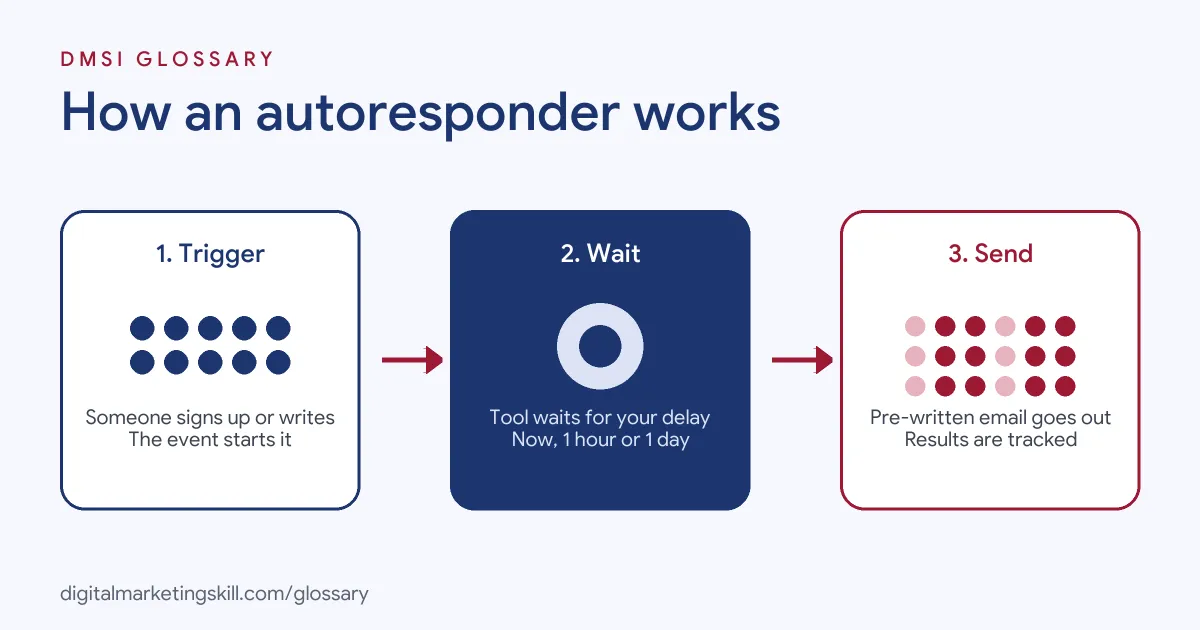
Every autoresponder follows the same three steps. First, a trigger fires, such as a new sign-up. Next, the tool waits for any delay you set. Finally, it sends the message you wrote and records what the person does next.
Triggers
A trigger is the event that starts the process. Klaviyo describes a flow as “a sequence of automated actions” that starts from “a behavior or event”. For instance, a flow might start when someone joins a list, starts checkout, or has a birthday coming up.
In Mailchimp, a welcome flow starts with a “Signs up for Email” or “Signs up for SMS” starting point. Mailchimp also notes that people who are already subscribed won’t enter the flow again.
Delays and Sequences
After the trigger, you choose when the email goes out. In Mailchimp’s welcome flow, the default delay is immediate. The other options are 1 hour, 6 hours or 1 day. You can then add more steps, so one autoresponder becomes a short sequence.
Klaviyo goes further. Its flows can include time delays and multi-branch splits that route people into up to 20 paths. As a result, a buyer and a browser can get different follow-ups from the same trigger.
The Rules for Automatic Replies
Personal autoresponders, such as out-of-office replies, follow some technical rules. RFC 3834 says any automatic response should carry an “Auto-Submitted” header with the value “auto-replied”. It also says responders should not reply to messages that already carry that header. This stops two robots from emailing each other in an endless loop.
The same standard says an “away” reply should not go to the same sender more than once in a set period. It recommends 7 days as the default. Gmail works in a similar way. Its vacation reply usually goes only to the first message from each person, and again if they write after four days.
Autoresponder Examples
Here are three common examples of an autoresponder at work:
- Lead magnet delivery: A coach offers a free checklist. Once someone signs up, an email delivers the link straight away and invites them to reply with a question.
- Welcome sequence: An online shop sends a welcome email right after sign-up. Then, two days later, it sends a second email about its best-selling products.
- Out-of-office reply: A freelancer on holiday sets a vacation reply. It tells clients when she will be back and who to contact in the meantime.
These are made-up examples, but they show the pattern. In each case, one clear action leads to one helpful, expected message.
Types of Autoresponder Compared
The word covers a few different tools, so here is a quick comparison:
| Type | Trigger | Typical use |
|---|---|---|
| Marketing autoresponder | Sign-up, download or form fill | Deliver a lead magnet and start a relationship |
| Behaviour-based flow | Checkout started, order placed, no visit for a while | Recover carts, thank buyers, win people back |
| Out-of-office reply | Any incoming email while away | Tell people when you will reply |
| Service responder | Email sent to a set address | Confirm a request, such as a support ticket |
In short, a marketing autoresponder aims to build a relationship, while a personal reply simply manages expectations.
How to Set Up an Autoresponder
The menus differ between tools, but the steps below work in most email platforms:
- Pick one goal, such as delivering a free guide or welcoming new subscribers.
- Choose the trigger. For a list, this is usually “signs up” or “joins list”.
- Set the delay. For a lead magnet, send it at once, because people expect it straight away.
- Write a short email with one main link and a clear subject line.
- Send a test to your own inbox. Mailchimp advises checking “your design, copy, and links in a real inbox” before you turn a flow on.
- Turn it on, then check the report after a week to see opens, clicks and unsubscribes.
Once the first email works, you can add a second or third step. However, add each one for a reason, not just to fill the sequence.
Best Practices for an Autoresponder
- Send what you promised. If the form offered a guide, put the guide in the first email.
- Keep it short. RFC 3834 says a personal responder should “send only brief responses in plain text”. Marketing emails can carry more design, but brevity still helps.
- Make it easy to leave. Google’s sender guidelines say bulk senders of more than 5,000 messages a day to Gmail must support one-click unsubscribe for marketing messages.
- Watch your spam rate. Google asks senders to keep spam rates in Postmaster Tools below 0.3%, and ideally below 0.10%.
- Personalise with care. A first name is fine. Even so, the content matters far more than the greeting.
Common Mistakes to Avoid
Beginners often make the same few errors. First, they set an autoresponder live without testing it, so broken links reach every new lead. Second, they write long emails that bury the one thing the reader asked for. Third, they forget to update old sequences, so new subscribers get outdated offers. Finally, some people set out-of-office replies that answer mailing lists, which annoys everyone on the list. Each of these takes only a few minutes to fix once you spot it.
Where You’ll Use an Autoresponder at Work
Autoresponders are an everyday tool in email and automation roles. For example, remote job listings ask candidates to:
- “Set up newsletters, autoresponders, and other automated communications” (Email Implementer).
- Have “Experience with tools like Clickfunnels, Marketing CRMs, Autoresponders, and similar marketing software” (Onboarding Analyst).
So if you want to work as an Email Marketing Specialist or Marketing Automation Specialist, employers will expect you to build, test and improve automated emails. They will also want proof, such as a working sequence you can show them.
Learn It in the Lead Generation and Email Track
You can learn to build an autoresponder in the AI-Powered Lead Generation and Email Automation track. There, you build a lead magnet and an automated email sequence that converts, so you finish with a project you can show an employer. You also work on a U.S. Project Internship from day one, with unlimited 1-on-1 mentoring.
Want to plan the full journey? Read our guide to building an email automation workflow. You can also browse these lead magnet ideas for the offer your first email will deliver, or learn how double opt-in confirms new subscribers.
Frequently Asked Questions
What is an autoresponder in simple terms?
It is a tool that sends a pre-written email automatically when something happens, such as a new sign-up. You set it up once, and it keeps working on its own.
Is an autoresponder the same as email automation?
Mostly, yes. An autoresponder is the simplest form of email automation. Modern tools add branches, conditions and delays, but the core idea of a trigger and a message stays the same.
How fast should an autoresponder send?
For a lead magnet or welcome email, send it straight away, because people expect it. Mailchimp’s welcome flow sends immediately by default.
Can an out-of-office reply cause problems?
Yes, if it replies to mailing lists or other robots. That’s why the standard for automatic replies asks tools to label their messages and limit replies to the same sender.
Do I need coding skills to set up an autoresponder?
No. Most email platforms use drag-and-drop builders. However, basic HTML helps when you want to fix layout issues in an email template.
Sources: IETF RFC 3834: Recommendations for Automatic Responses to Electronic Mail; Klaviyo Help Center: Getting started with flows; Mailchimp Help: Welcome automations; Gmail Help: Send automatic replies; Google: Email sender guidelines; remote job listings on Himalayas.