
Cookie consent is the permission a website asks for before it stores or reads cookies and similar tracking files on a visitor’s device. In the UK and Europe, sites must explain what non-essential cookies do and get a clear “yes” before setting them. It matters because analytics, ads and remarketing all depend on how you handle that choice.
Key Takeaways
- Under UK rules, you must tell people about cookies, explain what they do and get consent before setting non-essential ones.
- Strictly necessary cookies, such as a shopping basket, don’t need consent. The UK regulator says analytics cookies are not in that group.
- Valid consent is freely given, specific, informed and shown by a clear positive action.
- Rejecting must be as real a choice as accepting. A banner that pushes people towards “agree” is not compliant.
- Google’s consent mode lets its tags adjust to each visitor’s choice. Google also requires consent for users in the EEA, the UK and Switzerland.
What Is Cookie Consent?
Cookies are small files a website saves in your browser. Some keep the site working, like remembering what’s in your basket. Others track visits for analytics or follow people across sites for advertising.
Cookie consent is the step where you ask a visitor which of these they allow. Usually, it shows up as a banner or pop-up when someone first lands on a site. The visitor can accept, reject or choose by category.
In the UK, the rules come from the Privacy and Electronic Communications Regulations, known as PECR. The Information Commissioner’s Office (ICO) explains them simply: you must tell people the cookies are there, explain what they do and why, and get their consent. The ICO adds that the rules cover all cookies, even anonymous ones.
For marketers, cookie consent is more than a legal box to tick. It sets how much data your Meta Pixel, Google tags and analytics tools can collect.
How Cookie Consent Works
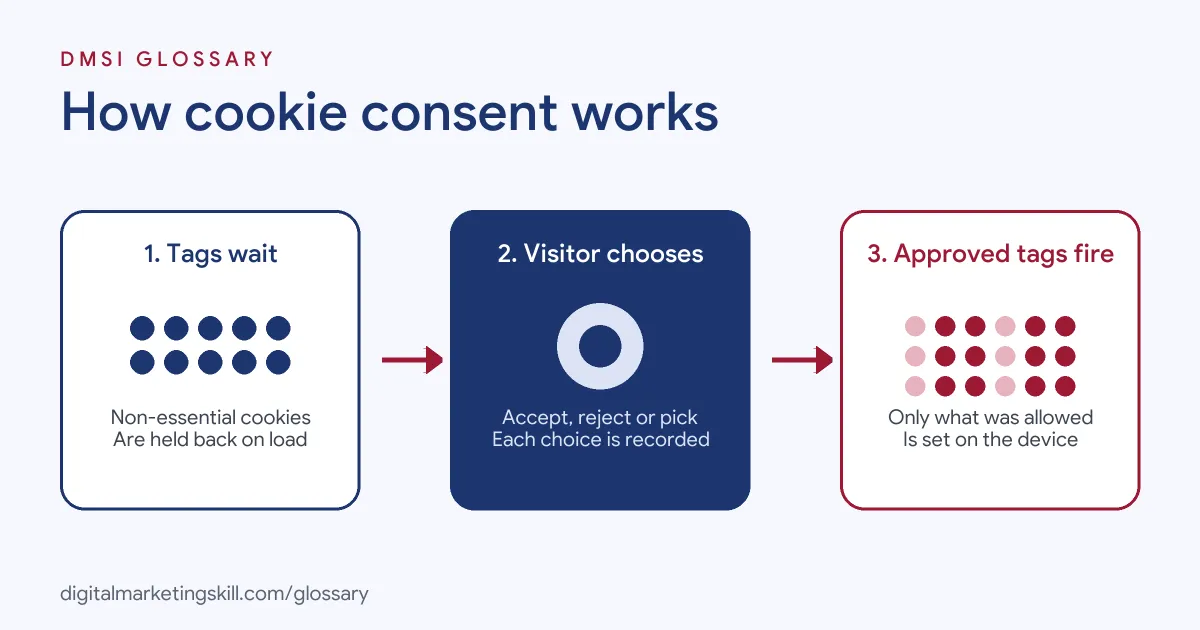
A compliant set-up follows three steps. First, the site holds back non-essential cookies when the page loads. Next, it shows a clear choice and records the answer. Then it only fires the tags the visitor agreed to.
What Counts as Valid Consent
The ICO says consent “must be freely given, specific and informed.” It also needs “some form of unambiguous positive action,” such as ticking a box or clicking a button. Simply carrying on using the site is not enough.
Also, consent hidden in a privacy policy that few people read doesn’t count. The facts have to be clear and easy to find.
Strictly Necessary Cookies
There is one main exemption. You don’t need consent for cookies that are strictly necessary to give the visitor a service they asked for. The ICO’s examples include basket cookies, security cookies for online banking and load-balancing cookies.
However, “helpful” is not the same as “necessary.” The ICO states that “analytics cookies do not fall within the ‘strictly necessary’ exemption.” So, under its guidance, analytics tools need consent too.
Timing and Withdrawal
Timing matters as much as the banner. According to the ICO, “you cannot set non-essential cookies on your website’s homepage before the user has consented to them.” In addition, people must be able to withdraw consent at any time, with the same ease they gave it. You also decide when a choice expires, after which you ask again.
Cookie Consent Examples
Here are three made-up examples of good and bad set-ups:
- Example 1, compliant banner: An online shop shows “Accept all” and “Reject all” buttons of the same size. It also offers a “Manage choices” link by category. Its analytics and ad tags wait until a visitor accepts.
- Example 2, nudging banner: A blog shows a big green “Agree” button but hides “Reject” behind a small grey link. The ICO describes a mechanism that “emphasises ‘agree’ or ‘allow’ over ‘reject’ or ‘block'” as non-compliant.
- Example 3, consent mode set-up: A training provider links its banner to Google’s consent mode. When a visitor declines ads cookies, the Google tags adjust their behaviour instead of setting advertising cookies.
Google Consent Mode: Basic vs Advanced
Google’s consent mode lets its tags respond to a visitor’s choice. It uses four consent types: ad_storage, analytics_storage, ad_user_data and ad_personalization. You can run it in two ways:
| Feature | Basic consent mode | Advanced consent mode |
|---|---|---|
| When Google tags load | Only after the visitor uses the consent banner | When the page opens, with consent set to denied by default |
| Data if the visitor declines | No data is sent to Google | Full measurement data is only sent after consent is granted |
| Conversion modelling | Based on a general model | Based on an advertiser-specific model |
In both cases, Google says you remain responsible for getting your users’ consent. Consent mode adjusts the tags; it doesn’t replace the banner.
How to Set Up Cookie Consent on Your Website
- Audit your cookies. List every cookie and tag on the site, including third-party ones from ad and analytics tools.
- Sort them into groups. For instance, use strictly necessary, analytics, and marketing. Only the first group can run without consent.
- Choose a consent tool. Many sites use a consent tool or a WordPress plugin to show the banner and store each choice.
- Write clear wording. Explain each group in plain language. Then give equal weight to accept and reject options.
- Block tags until consent. Make sure non-essential tags don’t fire on page load. Next, connect the banner to Google’s consent mode if you use Google tags.
- Keep records and a way out. Google’s EU user consent policy asks you to keep records of consent and give clear instructions for withdrawing it. So add a link, such as “Cookie settings”, in your footer.
- Test it. Finally, open the site in a private window, decline everything and check that no marketing cookies appear.
What Cookie Consent Means for Your Data
Every “reject” changes what your reports can see. With basic consent mode, Google gets no data at all from people who decline. As a result, your analytics will show fewer visits and conversions than really happened. Google uses modelling to fill some of that gap, and advanced mode gives a model built for your own account. So when you compare results over time, check whether your consent set-up changed too.
Best Practices for Cookie Consent
- Make reject as easy as accept. A genuine free choice is the core of the ICO’s guidance.
- Don’t pre-enable cookies. The ICO says enabling a non-essential cookie without a positive action is not allowed.
- Name third parties. When your site sets third-party cookies, both you and that third party share responsibility for telling users and getting consent.
- Avoid forced consent. The ICO says consent should not be a condition of the service unless it is necessary for that service.
- Review after every new tool. Each new pixel or plugin can add cookies, so update your list when you add one.
Common Mistakes to Avoid
Many sites get the banner right but the tags wrong. For example, the analytics tag fires before anyone clicks. Others treat scrolling as consent, which the ICO rules out. Some forget to block third-party embeds, such as video players. Meanwhile, others make withdrawal hard by hiding the settings link. Each one can mean legal risk and data you can’t trust.
Where You’ll Use Cookie Consent at Work
Consent comes up in marketing, web and privacy roles. For example, remote job listings mention:
- “Web compliance and governance, including cookie consent and tracking governance” (Lead Digital Marketing Manager).
- “Cookie compliance and consent management” (Privacy Analyst).
- Experience with “consent management, cookies, tagging, data collection, or consumer privacy experiences” (Manager, Software Engineering, Marketing and Privacy Engineering).
So whether you become a Digital Marketing Manager, Growth Marketer or Freelance Digital Marketer, you’ll need to check that tracking respects each visitor’s choice.
Learn It in the Full Stack Programme
You can learn how tracking, analytics and ads fit together in the Full Stack (all four tracks) programme. It covers all ten courses, with one portfolio project from each track. You also get unlimited 1-on-1 mentoring and a U.S. Project Internship from day one.
For related reading, see our guide to data-driven marketing and our glossary entry on the Conversions API.
Frequently Asked Questions
What is cookie consent in simple terms?
It is a visitor’s permission for a website to store or read non-essential cookies on their device. Sites usually ask for it with a banner.
Do analytics cookies need cookie consent?
Under the ICO’s guidance, yes. It says analytics cookies do not fall within the strictly necessary exemption.
Is a cookie wall allowed?
The ICO says consent should not be bundled as a condition of the service unless it is necessary for that service. The key test is whether people get a genuine free choice.
How long does cookie consent last?
There is no fixed period in the ICO guidance. You decide when a choice expires, then ask the visitor again.
Does Google consent mode replace a cookie banner?
No. Consent mode changes how Google tags behave based on the choice. You still need a banner or other tool to ask for consent.
Sources: ICO: Cookies and similar technologies; ICO: How do we comply with the cookie rules?; Google for Developers: Consent mode overview; Google: EU user consent policy; remote job listings on Himalayas.