
A SERP, or search engine results page, is the page a search engine shows after someone types or speaks a query. It mixes paid ads, organic links and features such as images, videos and related questions. It matters because the SERP is where people decide which result to click, so its layout shapes how much traffic your page can win.
Key Takeaways
- SERP stands for search engine results page. Every query produces its own SERP.
- A SERP holds paid results, organic results and extra features, such as image results and “People Also Ask”.
- Google says the features on the page change with the query. Location, device and language also change what people see.
- Google’s ads sit in top and lower ad locations, and the top ads come from a separate auction.
- To win clicks, you study the SERP for your keyword first, then build a page that fits what Google already shows.
What Is a SERP?
Think of a SERP as a shop window that the search engine fills for each query. You don’t choose the layout. Instead, the engine decides which pages, ads and features best answer the search, then lays them out in order.
For example, if you search “modern bicycle”, Google says you are more likely to see image results. However, a search for “bicycle repair shops” is more likely to show local results. Both are SERPs, yet they look very different because the intent behind each query is different.
That’s why SEO and paid search specialists talk about the SERP so much. In other words, ranking well is only half the job. You also need to know what the rest of the page looks like, because that decides how many people scroll down to your link. Matching the search intent behind a query is the first step.
How a SERP Works
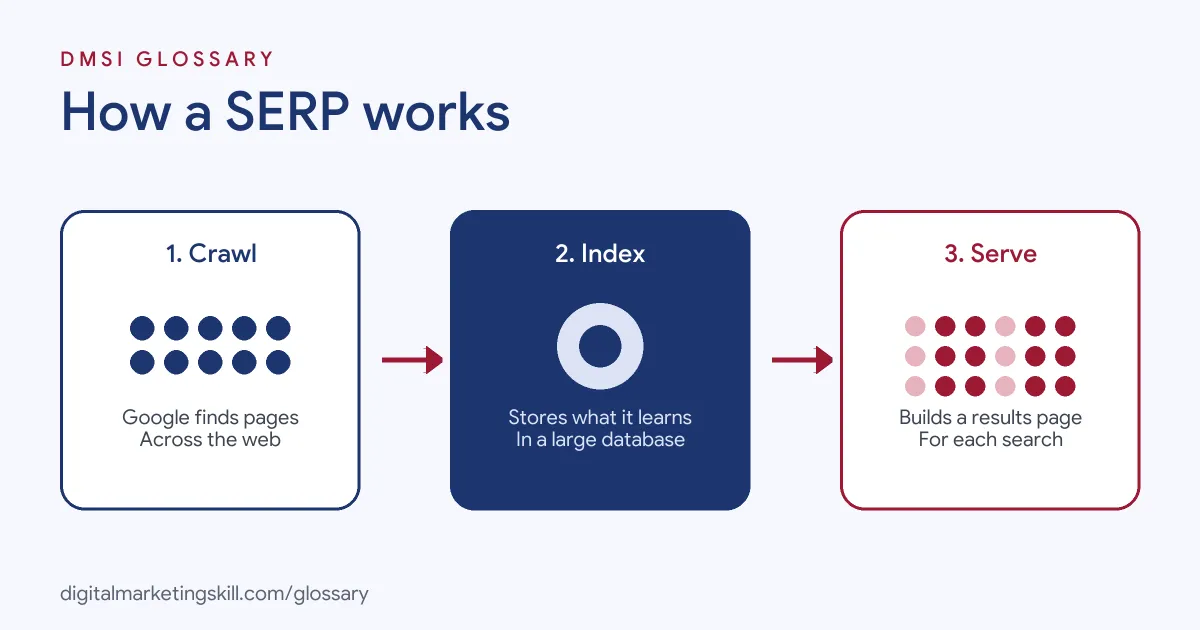
Google builds each results page in three stages. First, it crawls the web to find pages. Next, it indexes them, which means it stores what it learns in a large database. Finally, when someone searches, it serves the results it believes are the most relevant and highest quality for that query.
What Decides the SERP Layout
Google says relevance “is determined by hundreds of factors.” Some of these come from the searcher. For instance, Google notes that the same search for a bicycle repair shop shows different results to someone in Paris than to someone in Hong Kong. The device and the searcher’s language matter too.
Google also says that indexing “isn’t guaranteed.” So a page that Google never indexes can never appear on any SERP, however good it is.
Paid and Organic Results
Most commercial searches show both ads and organic links. Google Ads Help explains that ads can appear in a top location, “generally above search results”, and in ad locations lower down the page. It also says that “top ads are selected by a different ad auction” from ads in other places. Organic results, by contrast, cannot be bought. They depend on how relevant and useful Google judges your page to be.
SERP Features
Google’s own gallery of visual elements names the main parts of a results page. These include text results, rich results, image results, video results and exploration features. Rich results “typically” rely on structured data, such as review stars or recipe details. Exploration features include related searches and related questions, which Google says are also called “People Also Ask”.
SERP Examples
Here are three made-up examples of how the SERP changes with the query:
- Local search (example): Someone types “plumber near me”. The SERP leans towards local results and a map, so a plumber needs a strong local presence, not just a blog post.
- How-to search (example): Someone searches “how to repot a plant”. The SERP may show videos and a “People Also Ask” box, so a short video and clear answers can help a gardening site.
- Buying search (example): Someone searches “running shoes for flat feet”. This SERP often mixes ads, product results and reviews, so a shop may need both paid and organic visibility.
In each case, the results page tells you what format Google expects. Your content should match that format.
Parts of a SERP Compared
Google’s Search Central documentation describes each element. Here is a quick guide:
| Element | What it is | How you influence it |
|---|---|---|
| Title link | The clickable title of a result | Write a clear, accurate page title |
| Snippet | The description or summary under the title | Write a helpful meta description and clear page text |
| Sitelinks | Two or more extra links from the same site | Use a clear site structure and internal links |
| Rich result | A result with extra visuals, often from structured data | Add correct structured data where it fits |
| People Also Ask | A group of related questions | Answer common questions plainly on your page |
| Search ads | Paid results in top or lower ad locations | Run Google Ads campaigns |
In short, some parts of the SERP you earn and some you pay for. A good strategy plans for both.
How to Analyse a SERP for Your Keyword
Before you write a page, study the results you want to appear in. Follow these steps:
- Search your target keyword. Use a private window, so your own history affects the results less.
- Note the features. Write down whether you see ads, videos, images, a map or “People Also Ask”.
- Check the top organic results. Are they guides, product pages, lists or tools? This shows the format Google expects.
- Read the questions. Collect the related questions and answer the best ones on your page.
- Check the device. Search on a phone as well, because the layout can differ.
- Plan your page. Match the format, then make yours more useful, clearer or more complete.
- Track results. After you publish, watch your impressions and clicks in Google Search Console.
For example, if every top result for a keyword is a step-by-step guide, a sales page will struggle to rank there. So you would write a guide instead and link it to your offer.
Best Practices for SERP Visibility
- Write titles for people. Your title link is often the first thing a searcher reads, so make it clear and accurate. Our guide to meta titles explains how.
- Write a helpful summary. A good meta description can improve the snippet that appears on the SERP.
- Answer questions early. Clear, short answers near the top of a page suit question-based features.
- Use structured data correctly. It can make a page eligible for rich results, although Google never promises to show them.
- Check the SERP often. Layouts change, so review your main keywords regularly.
Common Mistakes to Avoid
The most common mistake is writing a page before looking at the SERP. As a result, people create the wrong format and wonder why it never ranks. Another mistake is chasing the top spot while ignoring ads and features that push organic links down the page. Some marketers also check results only on a desktop, even though many searches happen on phones. Finally, many forget that results vary by location, so a ranking you see at home may not match what a customer sees elsewhere.
Where You’ll Use SERP Analysis at Work
Reading the results page is a daily task in SEO and content roles. For example, real remote job listings ask candidates to:
- “Assist in keyword research, SERP analysis, and competitor research to support SEO initiatives” (SEO Executive).
- Carry out “Competitor analysis and SERP evaluation” (Remote SEO Content Editor, AI Search and AEO).
- “improve CTR and SERP feature capture on your highest-value pages” (SEO Manager).
So if you want to work as an SEO Specialist or Website Manager, employers will expect you to read a SERP, explain what it means and plan content that fits it. They will also want proof, such as a page you ranked and the data that shows it.
Learn It in the WordPress and SEO Track
You can learn to read and win the SERP in the AI-Powered WordPress and SEO Specialist track. It covers WordPress website and eCommerce development, search engine optimisation and content marketing. Your portfolio project is a WordPress site or store that you build and rank with an SEO content plan. You also get unlimited 1-on-1 mentoring and a U.S. Project Internship from day one.
Next, read our guide to Google ranking factors and our on-page SEO guide to see how pages earn their place.
Frequently Asked Questions
What does SERP stand for?
SERP stands for search engine results page. It is the page you see after you search on Google, Bing or another search engine.
Why does the SERP look different for different searches?
Google changes the features on the page to suit each query. It also takes your location, device and language into account, so two people can see different results.
What is a SERP feature?
It is any result that goes beyond a plain blue link. Examples include image results, video results, rich results and the “People Also Ask” box.
Can I pay to appear at the top?
You can pay for ads, which appear in ad locations at the top or lower down. However, you cannot pay for organic rankings, which Google decides on relevance and quality.
How do I see my site’s SERP performance?
Use Google Search Console. Its Performance report shows how often your pages appear in results and how often people click them.
Sources: Google Search Central: How Google Search works; Google Search Central: Visual elements gallery of Google Search; Google Ads Help: How ad locations work; remote job listings on Himalayas.