
On-page SEO means the changes you make directly on a page so search engines can read it correctly. That covers the title tag, headings, body text, internal links and images. Most checklists list the same items without saying which ones actually move rankings. This guide separates the two, with a source for every figure.
Key Takeaways
- Google rewrites a supplied title tag around 13% of the time and keeps it as written the rest. A clear, keyphrase-first title has the better odds of surviving untouched (Google Search Central).
- Google uses a page’s own meta description as the snippet only some of the time. Ahrefs found roughly a quarter of top-ranking pages carry no meta description at all, yet still rank. The tag influences clicks more than rankings (Ahrefs).
- Good Core Web Vitals performance sits at under half of mobile pages and just over half of desktop pages, across the whole web. That is why page-speed fixes still move the needle for most sites (HTTP Archive Web Almanac).
- Google’s own documentation says length alone, keyword density and heading order carry no ranking weight. On-page SEO works by matching intent and structure, not by stuffing words (Google SEO Starter Guide).
- A documented case from a technology company’s blog shows traffic grow after combining frequent publishing with basic on-page fixes: internal links, one or two keyphrases per page, and clear meta descriptions. The fundamentals compound; they do not act alone (HubSpot).
In this guide
- The Gap in Most On-Page SEO Advice
- How On-Page SEO Actually Works
- What Differs by On-Page Element
- Title Tags: The First Signal Google Rewrites
- Meta Descriptions: The Snippet Google Sometimes Ignores
- Headings: The Outline Crawlers and Readers Both Follow
- Internal Links: The Paths That Spread Authority
- Content Depth: A Correlation, Not a Ranking Rule
- Page Experience: The Layer Most Sites Still Fail
- Images: The Element Most Sites Leave Half-Done
- URLs: The Element You Set Once and Rarely Touch Again
- How to Lead With Each Element
- Title Tags: Put the Keyphrase First
- Meta Descriptions: Write for the Click, Not the Crawler
- Headings: Build One Outline, Not Six Section Labels
- Internal Links: Connect Every Important Page to at Least One Other
- Content Depth: Match Length to Intent, Not a Word-Count Rule
- Page Experience: Fix the Worst Vital First
- Images: Write Alt Text That Describes, Not Stuffs
- URLs: Set It Once and Protect It
- How to Measure On-Page SEO
- The One Decision Rule
- What Doing This Right Looks Like
- Frequently Asked Questions About On-Page SEO
- Start With One Page
The Gap in Most On-Page SEO Advice
Search any on-page SEO checklist and you get the same items: title tag, meta description, headings, URL, images, internal links, content length. Most lists skip one question. Which of those items does Google actually weigh for ranking, and which only affect whether someone clicks your result once it is already ranking? That distinction decides where you spend your time.
The ground rules here are simple. Google’s own documentation is quoted directly, not folklore. Every third-party figure names its sample size and its limits, because a tactic is only as credible as the evidence behind it. Nothing below is a permanent formula. Google updates specific signals often, so treat each item as a current, checkable practice.
How On-Page SEO Actually Works
A page earns a ranking in three stages. Google’s crawlers find and fetch the page. The content gets parsed and stored in the index. A ranking system then decides which indexed pages best answer a given query. On-page SEO happens in the first two stages, and it shapes the third: it makes a page easier to crawl and clearer about what it answers.
Two forces run through that process at once. The first is technical clarity: can the crawler read your headings, links and text without guessing? The second is relevance: does your content answer the query better than the pages already indexed? A page can be technically flawless and still rank poorly if it answers the wrong question. A page can answer the right question and still underperform if its structure confuses the reader. On-page SEO works on both forces together.
Google is explicit that some old shortcuts no longer apply. The keywords meta tag carries no weight. Raw content length is not a ranking input. Heading order does not change how a page ranks, says the Google SEO Starter Guide. What still matters is whether your structure helps the crawler and the reader understand the page quickly.
What Differs by On-Page Element
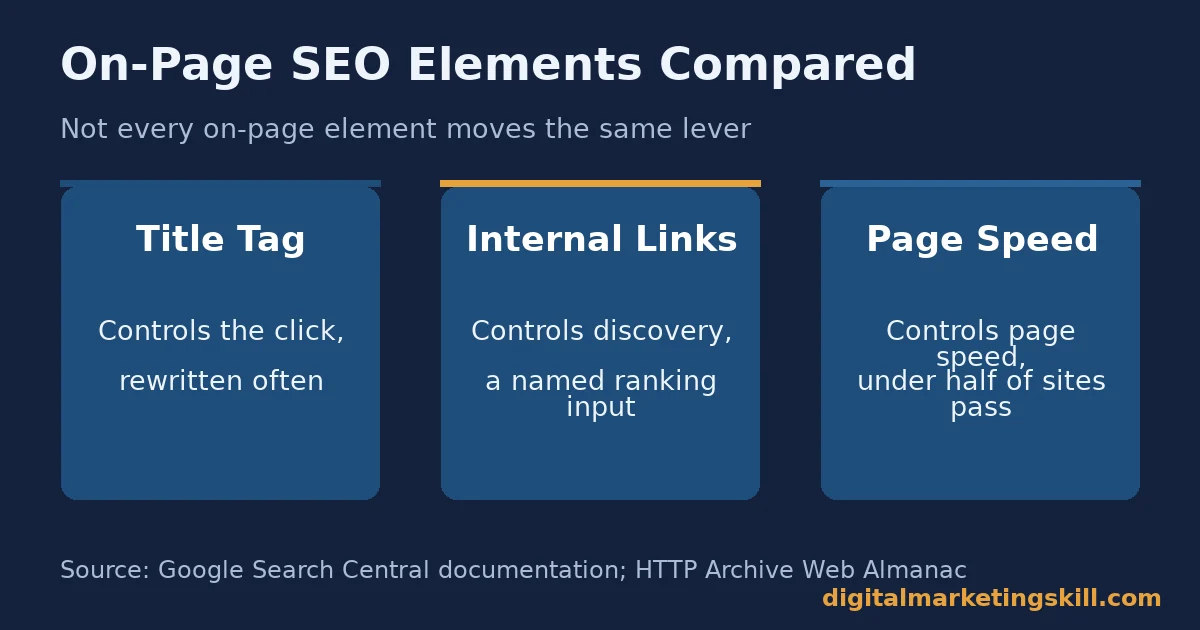
Not every on-page element carries the same weight. Here is what actually differs between the six elements worth your time.
Title Tags: The First Signal Google Rewrites
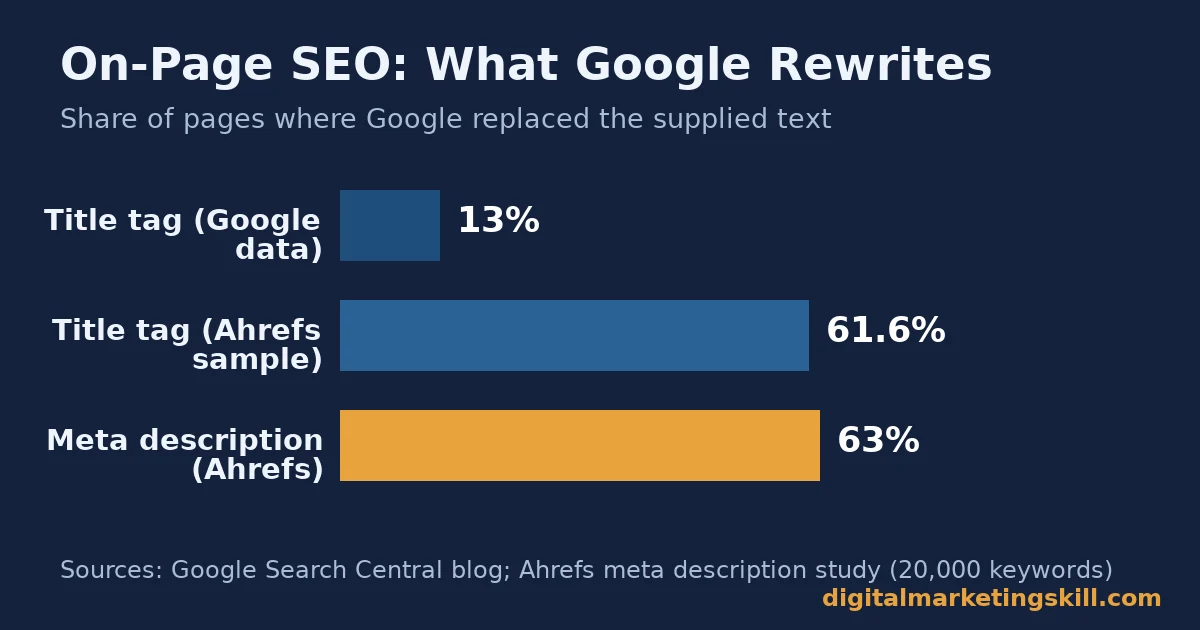
The title tag is the line Google is most likely to alter before showing it in results. Google changed how it generates titles. After that change, its own blog post says title elements are used as supplied around 87% of the time, up from roughly 80% before (Google Search Central blog). Ahrefs sampled a different set of pages. It found Google rewrites the title tag on roughly 61.6% of them, usually with only minor wording changes. Treat the two figures as snapshots, not one fixed rate. The pattern holds either way. A generic, duplicated or keyword-stuffed title is more likely to get replaced with text pulled from your headings or body content instead.
Meta Descriptions: The Snippet Google Sometimes Ignores
A meta description has no measurable effect on ranking position. It still decides whether a ranked result earns the click. Google’s documentation says snippets are “primarily created from the page content itself.” The meta description gets used only sometimes. Keyword-list style descriptions are “less likely to be displayed,” Google adds (Google snippet documentation).
Ahrefs studied 20,000 keywords. It found Google rewrote the supplied meta description on roughly 63% of pages. The rewrite rate was higher for long-tail queries than broad ones. About a quarter of top-ranking pages had no meta description at all (Ahrefs meta description study).
Headings: The Outline Crawlers and Readers Both Follow
Headings do not need a fixed order to rank. They do need to describe the content under them accurately. The crawler and the reader both use headings to predict what comes next. A heading that only labels a section, like “Benefits,” does less work than one that states a claim, like “Fixing Load Speed Cuts Bounce Rate.” The second version gives a search engine a self-contained statement it can match to a query. Where you place the keyphrase inside that structure is its own skill, covered in our guide to keyword placement.
Internal Links: The Paths That Spread Authority
Internal links are the one on-page element Google ties directly to crawling and ranking. “Every page you care about should have a link from at least one other page on your site,” Google says. Anchor text should be “descriptive, reasonably concise, and relevant to the page that it’s on and to the page it links to” (Google’s internal linking guidance). A page with zero internal links pointing to it is an orphan page. It is harder for crawlers and readers to find, no matter how well it is written.
Content Depth: A Correlation, Not a Ranking Rule
Longer pages often rank well, but length itself is not the cause. Google states plainly that “the length of the content alone doesn’t matter for ranking purposes.” The real driver is coverage. A page that answers every sub-question a searcher has tends to run longer simply because it does more work, not because word count earns a bonus.
Page Experience: The Layer Most Sites Still Fail
Core Web Vitals measure loading speed, responsiveness and visual stability. They are confirmed ranking inputs. Google is still clear that “Search always seeks to show the most relevant content, even if the page experience is sub-par” (Google page experience documentation). Despite years of attention, most sites still fail this layer. The HTTP Archive’s Web Almanac draws on real-user Chrome data across millions of origins. It found only about 48% of mobile pages and 56% of desktop pages pass the combined Core Web Vitals threshold. The largest single gap sits in Largest Contentful Paint, the time until the biggest visible element loads (HTTP Archive Web Almanac, Performance chapter). Mobile carries its own extra constraints, covered separately in our guide to mobile SEO.
Images: The Element Most Sites Leave Half-Done
Images carry two separate on-page jobs: helping the page load fast, and telling search engines what the picture shows. Google’s own image SEO guidance calls alt text “the most important attribute” for image metadata, because it is the only text description a crawler, or a screen reader, has to work with. Yet the WebAIM Million scan of one million home pages found missing alt text on 53.1% of pages, one of the six most common accessibility failures found on the web (WebAIM Million).
URLs: The Element You Set Once and Rarely Touch Again
Google’s own URL structure guidance recommends hyphens over underscores to separate words, because hyphens are read as word breaks and underscores are not. A clean, hyphenated URL that matches your keyphrase is a small, one-time fix. Changing a URL after it has earned links and rankings carries real risk, so get it right before you first publish rather than editing it later.
How to Lead With Each Element
Knowing what differs is the easy half. Here is the tactic for each element, in the same order.
Title Tags: Put the Keyphrase First
Write one literal title per page, under roughly 60 characters. Put the exact keyphrase in the first few words. Never duplicate a title across pages. A duplicated or vague title is exactly the pattern Google named as a rewrite trigger.
Meta Descriptions: Write for the Click, Not the Crawler
Since the description does not move rankings, write it to earn the click. State the specific benefit or answer in 120 to 156 characters. Include the keyphrase once, naturally. Skip the keyword list; Google says it is less likely to display one anyway.
Headings: Build One Outline, Not Six Section Labels
Give every heading a claim instead of a label. Place the keyphrase or a close variant in several of them. Keep the outline consistent: one H2 per major idea, H3s nested under the H2 they belong to. A reader, or an AI system summarizing the page, can then rebuild the logic from headings alone.
Internal Links: Connect Every Important Page to at Least One Other
Audit your site for orphan pages first. Then add contextual links from related, already-published posts. Vary the anchor text so it describes the destination instead of repeating “click here.” Space links out in the text rather than stacking them, which is what Google’s own guidance recommends for clarity.
Content Depth: Match Length to Intent, Not a Word-Count Rule
Before writing, list every sub-question a searcher with this intent would ask. Answer each one in its own section. If that produces 800 words, publish 800 words. If it produces 3,000, publish 3,000. Padding a short answer to hit a round number adds nothing, because length is a side effect of coverage, not a lever on its own.
Page Experience: Fix the Worst Vital First
Measure your Largest Contentful Paint, Interaction to Next Paint and Cumulative Layout Shift with real-user data. Fix whichever one fails hardest, rather than tuning all three evenly. Web.dev’s own case studies show the pattern. One retailer cut its Largest Contentful Paint and reported an 8% increase in sales. A marketplace improved loading speed and reported a 23% gain in average session duration. Both attributed the result to fixing their single worst vital first (web.dev Core Web Vitals business impact case studies).
Images: Write Alt Text That Describes, Not Stuffs
Write one sentence of alt text per image that describes what it actually shows. Include the keyphrase only when it fits naturally, never by force. Compress every image before upload and serve it in a modern format, since a slow-loading image page drags down the same Largest Contentful Paint score covered above.
URLs: Set It Once and Protect It
Use a short, hyphenated URL that matches your keyphrase, decided before the page goes live. If you must change a ranked URL later, keep a redirect from the old address to the new one, so the links and rankings it already earned are not lost.
How to Measure On-Page SEO
Four numbers tell you whether on-page work is paying off. Pull each one from Search Console or your analytics platform.
- Average position: the mean ranking spot for a keyphrase over the date range you check. A title or heading change should move this within a few weeks if it is working.
- Click-through rate (CTR): clicks divided by impressions for a query. This is usually the first number a better title or meta description moves, often before average position changes at all.
- Core Web Vitals pass rate: the share of a page’s real-user visits that meet the “good” threshold on all three vitals at once. Track it per page, not just site-wide, since one slow template can hide faster pages in an average.
- Internal links per page: a simple crawl count of how many other pages link to a given URL. A page stuck at zero or one is an orphan risk, regardless of how well it is written.
Read these alongside whatever conversion metric you already track. On-page SEO moves visibility and clicks, not revenue directly. A ranking gain that does not show up in sessions within a month is worth re-checking before you call it a success. For a wider view of where that traffic comes from once rankings move, see our guide to website traffic sources.
The One Decision Rule
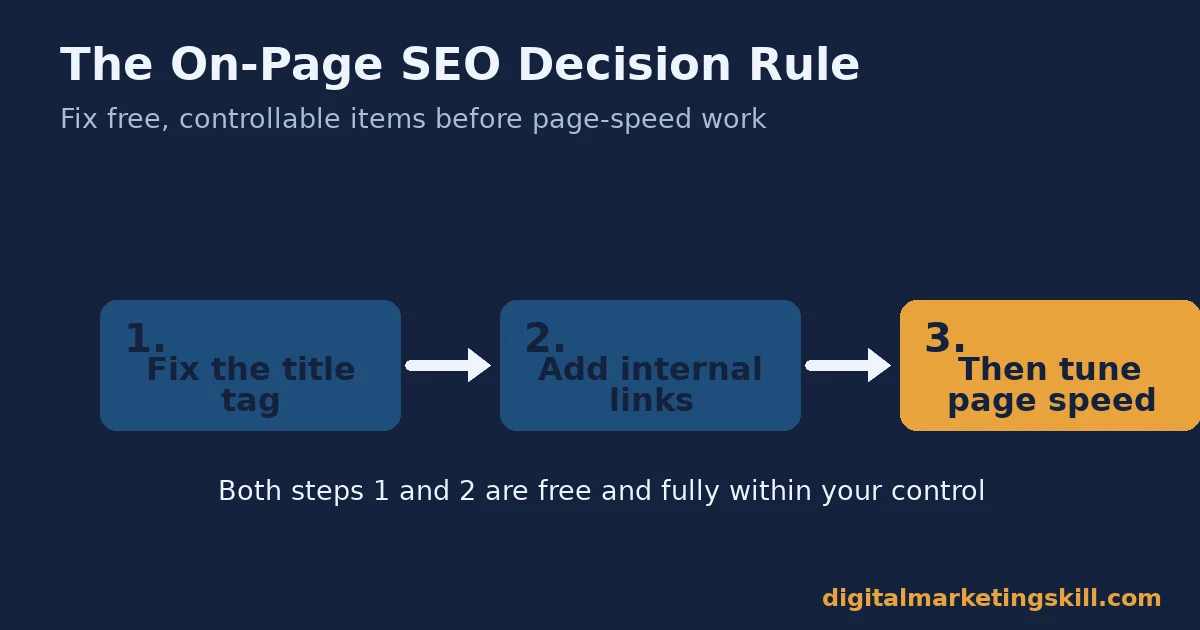
If you can fix only one thing this week, fix internal links and the title tag before you touch design. Both are free. Both sit entirely within your control, unlike Core Web Vitals, which can need developer time. Both directly affect whether Google can find and correctly label the page at all. Here is an illustrative, invented example. A page titled “Our Services,” with zero internal links pointing to it, sits unindexed-feeling for months. Rename it with the keyphrase first, then add three internal links from related, already-ranking posts. It typically starts appearing in Search Console’s impression data within weeks, simply because it became findable.
What Doing This Right Looks Like
HubSpot reported a documented case: a technology company’s blog grew traffic roughly 2,512% in one year. The change was not one trick. The company increased posting frequency. It shifted from executive-authored posts to practical, reader-focused content. It applied the same basic fundamentals covered above: one or two keyphrases per post, consistent internal linking between related articles, and clear meta descriptions on every page (HubSpot blogging case study).
The limit is worth stating plainly. This is one company’s self-reported result from a small starting base. Read the percentage as a direction, not a guarantee. A smaller base tends to produce a bigger percentage gain than an already-large site sees from the same work. On-page SEO is also increasingly read by AI answer engines, not only classic search. That distinction is covered in our guide to generative engine optimization. It is the kind of skill a working SEO expert keeps sharpening on real client pages.
Frequently Asked Questions About On-Page SEO
Does keyword density affect rankings?
Not directly. Google warns against repeating words, calling it “tiring” for readers and against its spam policies when overdone. Aim for natural use in the opening, a few subheadings and the body, roughly 0.5 to 3%, rather than a fixed target.
How long should a page be for on-page SEO?
As long as it takes to answer every sub-question a searcher with that intent has, and no longer. Google states that content length alone is not a ranking factor, so size a page to its coverage, not to a round number.
Do I need to optimize every page on my site?
Yes, in the sense that every page you want found needs a clear title, one internal link pointing to it, and content matched to a real search intent. Pages with none of those are effectively invisible, regardless of quality.
Does page speed really affect SEO?
Yes. Core Web Vitals are a confirmed ranking input. But Google still prioritizes relevance over speed when the two conflict, so a slow page with the best answer can still outrank a fast page with a weaker one.
What is the most important on-page SEO element?
Content quality and intent match come first, because they are what the title, headings and links all describe. A perfectly structured page that does not answer the query will not outrank a plainer page that does.
Should I rewrite my title tag if Google keeps changing it?
Yes. A rewritten title usually signals the original was duplicated, too long, or vague. Shorten it and put the keyphrase first, which lowers the odds of a rewrite based on Google’s own stated triggers.
Do internal links really make a measurable difference?
They are one of the few on-page elements Google names directly as a crawl and discovery signal. A page with no internal links pointing to it is harder to find, regardless of its content quality.
How often should on-page SEO be revisited?
Revisit it whenever a page’s average position or click-through rate drops for a tracked keyphrase, or whenever you publish a new, related page that should link back to it. On-page SEO is maintenance, not a one-time task.
Does alt text need the keyphrase in every image?
No. Write the alt text to describe what the image shows first. Add the keyphrase only when it fits that description naturally; forcing it into every image reads as stuffing, not description.
Should I change a page’s URL to add the keyphrase?
Only if the page is new or has little traffic. Once a URL has earned links and rankings, changing it carries real risk, so redirect the old address to the new one if you do change it.
Start With One Page
Pick your single highest-potential page. Fix its title, its headings and its internal links this week. Then measure average position and click-through rate before touching anything else. On-page SEO is a skill you build on real pages, under real feedback from Search Console, not by memorizing a checklist.
Want structured, hands-on practice with this and the AI tools now used alongside it? The Digital Marketing Skill Institute’s Master Diploma in Digital & AI Marketing includes an AI-Powered WordPress and SEO Specialist track. It is one of four AI-powered tracks, with a Full Stack option covering all four. It is built around unlimited 1-on-1 coaching and mentoring, a U.S. Project Internship with a verified U.S. Work Reference Letter, and dual US and UK accreditation recognized in more than 100 countries. The program is fully online, so you can study from anywhere in your country.
See the Master Diploma program page for the full track breakdown. Browse the Digital Marketing Skill Institute blog for more practical guides, or read student reviews. Go to digitalmarketingskill.com to explore the full program. Wherever you live, you can apply here to get started, and you can always come back to digitalmarketingskill.com for more guides like this one.
Every figure in this guide was checked against its original source before publication. Figures marked as illustrative are invented examples, not real results.
![9 Amazing Digital Marketing Skills to Make Money Online [With Proof]](https://digitalmarketingskill.com/wp-content/uploads/2019/07/9-Amazing-Digital-Marketing-Skills-to-Make-Money-Online-With-Proof-17.png)






