
Inbox placement is the share of your emails that land in the main inbox, rather than the spam folder or nowhere at all. An email can be “delivered” and still end up in spam, so inbox placement measures whether people can actually see it. It matters because every sale, lead and click from email starts with a message that reaches the inbox.
Key Takeaways
- Delivery means the receiving server accepted your email. Inbox placement means it reached the inbox, not spam.
- Gmail and Yahoo require authentication, such as SPF and DKIM, and bulk senders also need DMARC.
- Google tells bulk senders to keep spam rates below 0.10% and never reach 0.30%. Yahoo asks senders to stay below 0.3%.
- Marketing emails to Gmail from bulk senders must support one-click unsubscribe.
- Clean lists, real permission and wanted content do more for inbox placement than any single trick.
What Is Inbox Placement?
When you send an email, three things can happen. The receiving server can reject it. It can accept it and put it in spam. Or it can accept it and put it in the inbox. Only the last result gives you a real chance of being read.
This metric focuses on that last result. It’s usually shown as a percentage. For example, if you send 10,000 emails and 8,500 reach the inbox, your rate is 85%.
This differs from your delivery rate. Your email platform often reports “delivered” for any message that the server accepted. However, that number can include emails sitting in spam. So a high delivery rate can hide a real problem.
It is a core part of email marketing. If your emails don’t reach the inbox, nothing else in the campaign can work.
How Inbox Placement Works
Mailbox providers, such as Gmail and Yahoo, decide where each email goes. They check three main areas. First, they confirm you are who you say you are. Next, they look at your sending reputation. Finally, they judge how recipients react to your mail.
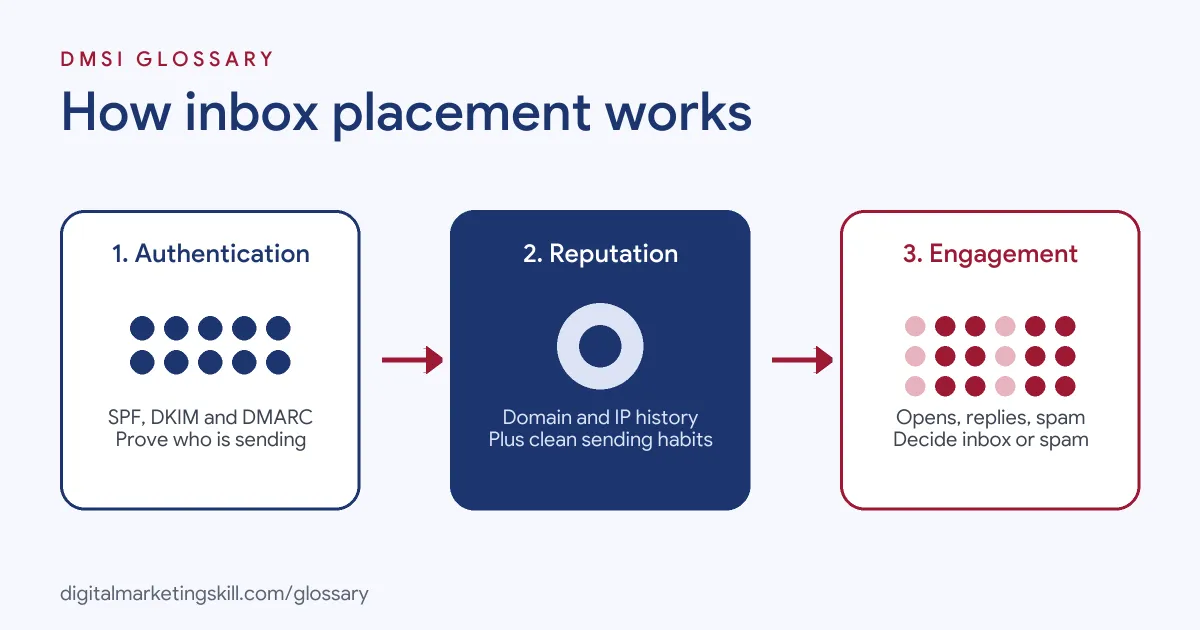
Authentication
Authentication proves an email really comes from your domain. Google’s sender guidelines say all senders to Gmail must “set up SPF or DKIM email authentication.” Senders of more than 5,000 messages a day need SPF and DKIM, plus DMARC. Google notes that your DMARC policy “can be set to none.”
Alignment matters too. For direct email, Google says “the domain in the sender’s From: header must be aligned with either the SPF domain or the DKIM domain.” Yahoo’s rules for bulk senders say the same: “DMARC must pass.”
Sender Reputation
Providers track how your domain and IP addresses behave. They also check technical basics. Google asks for valid forward and reverse DNS records, a TLS connection and messages formatted to the RFC 5322 standard. In addition, sudden spikes in volume or many emails to dead addresses can harm your reputation.
Recipient Engagement and Spam Complaints
The clearest signal is how people react. When someone marks your email as spam, your spam rate rises. Google advises bulk senders to “keep spam rates reported in Postmaster Tools below 0.10% and avoid ever reaching a spam rate of 0.30% or higher.” It also warns that it “can take time” for improvements to show in spam filtering.
Inbox Placement Examples
Here are three made-up examples:
- Example 1, the bought list: A start-up imports 20,000 addresses it didn’t collect itself. Many bounce and some people report spam. As a result, its next campaign lands mostly in spam, even for real subscribers.
- Example 2, the missing DMARC record: A shop sends 8,000 emails a day to Gmail users with SPF and DKIM but no DMARC. Because it is over 5,000 a day, it falls short of Google’s bulk sender rules.
- Example 3, the clean-up: A coaching business removes subscribers who haven’t opened or clicked in a long time. Its list shrinks, but more of its emails reach the inbox.
Inbox Placement vs Delivery Rate vs Open Rate
These three numbers measure very different things:
| Metric | What it measures | Main limit |
|---|---|---|
| Delivery rate | Emails the receiving server accepted | Counts spam-folder emails as delivered |
| Inbox placement | Emails that reached the inbox | Usually estimated with seed tests or panel data |
| Open rate | Emails your platform recorded as opened | Google says it doesn’t track open rates and can’t verify third-party figures |
In short, delivery tells you the door opened, inbox placement tells you the email got to the right room, and opens only hint at what happened next.
How to Improve Inbox Placement
- Authenticate your domain. Set up SPF, DKIM and DMARC for the domain you send from. Then check that they align with your From address.
- Set up Google Postmaster Tools. Use it to watch your spam rate and domain reputation for Gmail.
- Add one-click unsubscribe. Google says bulk senders’ marketing messages “must support one-click unsubscribe” and show a clear unsubscribe link in the body.
- Honour opt-outs quickly. Yahoo asks bulk senders to “honor unsubscribes within 2 days.”
- Clean your list. Yahoo recommends you “remove invalid recipients from your list promptly” and watch hard and soft bounces.
- Send what people expect. Use double opt-in where it makes sense, and keep content close to what subscribers signed up for.
- Test before big sends. Finally, send to a set of test inboxes across providers and check where the email lands.
How Seed Testing Works
Mailbox providers don’t tell you where each email landed. So teams estimate it with a seed list. This is a set of test addresses at Gmail, Outlook, Yahoo and other providers. You add the seeds to a real send, then check which folder each copy reached. The share that hit the inbox gives you an estimate. Because seed inboxes don’t behave like real readers, treat the result as a warning light rather than an exact score.
It also helps to know how one-click unsubscribe works. The method comes from RFC 8058, a technical standard. It adds a List-Unsubscribe-Post header that must contain “List-Unsubscribe=One-Click”. Most email platforms add these headers for you, but it is worth checking.
Best Practices for Inbox Placement
- Grow volume slowly. A new domain or IP should build up sending over time, not jump to full volume.
- Segment by engagement. Send more often to active readers and less often to quiet ones.
- Re-confirm inactive subscribers. Yahoo suggests sending a reconfirmation email to inactive subscribers from time to time.
- Don’t impersonate Gmail. Google warns against using Gmail addresses in your From header for bulk mail.
- Watch trends, not one send. Track your spam rate and test results over weeks, since one result can mislead.
Common Mistakes to Avoid
Many senders trust the “delivered” figure and never check spam folders. Others buy or rent lists, which brings bounces and complaints. Some hide the unsubscribe link, so annoyed readers press “spam” instead. Also, teams often skip DMARC because email still seems to work. Finally, sending a sudden flood of email from a new domain can damage its reputation before it starts.
Where You’ll Use Inbox Placement at Work
Email roles often list deliverability as a core skill. For example, remote job listings ask for:
- A “Strong grasp of deliverability and inbox-placement mechanics (sender reputation, authentication, list hygiene, Promotions-tab avoidance)” (Email and SMS Specialist).
- Following “email and SMS deliverability best practices: list hygiene, warm-up protocols, segmentation for engaged vs. unengaged audiences, suppression management, and compliance” (Email Content Marketing Strategist).
- Someone to “build, launch, and manage a high-volume email-sending infrastructure from the ground up” (Email Infrastructure and Deliverability Specialist).
So if you want to work as an Email Marketing Specialist or Marketing Automation Specialist, expect to own deliverability, not just the copy.
Learn It in the Lead Generation and Email Track
You can learn to keep emails out of spam in the AI-Powered Lead Generation and Email Automation track. There, you build a lead magnet and an automated email sequence that converts. You also get unlimited 1-on-1 mentoring and a U.S. Project Internship from day one.
For more detail, read our guide to email deliverability and our list of email testing tools.
Frequently Asked Questions
What is inbox placement in simple terms?
It is the share of your emails that reach the inbox rather than spam. It shows whether people can actually see what you send.
What is a good inbox placement rate?
Higher is always better, and there is no official target. Instead, compare your results over time and across providers, and act when they drop.
How do I measure inbox placement?
Most teams use seed tests, which send a copy to test inboxes and report where it lands. Gmail’s Postmaster Tools also shows your spam rate and reputation.
Is inbox placement the same as deliverability?
The two are closely linked. Deliverability is the wider practice of getting email delivered and seen, while inbox placement is the result you measure.
Does the Gmail Promotions tab count as the inbox?
Generally, yes. Promotions is a tab inside the inbox, not the spam folder. Still, emails there may get less attention than those in the main tab.
Sources: Google Workspace Admin Help: Email sender guidelines; Yahoo Sender Hub: Best practices; IETF: RFC 8058, one-click unsubscribe; remote job listings on Himalayas.