
A spam trap is an email address used to catch senders who mail people without permission. Nobody signs up with it, so any email it receives is a sign that the sender is buying lists, scraping addresses or not cleaning their list. It matters because hitting one can damage your sender reputation, push your emails into spam or even get you blocked.
Key Takeaways
- Spamhaus defines spam traps as email addresses that have not opted in to any email.
- There are three main types: pristine traps, recycled traps and typo traps.
- Owners never reveal which addresses are traps, so you can’t simply look them up.
- Bought lists, scraped addresses and old, uncleaned lists are the usual way traps get in.
- Confirmed opt-in, regular list cleaning and removing hard bounces are the best defence.
What Is a Spam Trap?
A spam trap looks like any other email address. The difference is that no real person uses it to sign up for anything. So if your newsletter reaches one, you clearly didn’t get permission from its owner.
Spamhaus, one of the best-known anti-spam organisations, explains the purpose. Reputation systems use these addresses to highlight senders who add people to their lists without getting permission. It adds that traps are also very effective at spotting marketers with poor permission and list management practices.
For example, a company buys a list of 10,000 “verified” emails. Hidden among them are a few addresses that anti-spam groups created and never used. When the company sends its first campaign, those traps receive it. As a result, the company’s domain and IP address start to look like a spammer’s.
How a Spam Trap Works
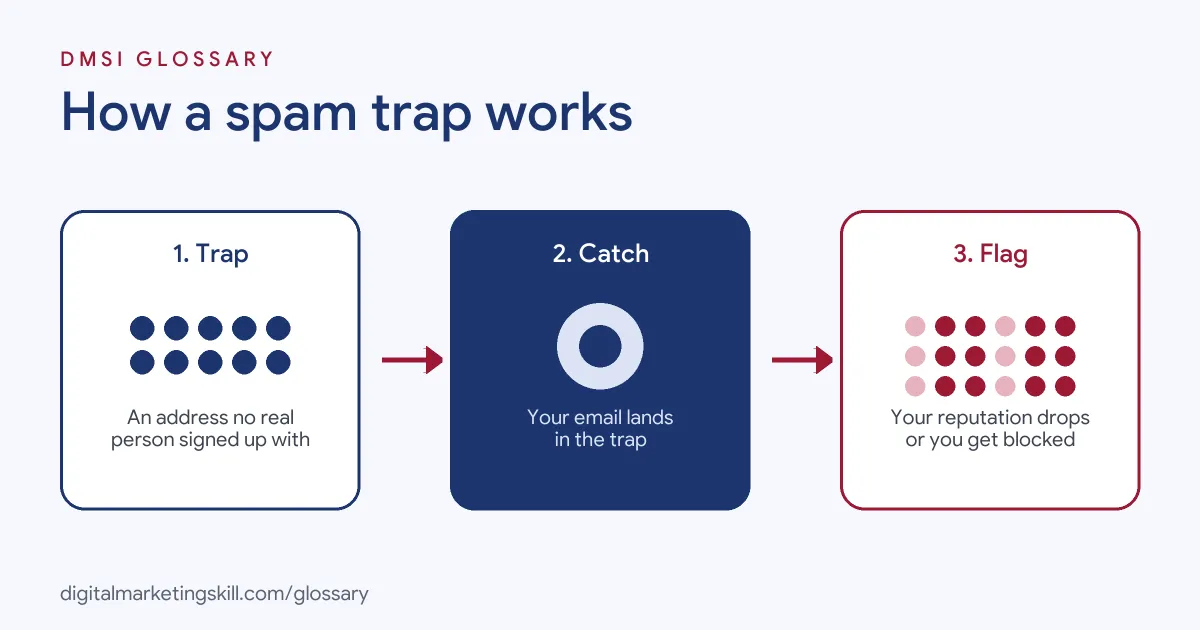
Trap owners, such as blocklist operators and mailbox providers, set up or repurpose addresses and watch what arrives. Any mail they receive is unwanted by definition. They then use that evidence to judge, and sometimes block, the sender.
Pristine Traps
Mailgun, an email delivery service, describes pristine traps, or honeypots, as addresses that blocklists and inbox providers create and place around the web. They were never used by a real person. They often end up on bought or scraped lists. Mailgun says these carry the most serious risk, because they prove the sender never had permission.
Recycled Traps
These start life as real addresses. Then the owner leaves a job or graduates, and the address goes unused. According to Mailgun, mailbox providers may later turn some of these old addresses into traps. Before that happens, mail to them shows up as a hard bounce. Once the address becomes a trap, it stops bouncing.
Typo Traps
Typo traps catch mistakes such as gnail.com instead of gmail.com, or .con instead of .com. Mailgun notes that they don’t prove you are a spammer. However, they do suggest that you don’t confirm new sign-ups before adding them.
Spam Trap Types Compared
Here is a quick summary of the three types:
| Type | How it gets on your list | Main warning sign |
|---|---|---|
| Pristine | Bought, rented or scraped lists | You never had permission |
| Recycled | Old addresses you kept mailing | Poor list cleaning and ignored bounces |
| Typo | Mistyped addresses at sign-up | No confirmed opt-in step |
In short, each type points to a different weakness in how you build or maintain your list.
What Happens If You Hit a Spam Trap?
The effect depends on the type. Mailgun says pristine traps bring the fastest penalties, because they were never real addresses. In that case, a sender may go straight onto a blocklist. Then future mail from that address, IP or even the whole organisation may not be delivered.
Recycled and typo traps usually take longer to judge, so the penalty isn’t instant. Even so, they still hurt your reputation, and repeat hits can lead to a block.
You also won’t get a warning naming the trap. Spamhaus explains why owners keep them secret. A trap is part of a reputation system’s “secret sauce”, and it becomes useless once revealed.
Spam Trap Examples
Here are three made-up examples:
- Bought list (example): A start-up buys a list for a launch email. Several pristine traps are on it. Soon after, its sending IP appears on a blocklist, and even order confirmations struggle to arrive.
- Old list (example): A shop restarts a newsletter to a list it hasn’t mailed in three years. Some of those old work addresses are now recycled traps, so deliverability drops.
- Event sign-ups (example): A business types in email addresses from paper forms after a trade show. A few typos land on typo traps, which hints that it skipped confirmed opt-in.
In each case, a better list-building habit would have prevented the problem.
How to Avoid Spam Traps
You can’t find traps directly, so focus on habits that keep them out:
- Never buy or rent lists. Yahoo’s sender guide also warns against bought lists and pre-ticked opt-in boxes.
- Use confirmed opt-in. Google recommends confirming each new address before you add it. A confirmation email also stops typos from joining.
- Remove hard bounces straight away. An address that bounces today could become a recycled trap later.
- Re-engage, then remove, inactive contacts. Google suggests you consider unsubscribing people who don’t open or read your mail.
- Be careful with old lists. Don’t suddenly mail contacts you haven’t emailed in a long time.
- Watch your reputation. Use Google Postmaster Tools and check blocklists if delivery drops.
A Simple List-Cleaning Routine
Here is a made-up routine a small online shop could follow. Each week, its email tool removes any address that hard bounces. Each month, it tags anyone who hasn’t opened an email in 90 days. Those people get a short “Do you still want to hear from us?” email. If they don’t click, the shop removes them a week later.
New sign-ups get a confirmation email first, and they only join the list once they click the link. As a result, typos never make it in, old addresses drop off before they can turn into traps, and the list stays full of people who want the emails.
Best Practices
A few habits keep your list trap-free:
- Grow your list honestly. Offer something useful in return for a sign-up.
- Clean your list on a schedule. For example, review inactive contacts every few months.
- Don’t trust “trap removal” promises. Spamhaus says claims that tools can find and remove traps are questionable, because it often sees mail in its traps from “verified” lists.
- Fix the cause, not just the address. Spamhaus notes that removing a single trap without changing your practices doesn’t solve the underlying problem.
Common Mistakes to Avoid
First, many senders think a list is safe because the seller called it “opt-in”. Second, they keep mailing addresses that bounced, which invites recycled traps. Third, they add event or phone sign-ups without confirmation. Finally, they try to “listwash” a bad list. Spamhaus defines listwashing as removing traps and bad addresses from a list that isn’t confirmed opt-in while keeping the rest, and it treats this as poor practice.
Where You’ll Use Spam Traps at Work
We didn’t find current remote listings that name this exact term. Even so, avoiding traps is part of daily work in email roles. As an Email Marketing Specialist, you will protect deliverability by keeping your list clean. As a Marketing Automation Specialist, you will build confirmation and sunset flows that remove risky contacts automatically. And as a Lead Generation Specialist, you will choose sign-up methods that bring in real, willing people. Above all, employers want proof that you grow lists the right way.
It also links closely to your sender reputation, which traps can damage quickly.
Learn It in the Lead Generation and Email Track
You can learn to build a clean, permission-based list in the AI-Powered Lead Generation and Email Automation track. There, you build a lead magnet and an automated email sequence that converts. You also get unlimited 1-on-1 mentoring and a U.S. Project Internship from day one.
For honest ways to grow your audience, read our guide to email list building.
Frequently Asked Questions
What is a spam trap in simple terms?
It is an email address that nobody uses to sign up for anything. If you email it, that shows you added people without permission.
How do I know if I hit a spam trap?
You usually won’t be told. Instead, you may see falling inbox placement, a blocklist listing or a drop in your sender reputation.
Can I remove spam traps from my list?
Not reliably. Owners never reveal them, and Spamhaus doubts tools that claim to find them. So focus on how you collect and clean addresses.
Does double opt-in prevent spam traps?
It helps a lot. A confirmation step stops typo traps and makes sure a real person owns each new address.
What is the worst type of spam trap to hit?
Pristine traps are usually the most serious, because they were never real addresses and prove you lacked permission.
Sources: Spamhaus: Glossary; Mailgun: What are spam traps?; Google: Email sender guidelines; Yahoo Sender Hub: Sender best practices.