
Email testing tools catch rendering breaks, spam-trigger content and weak subject lines before a campaign reaches real subscribers. Most marketing emails get tested in exactly one inbox: the sender’s own. That single check misses most of what actually goes wrong.
Subscribers open email in dozens of different clients and devices, and each one renders your message differently. Email testing tools exist to close that gap before a real subscriber ever sees the result.
Key Takeaways
- No single inbox dominates, which is why email testing tools matter. Litmus tracked over 1 billion email opens. It found Apple Mail at 62.26%, Gmail at 27.03% and Outlook at 5.83%. A campaign tested only in one client is likely to render wrong somewhere else.
- The average campaign still earns a strong return, which raises the cost of a broken send. Litmus reports email marketing returns about $36 for every dollar spent. One rendering or spam-filter failure is expensive relative to the channel’s own upside.
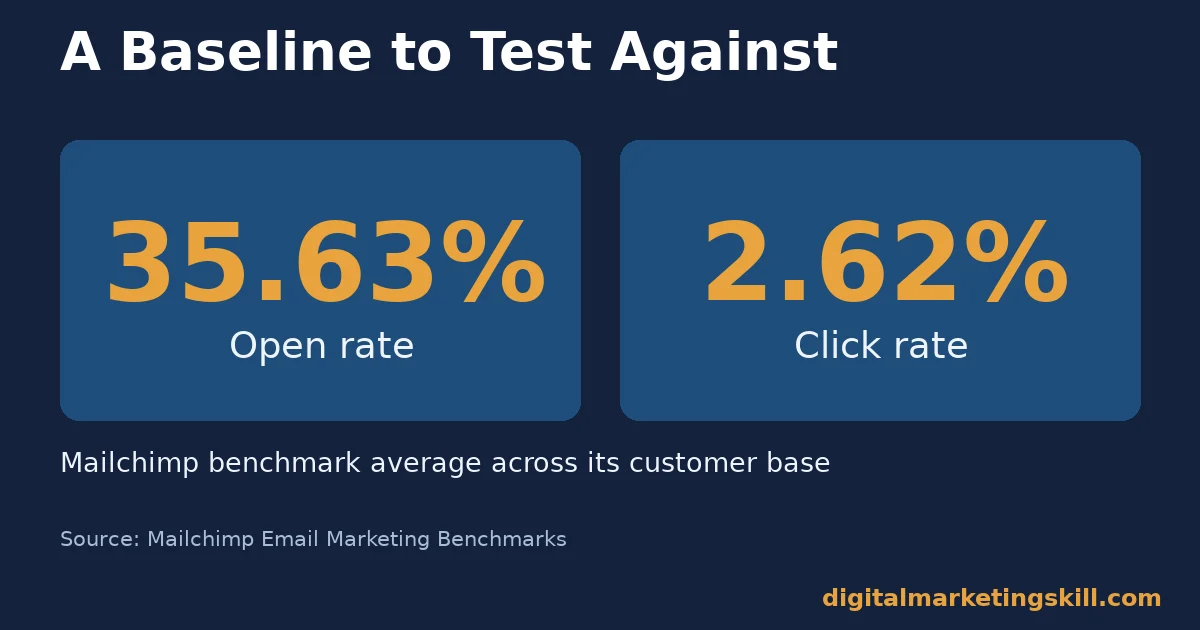
- Open rates sit around one in three, so subject lines carry real weight. Mailchimp’s benchmark data across its customer base puts the average open rate at 35.63% and click rate at 2.62%.
- Spam filtering is aggressive and automated. Google reports Gmail stops more than 99.9% of spam, phishing and malware. It also blocks nearly 15 billion unwanted messages a day. Legitimate campaigns can get caught in the same filters without the right pre-send checks.
- Authentication changes outcomes at scale. After Gmail required authentication for bulk senders, unauthenticated messages to Gmail users fell 75%. Sender setup affects whether a campaign even reaches the inbox to be judged.
In this guide
- What Most Email Marketing Advice Skips
- How Email Testing Tools Actually Protect a Campaign
- Four Kinds of Email Testing Tools Worth Running Before Every Send
- How to Run Each Test Without Slowing Down Your Send Schedule
- How to Measure Whether Your Email Testing Is Actually Working
- The One Decision Rule: Test Rendering and Spam Before You Test Anything Else
- A Real Case: Why Authentication Requirements Changed Sender Behavior
- Frequently Asked Questions About Email Testing Tools
- Start by Testing Your Next Campaign Before It Sends
What Most Email Marketing Advice Skips
Most email marketing advice focuses on writing better copy and building bigger lists. Both matter. Neither helps if the email renders broken in half your subscribers’ inboxes. Neither helps if it lands in spam before anyone reads a word. Email testing tools protect the work you already put into the list and the copy.
The gap is not creativity. It is a missing checkpoint before send. This guide covers four kinds of email testing tools worth running on every campaign. They are rendering checks, spam checks, subject line checks and personalization checks. Each one catches a different way a good campaign can quietly fail.
None of this replaces a good offer or a well-built list. Email testing tools cannot fix a weak subject line strategy or a list nobody wants to hear from. What they fix is more common: a decent campaign losing opens and clicks to problems nobody checked for.
How Email Testing Tools Actually Protect a Campaign
An email can fail a subscriber in three separate ways. Each needs a different test. It can look broken, because the client renders your code differently than you expect. It can never arrive, because a spam filter intercepts it. Or it can arrive and render fine, but still get ignored. The usual reason is a weak subject line or a personalization field that failed to fill in.
These three failure modes do not announce themselves. A marketer checking their own inbox sees none of the rendering problems a different reader would hit. They are looking at one client, not the dozens their list actually uses. The same blind spot applies to spam filtering and subject lines. A sender cannot see their own email the way a skeptical, busy subscriber does.
Each failure mode needs its own check, in roughly this order. First confirm the email arrives. Then confirm it renders correctly. Finally confirm the subject line and personalization earn attention once it does. Good email testing tools cover all three stages, not just one.
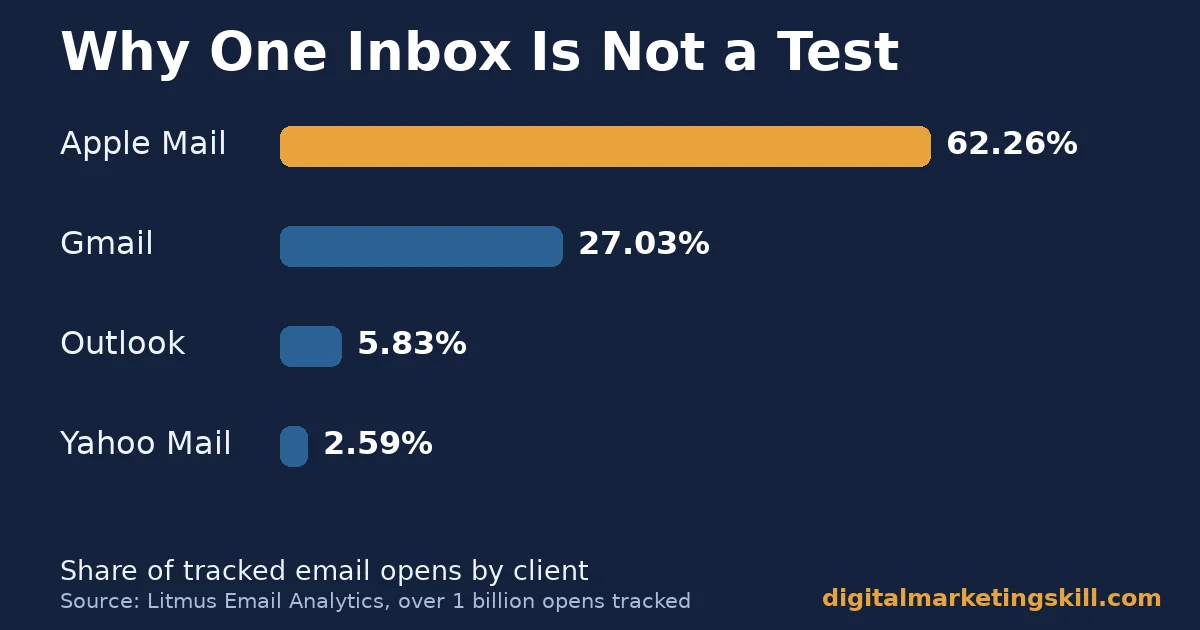
That spread is the core argument for rendering tests. Litmus’s own tracking of over 1 billion opens shows no single client above two-thirds of the market. A campaign that looks perfect in one client can still break for a meaningful share of a list.
Why Checking Your Own Inbox Is Not a Test
Checking a campaign in your own inbox confirms exactly one rendering path: your client, your device, your image-loading settings. It says nothing about how the email displays on a different mail client or operating system.
It says nothing about a subscriber with images blocked by default either. A rendering tool checks dozens of combinations at once. That is something a single human inbox cannot replicate, no matter how carefully you look.
This gap grows with list size. A small list on similar devices carries less risk. A list of thousands spread across every major client carries far more, and the bigger the list, the more a single untested rendering bug costs in lost clicks.
Four Kinds of Email Testing Tools Worth Running Before Every Send
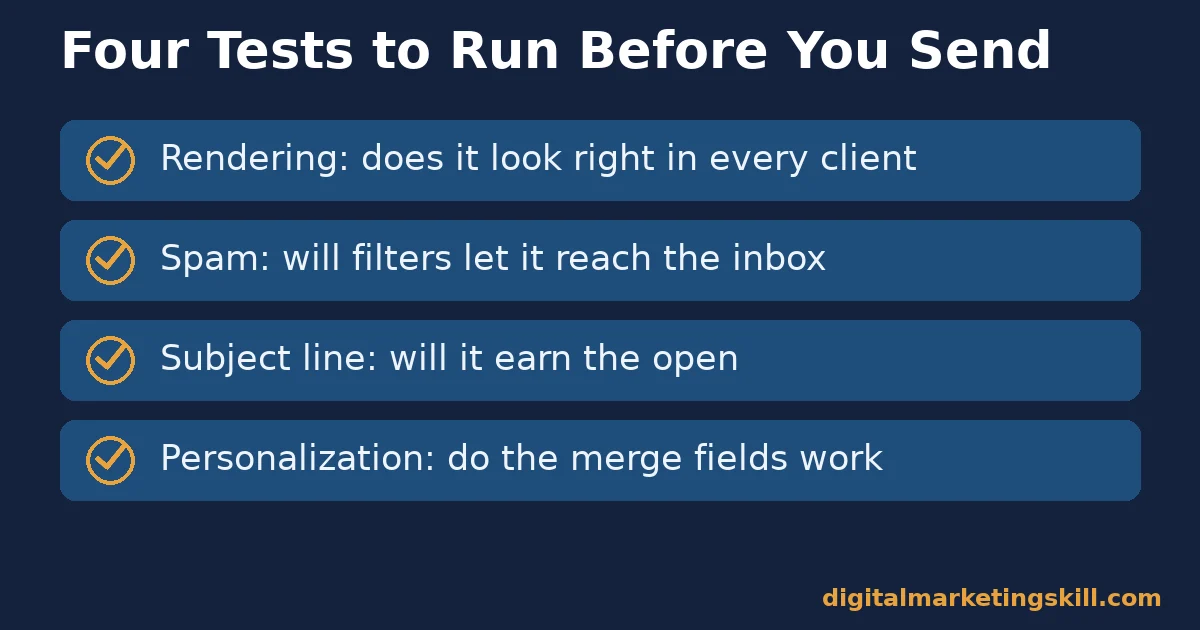
Four distinct checks catch most of what goes wrong between a finished draft and a subscriber’s inbox. Each catches a different failure, so skipping one leaves a real gap in your testing coverage.
Most teams already own access to at least one of these four categories through their existing email platform. The bigger obstacle is habit, not budget, since the tools usually sit unused inside a plan a team already pays for.
Rendering Tests: Built to Catch Broken Layouts
A rendering test renders your email across many email clients and devices, then shows you screenshots of each. You can catch a collapsed layout, a missing image or broken formatting before a subscriber does. Email code behaves inconsistently across clients in a way web browsers mostly do not anymore. That inconsistency is exactly why this kind of testing tool still matters for email specifically.
Spam Tests: Built to Catch Filter Triggers
A spam test scores your email’s content, formatting and sender reputation signals against the patterns filters flag. It reports back before you send to your full list. Spam filters are strict by design. Google alone blocks nearly 15 billion unwanted messages a day. A legitimate campaign with the wrong mix of links, images or trigger words can get swept into that same net.
Subject Line Tests: Built to Catch Weak Opens
A subject line is the first, and sometimes only, decision a subscriber makes about your email. An email that is never opened never gets a chance to convert. With average open rates sitting around 35%, most of a list never opens the email at all. The body copy a marketer spent the most time writing often goes unseen by the majority of recipients.
A subject line test tool compares options against real sending data instead of personal opinion about which phrase sounds catchier.
Personalization Tests: Built to Catch Missing Merge Data
Email testing tools for personalization work differently from rendering or spam tools. The failure here sits in the data, not in the code.
A personalization test confirms that merge fields, dynamic content and personalized images render correctly across every subscriber record, not just the sample row used while building the campaign. Showing “Hi {FirstName}” to a real subscriber damages trust in a way a generic greeting never would. Trust is exactly what keeps a buyer relationship intact between purchases.
How to Run Each Test Without Slowing Down Your Send Schedule
Each check below takes minutes, not hours, once it becomes a habit rather than an afterthought. The goal is not to add a slow approval process. It is to build a short, repeatable routine that runs the same way on every campaign, so testing never depends on whether someone remembers to do it.
Rendering Tests: Lead With Your List’s Actual Client Mix
Check your email analytics for which clients and devices your subscribers actually use. Prioritise testing those combinations first, instead of testing every client equally. A list skewed heavily toward one client still needs a broad check, but the priority order should follow your real audience, not a generic list of popular clients.
Spam Tests: Lead With a Score, Not a Guess
Run every campaign through a spam-scoring check before the full send. Treat a high score as a signal to simplify, not to send anyway and hope. A heavy image-to-text ratio, spam-trigger words and a long, cluttered subject line are the most common causes of a poor score. Fixing those three issues resolves most spam-score problems without touching the rest of the email.
Subject Line Tests: Lead With Real Send-Based Data
Test subject lines against your own list’s past performance, rather than generic advice about which words work. What performs well for one audience can underperform for another. A subject line tool that learns from your own sending history gives a more honest prediction than a universal word list.
Personalization Tests: Lead With Edge-Case Records
Preview personalization using subscriber records with missing fields, unusual characters or extreme values, not just a clean sample record. The edge case is exactly where a merge tag is most likely to fail, so testing only the easy case gives false confidence.
Keep a small set of deliberately difficult test records on hand and reuse them for every campaign. A record with a blank first name, an unusually long name and a special character in it will surface most personalization bugs well before a real subscriber does.
Combine all four checks into one short pre-send checklist rather than four separate steps scattered across different tools and tabs. A single checklist, run in order, turns testing into a two-minute habit instead of a judgment call made under deadline pressure.
Teams that write the checklist down tend to keep running it months later. The enthusiasm from a new email testing tool purchase fades fast, but a written checklist survives staff turnover and busy weeks in a way good intentions alone never do.
How to Measure Whether Your Email Testing Is Actually Working
Four numbers show whether pre-send testing is paying off, beyond simply feeling more careful. Track them over time, not just on one campaign, since a single send can look fine by chance even with weak testing habits behind it.
Set a Baseline Before You Change Anything
Pull your last several campaigns’ open, click and complaint rates before you start a new testing routine. Without that baseline, you cannot tell whether a later improvement came from better testing. It might instead come from an unrelated change, like a stronger offer or a cleaner list.
The Four Numbers to Track
- Open rate is the share of delivered emails a subscriber opens, and it reflects subject line and sender reputation together. Mailchimp’s benchmark average sits at 35.63% across its customer base, a reasonable starting comparison for your own list.
- Click rate is the share of delivered emails that earn a click. It reflects both the subject line’s promise and whether the rendered email actually delivers on it. A campaign with a strong open rate but a weak click rate often has a rendering or content problem that testing would catch, the same kind of friction that quietly caps online sales on a landing page.
- Spam complaint rate is the share of recipients who mark your email as spam. A rising rate is one of the clearest signals that content or sending patterns need review before the next send, not after.
- Rendering defect count is simply how many broken layouts a rendering test catches before send. Tracking this number over time shows whether testing is catching real problems or becoming a box-checking exercise.
Read these four together. A good open rate with a weak click rate usually points at a rendering or content problem, not a subject line problem, since the subject line already did its job by earning the open. A rising spam complaint rate alongside falling opens often means a deliverability issue instead. That calls for a different fix entirely, usually on the sending and authentication side rather than the copy.
The One Decision Rule: Test Rendering and Spam Before You Test Anything Else
The single most useful rule here is simple. Run rendering and spam checks on every campaign, every time, before you spend testing budget on subject line or personalization variants. A perfectly worded subject line cannot save an email that renders broken or never reaches the inbox at all.
A Worked Example of the Cost of Skipping a Test
Here is an illustrative, invented example, not a real result. Suppose a list of 10,000 subscribers normally opens at 35%, for 3,500 opens. A rendering break in one major client might realistically cost a quarter of that client’s share of opens. Total opens could shrink toward 3,100 before a single subject line test ever runs.
Fixing the rendering issue recovers more than any subject line tweak could on its own. That is the order the decision rule protects. Fix what blocks the message first, then refine what persuades once it arrives. Good email testing tools make that order easy to follow, because rendering and spam checks run in minutes, well before copy or design review even begins.
A Real Case: Why Authentication Requirements Changed Sender Behavior
Gmail’s own account of its bulk sender requirements is a useful case for why pre-send checks now include more than rendering and spam content. After Gmail began requiring authentication such as SPF and DKIM for high-volume senders, unauthenticated messages to Gmail users fell 75%, according to Google’s own announcement. Senders who had skipped authentication setup saw campaigns affected at scale. The effect reached well beyond a handful of individual emails.
The change did not punish careful senders. It mostly caught senders who had never checked their own setup, the same group most likely to skip rendering and spam checks too. A team already running email testing tools on content tends to be the same team that had authentication sorted out before the requirement even changed.
The lesson is that testing now has to include sender setup, not only the email’s content and rendering. A guide to the authentication side of this sits in what Gmail, Yahoo, Outlook and Apple actually check. It pairs well with the content-and-rendering testing covered here.
Frequently Asked Questions About Email Testing Tools
Do I need a dedicated rendering test for every single campaign?
For any campaign going to more than a handful of people, yes. Rendering differs enough across clients that a single inbox check cannot substitute for seeing how the email actually displays across the clients your list uses. A quick rendering check before every send costs far less time than fixing a broken campaign after subscribers have already seen it.
What is the fastest way to check if an email will land in spam?
Run it through a spam-scoring tool before the full send. Look specifically at image-to-text ratio, trigger words and link count, since those drive most avoidable spam flags. A high score should change the email, not just raise a warning you ignore.
How much does a broken subject line actually cost in opens?
Enough to matter. With average open rates around 35%, a weak subject line can push a campaign well below that baseline. An email nobody opens never gets the chance to earn a click, regardless of how good the body copy is.
Should small lists bother with personalization testing?
Yes, arguably more so. A small list notices a broken merge tag just as much as a large one, and the trust damage from “Hi {FirstName}” does not scale down with list size. A close-knit audience may even notice and remember the mistake longer than a larger, more anonymous one would.
Is rendering testing still necessary now that most email is read on mobile?
Yes, because mobile itself splits across multiple clients and apps, each with its own rendering engine. Mobile is not one test case. It is several, and a rendering tool checks them as separate cases rather than one assumed mobile view.
How do email testing tools relate to email deliverability and authentication?
They are complementary, not the same thing. Authentication, such as SPF, DKIM and DMARC, decides whether an email is allowed to reach the inbox at all. Rendering, spam-content and subject line testing decide whether it performs once it gets there. Both steps matter, and skipping either leaves a gap.
Can I rely on one all-in-one testing tool instead of several?
Often, yes, since many platforms now bundle rendering, spam and subject line checks into one workflow. What matters is that all four checks actually happen before send, not which specific tool or combination of email testing tools performs them. A simple checklist works just as well as an expensive platform if the team actually follows it every time.
Consistency beats sophistication here. A cheap tool used on every send outperforms an expensive one that only gets opened occasionally.
Start by Testing Your Next Campaign Before It Sends
Pick your next scheduled campaign and run it through a rendering check and a spam check before it goes to the full list, even if that is the only testing step you add this month. Measure the open and click rates against your usual baseline, then add subject line and personalization testing once the basics are routine.
Small, consistent testing habits compound faster than one perfect campaign ever could. The right email testing tools make that consistency far easier to sustain across a busy sending calendar.
Digital Marketing Skill Institute’s Master Diploma in Digital & AI Marketing covers email marketing and conversion testing as part of its nine practical courses, alongside paid and organic customer acquisition. The program includes unlimited one-on-one coaching and mentoring and real project work inside a US company.
It is dual US and UK accredited and recognised in more than 100 countries, delivered 100% online. You can apply this testing workflow to real campaigns from anywhere in your country.
See the full program on the Master Diploma page, browse more guides on the digital marketing blog, or go straight to apply when you are ready. Learn more at digitalmarketingskill.com, wherever you live, and see real outcomes on the reviews page. Visit digitalmarketingskill.com to get started.
Every figure in this guide was checked against its original source before publication. Figures marked as illustrative are invented examples, not real results.
![9 Amazing Digital Marketing Skills to Make Money Online [With Proof]](https://digitalmarketingskill.com/wp-content/uploads/2019/07/9-Amazing-Digital-Marketing-Skills-to-Make-Money-Online-With-Proof-17.png)






