
A campaign budget is the amount of money you set for an advertising campaign to spend, either as an average per day or as a total for a fixed period. The ad platform uses it to pace your spending across days and auctions. It matters because your budget limits how many people you can reach, and how it is set affects both cost control and results.
Key Takeaways
- Google Ads offers average daily budgets and, for many campaign types, campaign total budgets.
- With a daily budget, Google can spend up to two times that amount on a single day, but not more than 30.4 times it in a month.
- With a campaign total budget, Google says you “will never be charged more than your total budget.”
- To turn a monthly plan into a daily budget, divide it by 30.4.
- Meta can share one budget across all ad sets in a campaign and move money to the best opportunities.
What Is a Campaign Budget?
Every paid campaign needs a spending limit. Google describes the average daily budget as “the average amount that you set for each ad campaign on a per-day basis.” You choose it based on your goals and what you are comfortable spending each day, and you can change it at any time.
The word “average” is important. Search traffic rises and falls from day to day. So Google spends more on busy days and less on quiet ones, while keeping the month on track.
Your budget works alongside your bids. In short, the campaign budget decides how much you spend overall, while bids and bid strategies decide what you pay in each auction. Both matter in Google Ads.
How a Campaign Budget Works
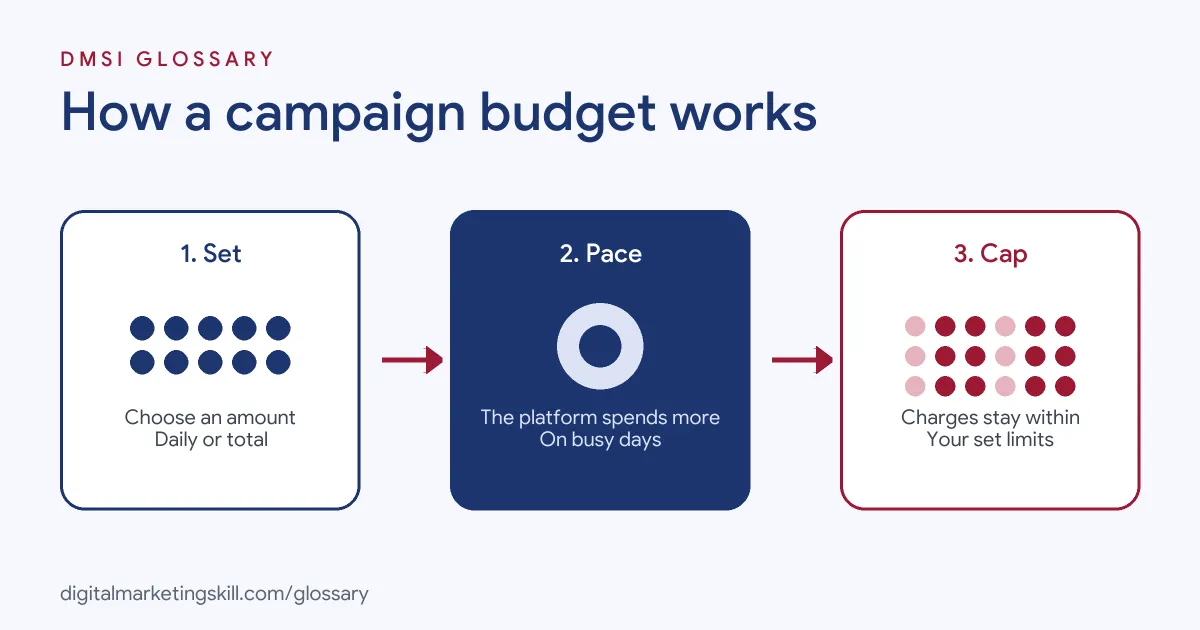
The platform turns your budget into spend in three steps. First, you set an amount and a type. Next, the system paces delivery, spending more when it finds good opportunities. Finally, it caps your charges so you never go over the set limits.
Average Daily Budgets
This is the most common type in Google Ads. Google explains that you will never pay more than your daily spending limit, which is “two times your average daily budget for most campaigns” on any particular day. You also will not pay more than your monthly spending limit, which is “30.4 times your average daily budget for most campaigns.”
Here is Google’s own example. If you want to spend $304 a month, you divide $304 by 30.4, the average number of days in a month. That gives an average daily budget of $10.
Campaign Total Budgets
Sometimes you have a fixed amount for a fixed period, such as a two-week sale. For this case, Google offers campaign total budgets. It says this option “takes into account how much has been spent so far and adjusts spending daily” to try to spend the full amount by the end date.
There are some rules. According to Google, total budgets are only available for new campaigns, and “you can’t change the budget type after a campaign is created.” The minimum period is three days. Google lists Performance Max, Search, Shopping, Demand Gen and YouTube campaigns as supported.
Shared and Campaign-Level Budgets
Some setups pool money across several units. In Google Ads, shared budgets let you set one budget across multiple campaigns. On Meta, the Advantage campaign budget is set at campaign level. Meta’s developer documentation says it “automatically and continuously finds the best available opportunities for results across your ad sets.” In other words, the money flows to whichever ad sets are performing best.
Campaign Budget Examples
Here are three made-up examples of budget choices:
- Always-on search: An accountant plans to spend $608 a month on Google Search. They divide by 30.4 and set an average daily budget of $20.
- Short sale: An online shop runs a ten-day promotion with $1,500 to spend. It uses a campaign total budget, so it cannot be charged more than $1,500 across the campaign.
- Paid social test: A café runs three audiences on Meta under one campaign budget. As a result, Meta moves more money to the audience that gets the cheapest results.
Daily Budget vs Total Budget
This table compares the two main Google Ads options:
| Feature | Average daily budget | Campaign total budget |
|---|---|---|
| Best for | Ongoing campaigns with flexible spend | A set amount over a specific period |
| Daily limit | Up to two times the daily budget for most campaigns | No daily spending limit |
| Overall limit | 30.4 times the daily budget in a month | Never charged more than the total |
| Can you switch type later? | Existing campaigns cannot switch to total budgets | No, the type is fixed once the campaign is created |
How to Set a Campaign Budget
Use these steps to choose and set a sensible amount:
- Start from the goal. Decide what a lead or sale is worth to the business.
- Pick the budget type. Choose a daily budget for ongoing campaigns, or a total budget for a fixed promotion.
- Work out the number. For a monthly plan, divide the monthly amount by 30.4 to get the daily figure.
- Set it in the platform. In Google Ads, go to Campaigns, find the campaign and edit the amount in the Budget column.
- Check the budget report. Google says this report shows how much you are projected to pay by the end of the month.
- Review results weekly. After that, move money towards the campaigns with the best cost per result.
Best Practices for a Campaign Budget
- Expect daily swings. A day that spends up to twice the average is normal for most Google campaigns.
- Change budgets in steps. Large, sudden changes make results harder to read.
- Match budget to bids. A tiny budget with high bids may run out early each day.
- Keep test budgets separate. This stops a new idea from taking money from proven campaigns.
- Write down the plan. Record the monthly target, so everyone knows what “on budget” means.
Common Campaign Budget Mistakes
Beginners often get caught out in the same ways. First, they panic when one day spends twice the daily amount, even though Google allows this. Second, they set a monthly figure as the daily budget, which overspends by about thirty times. Third, they choose a total budget and then try to switch the type later, which Google does not allow. Finally, they spread a small budget across too many campaigns, so none of them gathers enough data. Each of these is easy to avoid once you understand how pacing and spending limits work, so read the budget rules for every platform you use.
Where You’ll Use a Campaign Budget at Work
Budget management is part of almost every paid media role. For example, recent remote job listings ask candidates to:
- “Manage campaign budgets, audiences and optimisation across Meta, TikTok and other relevant platforms” (Performance Marketing Manager, Paid Social).
- “Monitor campaign budgets closely and optimize return on investment (ROI) by adjusting bids, targeting strategies, and creative direction accordingly” (Media Buyer).
- “Strong understanding of keyword research, campaign building, bidding strategies, and budget pacing” (Media Buyer Specialist).
So if you want to work as a Google Ads Specialist or PPC Specialist, you will set budgets, track pacing and explain spending to clients every week.
Learn It in the Google Ads Track
You can learn to plan and manage budgets in the AI-Powered Google Specialist track. There, you launch and measure a Google Ads campaign with conversion tracking, so you can show real spend and results. You also join a U.S. Project Internship from day one, with unlimited 1-on-1 mentoring.
For more on planning spend, read our guide to setting a Google Ads budget.
Frequently Asked Questions
What is a campaign budget in simple terms?
It is the amount you allow an ad campaign to spend, set as a daily average or as a total for a period. The platform paces spend so you stay within it.
Can Google Ads spend more than my daily budget?
Yes, on some days. For most campaigns, Google can spend up to twice the daily budget in a day, but not more than 30.4 times it in a month.
How do I turn a monthly budget into a daily one?
Divide the monthly amount by 30.4. For example, $304 a month becomes $10 a day.
What is a campaign total budget?
It is a Google Ads option for spending a set amount over a fixed period. Google adjusts daily spend to use the total and will not charge you more than it.
What is the Meta Advantage campaign budget?
It is a budget set at campaign level on Meta. The system shares it across your ad sets and moves money to the best available opportunities.
Sources: Google Ads Help: About average daily budgets; Google Ads Help: About campaign total budgets; Google Ads Help: Set and change an average daily budget; Meta for Developers: Advantage campaign budget; remote job listings on Himalayas.