
A Google Ads budget has no single right number. It depends on your business model, your industry’s cost per click, and how many conversions your bidding strategy needs to learn from. This guide gives a decision framework, not a single figure, plus the benchmarks to size your own number.
Key Takeaways
- The cross-industry average cost per click on Google Search is $2.96, based on an analysis of over $2.8 billion in ad spend by Ryze AI.
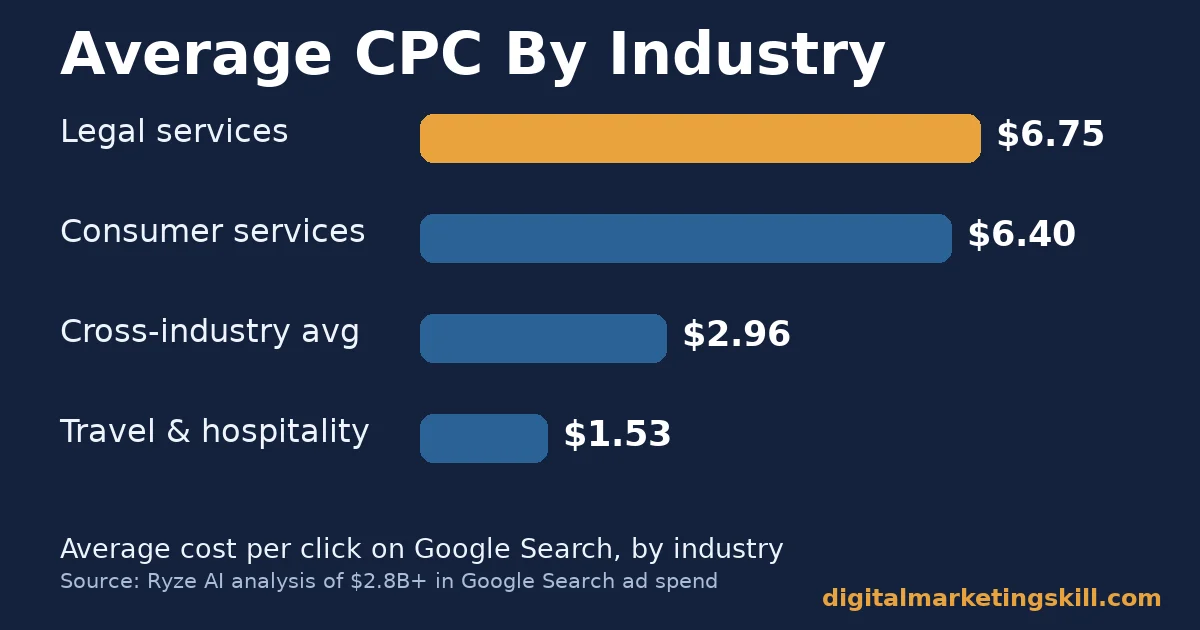
- Legal services average $6.75 per click. Travel and hospitality averages $1.53. The gap between industries is more than four times.
- A realistic starting Google Ads budget for a small, transactional business is $500 to $10,000 a month, per budgeting guide Opascope.
- B2B programs typically need $3,000 to $5,000 a month per campaign before Smart Bidding has enough data to optimize well.
- Google’s own documentation confirms that learning-phase duration depends on conversion volume and conversion cycle length, not a fixed number of days.
In this guide
- Why Every Google Ads Budget Guide Gives a Different Number
- How the Auction Actually Sets Your Google Ads Budget
- How Your Google Ads Budget Should Differ By Business Model
- How to Set Your Google Ads Budget, Step By Step
- What Google Ads Actually Costs, By Industry
- Why Your Google Ads Budget Needs to Survive the Learning Phase
- Common Google Ads Budget Mistakes to Avoid
- Shared Budgets vs. Campaign Budgets
- The One Decision Rule For Sizing a Google Ads Budget
- When to Scale a Google Ads Budget Up, Not Just Set It
- How to Measure Whether Your Google Ads Budget Is Working
- A Real Case: What Students Learn About Budgeting for Paid Search
- Frequently Asked Questions About Google Ads Budgets
- Learn to Budget Paid Search Campaigns With Guided Practice
Why Every Google Ads Budget Guide Gives a Different Number
Search for a Google Ads budget number and you will find five different answers. One guide says $1,000 a month. Another says $10,000. Neither is wrong. They are answering different questions for different businesses.
The real driver of a Google Ads budget is not a rule of thumb. It is three numbers multiplied together: the cost per click in your industry, the clicks your bidding strategy needs to learn, and how many of those clicks you can afford before they turn into revenue. Skip any one of those three inputs, and the number you land on is a guess.
A quick ground rule: the figures below come from named, dated sources. Treat CPC benchmarks as a snapshot, not a permanent ranking, since auction prices shift with competition and the time of year.
There is a second ground rule worth naming too. A generic Google Ads budget number ignores the single biggest driver of cost: your own account quality. Two businesses in the same industry, bidding on the same keywords, can pay very different prices. So a benchmark is a starting point for planning, never a guarantee of what you will actually pay.
How the Auction Actually Sets Your Google Ads Budget
Our beginner’s guide to pay-per-click advertising covers the full auction mechanics; here is the short version. Google Ads runs an auction every time someone searches a keyword you bid on. Your actual cost per click is set by Ad Rank, which combines your bid with your Quality Score. A higher Quality Score can win you a lower price than a competitor who bids more but has a less relevant ad.
This matters for budgeting because two businesses in the same industry can pay very different prices for the same keyword. A well-optimized account effectively buys a larger Google Ads budget’s worth of clicks for the same spend.
So before raising a budget, check whether Quality Score is the real constraint, not the number in your account. Our guide to fixing the auction instead of just the budget covers this in more depth.
Google’s own documentation defines your average daily budget as the amount you are “roughly comfortable spending each day over the course of the month.” That wording matters. Google can spend up to twice your daily budget on a strong day. It spends less on a slower one to balance out. So judge a Google Ads budget by the monthly total, not any single day’s spend.
How Your Google Ads Budget Should Differ By Business Model
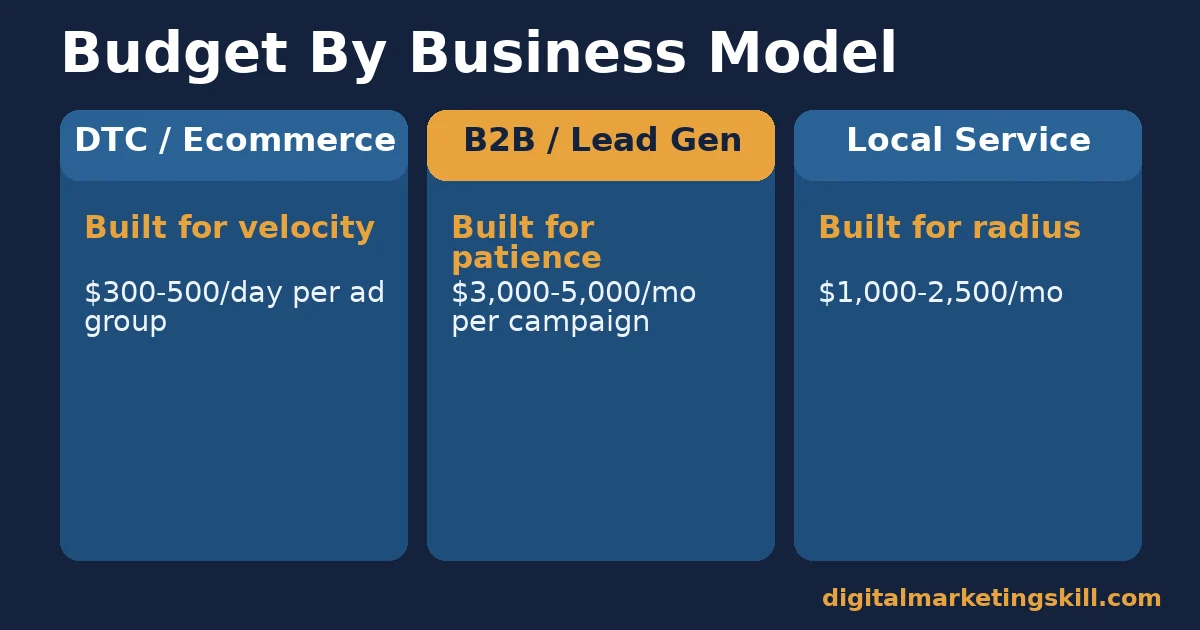
Budgeting guide Opascope splits recommended minimums by how a sale actually happens. The split matters more than industry alone.
DTC and Ecommerce: Built For Daily Velocity
A direct-to-consumer or ecommerce business sells in one click, from ad to checkout. Opascope recommends $300 to $500 per day, per ad group, so the algorithm sees enough daily volume to optimize. Spread too thin across many ad groups, and none of them ever collect enough data.
B2B and Lead Generation: Built For Patience
A B2B sale usually runs through a longer chain: a click, a form, a sales call, a close. Opascope recommends $3,000 to $5,000 a month per campaign as a realistic floor. The conversion that matters here, a qualified lead or a closed deal, happens rarely. So the algorithm needs a wider window to learn.
Local Service Businesses: Built For a Tight Radius
A local service business, such as a plumber or a dentist, competes in a small geographic radius with a handful of real rivals. Spend here often lands between B2B and DTC levels, commonly $1,000 to $2,500 a month. Every click already filters for someone within driving distance, which makes each one worth more.
How to Set Your Google Ads Budget, Step By Step
These steps mirror the three business models above. Use the one that matches how your sale actually happens.
DTC: Lead With Ad Group Math
Count your active ad groups. Multiply each by Opascope’s $300 to $500 daily minimum. If the total is more than you can spend, consolidate ad groups before you consolidate budget, so each one still gets enough daily clicks to learn.
B2B: Lead With the Full Funnel, Not Just Clicks
Work backward from a closed deal. Estimate how many leads you need to close one deal, then how many clicks you need to generate one lead. Multiply that click count by your industry’s average cost per click, then compare the result against the $3,000 to $5,000 campaign floor. A weak landing page design can quietly double that click-to-lead math, so fix the page before raising the budget.
Local Service: Lead With Radius Math
Estimate how many searches happen for your service inside your service radius each month. A tight radius with few competitors can produce a usable Google Ads budget well under $1,000. A competitive metro area usually needs more, closer to $2,500.
What Google Ads Actually Costs, By Industry
Cost per click varies more by industry than almost any other factor. According to Ryze AI’s analysis of over $2.8 billion in Google Search ad spend, legal services average $6.75 per click. That is the highest tracked industry. Consumer services average $6.40. Travel and hospitality averages $1.53, among the lowest.
The cross-industry average sits at $2.96 per click. If your industry sits well above that average, your Google Ads budget needs to buy fewer, more carefully targeted clicks rather than simply more volume.
Click-through rate shapes that cost too. Search Engine Journal, reporting on WordStream by LocaliQ’s annual benchmark study of thousands of campaigns across 20 industries, found the average click-through rate across Google and Microsoft Ads was 6.64% over a 12-month period. A below-average click-through rate often signals weak ad relevance. That weak relevance raises your effective cost per click, even if your bid stays the same.
Why Two Businesses In the Same Industry Pay Different Prices
Industry benchmarks describe an average, not a guarantee. A business with strong Quality Scores, tight keyword-to-ad matching, and a fast landing page routinely pays below its industry’s benchmark. A business with loose targeting and generic ad copy pays above it, for the exact same keywords. So treat the benchmark as a ceiling to beat, not a price you are stuck with.
Why Your Google Ads Budget Needs to Survive the Learning Phase
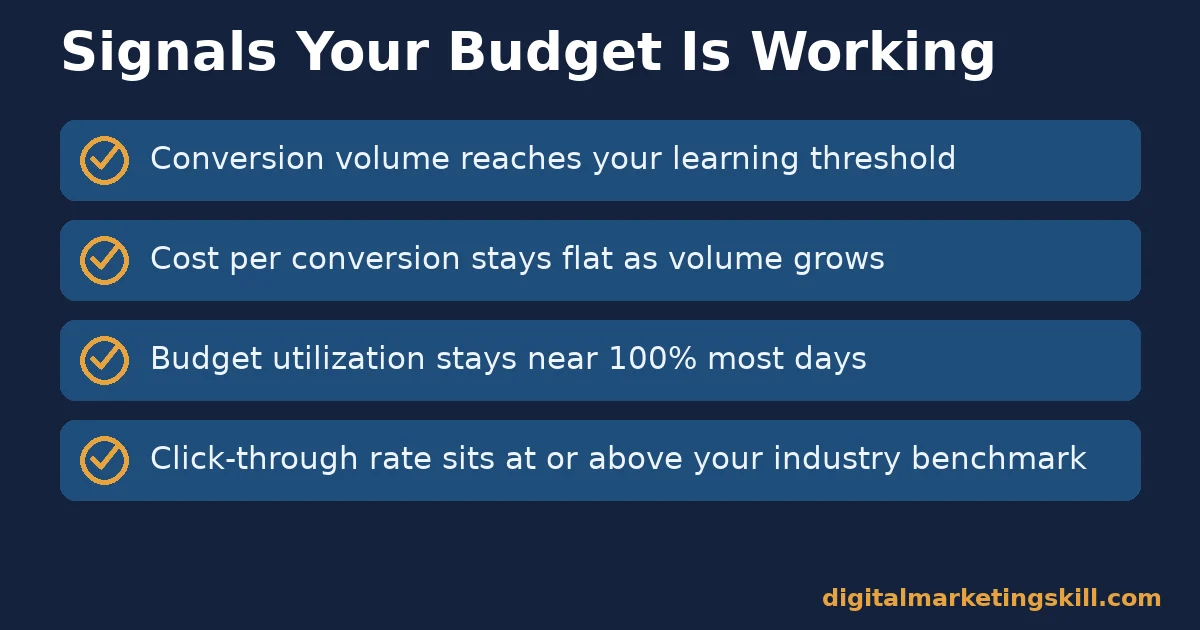
Smart Bidding strategies need time to calibrate before they perform well. Google’s own documentation confirms that learning-phase duration depends on conversion volume and conversion cycle length, not a fixed calendar window, and typically takes one to two conversion cycles to calibrate.
In practice, Opascope cites roughly 30 conversions in seven days. That is a practical threshold many advertisers use for Smart Bidding to exit learning mode reliably. A Google Ads budget that gets cut before reaching that volume rarely gets a fair test, because the algorithm never finishes calibrating.
A Worked Example: Two Businesses, Two Very Different Budgets
Here is an illustrative comparison, with invented numbers, showing why one business model cannot borrow another’s budget. A local dental practice and a B2B software company both consider a $2,000 monthly Google Ads budget.
For the dental practice, operating in a tight radius with industry CPCs near the $8 benchmark for dental services, $2,000 buys roughly 250 clicks a month. That is enough local volume to generate a steady stream of appointment inquiries.
For the B2B software company, the same $2,000 sits below the $3,000 to $5,000 campaign floor this guide covers. It likely never collects enough qualified leads to exit the learning phase cleanly. The dental practice’s budget is sized correctly. The software company’s identical budget is not, even though the dollar amount is the same.
Common Google Ads Budget Mistakes to Avoid
Most budgeting problems trace back to one of four habits. Check your own account against each before changing your spend.
Changing the Budget Too Often
Raising or cutting a budget every few days keeps a campaign permanently stuck in its learning phase. Pick a number, commit to it for a full learning cycle, and resist the urge to react to a single slow day.
Spreading One Budget Across Too Many Campaigns
A $2,000 Google Ads budget split evenly across eight campaigns gives each one $250. That often sits below the threshold any of them need to learn. Fewer, better-funded campaigns usually outperform many thin ones.
Ignoring Quality Score While Raising Spend
Increasing a budget without improving ad relevance just buys more clicks at the same inflated price. Fix relevance and landing page experience first, then scale the budget that is already working efficiently.
Judging Results Before the Learning Phase Ends
A campaign that looks unprofitable in week one may simply still be calibrating. Compare performance only after the learning phase Google describes has had time to complete.
Shared Budgets vs. Campaign Budgets
Most of this guide assumes one budget per campaign, which is the simplest way to size and track spend. Google’s own documentation describes a second option: a shared budget across multiple campaigns with a common goal, where Google automatically reallocates unused spend from one campaign to another on a given day.
Google specifically calls out seasonal campaigns, such as ones built around a holiday, as a good fit for shared budgets. For most small and mid-sized advertisers, though, a Google Ads budget set per campaign is easier to diagnose when something underperforms, since a shared pool can hide which campaign is actually struggling.
The One Decision Rule For Sizing a Google Ads Budget
Set your budget to the level that produces enough conversions for your bid strategy to learn, then hold it steady for one full learning cycle before judging the result. A budget raised and cut every two weeks never gets a fair test, no matter how large it is.
Here is an illustrative example, with invented numbers. A local service business starts at $600 a month and sees inconsistent results. It raises the budget to $1,500, matching the local-service range above, and holds it steady for six weeks. Cost per lead drops by a third once the algorithm has enough data to stop guessing.
When to Scale a Google Ads Budget Up, Not Just Set It
A starting budget is only the first decision. Once a campaign clears its learning phase and consistently hits a healthy cost per conversion, the next question becomes when to scale it up, not whether to.
The Clearest Signal: A Stable Cost Per Conversion
Watch cost per conversion over at least two full learning cycles. If it stays roughly flat while volume grows, your Google Ads budget still has room to scale profitably. If cost per conversion climbs as volume grows, you are likely running out of efficient auction inventory at your current targeting.
Scale in Steps, Not Jumps
Increase a working budget by 20% to 30% at a time, rather than doubling it overnight. A large jump can push a campaign back into a fresh learning phase, because the algorithm has to recalibrate for the new spend level. Smaller steps let performance data carry over more smoothly.
Watch for the Auction’s Natural Ceiling
Every keyword set has a ceiling on how much efficient volume it can return, set by search demand in your market. Past that ceiling, a larger Google Ads budget mostly buys lower-quality placements and a rising cost per conversion. Expanding keywords or geography, not just the number, is usually the better next move.
How to Measure Whether Your Google Ads Budget Is Working
Four numbers show whether a Google Ads budget is sized correctly. Track them weekly while a campaign is still learning, then monthly once it stabilizes.
- Click volume: clicks earned in the period. Compare it against the conversion volume your bid strategy needs to exit learning.
- Cost per click: spend divided by clicks. Compare it against your industry’s benchmark to see if you are overpaying for traffic.
- Cost per conversion: spend divided by conversions. This is the number that actually determines whether a Google Ads budget is profitable.
- Budget utilization: the share of your daily budget actually spent. A campaign that consistently under-spends is losing clicks to a budget cap, not to weak demand.
Review these four numbers together, not one at a time. A low cost per click paired with a high cost per conversion usually means the clicks are cheap but poorly targeted. A high cost per click paired with a low cost per conversion often means the traffic is expensive but converts well enough to justify a larger Google Ads budget.
A Real Case: What Students Learn About Budgeting for Paid Search
Training providers that teach paid search consistently emphasize the same lesson this guide covers. A Google Ads budget only works when it is sized to the business model, not copied from a generic benchmark.
Digital Marketing Skill Institute, at digitalmarketingskill.com, builds its paid media coaching around exactly this kind of decision framework. A single recommended number cannot replace it, because a franchise lead-gen campaign and a DTC product launch need genuinely different budgets to succeed.
The same principle shows up across published graduate reviews on the Institute’s reviews page. Students who learn to diagnose a campaign before touching the budget describe feeling more confident running real client accounts. No specific income figures are claimed here, since budgeting skill alone does not guarantee a result.
Frequently Asked Questions About Google Ads Budgets
What is a good starting Google Ads budget for a small business?
For a small, transactional business, $500 to $10,000 a month is a realistic range, according to Opascope’s budgeting guide. Where you land inside that range depends on your industry’s cost per click and your business model.
How much does Google Ads cost per click on average?
The cross-industry average is $2.96 per click, based on Ryze AI’s analysis of over $2.8 billion in ad spend. Your actual cost depends heavily on your industry, ranging from under $2 to nearly $7.
Why does my Google Ads budget run out so fast?
Usually because your industry’s cost per click is above average, or your budget is spread across too many ad groups or campaigns. Consolidating targeting often stretches the same budget further.
Should I increase my Google Ads budget if results are slow?
Not immediately. First check whether the campaign has exited its learning phase. Raising a budget before that point usually restarts the learning clock instead of fixing the real problem.
Is Google Ads more expensive for B2B or ecommerce?
Neither is universally more expensive, but B2B campaigns typically need a higher minimum, $3,000 to $5,000 a month per campaign, because conversions happen less often and the algorithm needs more time to learn.
How long should I keep a Google Ads budget unchanged before judging it?
At least one full learning cycle, which Google’s documentation describes as one to two conversion cycles. Changing budget, bids, or targeting mid-cycle restarts the calibration.
Does a higher click-through rate always mean a lower cost per click?
Usually, but not always. A higher click-through rate signals stronger ad relevance, which tends to lower cost per click through Quality Score. A high click-through rate on a poorly targeted ad can still waste a Google Ads budget on clicks that never convert.
What should I do if my Google Ads budget is split across too many campaigns?
Consolidate the weakest-performing campaigns into fewer, better-funded ones. A concentrated budget usually exits the learning phase faster than the same total spend spread thin.
Learn to Budget Paid Search Campaigns With Guided Practice
Sizing a Google Ads budget correctly is a skill built through real campaigns, not a formula memorized once. The Master Diploma in Digital & AI Marketing from Digital Marketing Skill Institute includes an AI-Powered Google Specialist track, inside four AI-powered tracks totalling ten courses, with a Full Stack option for completing all four.
Every track includes unlimited 1-on-1 coaching and mentoring, a U.S. Project Internship with a verified U.S. Work Reference Letter, and dual US and UK accreditation recognised in more than 100 countries. The program runs 100% online, so you can build this skill from anywhere in your country.
Explore the Master Diploma program structure, browse more guides on the Digital Marketing Skill Institute blog, or read real outcomes on the reviews page. When you are ready, apply for the Master Diploma, wherever you live, or start from the Digital Marketing Skill Institute homepage.
Every figure in this guide was checked against its original source before publication. Figures marked as illustrative are invented examples, not real results.
![9 Amazing Digital Marketing Skills to Make Money Online [With Proof]](https://digitalmarketingskill.com/wp-content/uploads/2019/07/9-Amazing-Digital-Marketing-Skills-to-Make-Money-Online-With-Proof-17.png)






