
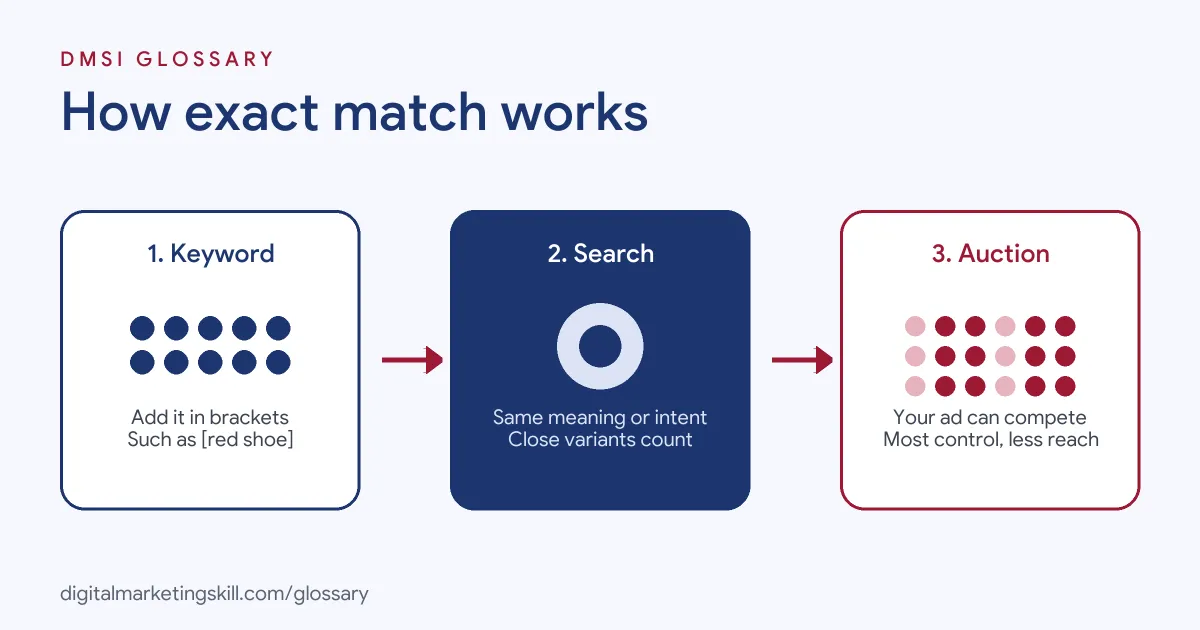
Exact match is the Google Ads keyword match type that gives you the most control, showing your ad only on searches with the same meaning or intent as your keyword. You set it by putting the keyword in square brackets, such as [red shoe]. It matters because it lets you focus your budget on the searches you value most, although it reaches fewer people than the other match types.
Key Takeaways
- Exact match is the narrowest of the three keyword match types: broad, phrase and exact.
- You add it by wrapping the keyword in square brackets.
- It matches on meaning, not just spelling. Plurals, misspellings, reordered words and synonyms can all count as close variants.
- You can’t opt out of close variants, so check your search terms report.
- Negative exact match works differently: it only blocks the exact words, in the same order, with nothing added.
What Is Exact Match?
Google Ads describes it in one line: “Ads may show on searches that have the same meaning or same intent as the keyword.” It adds that, of the three keyword matching options, this one “gives you the most steering over who views your ad, but reaches fewer searches than both phrase and broad match.”
So the name can mislead you. Exact match doesn’t mean the search has to use your words letter for letter. Instead, it means the search must mean the same thing.
For example, a florist might bid on [flower delivery london]. Its ad could show for “flower delivery london” and “london flower delivery”. However, it is unlikely to show for “flower delivery jobs london”, because that search means something different.
How Exact Match Works
When someone searches, Google compares the search with the keywords in your account. With square brackets, it only lets a keyword into the auction if the search has the same meaning or intent. If it does, your ad can compete. If not, the keyword stays out of that auction.
Close Variants
All keyword match types can match close variants. Google’s help centre says “There’s no way to opt out.” For keywords in square brackets, close variants may include:
- Spelling and word forms: misspellings, singular or plural forms, stemmings, abbreviations and accents.
- Reordered words: [shoes mens] and [mens shoes] mean the same thing.
- Function words: [shoes for men] is a close variant of [men shoes], with “for” removed.
- Implied words: [daydream vr headset] may show for “daydream headset”, since “vr” is implied.
- Synonyms and paraphrases: [bathing suits] may show for “swimming suits”.
- Same search intent: [images royalty free] may show for “free copyright images”.
How It Relates to Phrase and Broad Match
Google explains that broader match types capture all the queries of narrower ones, plus more. So any search that triggers your keyword in square brackets would also trigger the same keyword in quotes or with no symbols. That’s why the bracketed version always has the smallest reach.
Exact Match Examples
Here are three made-up examples of keywords in square brackets and how they might behave:
- Driving school: [driving lessons manchester] could match “manchester driving lessons” and “driving lesson manchester”. It is unlikely to match “driving instructor jobs manchester”.
- Accountant: [accountant for small business] could match “small business accountant”, because “for” is a function word.
- Software: [crm software] could match “crm sofware” as a misspelling. It is unlikely to match “free crm software download”, which adds new meaning.
In each case, the test is the same: does the search mean what the keyword means?
Exact Match vs Phrase Match vs Broad Match
Here is how the three keyword match types compare, based on Google’s descriptions:
| Match type | Syntax | When ads may show | Reach and control |
|---|---|---|---|
| Exact match | [keyword] | Searches with the same meaning or intent as your keyword | Least reach, most control |
| Phrase match | “keyword” | Searches that include the meaning of your keyword | Middle reach and control |
| Broad match | keyword | Searches related to your keyword, even without its direct meaning | Most reach, least control |
Broad match is the default in Google Ads, so you need to add the brackets yourself. For the middle option, see our entry on phrase match.
When to Use Square Brackets
This match type suits a few common situations:
- Your best keywords. When you know a search converts well, brackets let you bid on it with confidence.
- A small budget. You avoid paying for loosely related searches.
- Brand terms. Searches for your own business name are usually clear in meaning.
- Tight control over ad copy. When the search is predictable, you can write an ad that answers it closely.
However, the narrow reach can limit how much data your campaign collects. Google notes that Smart Bidding works best with broad match, because the wider set of searches helps it learn.
How to Use Exact Match in Google Ads
Follow these steps to add and manage keywords in square brackets:
- Pick proven searches. Use your search terms report or keyword research to find searches that lead to sales or leads.
- Add the brackets. In your ad group, type each keyword inside square brackets, such as [dog grooming leeds].
- Write matching ads. Use the same words in your headline, so the ad clearly answers the search.
- Choose a bid strategy. Google suggests using Smart Bidding with all match types.
- Check search terms often. Because of close variants, look for searches you didn’t expect.
- Add negatives where needed. Block close variants that don’t fit your offer.
A Simple Review Routine
Set aside time each week to open the search terms report. First, sort the searches by cost. Next, mark any that don’t match your offer and add them as negatives. Then look for strong searches that came in through wider keywords. If one keeps bringing sales, add it in square brackets so you can bid on it directly.
Best Practices
- Don’t expect word-for-word matching. Google matches on meaning, so plan for close variants.
- Keep ad groups tight. Group keywords with the same meaning, so one ad fits them all.
- Avoid needless duplicates. Google says similar keywords only give you one bid per search.
- Use it alongside wider types. Broader keywords can uncover new searches to add later.
- Judge on conversions. Fewer clicks are expected, since it reaches fewer searches. What counts is the cost per result.
Common Mistakes to Avoid
Beginners often make the same few errors. First, they believe exact match means exact words, then get surprised by close variants. Second, they forget the brackets, so the keyword runs as broad match. Third, they use only bracketed keywords and starve the campaign of reach. Finally, they confuse positive and negative versions, which follow different rules. Each of these is easy to avoid once you know how Google reads the brackets.
Negative Exact Match
You can also use square brackets for negative keywords, but the rule is stricter. Google says that with a negative exact match keyword, “your ad won’t show if the search contains the exact keyword terms, in the same order, without extra words.” In addition, negative keywords don’t match close variants. So a negative [running shoes] blocks only “running shoes”. Your ad may still show for “blue running shoes” or “running shoe”.
Where You’ll Use Exact Match at Work
Match types are a basic skill in paid search jobs. For example, one remote Google Ads Specialist (PPC / Search) listing asks for a:
- “Solid grasp of campaign structure, keyword analysis, match types, negatives and bid strategies (CPC, CPA and others)” (Google Ads Specialist).
In practice, a Google Ads Specialist or PPC Specialist decides which keywords deserve square brackets, reviews search terms and reports on cost per conversion. So employers will want to see that you can explain your keyword choices and the results they brought.
Learn It in the Google Specialist Track
You can learn to plan and manage keyword match types in the AI-Powered Google Specialist track. There, you launch and measure a Google Ads campaign with conversion tracking, so you have real results to show. You also work on a U.S. Project Internship from day one, with unlimited 1-on-1 mentoring.
For more detail on all three options, read our guide to Google Ads match types.
Frequently Asked Questions
What is exact match in simple terms?
It is a keyword setting that shows your ad only on searches that mean the same thing as your keyword. You add it with square brackets.
Does exact match still mean the exact words?
No. Google matches on meaning, so plurals, misspellings, reordered words and synonyms can all trigger your ad.
How do you write an exact match keyword?
Put the keyword inside square brackets, such as [red shoe]. Without them, Google treats it as broad match.
Is exact match better than broad match?
It gives more control but less reach. You can use both, with brackets for proven searches and broad match to find new ones.
What is negative exact match?
It blocks your ad only when the search is exactly your negative keyword, in the same order, with no extra words.
Sources: Google Ads Help: About keyword matching options; Google Ads Help: Keyword close variants; Google Ads Help: About negative keywords; remote job listings on Himalayas.