
Key events are the actions in Google Analytics 4 that you mark as most important to your business, such as a purchase, a sign-up or a lead form. Google defines a key event as “an event that measures an action that’s particularly important to the success of your business.” They matter because they turn a long list of tracked actions into the few results your marketing is meant to drive.
Key Takeaways
- Any event you collect in GA4 can become a key event. You simply mark it in Admin.
- Google renamed what Analytics used to call conversions. Those important actions “are now called ‘key events.'”
- Conversions now live in Google Ads. You can create a Google Ads conversion from a GA4 key event for bidding.
- GA4 marks purchase as a key event by default, plus some app events.
- Newly marked events can take up to 24 hours to show in standard reports, and they don’t change past data.
What Are Key Events?
GA4 records many events, from page views to scrolls and clicks. Most of these are useful context. However, only a few show whether your marketing is working. Marking them is how you flag those few.
For example, an online shop cares most about purchases. A training school cares about enquiry forms. A software company might care about free trial sign-ups. Each one marks that action as a key event, so it stands out in reports.
The name is fairly new. Google’s help centre explains that important events “that were marked as conversions in Analytics” are now called key events. The change separates two ideas. A key event is an important action you measure in Analytics. Meanwhile, a conversion is what Google Ads uses to measure and optimise ad results.
So when you see older guides that talk about “GA4 conversions”, they usually mean the same thing under its new name.
How Key Events Work
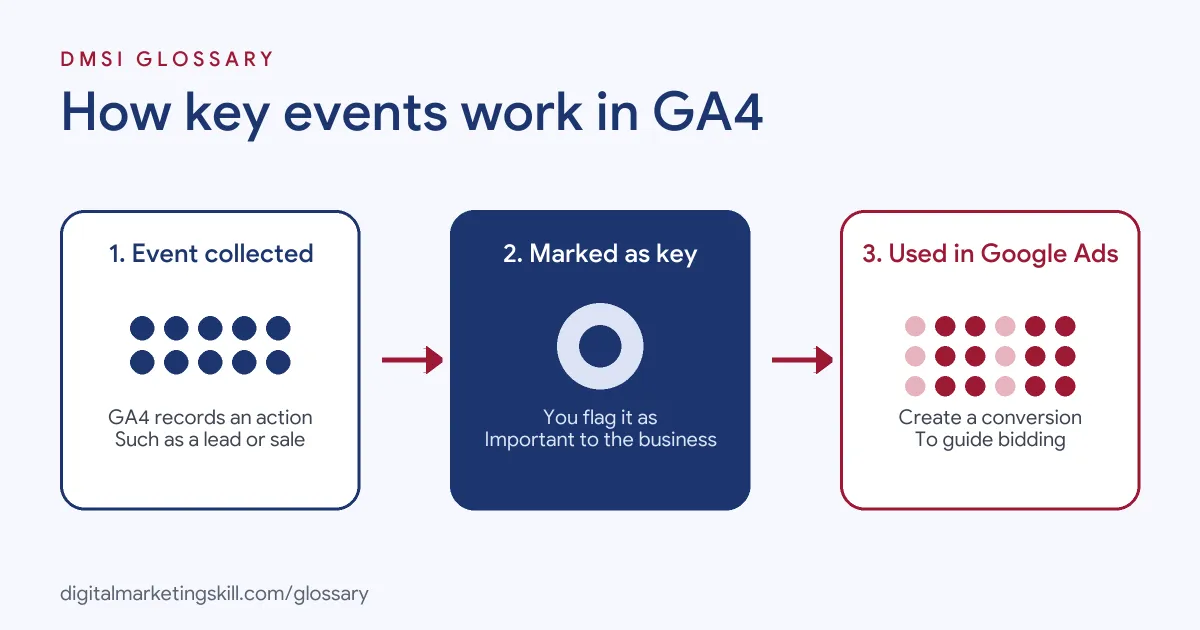
The process has three steps. First, GA4 collects an event, such as generate_lead or purchase. Next, you mark that event as a key event. Then GA4 reports it as a key event, and you can import it into Google Ads as a conversion if you want to use it for bidding.
Marking an Event
Google’s help page says that to measure a key event, “you must create or identify an event that measures the important user interaction and then mark the event as a key event.” In practice, you go to Admin, then Data display, then Events, and switch on the key event setting for the event you want.
Google adds that any event you collect “can become a key event.” So the main skill is choosing well, not the clicking itself.
Default Key Events
Some events are marked for you. GA4 marks purchase as a key event by default on web and app. It also marks a few app-only events, such as first_open and in_app_purchase. In addition, when you enable Ads Personalization with a linked Google Ads account, GA4 marks more events, including add_to_cart, begin_checkout and view_item.
Timing and History
Marking a key event doesn’t rewrite the past. Google says it reports “from time of creation” and “doesn’t change historic data.” It also says to “allow for up to 24 hours” for a new key event to show up in standard reports. However, Realtime reports update within a few minutes.
Key Events Examples
Here are three made-up examples of how businesses choose them:
- Example 1, online shop: A shop keeps purchase as its main key event. It also marks begin_checkout, so it can spot drops between checkout and payment.
- Example 2, training school: A school sends generate_lead when someone submits an enquiry form, then marks it as a key event. As a result, it can compare leads by channel in its acquisition reports.
- Example 3, software company: A start-up marks sign_up as a key event. Then it creates a Google Ads conversion from it, so its campaigns can bid towards new trials.
Key Events vs Events vs Google Ads Conversions
These three ideas sit on top of each other:
| Term | Where it lives | What it does |
|---|---|---|
| Event | Google Analytics 4 | Records any action, such as a page view, click or purchase |
| Key event | Google Analytics 4 | Flags an event as especially important to the business |
| Conversion | Google Ads | Measures ad results and can feed automated bidding |
In short, every key event is an event, but not every event is a key event. Likewise, a key event only becomes a conversion when you create one from it in Google Ads.
How to Set Up Key Events in GA4
- List your business goals. Write down the two to five actions that best show success, such as purchases, leads or sign-ups.
- Check the events exist. Look in Admin, under Data display, then Events. If an action isn’t tracked yet, set it up first, ideally with a recommended event name.
- Mark each event. Switch on the key event setting for each chosen event.
- Wait and verify. Check Realtime within minutes. Then allow up to 24 hours before you expect it in standard reports.
- Link Google Ads. If you run ads, link the accounts. Then create Google Ads conversions from the actions you want to bid on.
- Review regularly. Finally, unmark any that no longer reflect your goals, so reports stay focused.
How to Read Key Event Reports
Once your tracking is live, use it to compare channels and campaigns. For instance, look at key events by session source to see which channels bring leads, not just visits. Then work out the share of sessions or users that completed one, so busy and quiet channels can be compared fairly. Most importantly, compare like with like. A channel with fewer visits but more leads or sales may deserve more budget than a channel with lots of traffic.
Best Practices for Key Events
- Keep the list short. If everything is a key event, nothing stands out.
- Use clear, consistent names. Recommended names, such as generate_lead or purchase, make reports easier to read.
- Separate main and supporting actions. For example, mark purchase as primary and begin_checkout as a supporting signal.
- Avoid duplicates. Make sure the same form doesn’t fire two different tracked actions.
- Agree definitions with your team. Sales, marketing and leadership should all mean the same thing by “a lead”.
Common Mistakes to Avoid
A common mistake is marking page views or scrolls as key events, which inflates results. Another is expecting a new key event to fill in past data, which Google says it doesn’t. Some teams also forget to create Google Ads conversions, then wonder why bidding ignores their leads. Others track a thank-you page that people can reach without submitting a form. Lastly, many leave old settings switched on after goals change.
Where You’ll Use Key Events at Work
Listings often still say “conversions” or “conversion events”, but the task is the same. For example, remote job listings ask candidates to:
- “Implement and maintain website analytics, conversion events, advertising pixels, and UTM tracking to measure performance accurately” (Marketing Lead).
- “Implement, validate, and maintain event tracking, conversion tracking, and analytics frameworks to ensure data accuracy and consistency” (Data Analytics and Optimization Specialist).
- Use “event tracking, segmentation, and audiences to create detailed customer journey analysis” (GA4 Specialist).
So if you want to work as a Google Ads Specialist, PPC Specialist or Web Analytics Specialist, you’ll need to choose, set up and report on these actions.
Learn It in the Google Specialist Track
You can learn to set up tracking and conversions in the AI-Powered Google Specialist track. It covers Google Ads and Google Analytics, and you launch and measure a Google Ads campaign with conversion tracking. You also get unlimited 1-on-1 mentoring and a U.S. Project Internship from day one.
To get started, read our Google Analytics for beginners guide and our overview of Google Analytics reports.
Frequently Asked Questions
What are key events in simple terms?
They are the actions in GA4 that matter most to your business, such as purchases or leads. You mark them so they stand out in reports.
Are key events the same as conversions?
Not quite. They live in Google Analytics. Conversions live in Google Ads, and you can create one from a key event.
How many key events should I have?
Google’s help page says any event you collect can become one. Still, most teams keep a short list of the actions that truly show success.
Why don’t my new key events show in reports?
Google says to allow up to 24 hours for standard reports. Realtime reports update within a few minutes.
Can I mark past events as key events?
You can mark the event, but GA4 only reports it as a key event from that point on. It doesn’t change historic data.
Sources: Analytics Help: About key events; Analytics Help: Mark events as key events; Analytics Help: Recommended events; remote job listings on Himalayas.