
GA4 events are the individual actions that Google Analytics 4 records on your website or app, such as a page view, a click or a purchase. In GA4, almost everything you measure is an event, and each one can carry extra details called parameters. They matter because the events you track decide which questions your reports can answer.
Key Takeaways
- Google defines an event as something that lets you “measure a specific interaction or occurrence on your website or app.”
- There are four types: automatically collected, enhanced measurement, recommended and custom events.
- Enhanced measurement can track scrolls, outbound clicks, site search, video plays, file downloads and form use without extra code.
- Use Google’s recommended names, such as generate_lead or purchase, before you invent your own.
- Event names can be up to 40 characters, and each event can carry up to 25 parameters.
What Are GA4 Events?
Older versions of Google Analytics were built around sessions and pageviews. GA4 is different. It treats every interaction as an event, from opening a page to buying a product.
Each event has a name, such as page_view or purchase. It can also carry parameters, which add context. For example, a purchase event might include the order value and currency. In other words, the event says what happened, and the parameters say the details.
Think of GA4 events like lines in a diary. Each line says what a visitor did and when. So the more care you take with each line, the easier the diary is to read later.
This model is flexible. You can track the same kinds of actions on a website and an app, and compare them in one property. However, it also means you must plan your events with care. If you don’t track an action, GA4 can’t report on it later.
Many events also feed your conversion tracking. That’s because you can mark important ones as key events, which then show up in reports and can be used for Google Ads bidding.
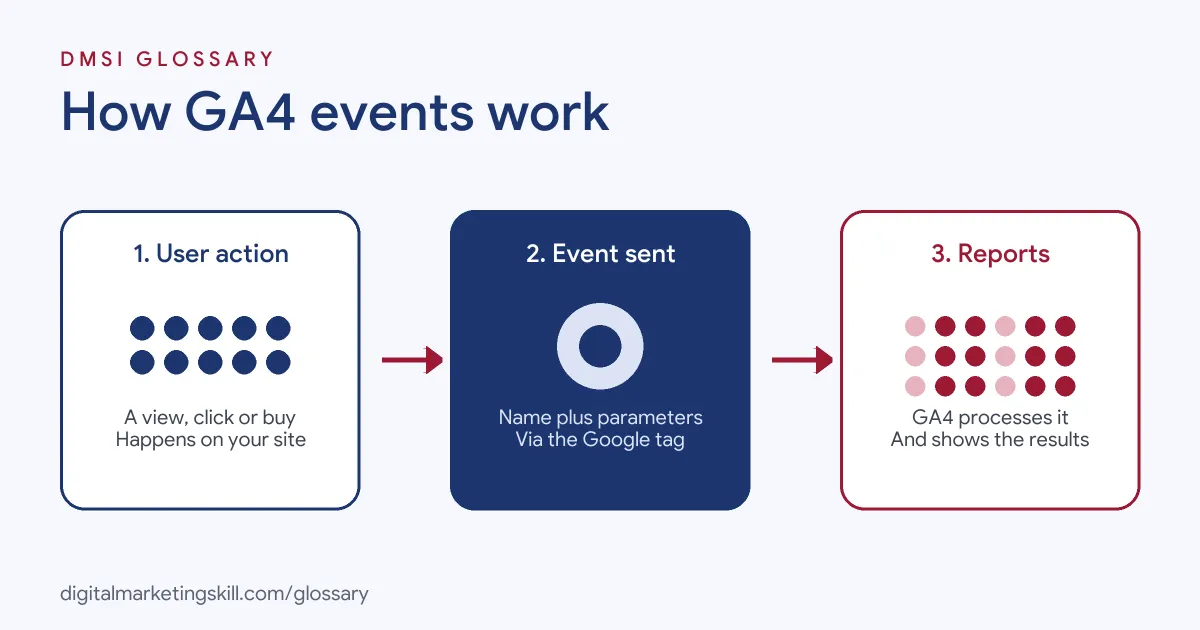
How GA4 Events Work
The flow has three steps. First, a visitor does something on your site or app. Next, the Google tag or app SDK sends an event with its parameters. Finally, GA4 processes the event and adds it to your reports.
The Four Types of GA4 Events
Google’s help centre groups events into four types:
- Automatically collected events “are collected by default when you set up Google Analytics on your website or app.”
- Enhanced measurement events are also collected on set-up, but only when enhanced measurement is turned on.
- Recommended events “are events that you implement, but that have predefined names and parameters.”
- Custom events “are events that you define.” Google suggests creating them only when no other event fits.
There is a catch with the last group. Google notes that “custom events don’t show up in most standard reports.” So you’ll often need explorations or custom dimensions to analyse them.
Enhanced Measurement
Enhanced measurement saves you a lot of set-up. When it’s on, GA4 can record page views, scrolls, outbound clicks, site search, video engagement, file downloads and form interactions. For instance, the scroll event fires “the first time a user reaches the bottom of each page,” which Google defines as 90% of the page depth.
You can switch it on or off in Admin, under Data streams. Then you can turn single options off with the settings icon. You need Editor access or higher to do this.
Event Limits
GA4 also sets limits on events. According to Google, event names and parameter names can each be up to 40 characters. Parameter values can be up to 100 characters. In addition, each event can carry up to 25 parameters. App data streams are limited to 500 distinct event names, while web data streams have no cap on distinct names.
GA4 Events Examples
Here are three made-up examples of how different sites use events:
- Example 1, online shop: A store sends view_item, add_to_cart, begin_checkout and purchase. As a result, it can see where shoppers drop out of the checkout.
- Example 2, training school: A school sends generate_lead when someone submits an enquiry form. It then marks generate_lead as a key event, so it can count leads by channel.
- Example 3, blog: A blog relies on enhanced measurement for scrolls and outbound clicks. It also adds a custom event called newsletter_signup, with a parameter for the form location.
GA4 Event Types Compared
This table shows how the four types differ:
| Type | Set-up needed | Examples |
|---|---|---|
| Automatically collected | None beyond installing GA4 | First visit, session start |
| Enhanced measurement | Toggle on in the data stream | page_view, scroll, click, file_download, form_submit |
| Recommended | You add them, using Google’s names and parameters | login, sign_up, generate_lead, add_to_cart, purchase |
| Custom | You add them, with your own names | newsletter_signup, quiz_complete |
Google says recommended events help you “generate more useful reports, and build suggested audiences.” That’s why they come before custom ones.
How to Set Up GA4 Events
- List your business questions. For example: “Which channels bring enquiries?” or “Where do shoppers leave checkout?”
- Turn on enhanced measurement. Check which of its events already cover your needs.
- Match actions to recommended events. Use names such as sign_up, generate_lead or purchase, with their prescribed parameters.
- Add custom events only for gaps. Keep names short, lower case and consistent, such as quiz_complete.
- Send the events. Use the Google tag, Google Tag Manager or the app SDK. Then test with DebugView or the Realtime report.
- Mark key events. In Admin, under Data display, open Events and mark the actions that matter most. Google says new key events can take up to 24 hours to appear in standard reports.
- Document everything. Finally, keep a tracking plan with each event, its parameters and where it fires.
Best Practices for GA4 Events
- Plan before you tag. A short tracking plan stops duplicate or messy event names.
- Prefer recommended names. They unlock more reporting features than custom names.
- Use parameters, not new events. For instance, send one form_submit event with a form_name parameter, rather than ten separate events.
- Check that IDs and values are right. A purchase event with the wrong value can skew every revenue report.
- Review key events regularly. Keep the list to actions that truly matter to the business.
Common Mistakes to Avoid
Most problems with GA4 events come from a lack of planning. A common mistake is tracking everything, which fills reports with noise. Another is mixing naming styles, such as SignUp and sign_up, which splits the data. Some teams also forget that custom events don’t appear in most standard reports. Others fire a purchase event on page refresh, which counts the same sale twice. Lastly, many never test their tags, so errors go unnoticed for weeks.
Where You’ll Use GA4 Events at Work
Event tracking is a daily task in analytics and paid media roles. For example, remote job listings mention:
- “Using event tracking, segmentation, and audiences to create detailed customer journey analysis leading to clearly actionable insights and recommendations” (GA4 Specialist).
- “Experience implementing and running product analytics platforms such as Amplitude, Mixpanel, or GA4, including event tracking setup” (Conversion Rate Optimization Principal).
- An “Understanding of event tracking (GA4, etc.)” (Data Engineer).
So if you want to work as a Web Analytics Specialist, Google Ads Specialist or PPC Specialist, you’ll need to plan, build and test event tracking.
Learn It in the Google Specialist Track
You can learn GA4 tracking in the AI-Powered Google Specialist track. It covers Google Ads and Google Analytics, and you launch and measure a Google Ads campaign with conversion tracking. You also get unlimited 1-on-1 mentoring and a U.S. Project Internship from day one.
For a gentle start, read our Google Analytics for beginners guide and our tips on Google Analytics campaign tracking.
Frequently Asked Questions
What are GA4 events in simple terms?
They are the actions GA4 records, such as page views, clicks and purchases. Each one can carry details called parameters.
What is the difference between an event and a key event?
Any tracked action is an event. A key event is one you mark as important, such as a purchase or a lead, so it gets special treatment in reports.
Do I need Google Tag Manager for events?
No. Many events come automatically or through enhanced measurement. However, Tag Manager makes it easier to add recommended and custom events.
Why don’t my custom events appear in reports?
Google notes that custom events don’t show up in most standard reports. Use explorations, or register their parameters as custom dimensions.
How many parameters can one event have?
Google allows up to 25 parameters per event. Parameter values can be up to 100 characters long.
Sources: Analytics Help: About events; Analytics Help: Enhanced event measurement; Analytics Help: Recommended events; Analytics Help: Event collection limits; Analytics Help: Mark events as key events; remote job listings on Himalayas.