
AI search is a way of searching where an AI model reads information from the web and writes a direct answer, usually with links to its sources, instead of only showing a list of pages. Examples include Google’s AI Overviews and AI Mode, and ChatGPT search. It matters because more people now get answers without clicking, so brands need their content to be found, trusted and cited by these tools.
Key Takeaways
- AI search tools combine a search index with a large language model, then summarise what they find.
- Google says there are no extra requirements or special optimisations needed to appear in its AI features.
- ChatGPT search shows inline citations and a Sources list, and it may share disassociated queries with providers such as Bing.
- OpenAI says sites that block OAI-SearchBot “will not be shown in ChatGPT search answers.”
- Helpful, unique content and sound technical SEO are still the foundations.
What Is AI Search?
Traditional search gives you ten blue links and leaves the reading to you. In contrast, AI search reads for you. It gathers information from several pages, writes a short answer in plain language, and shows links so you can check the facts.
Several tools now work this way. Google offers AI Overviews at the top of some results, plus AI Mode for deeper questions. OpenAI’s help centre says “ChatGPT will automatically search the web if your question might benefit from information on the web.” Other assistants offer similar features.
Under the hood, these tools pair a search system with a large language model. The search part finds relevant pages. Then the model reads them and writes the answer.
For marketers, this changes the goal. Ranking still matters. However, a quote or link inside an AI answer now gives you a second way to reach people.
How AI Search Works
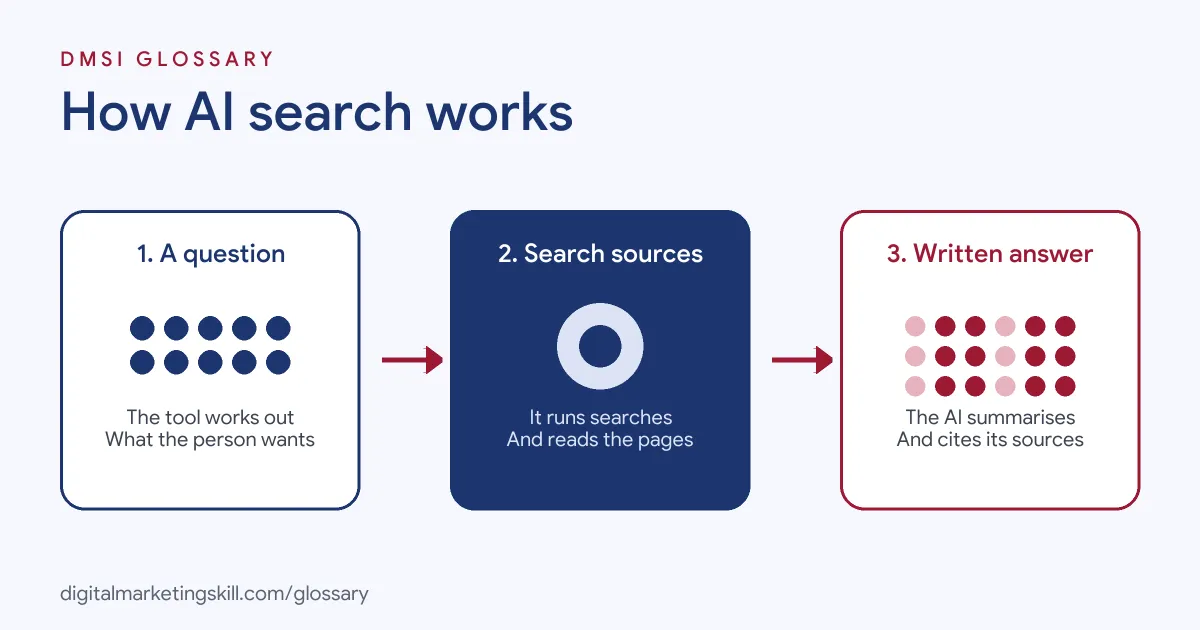
Most AI search tools follow three steps. First, they work out what the person is asking. Next, they run one or more searches to collect sources. Finally, the model writes an answer and attaches links or citations.
Searching Many Sources at Once
Google’s documentation says its AI features may use a “query fan-out” technique. This means “issuing multiple related searches across subtopics and data sources.” As a result, one question can pull in pages that a single classic search might not show.
Citations and Links
AI answers usually show where the facts came from. In ChatGPT search, responses include inline citations, and all cited sources appear under a Sources button at the end. Google’s AI features show supporting links next to the summary. So a page can earn a visit even when the searcher reads the answer first.
Crawlers and Access
To cite your page, a tool must be able to reach it. On Google, a page must be “indexed and eligible to be shown in Google Search with a snippet.” On ChatGPT, OpenAI uses a crawler called OAI-SearchBot, which “is used to surface websites in search results in ChatGPT’s search features.” A separate crawler, GPTBot, is used for model training. Blocking GPTBot doesn’t remove you from ChatGPT search, because search visibility depends on OAI-SearchBot.
Where the Results Come From
Many assistants rely on partners for part of their web results. OpenAI’s help centre says ChatGPT “may share disassociated search queries” with third-party providers such as Bing. It may also share a general location based on your IP address. For site owners, this means classic search engine visibility can still feed AI answers. In other words, the basics of indexing and ranking still matter.
AI Search Examples
Here are three made-up examples:
- Example 1, a travel question: Someone asks for the best time to visit Lisbon for a quiet trip. The AI answer summarises weather and crowds, then links to two travel blogs it used.
- Example 2, a software comparison: A buyer asks how two email tools compare for small shops. The answer cites a detailed comparison page, which then gets a well-qualified visit.
- Example 3, a blocked site: A publisher blocks OAI-SearchBot in robots.txt. As a result, its articles stop appearing as sources in ChatGPT search answers.
AI Search vs Traditional Search
Here is how the two experiences differ:
| Feature | Traditional search | AI search |
|---|---|---|
| What you see first | A ranked list of links | A written answer with source links |
| How questions look | Short keyword phrases | Longer, more specific questions and follow-ups |
| How sites win | Ranking high on the page | Being chosen and cited as a source |
| Main controls | robots.txt, noindex, snippets | The same, plus crawler-specific rules such as OAI-SearchBot |
Google notes that in its AI experiences “users are asking longer and more specific questions.” So content that covers a topic in depth has more ways to match.
How to Optimise Your Content for AI Search
- Check access. Make sure Googlebot and OAI-SearchBot aren’t blocked in robots.txt if you want to appear in both.
- Confirm indexing. In Search Console, check that key pages are indexed and can show a snippet.
- Write unique, useful content. Google advises “unique, non-commodity content that visitors from Search and your own readers will find helpful and satisfying.”
- Answer the follow-up questions. Cover the next three things a reader would ask, in clear sections with plain headings.
- Back claims with evidence. Cite sources, show data and name experts, so your page is worth quoting.
- Keep structured data honest. If you use it, Google says all the content in your markup must be visible on the page.
- Measure beyond clicks. Finally, track engaged visits, leads and mentions, not just traffic.
How to Measure Your Visibility
Measurement is still developing, so combine a few signals. Google says traffic from its AI features is included in the overall Web search figures in Search Console. For other assistants, check referral traffic in your analytics tool for visits from their domains. You can also run a fixed list of real customer questions in each tool every month and record whether your brand is cited.
Best Practices for AI Search
- Write for people first. The same quality signals that help classic rankings help AI answers too.
- Lead with the answer. Put a clear, quotable sentence near the top of each section.
- Decide on crawler access deliberately. Choose which bots to allow for search and which to block for training.
- Keep business data current. Google advises keeping your Merchant Center and Business Profile up to date.
- Value quality visits. Google reports that clicks from results with AI Overviews are “higher quality.”
Common Mistakes to Avoid
One mistake is blocking every AI crawler without checking the effect on search visibility. Another is publishing thin, generic content that adds nothing new. Some teams also chase special tricks, even though Google says its AI features need none. Others judge results by clicks alone. Some even mix up GPTBot and OAI-SearchBot, so they block the wrong crawler. Finally, many forget that AI answers can be wrong, so they never check how their brand is described.
Where You’ll Use AI Search at Work
SEO and content roles increasingly name AI search directly. For example, remote job listings mention:
- A “Working knowledge of AEO/GEO and how AI search is changing content strategy” (Sr. Content Marketing Manager, B2B SaaS).
- “Search & AI Visibility (SEO, GEO, AEO)” as a core area (Content Operations Specialist).
- “helping them win clients with AI search visibility services” (Agency Partnerships Lead).
So if you want to work as an SEO Specialist, Website Manager or Content Creator, expect to plan content for both classic rankings and AI answers.
Learn It in the WordPress and SEO Track
You can learn search-ready content skills in the AI-Powered WordPress and SEO Specialist track. It covers AI fundamentals, SEO and content marketing, and you build a WordPress site or store and rank it with an SEO content plan. You also get unlimited 1-on-1 mentoring and a U.S. Project Internship from day one.
For more, read our guide to generative engine optimisation and our article on AI in digital marketing.
Frequently Asked Questions
What is AI search in simple terms?
It is search where an AI reads web pages for you and writes a short answer, with links to the sources it used.
Is AI search replacing Google?
Not exactly. Google itself now includes AI features such as AI Overviews and AI Mode alongside its classic results.
How do I get my site cited by ChatGPT search?
Make sure OAI-SearchBot can crawl your site. Then publish clear, useful pages that answer real questions well.
Does blocking GPTBot hide my site from ChatGPT search?
No. OpenAI says GPTBot relates to model training, while search visibility depends on OAI-SearchBot.
Do I need special markup for AI search?
Google says there is no special schema.org structured data you need for its AI features. Good content and technical basics matter most.
Sources: Google Search Central: AI features and your website; Google Search Central Blog: Succeeding in AI search; OpenAI Help Center: ChatGPT search; OpenAI: Overview of OpenAI crawlers; remote job listings on Himalayas.