
An AI crawler is an automated bot that visits web pages for an AI company, to collect training data, power AI search answers or fetch a page when a user asks an AI assistant a question. Well-known examples include OpenAI’s GPTBot and OAI-SearchBot and Anthropic’s ClaudeBot. It matters because whether you allow or block these bots affects how AI companies use your content and whether it can appear in AI answers.
Key Takeaways
- AI crawlers do three main jobs: collect training data, build AI search results and fetch pages for users in real time.
- Most AI companies run separate bots for each job, so you can allow one and block another in robots.txt.
- OpenAI says sites that block OAI-SearchBot “will not be shown in ChatGPT search answers.”
- Google-Extended is a robots.txt token, not a separate bot. Google says it doesn’t affect inclusion or ranking in Google Search.
- Anthropic says its bots honour robots.txt and support the non-standard Crawl-delay rule.
What Is an AI Crawler?
Think of an AI crawler as a visitor that reads your site for a machine, not a person. Like Googlebot, it requests pages, reads the text and moves on. However, what happens next depends on its job.
Some AI crawlers gather content that may help train future AI models. Others build an index for AI search, so an assistant can cite your page in an answer. A third type only visits when a real user asks an assistant to look something up.
For example, OpenAI explains that GPTBot crawls content that may help train its generative AI models. OAI-SearchBot, by contrast, “is used to surface websites in search results in ChatGPT’s search features.” So the same company can send two different bots for two different reasons.
How an AI Crawler Works
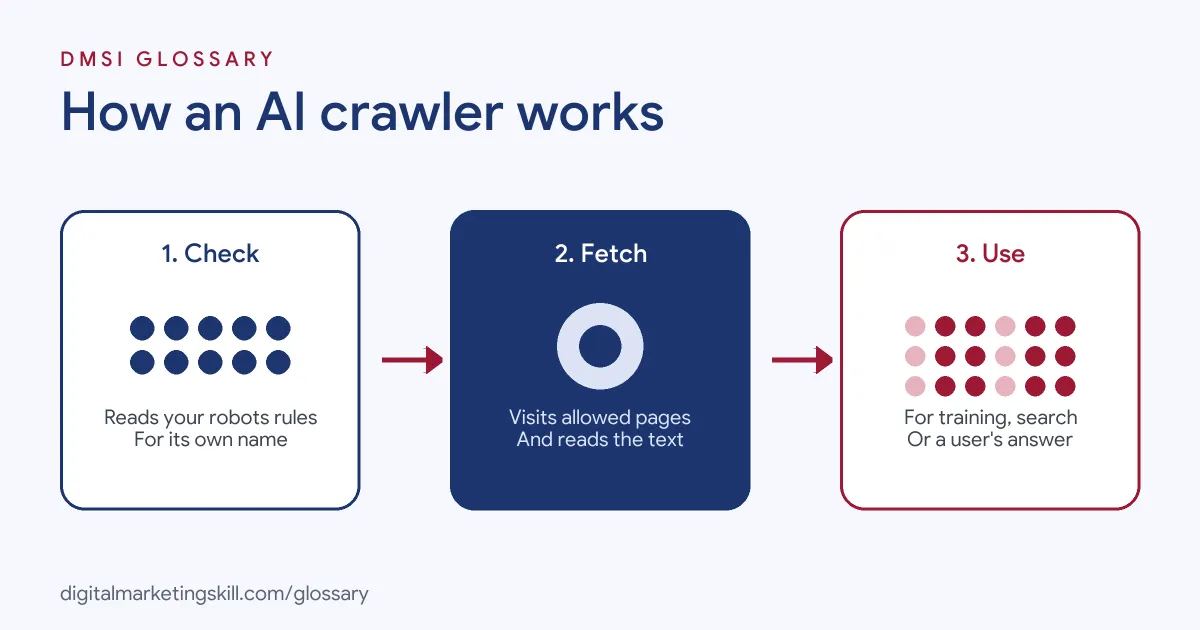
An AI crawler works in three steps. First, it checks your robots.txt file for rules that name its user agent. Next, it requests the pages the rules let it visit. Finally, it sends the content back for training, search indexing or a live answer, depending on its purpose.
Training Crawlers
Training crawlers collect public content that may help build future models. OpenAI says, “Disallowing GPTBot indicates a site’s content should not be used in training generative AI foundation models.” Similarly, Anthropic says that when a site restricts ClaudeBot, “it signals that the site’s future materials should be excluded from our AI model training datasets.”
AI Search Crawlers
Search crawlers help AI tools find and cite pages. OpenAI uses OAI-SearchBot for ChatGPT search, and Anthropic uses Claude-SearchBot to improve its search results. Anthropic warns that blocking Claude-SearchBot “may reduce your site’s visibility and accuracy in user search results.” OpenAI also notes it can take about 24 hours for its systems to adjust after you change robots.txt.
User-Triggered Fetchers
Some bots only visit when a person asks. OpenAI says ChatGPT-User “is not used for crawling the web in an automatic fashion.” Because a user starts these visits, OpenAI notes that “robots.txt rules may not apply.” Anthropic’s equivalent is Claude-User. It says blocking Claude-User stops its system from retrieving your content for a user’s question.
Google-Extended
Google works differently. Google-Extended doesn’t have its own user agent string. Instead, it is a robots.txt token that lets you manage whether content Google crawls may be used for training Gemini models and for grounding in Gemini Apps. Google says it “does not impact a site’s inclusion in Google Search nor is it used as a ranking signal in Google Search.”
AI Crawler Examples
Here are three made-up examples of how sites handle AI crawlers:
- News publisher (example): It blocks GPTBot and ClaudeBot to keep its articles out of training, but allows OAI-SearchBot and Claude-SearchBot, so AI search tools can still cite its stories.
- Software company (example): It allows every AI crawler, because it wants its help docs to appear in as many AI answers as possible.
- Small shop (example): Its server slows down under heavy crawling, so it adds a Crawl-delay rule for ClaudeBot rather than blocking it.
In each case, the site makes a deliberate choice for each bot, rather than one blanket rule.
AI Crawlers Compared
Here are the main crawlers from three companies and what each one does, based on their own documentation:
| Name | Company | Main job |
|---|---|---|
| GPTBot | OpenAI | Collects content that may help train models |
| OAI-SearchBot | OpenAI | Surfaces websites in ChatGPT search |
| ChatGPT-User | OpenAI | Visits pages when a user asks |
| ClaudeBot | Anthropic | Collects content that could help train models |
| Claude-SearchBot | Anthropic | Improves search result quality |
| Claude-User | Anthropic | Fetches pages for a user’s question |
| Google-Extended | A robots.txt token for Gemini training and grounding |
In short, blocking a training bot doesn’t have to remove you from AI search, as long as you treat each bot separately.
How to Manage AI Crawlers on Your Site
- Decide your goals. Do you want to appear in AI answers, stay out of training, or both?
- Open your robots.txt file. It sits at the root of your site, such as yoursite.com/robots.txt.
- Add rules per bot. Write a separate group for each user agent you want to allow or block.
- Keep search bots in mind. If you want AI visibility, avoid blocking search crawlers such as OAI-SearchBot.
- Limit speed if needed. Anthropic supports Crawl-delay for its bots, which can ease server load.
- Check your server logs. Look for the user agent names to see which bots actually visit.
- Review regularly. AI companies add and rename bots, so check their documentation from time to time.
For example, a short robots.txt group might name GPTBot and disallow the whole site, while another group allows OAI-SearchBot. That keeps content out of OpenAI’s training but open to ChatGPT search.
Best Practices for AI Crawlers
- Treat each bot separately. One blanket block can remove you from AI search by accident.
- Use the official names. Copy user agent tokens from each company’s documentation.
- Don’t confuse files. robots.txt controls access, while a file like llms.txt only describes your content.
- Protect private areas properly. Use logins, not just robots.txt, for anything sensitive.
- Write down your policy. Then your team knows why you allow or block each bot.
Common Mistakes to Avoid
The most common mistake is blocking every AI bot with one rule, then wondering why the site never appears in AI answers. Another is assuming that blocking Google-Extended affects Google Search, which Google says it doesn’t. Some sites also expect robots.txt to stop user-triggered fetchers, even though OpenAI says its rules may not apply there. Others copy rules with typos in the bot names. Finally, many set rules once and never review them.
Where You’ll Use AI Crawlers at Work
Managing AI crawlers is becoming part of technical SEO and AI search work. For example, real remote job listings ask candidates to:
- “Govern AI crawler access (GPTBot, OAI-SearchBot, PerplexityBot, Google-Extended, and others) through robots.txt and related controls, balancing visibility with site performance.” (Sr. Manager, AI Search Visibility).
- “Connect GEO work to the SEO fundamentals it depends on, including crawlability for AI crawlers, structured data, and content that is easy to extract and cite.” (SEO Strategist).
So if you want to work as an SEO Specialist or Website Manager, employers will expect you to understand which bots visit, what they do and how to control them. It links closely to technical SEO.
Learn It in the WordPress and SEO Track
AI fundamentals are part of every DMSI track, and you will use this skill most in the AI-Powered WordPress and SEO Specialist track. There, you learn WordPress website and eCommerce development, search engine optimisation and content marketing. Your portfolio project is a WordPress site or store that you build and rank with an SEO content plan. You also get unlimited 1-on-1 mentoring and a U.S. Project Internship from day one.
Next, read our guide to generative engine optimisation to see how crawler access fits into AI search.
Frequently Asked Questions
What is an AI crawler in simple terms?
It is a bot that reads web pages for an AI company. It may gather training data, build AI search results or fetch a page for a user.
Can I block AI crawlers?
Yes. Most AI companies say their bots follow robots.txt, so you can block or allow each one by name.
Will blocking GPTBot remove me from ChatGPT search?
Not by itself. OpenAI uses GPTBot for training and OAI-SearchBot for search, so each one needs its own rule.
Does blocking Google-Extended hurt my Google rankings?
No. Google says Google-Extended does not affect inclusion in Google Search and is not a ranking signal.
How do I see which AI bots visit my site?
Check your server logs or hosting analytics for user agent names, such as GPTBot or ClaudeBot.
Sources: OpenAI: Overview of OpenAI crawlers; Anthropic: How site owners can manage Anthropic’s crawlers; Google Search Central: Google’s common crawlers; remote job listings on Himalayas.