
Zapier is a no-code automation tool that connects thousands of web apps, so that an event in one app can automatically trigger actions in others. For example, a new form entry can add a contact to your email list and alert your team, without anyone lifting a finger. Marketers use it to save hours of copy-and-paste work and to make sure leads and data move between tools quickly and reliably.
Key Takeaways
- Zapier says it offers integrations for more than 9,000 apps, such as Google Docs, Slack and Salesforce.
- An automated workflow in Zapier is called a Zap. Each one has a trigger and one or more actions.
- Every action a Zap completes counts as a task, which matters for plan limits.
- Filters and Paths let a Zap run only when conditions are met, or take different routes.
- Some features, such as multi-step Zaps, are only on paid plans.
What Is Zapier?
The tool sits between your apps and moves data from one to another. Its help centre defines an app as “a web service or application, such as Google Docs, Slack, or Salesforce,” and says Zapier offers integrations for 9,000+ apps.
The basic unit is the Zap. The company describes it as “an automated workflow that connects your apps and services together.” When you turn a Zap on, it “will run the action steps every time the trigger event occurs.”
So you don’t need to write code or hire a developer for many everyday jobs. Instead, you pick the apps, choose what should start the workflow and decide what should happen next.
How Zapier Works
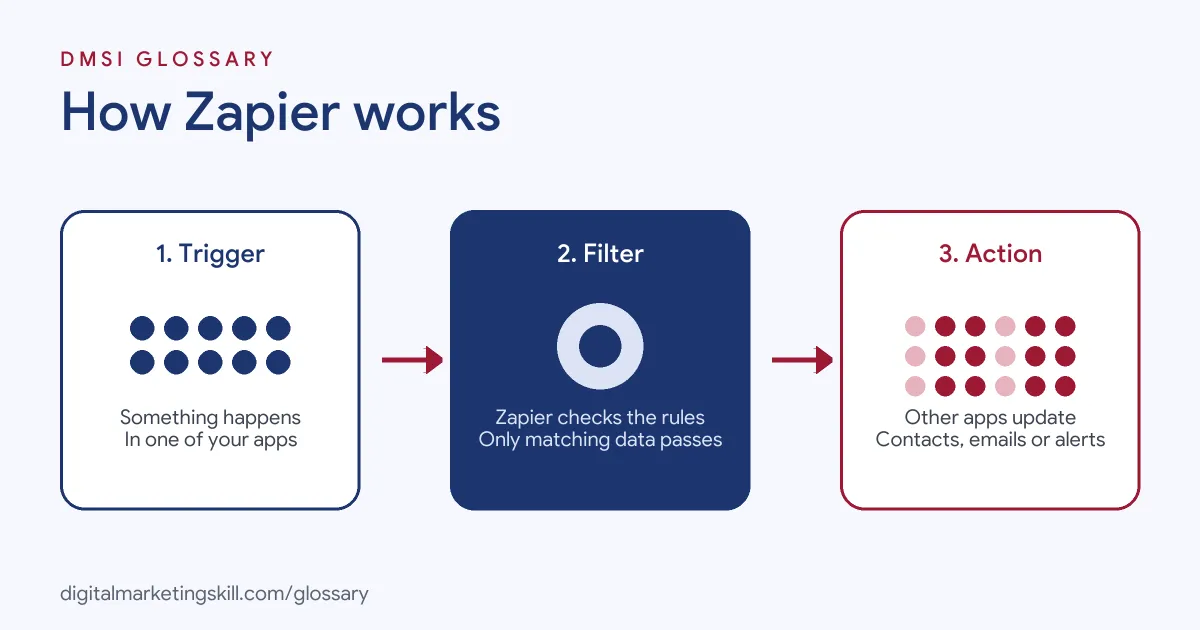
Every Zap follows the same pattern. First, a trigger event happens in one app. Next, Zapier checks any filters you set. Finally, it runs one or more actions in the same or other apps.
Triggers and Actions
Zapier defines a trigger as “an event that starts a Zap.” The help centre’s example is a workflow that sends a text message each time you receive an email. There, the trigger is “new email in inbox” and the action is “Send a text message.” A single-step Zap has one trigger and one action. If it has more actions, filters or searches, it counts as a multi-step Zap.
Tasks
Usage is measured in tasks. The help centre explains that “a task is an action your Zap successfully completes.” For example, if your Zap creates new Google Contacts, each contact it creates counts as one task. So a busy Zap with several actions uses tasks quickly.
Instant and Polling Triggers
Some triggers are instant. Zapier says triggers labelled Instant start Zaps immediately, because the app pushes data to Zapier when the event happens. Others work by polling, which means the tool checks the app for new data at set intervals. The available intervals depend on your plan and the app.
Zapier Examples
Here are three made-up examples from marketing teams:
- Lead capture: A new Facebook lead form entry creates a contact in the CRM, adds the person to an email list and posts a message in Slack.
- Webinar follow-up: Each new webinar registrant gets added to a Google Sheet and receives a confirmation email from the email tool.
- Content workflow: When a blog post moves to “Ready” in a project board, a draft social post appears for review.
In each case, the work that used to take a person a few minutes now happens in seconds, every time, with no typos or forgotten steps.
Key Zapier Features Compared
| Feature | What it does | Plan note from Zapier |
|---|---|---|
| Filters | Lets a Zap run only when certain conditions are met | Adding one makes the Zap multi-step |
| Paths | Uses if/then logic to take different actions | Part of multi-step Zaps |
| Multi-step Zaps | More than one action in a workflow | Paid plans only |
| Premium apps | Certain app integrations | Paid plans or free trial |
| Autoreplay | Retries steps that fail due to temporary errors | Pro plan or higher |
| Webhooks by Zapier | Catches data sent from other apps to a unique URL | Listed on Free and paid plans |
Zapier also offers other products beyond Zaps, including Tables, Forms, Chatbots, Canvas and Agents.
How to Build Your First Zap
- Map the job. Write down the manual task you want to remove, step by step.
- Open the Zap editor. Zapier’s editor lets you set up a trigger and one or more actions.
- Choose the trigger app and event. For example, pick your form tool and “New submission.”
- Test the trigger. The editor tries to find existing data from the app to use as a test record.
- Add an action. Next, pick the app and event, such as “Add subscriber” in your email tool.
- Map the fields. Match each piece of data, such as name and email, to the right field.
- Add filters if needed. For instance, only continue when the email address is not empty.
- Turn it on and check Zap history. Finally, watch the first few runs to make sure everything works.
A Worked Example: Counting Tasks
Here is a made-up example to show how usage adds up. A coaching business has one Zap with a trigger and three actions: add the lead to the CRM, add them to an email list and post a Slack message. Each new lead therefore uses three tasks, because each completed action counts as one.
Now say the business gets 400 leads in a month. That single workflow uses 1,200 tasks. If the owner adds a fourth action, such as updating a spreadsheet, usage jumps to 1,600. So before you add steps, ask whether each one really earns its place. A filter that stops test entries or spam can also save tasks, because the actions never run for those records.
Best Practices
- Name every Zap clearly. Include the trigger and the result, such as “Form lead to CRM and Slack.”
- Watch your task use. Each completed action counts, so avoid steps you don’t need.
- Use filters to stop bad data. They can block test entries or incomplete records.
- Check Zap history. Every run is logged, which helps you spot errors early.
- Document your Zaps. Keep a simple list of what each one does and who owns it.
Common Mistakes
A common mistake is building a long, complex Zap before testing a simple version. Another is mapping the wrong fields, so names land in email boxes or data goes missing. Some teams also forget that Zaps keep running in the background, so a broken step can fail quietly for days. Finally, many people create several Zaps that do almost the same thing, which wastes tasks and causes duplicate emails. To avoid this, agree who owns each workflow and review the list now and then.
Where You’ll Use Zapier at Work
The tool often appears in job ads next to similar platforms. For example, real remote job listings include lines like these:
- “Familiarity with automation platforms such as n8n, Make, or Zapier” (AI Implementation and Automation Engineer).
- “Working knowledge of no-code automation platforms (Workato, Zapier, Tray) or scripting” (Senior Lead, Systems Administration).
- “Hands-on experience with an automation or iPaaS platform such as Keragon, Zapier, Make, n8n, or Workato” (Systems Integration and Automation Specialist).
So as a Marketing Automation Specialist, an Email Marketing Specialist or a Lead Generation Specialist, you may use Zapier or a similar tool to connect forms, CRMs and email platforms. Once you understand one, the others are much easier to learn, because the ideas are the same.
Learn It in the Lead Generation and Email Track
The AI-Powered Lead Generation and Email Automation track covers lead generation, email marketing and automation. Your portfolio project is to build a lead magnet and an automated email sequence that converts, which often relies on connecting tools like this. You also get unlimited 1-on-1 mentoring and a U.S. Project Internship from day one.
To understand what starts a Zap, read our glossary entries on the automation trigger and the webhook. To compare options, see our guide to marketing automation tools.
Frequently Asked Questions
What is Zapier used for?
It connects apps so that an event in one, such as a new lead, automatically triggers actions in others, such as adding a contact or sending an alert.
What is a Zap?
A Zap is an automated workflow in Zapier. Each one has a trigger and one or more actions.
Do I need to code to use Zapier?
No. You build most Zaps by choosing apps and events in the editor. Zapier also lets you build with code, or by asking an AI assistant such as Claude or ChatGPT.
What is a task in Zapier?
A task is an action your Zap successfully completes. For example, creating one contact counts as one task.
Are there alternatives to Zapier?
Yes. Job ads often list tools such as Make, n8n and Workato alongside it.
Sources: Zapier: Learn key concepts in Zapier; Zapier: Trigger Zaps from webhooks; Zapier: How it works; remote job listings on Himalayas.