
A webhook is an automatic message that one app sends to another the moment something happens, such as a new form sign-up or a new order. The sending app posts the details to a web address you give it, and the receiving app acts on them straight away. For marketers, a webhook is how your tools pass leads, orders and events to each other in near real time, without anyone copying data by hand.
Key Takeaways
- A webhook pushes data to you when an event happens, so you don’t have to keep asking for it.
- You set one up by giving the sending app a URL and choosing which events to send.
- GitHub says webhooks need less effort and fewer resources than polling an API.
- Tools like Zapier can give you a ready-made URL to catch webhook data and start a workflow.
- Good practice includes checking that each delivery is genuine and ignoring duplicates.
What Is a Webhook?
Zapier describes webhooks as “automated messages sent between apps,” a type of notification that includes detailed information about new items. GitHub’s documentation adds that they let you “subscribe to events happening in a software system and automatically receive a delivery of data to your server whenever those events occur.”
Here is an everyday comparison. Imagine waiting for a parcel. You could check the doorstep every ten minutes. Or the courier could ring the bell when it arrives. Polling is checking the doorstep. A webhook is the doorbell.
That’s why the idea matters in marketing. When someone fills in a form on your website, a webhook can send their details to your email tool, your CRM and a team chat channel within seconds.
How a Webhook Works
Every webhook follows the same pattern. First, you give the sending app a URL, often called an endpoint, and pick the events you care about. Next, when one of those events happens, the app sends an HTTP request with the event data to that URL. Finally, the receiving app reads the data and takes action.
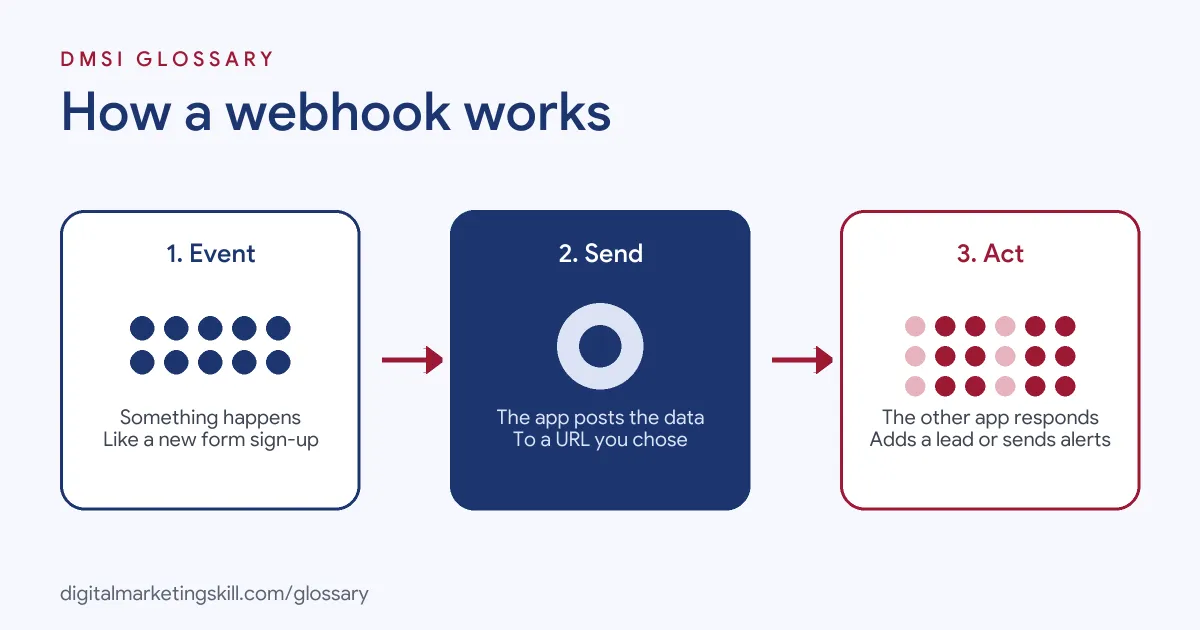
Events and Endpoints
GitHub explains that when you create a webhook, “you specify a URL and subscribe to events.” Then, when a subscribed event occurs, GitHub sends an HTTP request with data about the event to that URL. Shopify works the same way. Its developer guide uses the example of an app that subscribes to the orders/create topic, so it receives a message each time a shop gets a new order.
The Payload
The data inside the message is called the payload. Shopify says each delivery includes headers and an order payload. In marketing tools, the payload might hold a name, an email address, the form someone filled in or the product they bought. The receiving tool then maps those fields to its own records.
Webhook vs Polling
Without webhooks, an app has to keep calling another app’s API to check for new data. GitHub calls this “polling an API (calling an API intermittently) to see if data is available.” By contrast, a webhook needs you to express interest only once. GitHub lists three advantages: less effort and fewer resources, better scaling and near real-time updates.
Webhook Examples
Here are three common examples. The first two come from the platforms’ own documentation; the third is made up:
- New orders (Shopify): Shopify suggests uses such as sending order data to accounting software or telling shipping companies about changes in orders, returns or refunds.
- Team alerts (GitHub): GitHub gives the example of sending a notification to Slack or Discord when an event happens.
- Lead routing (example): A landing page tool sends each new lead by webhook to Zapier, which adds the person to an email list and alerts the sales team.
Webhook vs API
| Feature | Webhook | API request (polling) |
|---|---|---|
| Who starts it | The sending app, when an event happens | Your app, on a schedule |
| Speed | Near real time | Only as fast as you check |
| Effort | Set up once | Repeated calls, even when nothing is new |
| Best for | Reacting to new events | Fetching data on demand |
In practice, many teams use both together. A webhook tells you that something happened, and an API call can then fetch any extra details you need.
How to Set Up a Webhook With Zapier
You don’t need to write code to receive one. Zapier’s help centre describes this flow:
- Add a webhook trigger. In the Zap editor, choose Webhooks by Zapier as the trigger.
- Pick the event type. Choose Catch Hook for most cases. Zapier says Catch Raw Hook returns unparsed data, up to 2MB, including headers.
- Copy your URL. Zapier then shows a unique webhook URL that the other app can send data to.
- Paste it into the sending app. Find that app’s webhook settings, add a new connection and paste the URL.
- Send a test. Next, trigger the event, such as a test form entry, so Zapier receives sample data.
- Add your actions. Finally, map the fields to the next steps, such as adding a contact to your email tool.
A Worked Example: From Form to Follow-Up
Here is a made-up example. A language school runs a “free trial lesson” form on its landing page. Each time someone submits it, the form tool sends a message to a Zapier URL. The data includes the person’s name, email address, chosen language and preferred time.
From there, the flow takes three steps. First, it adds the contact to the school’s email tool and tags them with the language. Second, it creates a deal in the CRM, so the sales team can see the new lead. Third, it posts a short alert in the team’s chat channel. The whole chain runs in seconds, and nobody has to copy a single detail by hand. As a result, the school can call new leads while their interest is still fresh.
Best Practices
- Verify deliveries. Shopify advises verifying signatures, so you know each message really came from the sender.
- Handle duplicates. Shopify also suggests ignoring duplicate deliveries using a unique ID, because the same event can arrive twice.
- Use HTTPS. Keep endpoints secure, especially when payloads hold personal data.
- Log what arrives. For example, keep a record of deliveries so you can trace problems later.
- Test before launch. Send sample events and check every field lands in the right place.
Common Mistakes
A frequent mistake is pasting the wrong URL, so the data goes nowhere. Another is mapping fields incorrectly, for instance putting a first name into the email field. Some teams also forget that the receiving end must stay online; if it fails, events can be missed. Finally, many people never check security, which leaves an open endpoint that anyone could send fake data to.
Where You’ll Use Webhooks at Work
Webhooks come up in marketing operations and automation roles. For example, real remote job listings include lines like these:
- “Use Velocity scripting and webhooks where appropriate” (Marketing Automation and Campaign Operations Manager).
- “Hands-on with enrichment and automation tooling (e.g., Clay, Zapier/n8n, APIs/webhooks); SQL or scripting a plus” (GTM Engineer).
- “Familiar with application programming interfaces (APIs), REST, webhooks, and tools such as Postman” (Senior Business Systems Analyst).
So as a Marketing Automation Specialist or a Lead Generation Specialist, you will connect forms, CRMs and email tools this way. Knowing the basics also helps you talk clearly with developers and spot problems before they reach customers.
Learn It in the Lead Generation and Email Track
The AI-Powered Lead Generation and Email Automation track covers lead generation, email marketing and automation. Your portfolio project is to build a lead magnet and an automated email sequence that converts, which is exactly where webhook connections help. You also get unlimited 1-on-1 mentoring and a U.S. Project Internship from day one.
To see what a webhook can start, read our glossary entry on the automation trigger. For the wider picture, see our guide to marketing automation.
Frequently Asked Questions
What is a webhook in simple terms?
It is a message one app sends to another automatically when something happens. The message goes to a web address you choose and carries the event details.
What is the difference between a webhook and an API?
With an API, your app asks for data. With a webhook, the other app sends data to you as soon as an event happens.
Do I need to code to use a webhook?
Not always. Tools like Zapier give you a ready-made URL to receive data, so you can connect apps without writing code.
Is a webhook secure?
It can be. Use HTTPS, verify each delivery’s signature where the sender supports it and avoid sharing your endpoint publicly.
What happens if a webhook fails?
It depends on the sender. Some apps retry failed deliveries, while others don’t. That’s why logging and monitoring matter.
Sources: GitHub Docs: About webhooks; Zapier: Trigger Zaps from webhooks; Shopify Dev Docs: About webhooks; remote job listings on Himalayas.