
Mailchimp is an email and SMS marketing platform that lets businesses collect contacts, design campaigns and send automated messages from one account. You keep your contacts in an audience, organise them with tags, groups and segments, and then reach them with campaigns or automation flows. It matters because it is one of the best-known email tools for small businesses, so many marketing roles expect you to know your way around it.
Key Takeaways
- Your contacts live in an audience. Mailchimp recommends one primary audience, organised with tags and segments.
- Tags are labels you assign. Groups are interests contacts choose for themselves, usually on a sign-up form.
- Segments filter your audience so you can send to the people a message suits.
- Marketing automation flows can use multiple triggers, branches and actions to personalise each contact’s path.
- Which features you get depends on your plan, so check before you design a complex set-up.
What Is Mailchimp?
At its simplest, Mailchimp is where you store your subscribers and send them email. You build a sign-up form, people join your audience, and you send them newsletters, offers and updates. However, it can do much more than send a monthly newsletter.
For example, you can label contacts by where they signed up, let them pick their interests and send them automated messages when they join or buy. Mailchimp also handles SMS, so you can reach tagged contacts by text as well as email.
For a step-by-step start, read our guide to Mailchimp setup.
How Mailchimp Works
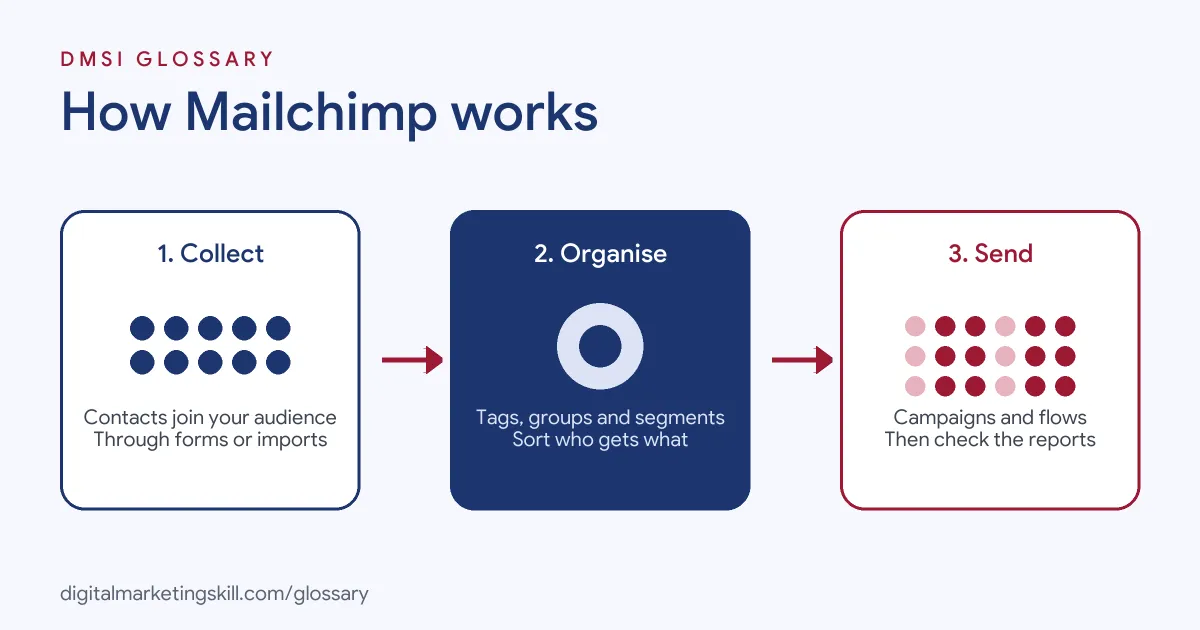
The platform works in three stages. First, contacts join your audience through forms, imports or integrations. Next, you organise them with tags, groups and segments. Finally, you send campaigns or automation flows and review the reports.
Audiences
Your audience is your contact list. Mailchimp’s help centre says that while you can manage several, “we recommend using 1 primary audience and organizing it with tags or segments.” It explains that this “simplifies your reporting and prevents duplicate contacts from increasing your total count.” Also, the number of audiences you can store depends on your plan.
Tags, Groups and Segments
These three tools help you sort one audience. Tags are labels you assign yourself, such as “webinar attendee” or “customer.” According to Mailchimp, you can “send emails and text messages directly to tagged contacts, or use your tag data to create segments.”
Groups, by contrast, “are a collection of contacts with shared interests or preferences.” Contacts usually choose them on your sign-up form. Mailchimp’s own example is a garden shop that asks whether someone is a gardener, a landscaper or an indoor plant lover. Segments then combine conditions, such as tags, groups and activity, to pick who gets a campaign.
Automation Flows
Automation is where Mailchimp saves you the most time. Its help centre says marketing automation flows “help you build dynamic, automated marketing paths for your contacts.” You can “create an automation flow with multiple triggers, branches, and unique actions to personalize the experience for each of your contacts.” Note that, depending on your plan, you may not have every flow tool.
Mailchimp Examples
Here are three made-up examples of how a small business might use it:
- Café: A café collects emails with a loyalty sign-up form. It tags people by branch and sends each branch its own weekly offer.
- Garden shop: A shop’s sign-up form asks people to choose an interest group. Indoor plant lovers then get care tips, while gardeners get seasonal planting guides.
- Consultant: A coach builds an automation flow for new subscribers. It sends a welcome email, then a free guide, then an invitation to book a call.
In each case, one audience serves several needs, because tags, groups and flows do the sorting.
Mailchimp vs Other Email Tools
Email platforms overlap a lot, but each has a typical strength. Here is a simple comparison:
| Tool | Typical strength | Common users |
|---|---|---|
| Mailchimp | Easy campaigns, sign-up forms, tags, groups and automation flows | Small businesses, creators and charities |
| Klaviyo | Deep store data and behaviour-triggered email and SMS | Online shops |
| HubSpot | Email combined with a CRM, sales tools and lead scoring | B2B and service companies |
For the eCommerce alternative, see our glossary entry on Klaviyo.
How to Set Up Mailchimp
- Create your account and add your business details.
- Set up one primary audience and import any existing contacts who have opted in.
- Build a sign-up form and add it to your website.
- Add groups to the form if you want people to choose their interests.
- Create tags for key labels, such as “customer” or “event attendee.”
- Build a welcome automation flow for new subscribers.
- Design your first campaign, send it to a segment and check the report.
Before you import anyone, read Mailchimp’s anti-spam practices and audience rules. The help centre asks you to be familiar with them before you create an audience.
Best Practices for Mailchimp
- Keep one main audience. Splitting contacts across many audiences makes reporting harder and can create duplicates.
- Tag consistently. Agree a short list of tag names, so the whole team uses the same labels.
- Let people choose. Groups on your form give you interest data straight from the subscriber.
- Segment every campaign. A message sent to the right segment usually performs better than one sent to everyone.
- Automate the basics first. For instance, start with a welcome flow before anything complex.
Metrics to Watch
Each report tells you how a send went. So check a few numbers every time:
- Clicks: how many people clicked a link. This shows whether the message made them act.
- Unsubscribes: how many people left. A spike means the content or frequency is off.
- Bounces: emails that could not be delivered. Remove bad addresses to keep your list healthy.
- Conversions: sales or sign-ups that followed. Link your site or store so you can see them.
Then compare segments. For example, if one tag group clicks twice as often, send it more of what it likes.
A Simple Welcome Flow
A welcome flow is the easiest automation to start with. Here is a made-up example for a small online bakery:
- Trigger: a person joins the audience through the sign-up form.
- Email one, straight away: a thank-you note with the promised recipe card.
- Wait two days.
- Email two: the story behind the bakery and its best-selling loaves.
- Branch: if the person clicked a product link, they get a tag called “interested buyer”. If not, they get a softer tips email.
- Email three: an invitation to order, sent only to the tagged group.
As a result, every new subscriber gets a warm start, and the team learns who is ready to buy.
Common Mistakes to Avoid
New users often create a new audience for every campaign, which leads to duplicates and messy reports. Others import contacts who never opted in, which breaks the platform’s rules and harms deliverability. Some send the same email to everyone, even when they have tags and groups that could target it. Finally, many never set up a welcome flow, so new subscribers hear nothing until the next newsletter.
Where You’ll Use Mailchimp at Work
Mailchimp appears in many marketing and email job listings. For example, recent remote listings ask for:
- “Hands-on experience with Apollo, Mailchimp, and email marketing is required.” (Virtual Assistant, Lead Generation and Email Marketing).
- “Experience with email marketing platforms (e.g., Mailchimp, Constant Contact) and a solid understanding of best practices for email design.” (Multimedia Content Specialist).
- “Experience with social media management tools and email marketing platforms (e.g., Mailchimp, HubSpot, Klaviyo, or similar).” (Marketing Specialist).
So as an Email Marketing Specialist or Marketing Automation Specialist, you may build forms, manage audiences and run flows in Mailchimp or a similar tool.
Learn It in the Lead Generation and Email Track
You can learn email platforms hands-on in the AI-Powered Lead Generation and Email Automation track. It covers lead generation, email marketing and automation. Your portfolio project is to build a lead magnet and an automated email sequence that converts. You also get unlimited 1-on-1 mentoring and a U.S. Project Internship from day one.
Frequently Asked Questions
What is Mailchimp used for?
It is used to collect subscribers and send them email and SMS campaigns, plus automated messages such as welcome emails.
What is an audience in Mailchimp?
An audience is where your contacts are stored. Mailchimp recommends keeping one primary audience and organising it with tags and segments.
What is the difference between tags and groups?
You assign tags yourself. Groups, on the other hand, are interests that contacts usually pick on your sign-up form.
Can Mailchimp send automated emails?
Yes. Its marketing automation flows can use multiple triggers, branches and actions, although some tools depend on your plan.
Is Mailchimp good for beginners?
Yes, it is a common first email tool. The skills you learn there, such as segmenting and automation, also carry over to other platforms.
Sources: Mailchimp Help: Create an audience; Mailchimp Help: About marketing automation flows; remote job listings on Himalayas and Himalayas.