
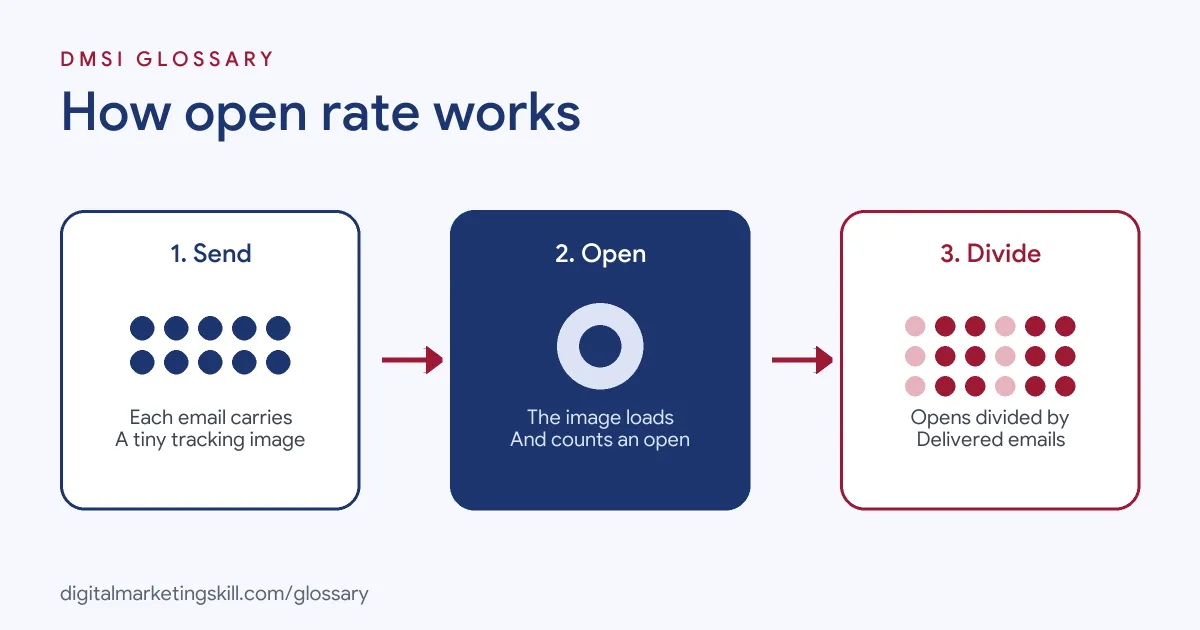
Open rate is the percentage of delivered emails that recipients opened. If 1,000 emails reach inboxes and your tool records 300 opens, the figure is 30%. It matters because it gives a quick signal of how well your subject line, sender name and timing work, although privacy features now make it less exact than it once was.
Key Takeaways
- The formula is opens divided by delivered emails, times 100.
- Most tools track opens with a tiny invisible image. If images don’t load, the tool may miss the open.
- Apple’s Mail Privacy Protection stops senders seeing whether someone opened an email, which can inflate the numbers.
- Use the metric to compare your own emails over time, not as an exact count.
- Pair it with clicks, conversions and unsubscribes for a fuller picture.
What Is Open Rate?
Mailchimp defines it as “a percentage that tells you how many successfully delivered emails were opened by recipients.” In other words, it shows what share of the people who got your email chose to open it.
Notice the word “delivered”. Bounced emails never reached an inbox, so the sum leaves them out. That way, a list full of bad addresses doesn’t drag the figure down unfairly.
For example, a florist sends a newsletter to 2,050 subscribers. Fifty bounce, so 2,000 reach inboxes. The email tool records 560 opens. The open rate is 560 ÷ 2,000 × 100 = 28%.
How Open Rate Works
Email tools can’t see inside your inbox. Instead, they use a small trick to tell when someone opens an email.
The Tracking Pixel
Mailchimp explains that it “loads a tiny, transparent image into each email and counts how often the image is downloaded for delivered emails.” The image is invisible to readers. When it loads, the tool records an open.
Why Open Rate Isn’t Exact
This method has gaps. Mailchimp notes that open tracking “relies on images, so it isn’t 100% accurate.” For instance, if someone’s email app has images turned off, the image won’t load, and the open won’t register. However, Mailchimp does count a click as an open, even if the tracking image didn’t load.
Apple Mail Privacy Protection and Open Rate
Privacy tools add another twist. Apple says Mail Privacy Protection “hides your IP address” and “prevents senders from seeing if you’ve opened the email message they sent you.” Mailchimp warns that bot activity, “such as Apple’s Mail Privacy Protection (MPP) can falsely inflate open and click metrics.” It recommends excluding this activity from your reports for more accurate figures.
Unique Opens vs Total Opens
Many tools show two kinds of opens. Unique opens count each person once, however many times they open the email. Total opens count every open, so one keen reader who opens three times adds three. Check your tool’s report notes to see which one its percentage uses. Unique opens tell you how many people engaged. Total opens can still help. A high number of repeat opens may mean people are coming back to an email, perhaps to use a code or forward it to a friend.
Open Rate Examples
Here are three made-up examples of how teams use the metric:
- Subject line test: A bakery sends two versions of a subject line to small groups. “Fresh sourdough is back” gets 34%, while “This week’s news” gets 22%. The rest of the list gets the winner.
- Spotting fatigue: A fashion brand sees its numbers slide each week after it starts sending daily. It cuts back to three emails a week, and engagement recovers.
- Cleaning a list: A software firm finds that one old segment barely opens anything. It sends a re-engagement email, then removes those who still don’t respond.
Open Rate vs Click Rate vs Conversion Rate
Each metric tells you something different:
| Metric | What it measures | What it tells you |
|---|---|---|
| Open rate | Delivered emails that people opened | How well the subject line, sender name and timing work |
| Click rate | Delivered emails with at least one click | How engaging the content and call to action are |
| Conversion rate | Recipients who took the goal action, such as buying | Whether the email drove real results |
Mailchimp sums it up: “A high open rate may mean that your audience is connecting with the subject lines.” Good click rates, meanwhile, suggest “your content is important to recipients.”
How to Improve Your Open Rate
Mailchimp lists three common reasons for low opens: a subject line that “isn’t relevant or interesting enough”, a list that isn’t segmented, and sending “too many or too few emails”. These steps tackle each one:
- Write subject lines that clearly say what’s inside. Test two versions with an A/B test.
- Use a sender name people recognise, such as your brand or a real person who works there.
- Write a preview text line that adds to the subject, rather than repeating it.
- Segment your list, so people get emails about what they care about.
- Test how often you send. Mailchimp notes that “sending more emails negatively impacts the level of engagement per email sent”, although results differ for everyone.
- Remove or re-engage contacts who haven’t opened in a long time, starting with a friendly check-in.
- Exclude bot and privacy-protected opens from reports, if your tool allows, so you can see real trends.
A Worked Example
Here is a made-up example. A charity sends two appeals. The first goes to 4,000 delivered inboxes and gets 1,200 opens, a 30% open rate, but only 40 donations. The second gets 900 opens from 4,000, just 22.5%, yet brings 70 donations. Which email did better? The second one, because it drove more of what the charity wanted. This is why you should read opens alongside clicks and results.
Best Practices
- Compare like with like. Track your own figures over time, by campaign type and by segment.
- Use benchmarks carefully. Mailchimp says averages “can vary from audience to audience, and differ by industry, company size, and other factors.”
- Don’t rely on opens alone. Clicks and conversions are stronger signs of interest.
- Be careful with open-based automation. Since privacy features can inflate opens, rules like “send if opened” may misfire.
- Test one change at a time. Then you know exactly what made the difference.
Common Open Rate Mistakes
A frequent mistake is treating the figure as an exact headcount. Another is chasing opens with clickbait subject lines, which can hurt trust and raise unsubscribes. Some teams compare their numbers with a general industry average and panic, without checking how their tool counts opens. Others forget to exclude privacy-protected opens, so results look better than they are. Finally, many never look beyond opens to the clicks and sales that really matter.
Where You’ll Use Open Rate at Work
Email roles track this metric every week. For example, recent remote job listings ask candidates to:
- “Monitor, analyze, and report on campaign metrics such as open rates, click-through rates, and conversions” (Email Marketing Specialist).
- “Write compelling subject lines, preview text, call-to-action buttons, and targeted SMS messaging” (Senior Copywriter).
So if you want to work as an Email Marketing Specialist or Marketing Automation Specialist, expect to test subject lines, read reports and explain what the numbers really mean.
Learn It in the Lead Generation and Email Track
You can learn to measure and improve email results in the AI-Powered Lead Generation and Email Automation track. It covers AI fundamentals, lead generation, and email marketing and automation. Your portfolio project is a lead magnet and an automated email sequence that converts. You also get unlimited 1-on-1 mentoring and a U.S. Project Internship from day one.
Next, read our guides to email open rates and email marketing metrics. You may also like our glossary entries on click-through rate and segmentation.
Frequently Asked Questions
How do you calculate open rate?
Divide the number of opens by the number of delivered emails, then multiply by 100. So 250 opens from 1,000 delivered emails is 25%.
Why is my open rate suddenly higher?
Privacy features such as Apple’s Mail Privacy Protection can inflate opens. Check whether your tool lets you filter out this activity.
What is a good open rate?
It varies by industry, audience and company size. The best guide is your own past results, plus benchmarks from your email tool.
Does a low open rate hurt deliverability?
Low engagement can be a warning sign. Spam complaints matter even more. Google asks everyone who sends to Gmail to keep the spam rate reported in Postmaster Tools below 0.3%. So keep your list clean and send relevant emails, so more people open and fewer mark you as spam.
Is open rate still worth tracking?
Yes, as a trend and for testing subject lines. Just don’t treat it as exact, and always look at clicks and conversions too.
Sources: Mailchimp: About open and click rates; Apple Support: Use Mail Privacy Protection on iPhone; Google: Email sender guidelines; remote job listings on Himalayas.