
Segmentation is the practice of dividing your contacts or customers into smaller groups that share something in common, such as location, interests or buying behaviour. Each group can then get messages that fit it, instead of one email for everyone. It matters because relevant messages tend to get more opens, clicks and sales, and fewer unsubscribes.
Key Takeaways
- A segment is a group of contacts filtered by one or more conditions, such as “bought in the last 90 days”.
- Common bases include demographics, location, behaviour, engagement and purchase history.
- In tools such as Klaviyo, segments are dynamic. People join and leave automatically as their data changes.
- In one Klaviyo analysis, highly segmented campaigns earned more than three times the revenue per recipient of unsegmented ones.
- Start with a few simple segments. Too many tiny groups are hard to manage and test.
What Is Segmentation?
Mailchimp gives a clear definition: “To segment is to filter and divide similar contacts. The resulting list of contacts is also called a segment.” In other words, you use data you already hold to sort people into groups.
The idea comes from market segmentation, where businesses split a whole market into groups of buyers with similar needs. In email and lead generation, the same thinking applies to your own list. You might separate new subscribers from loyal customers, or people interested in one product from those interested in another.
For example, a garden centre has 6,000 subscribers. Instead of one weekly email, it creates three segments: people who bought plants, people who bought furniture and people who haven’t bought yet. Each group gets offers that match what it cares about.
How Segmentation Works
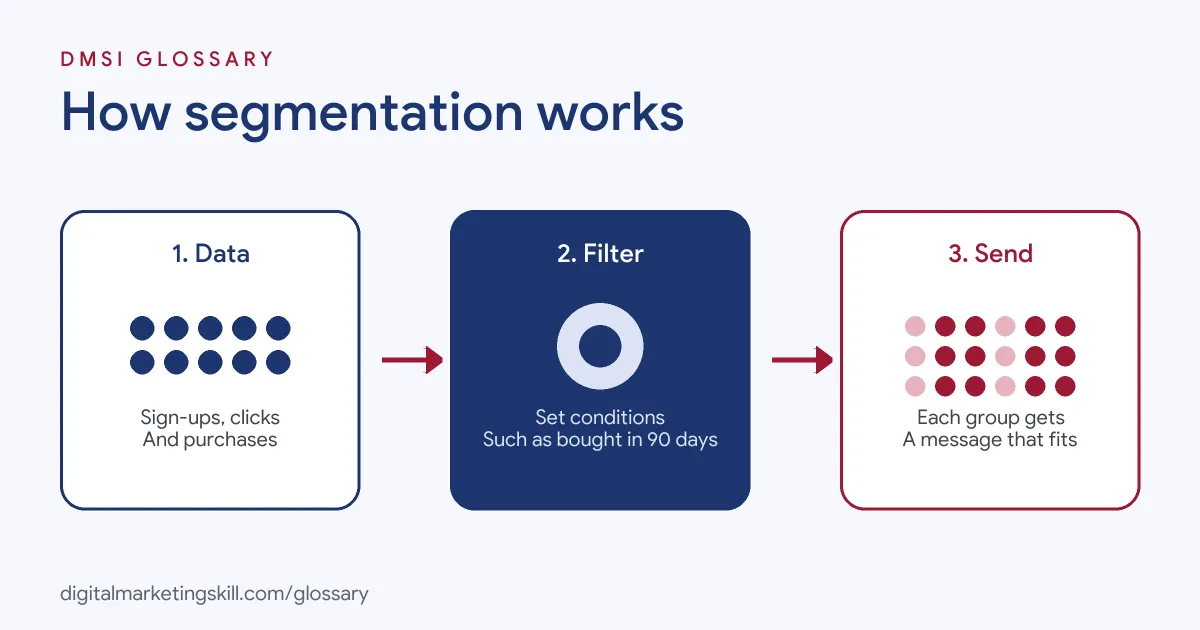
Every segment starts with data. Then you set conditions that filter contacts. Finally, you send a tailored message to the people who match.
The Data Behind Segmentation
Mailchimp notes that your audience holds information such as when contacts joined, where they live and how they use your marketing content. You can add more through sign-up form fields, tags, preferences and, if you connect a shop, purchase activity.
Conditions and Logic
A condition is a rule, such as “location is United Kingdom” or “opened any email in the last 30 days”. You can combine several. Mailchimp’s advanced segment builder, for instance, sorts contacts into nested groups using combined conditions. In addition, the same person can belong to several segments at once, as long as their data meets each set of conditions.
Static Lists vs Dynamic Segments
Klaviyo draws a useful line here. It says lists “are static, meaning they grow as people subscribe or are manually added”. Segments, by contrast, “are dynamic, meaning they grow as people meet the segments’ conditions and shrink as people no longer meet them.” It adds that segments update in close to real time.
Types of Segmentation
Most segments are built on one or more of these bases:
| Type | Based on | Example segment |
|---|---|---|
| Demographic | Age, job title, company size | Marketing managers at small firms |
| Geographic | Country, region, city or time zone | Subscribers in Scotland |
| Behavioural | Actions such as visits, clicks and downloads | Viewed the pricing page twice |
| Engagement | How often people open or click | No opens in 90 days |
| Purchase history | What, when and how much people bought | Bought twice, spent over £100 |
| Preference | Interests people chose themselves | Ticked “recipes” on the sign-up form |
Preference data is often the most useful, because people tell you directly what they want to hear about. You can mix types, too, such as engaged subscribers in one region.
Segmentation Examples
Here are three made-up examples of segmentation in practice:
- Win-back: A fashion brand builds a segment of customers who bought before but not in the last six months. It sends them a “we miss you” offer.
- Lead nurturing: A software firm segments leads by the guide they downloaded. Each group gets a short email series on that topic.
- Local events: A theatre segments its list by city. Only people near each venue hear about shows there.
In each case, a simple filter turns one generic email into several relevant ones.
Why Segmentation Matters
The main benefit is relevance. When people get emails that fit their interests, they are more likely to act. Klaviyo reports that in its analysis of emails sent by US-based customers, “highly segmented campaigns returned more than 3 times the revenue per recipient of unsegmented campaigns.”
There is a second benefit too. Sending fewer irrelevant emails means fewer people unsubscribe or mark you as spam. As a result, your sender reputation stays healthier, and more of your emails reach the inbox.
So how do you know it’s working? Pick one or two numbers and track them for each segment. Open and click rates show interest. Sales or sign-ups show value. Unsubscribe rates show when a message misses the mark. If a segment does no better than your full list, merge it back or change the message.
How to Set Up Segmentation
- Decide what you want to change, such as more repeat sales or better engagement.
- List the data you already hold, from sign-up fields to purchase history.
- Start with two or three segments that clearly need different messages.
- Build each segment in your email tool using simple conditions.
- Write a message that speaks to each group’s situation.
- Send, then compare results against your usual all-list email.
- Add a preference centre so people can tell you what they want.
- Review segments regularly and retire any that no longer help.
A Starter Set of Segments
If you’re not sure where to begin, these four work for most businesses. First, new subscribers who joined in the last 30 days. Second, engaged contacts who opened or clicked recently. Third, customers who have bought at least once. Finally, inactive contacts with no opens for a long time. Mailchimp also offers pre-built segments based on email engagement and purchase history, which can save setup time.
Best Practices for Segmentation
- Keep it simple at first. A few clear groups beat dozens you can’t maintain.
- Use dynamic segments. Let people move in and out as their behaviour changes.
- Collect preferences. Ask what topics people want, then honour it.
- Allow time to populate. Klaviyo notes large segments may take a while to fill, so build them before you schedule a send.
- Test against a control. Check that the tailored email beats the generic one.
Common Segmentation Mistakes
Some teams create so many segments that each one is too small to learn from. Others segment on data that is out of date, such as job titles from years ago. Many build segments once and forget them, so the conditions no longer match the business. Another mistake is sending the same email to every segment, which wastes the effort. Finally, some use sensitive data without care, which can feel intrusive and may break data protection rules.
Where You’ll Use Segmentation at Work
Segmentation is a core skill in email, CRM and lifecycle roles. For example, recent remote job listings ask candidates to:
- “Develop and manage audience segmentation strategies that support acquisition, retention, cross-sell, and reactivation campaigns” (CRM Data Manager).
- “Own segmentation and lifecycle stage definitions in HubSpot, ensuring clean handoffs between marketing, sales, and customer success” (Lifecycle Marketing Specialist).
- Show “Strong experience with HubSpot, including workflows, segmentation, and lifecycle stage management” (Lifecycle Marketing Specialist).
So if you want to work as an Email Marketing Specialist, Marketing Automation Specialist or Lead Generation Specialist, expect to build, test and report on segments every week.
Learn It in the Lead Generation and Email Track
You can learn to segment a real list in the AI-Powered Lead Generation and Email Automation track. It covers AI fundamentals, lead generation, and email marketing and automation. Your portfolio project is a lead magnet and an automated email sequence that converts. You also get unlimited 1-on-1 mentoring and a U.S. Project Internship from day one.
Next, read our guides to target audience segmentation and target market segmentation. You may also like our glossary entry on email lists.
Frequently Asked Questions
What is segmentation in email marketing?
It is splitting your email list into smaller groups based on shared data, so each group gets messages that fit it.
What is the difference between a list and a segment?
In Klaviyo, a list is static and grows as people subscribe. A segment is dynamic and updates as people meet or stop meeting its conditions.
How many segments should I have?
Start with two to four that clearly need different messages. Add more only when you have the content and data to support them.
Can one contact be in more than one segment?
Yes. Mailchimp lets contacts sit in several segments, as long as they meet each segment’s conditions.
What data is best for segmentation?
Behaviour and purchase history are often the strongest, along with preferences people choose themselves.
Sources: Mailchimp: Getting started with segments; Klaviyo Help: Getting started with segments; Mailchimp: Getting started with your audience; remote job listings on Himalayas.