
An ad group is a container inside a Google Ads campaign that holds a set of ads and the keywords or targets they share. Each campaign is made up of one or more of them, usually split by theme, such as one per product or service. It matters because a well-organised structure lets you match each search with a closely related ad, which tends to improve relevance and results.
Key Takeaways
- Google Ads accounts have three main levels: campaign, ad group, and ads with their keywords.
- Google defines it as a group that “contains one or more ads that share similar targets.”
- Organise them by a common theme, often matching the sections of your website.
- With Manual CPC, you set a default bid at this level and can override it for individual keywords.
- A campaign can hold up to 20,000 of them, though Local and App campaigns are limited to 100.
What Is an Ad Group?
Google’s glossary says: “An ad group contains one or more ads that share similar targets. Each of your campaigns is made up of one or more ad groups.” It also advises: “Use ad groups to organize your ads by a common theme.”
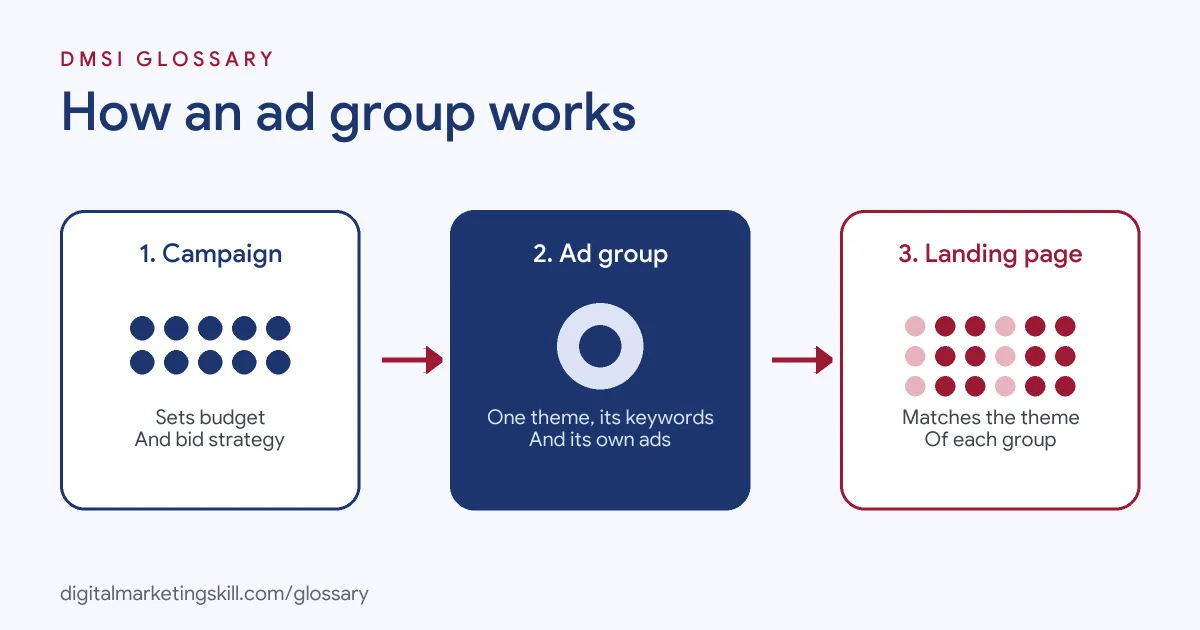
Think of your account like a filing cabinet. The campaign is a drawer, with its own budget and settings. Each ad group is a folder inside that drawer. The keywords and ads are the papers inside each folder.
For example, a bike shop runs one Search campaign. It creates three groups: “road bikes”, “mountain bikes” and “bike repairs”. Each one has its own keywords and ads. So someone searching “mountain bike for beginners” sees an ad about mountain bikes, not repairs.
How an Ad Group Works
In a Search campaign, the keywords tell Google which searches the group should compete for. When someone’s search matches one of those keywords, Google can show one of the group’s ads. The landing page in that ad should match the theme too.
Choosing Themes
Google notes that “Many advertisers find it helpful to base their ad groups on the sections or categories that appear on their website.” Its own example is a shop selling desserts, beverages and snacks, with one group for each kind of product. This keeps keywords, ads and landing pages closely linked.
Ad Group Bids
If you bid manually, this is where your default bid lives. Google explains that with Manual CPC “You start by setting a maximum cost-per-click (CPC) bid for your entire ad group (called your default bid)”. You can then set separate bids for individual keywords.
With automated bidding, targets usually sit at campaign level. For Target CPA, Google says you can set individual targets for each group, “but this isn’t recommended as it can restrict Smart Bidding.”
Limits to Know
Google’s account limits allow up to 20,000 ad groups per campaign and 10,000 campaigns per account. However, Local campaigns and App campaigns are limited to 100 per campaign. In practice, few advertisers get anywhere near these numbers. Most well-run accounts use far fewer, with each one doing a clear job.
Ad Group Examples
Here are three made-up examples of good structure:
- Dentist: One campaign with groups for “teeth whitening”, “emergency dentist” and “dental implants”. Each sends clicks to the matching service page.
- Online clothing store: Groups split by category, such as “men’s jackets”, “women’s jackets” and “kids’ coats”.
- Software firm: Groups split by need, such as “payroll software”, “HR software” and “time tracking”.
In each case, a searcher sees an ad that closely matches what they typed, and lands on a page about exactly that.
Ad Group vs Campaign vs Meta Ad Set
Here is how this level compares with others:
| Level | What you set there | Example |
|---|---|---|
| Campaign (Google) | Budget, bid strategy, networks and locations | “Bike shop – Search – UK” |
| Ad group (Google) | Theme, keywords or targets, ads and, for manual bidding, the default bid | “Mountain bikes” |
| Ad set (Meta) | Audience, placements, budget and schedule | “Cyclists aged 25 to 45 near London” |
On Meta, the middle layer is called an ad set. It plays a similar role, but focuses on audiences rather than keywords.
How to Set Up an Ad Group
- List the products, services or topics you want to advertise.
- Group them into tight themes. Use your website’s sections as a guide.
- For each theme, research a small set of closely related keywords.
- Create the group inside your campaign and add those keywords.
- Write ads that use the theme’s words, so they match what people search.
- Point each ad to the most relevant landing page, not just your home page.
- If you bid manually, set a default bid, then adjust key keywords.
- Review the search terms report, add negative keywords and split groups that have grown too broad.
When to Split an Ad Group
Watch for signs that a group has grown too broad. One clue is ads that don’t quite fit many of the keywords. Another is a search terms report full of very different searches. A third is one keyword that converts far better than the rest. In each case, moving those keywords into their own group lets you write a closer ad and send clicks to a better page.
A Worked Example
Here is a made-up example. A pet shop starts with one group holding 60 keywords, from “dog food” to “cat toys” to “fish tanks”. Its single ad talks about “pet supplies”, and clicks land on the home page. After a split into three themed groups, each with its own ad and landing page, searchers see ads that match what they typed. The shop can now also see which theme brings the most sales, and move budget towards it.
Best Practices for an Ad Group
- Keep themes tight. If one ad can’t fit every keyword, split the group.
- Match the landing page. Send people to the page that answers their search.
- Use several ads. Give Google different headlines and descriptions to test against each other.
- Name groups clearly. Clear names make reports easier to read, for you and for clients.
- Review regularly. Add negatives and new keywords based on real searches.
Common Ad Group Mistakes
A classic mistake is stuffing hundreds of loosely related keywords into one group, so no ad fits them all. Another is sending every ad to the home page. Some advertisers create so many tiny groups that each one gets too little data to learn from. Others set the same bid for every group, even when some products are worth far more. Finally, many never check the search terms report, so they keep paying for searches that don’t match the theme.
Where You’ll Use Ad Groups at Work
Account structure is a core paid search skill. For example, recent remote job listings ask candidates to:
- “Develop campaign structures, ad groups, keywords, targeting, and ad copy” (Media Buyer Specialist).
- “Set up and place AI-generated video and image content into Google Ads (YouTube) campaigns, including creating ad groups, uploading assets, setting targeting parameters, budgets, and bidding strategies” (Generative AI Content and YouTube Advertising Specialist).
So if you want to work as a Google Ads Specialist or PPC Specialist, expect to plan structures, build groups and reorganise them as accounts grow.
Learn It in the Google Specialist Track
You can learn to structure campaigns in the AI-Powered Google Specialist track. It covers Google Ads across Search, Display, Discovery, Gmail and YouTube, plus Google Analytics. Your portfolio project is a Google Ads campaign you launch and measure with conversion tracking. You also get unlimited 1-on-1 mentoring and a U.S. Project Internship from day one.
Next, read our Google Ads strategy guide and our explainer on Google Ads match types. You may also like our glossary entries on keyword match types and responsive search ads.
Frequently Asked Questions
What is an ad group in Google Ads?
It is a set of ads that share similar targets, such as the same keywords. Every campaign contains one or more of them.
How many keywords should an ad group have?
There’s no fixed number. Keep it to keywords close enough in meaning that one ad and one landing page fit them all. If that stops being true, split the group.
How many ad groups can a campaign have?
Up to 20,000 per campaign, according to Google’s limits. Local and App campaigns are limited to 100.
Is an ad group the same as a Meta ad set?
They sit at the same middle level, but they work differently. Google’s groups often centre on keywords, while Meta’s ad sets centre on audiences.
Can I set a bid for each ad group?
Yes, with Manual CPC you set a default bid per group. With automated strategies, targets usually sit at campaign level.
Sources: Google Ads Help: Ad group definition; Google Ads Help: How ad groups work; Google Ads Help: Account limits; Google Ads Help: Manual CPC bidding; remote job listings on Himalayas.