
Aggregated Event Measurement is Meta’s method for measuring website and app actions from people on Apple devices who have chosen not to be tracked. Instead of reporting each person’s actions, it works with grouped, limited data so advertisers still get some results while respecting the user’s choice. It matters because many mobile users are on iPhones, and without it your Meta ads would lose much of their reporting and optimisation for those who opt out.
Key Takeaways
- It exists because of Apple’s App Tracking Transparency rules, which apply on iOS 14.5 and later.
- Apple requires apps to ask permission before they track users across other companies’ apps and websites.
- Meta built this protocol to measure events from users who said no to that tracking.
- Advertisers once had to rank eight web events for it. Meta has since removed that step.
- Good tracking set-up still matters, since the system works with less data than before.
What Is Aggregated Event Measurement?
When Apple changed its privacy rules, it changed how ads could be measured on iPhones and iPads. Apple’s developer guidance says that on iOS 14.5 and later, apps “need to receive the user’s permission” through App Tracking Transparency to track them or access the device’s advertising identifier.
Many people say no. Without a fix, Meta would know very little about what those people did after seeing an ad. So Meta created a protocol to measure events from these users in a more limited, privacy-focused way. Meta’s developer documentation says you can use it “to measure app events from iOS 14.5+ users”.
For example, imagine an online shop runs Instagram ads. Some buyers use iPhones and have opted out of tracking. The protocol lets the shop still see some of those purchases in its reports, even though it cannot follow each buyer one by one.
How Aggregated Event Measurement Works
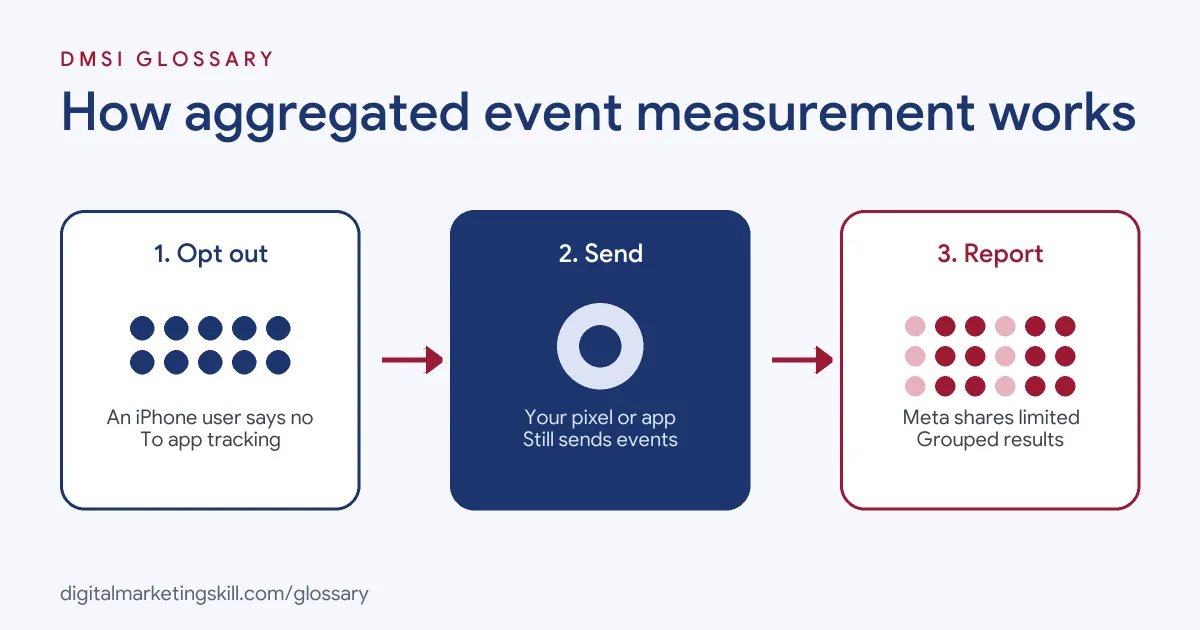
The system works in three broad steps. First, a user on iOS 14.5 or later sees an ad and chooses not to be tracked. Next, your pixel, app or server still sends events, such as purchases. Finally, Meta processes those events in a limited, grouped way and reports results back to you.
What Apple Means by Tracking
Apple defines tracking as “linking user or device data collected from your app with user or device data collected from other companies’ apps, websites, or offline properties” for targeted ads or ad measurement. Sharing data with data brokers counts too. Apple’s examples include sharing email lists or advertising IDs with an ad network to retarget users in other apps.
Web and App Events
The protocol covers both websites and apps. For apps, Meta says you can integrate “by using the Facebook SDK for iOS”. For websites, it applies to the web events your site sends to Meta. As a result, one system handles opted-out iOS users across both places.
How the Rules Have Changed
At first, advertisers had to choose and rank eight web conversion events. Events outside that list would not reach opted-out iOS users. Later, Meta announced that this ranking was no longer needed. According to Jon Loomer’s summary of the change, Meta also removed the separate tab in Events Manager. In addition, it dropped the need to verify your domain or pick a conversion domain for this purpose. Meta said the protocol “will continue to evolve”.
Aggregated Event Measurement Examples
Here are three made-up examples of how the protocol affects everyday work:
- Online shop: A clothing brand sees fewer reported purchases from iPhone users than its store data shows. The team knows some of the gap comes from opted-out users, so it checks sales in its own shop system too.
- Lead generation: A training company optimises for completed sign-ups. It makes sure the event fires on the thank-you page, so the protocol has a clean signal to work with.
- Mobile app: A fitness app adds the Facebook SDK for iOS. That way, installs and subscriptions from opted-out users can still be measured.
In each case, the business accepts that iOS data is limited. It then makes the data it does have as accurate as possible.
Aggregated Event Measurement Before and After
Here is a simple comparison of the old and current set-up, based on Meta’s announced changes:
| Area | Earlier set-up | Current set-up |
|---|---|---|
| Event ranking | Choose and rank up to eight web events | No ranking needed |
| Value optimisation | Turn on value sets, using at least four of the eight slots | No value sets needed |
| Domain verification | Required before configuring events | Not required for this, but still recommended |
| Events Manager | Separate tab for this protocol | Tab removed |
Even so, the core idea has not changed. Opted-out iOS users still produce less detailed data than users who allow tracking.
How to Prepare Your Account
You no longer need to rank events, but good set-up still helps. Follow these steps:
- Install the Meta Pixel correctly. Make sure key events, such as Purchase or Lead, fire on the right pages.
- Add the Conversions API. Sending events from your server as well gives Meta a stronger signal.
- Use the Facebook SDK for iOS in apps. Meta names this as the way to integrate for app events.
- Verify your domain anyway. It is no longer needed for this protocol, but it is still recommended for link ownership control.
- Compare with your own data. Check ad results against your shop or CRM to understand the gap.
After that, review your events every few months. Sites change, and broken tracking is easy to miss.
How to Explain It to a Client
Clients often ask why Meta shows fewer sales than their shop does. A short, honest answer works best. Here is an example you could adapt:
“Apple lets iPhone users block tracking across apps and websites. Many people choose that. Meta still measures some of their actions, but only in a limited way. So Meta’s report shows part of the picture. That is why we also check your shop’s own sales data each week.”
In short, you are not hiding a problem. Instead, you are showing that you understand the data and how to work with it.
Best Practices
- Optimise for events that matter. Purchases and qualified leads give the system a better goal than page views.
- Keep event names consistent. Use the same standard events across your pixel, server and app.
- Expect some gaps. Limited data means reports will never match your sales system exactly.
- Respect user choice. The point of the rules is privacy, so never try to get around them.
Common Mistakes to Avoid
One mistake is treating Meta’s numbers as the full truth for iOS users. They are an estimate built on limited data. Another is following old guides that tell you to rank eight events, even though Meta removed that step. Some advertisers also skip the Conversions API, which leaves the system with weaker signals. Finally, many forget to test their events after a website update, so purchases stop reporting without anyone noticing.
Where You’ll Use Aggregated Event Measurement at Work
Job ads rarely name the protocol itself. However, they often ask for the tracking skills around it. For instance, one remote media buyer listing asks for a “Strong understanding of pixels, conversion signals, attribution windows, and server-side tracking” (Senior Media Buyer).
In practice, a Paid Social Specialist or Social Media Manager needs to explain why iOS results look lower and how the team is measuring them. Clients often ask this, so a clear answer builds trust.
Learn It in the Social Media Track
You can learn to set up tracking for Meta ads in the AI-Powered Social Media Management and Advertising track. It covers social media marketing and analytics as well as advertising. You plan, create and run a paid social campaign for a real brand, with unlimited 1-on-1 mentoring and a U.S. Project Internship from day one.
For the basics, read our guide to the Meta Pixel and our guide to Facebook retargeting. You can also learn how the Conversions API sends events from your server.
Frequently Asked Questions
What is aggregated event measurement in simple terms?
It is Meta’s way of measuring ad results from iPhone and iPad users who opted out of tracking, using limited and grouped data.
Why does aggregated event measurement exist?
Apple requires apps on iOS 14.5 and later to ask permission before tracking users. Meta built this protocol to measure events from people who say no.
Do I still need to rank eight events?
No. Meta removed the need to configure and rank eight web events. You also no longer need value sets for value optimisation.
Do I still need to verify my domain?
It is no longer required for event set-up. However, it is still recommended for other reasons, such as link ownership control.
Does it affect Android users?
The protocol was built for Apple’s rules on iOS 14.5 and later, so it is about users on those Apple devices.
Sources: Apple Developer: User privacy and data use; Meta for Developers: Aggregated Event Measurement; Jon Loomer: Meta announces big changes to website conversion campaigns; remote job listings on Himalayas.