
Location targeting is an ad setting that lets you choose the countries, cities, regions or radius around a point where your ads can appear. Platforms like Google Ads use signals such as IP address and device location to decide where someone is, or which places they have shown interest in. It matters because showing ads only where you can actually serve customers cuts waste and makes every click more likely to turn into a sale.
Key Takeaways
- You can target whole countries, areas within a country or a radius around a location.
- Google can target people who are physically in a place, people who have shown interest in it, or both.
- Google works out physical location from signals such as IP address, GPS, Wi-Fi and mobile phone masts.
- For privacy reasons, Google does not allow radius targeting under 1 km.
- Location bid adjustments let you bid from 90% less to 900% more in chosen areas.
What Is Location Targeting?
Every ad platform needs to know where to show your ads. Location targeting is how you tell it. Google describes the aim as targeting “people in, regularly in, or who’ve shown interest in geographic locations relevant to where you do business”.
This matters most for local firms. A plumber in Leeds gains nothing from clicks in Glasgow. Equally, an online shop that only ships to the UK and Ireland should not pay for clicks from other countries.
For example, a dental clinic might target a 10 km radius around its practice. As a result, its budget goes to people who could realistically book an appointment.
How Location Targeting Works
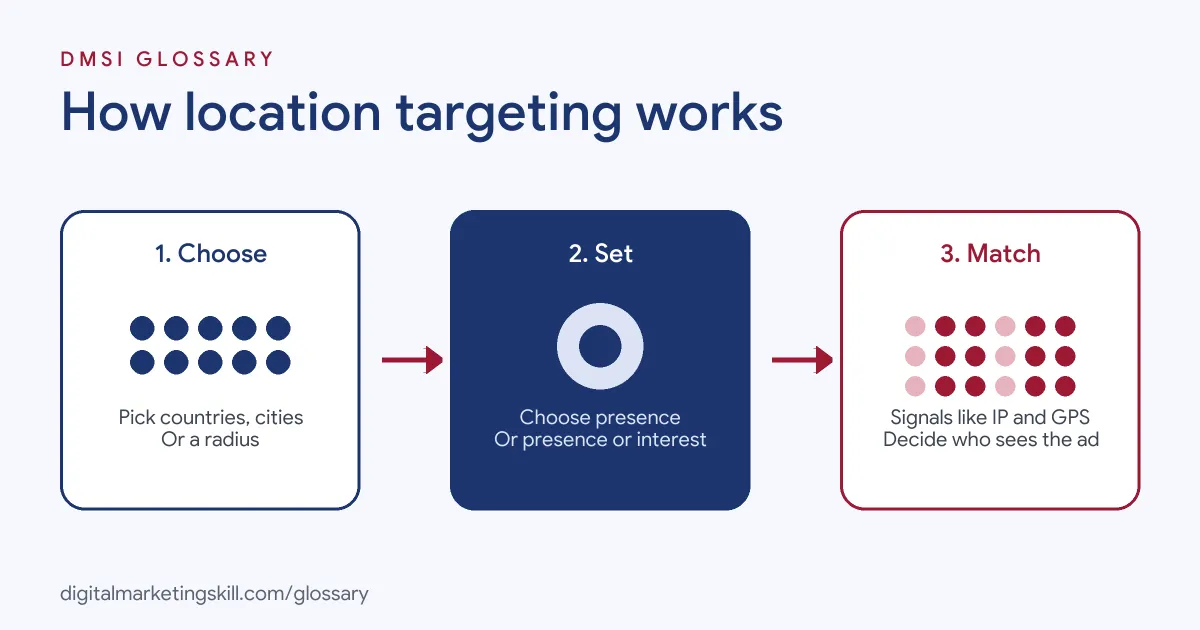
The process has three parts. First, you choose your target areas. Next, you choose whether to reach people who are in those areas, people interested in them, or both. Finally, the platform uses signals to decide whether each person matches.
Physical Location
Google says it uses “a number of factors” to find where someone is. Location is often based on IP address. Depending on the user’s settings, Google may also use GPS, Wi-Fi, Bluetooth or its database of mobile phone masts. Accuracy varies, so a person’s detected location is a best estimate, not a guarantee.
Location of Interest
Google can also show ads to people who have shown interest in a place. Signals include location words in searches, past searches, past locations, the content of the page where an ad shows and searches on Google Maps. For instance, someone in London searching “hotels in Edinburgh” has shown interest in Edinburgh.
However, these signals are not perfect. Google itself notes that a place mentioned on a page “doesn’t always indicate an interest in that location”. Its example is someone reading news about Birmingham, who is not necessarily interested in ads for Birmingham. So if your results show odd locations, check which option you chose before you blame the ads themselves.
Presence vs Presence or Interest
You choose between two main options. “Presence” reaches people who are in, or regularly in, your areas. “Presence or Interest” adds people who have shown interest in them. Google recommends the broader option as a best practice on Search. It says its internal data showed advertisers in travel, real estate and education saw 5% more conversions on Search after switching to it.
Location Targeting Examples
Here are three made-up examples of location targeting in action:
- Local service: A boiler repair firm targets a 15 km radius around its van depot. It uses “Presence”, since it only wants people who live there.
- Travel: A Lisbon hotel targets Lisbon with “Presence or Interest”. That way, it reaches people abroad who are planning a trip to the city.
- Online shop: A UK fashion brand targets the UK and Ireland only. It then raises bids in London, where its best customers are, with a location bid adjustment.
In each case, the setting matches the business model. Getting that match right is the whole skill. It is also worth noting that targeting can change over time. For instance, the boiler firm might widen its radius once it hires a second engineer.
Location Targeting Options Compared
Here is how the main options work in Google Ads:
| Option | Who it reaches | Best for |
|---|---|---|
| Country | Everyone matching the setting in a whole country | National brands and online shops |
| Region or city | People in, or interested in, a specific area | Regional services and city-based offers |
| Radius | People around a point, from 1 km upwards | Shops, clinics and trades with a service area |
| Excluded location | Nobody in that area | Places you cannot serve or deliver to |
Bear in mind that very small areas may not work well. Google warns that a small location could mean your ads show “intermittently or not at all”.
How to Set Up Location Targeting in Google Ads
These steps follow Google’s own help centre:
- Open your campaign settings. Go to Campaigns, select the campaign and open the Locations panel.
- Enter your locations. When you add a city, add the country too. Google’s example is not targeting Paris, France, when you mean Paris, Texas.
- Choose a radius if needed. Remember that Google does not allow a radius under 1 km.
- Pick your location option. Choose “Presence” or “Presence or Interest” based on your goal.
- Add exclusions. Exclude areas you cannot serve.
- Save, then review results. After a few weeks, check performance by location and adjust bids.
After that, consider location bid adjustments. Google allows a range from -90% to +900% at campaign level, so you can lean towards your strongest areas.
Best Practices for Location Targeting
- Match the option to the model. Use “Presence” for local services and “Presence or Interest” for travel or destination businesses.
- Check the location report. It shows where clicks and conversions really come from.
- Use local landing pages. A page that names the area often feels more relevant to local searchers.
- Exclude before you expand. Remove poor areas first, then widen targeting carefully.
- Consider sensitive rules. Google suggests “Presence” for businesses in sensitive sectors with strict targeting limits.
Common Mistakes to Avoid
A common mistake is leaving the default setting without checking it. As a result, a local business may pay for clicks from people far away who only showed interest. Another mistake is drawing tiny circles, which may stop ads from showing at all. Some advertisers also forget exclusions, so they serve ads where they cannot deliver. Finally, many set targeting once and never look again. Instead, review the location report regularly.
Location Targeting on Other Platforms
The same idea applies on social platforms, even though the menus differ. On Meta, TikTok and LinkedIn, you also choose countries, regions or cities for each campaign or ad set. The principle stays the same everywhere: only pay to reach people you can actually serve. However, each platform detects location in its own way, so always check its reports to see where results really come from.
Where You’ll Use Location Targeting at Work
Geographic targeting appears in many paid media job ads. For example, remote listings mention:
- “manage geo-targeted local ad strategies” (Media Buyer, Meta Ads).
- “Experience using geographic targeting, geo experiments, customer lists, or other audience segmentation approaches to improve acquisition efficiency” (Senior Performance Marketing Manager, Paid Social).
- Applying “local SEO, geographic targeting, and location-specific landing pages” (Senior Growth Marketing Manager, Home Services).
So if you want to work as a Google Ads Specialist or PPC Specialist, you will set, test and report on location targeting in almost every account you manage.
Learn It in the Google Ads Track
You can learn to set up location targeting in the AI-Powered Google Specialist track. It covers Google Ads across Search, Display, Discovery, Gmail and YouTube, plus Google Analytics. You launch and measure a Google Ads campaign with conversion tracking. In addition, you get unlimited 1-on-1 mentoring and a U.S. Project Internship from day one.
For more ideas, read our guides to Google Ads for small business and local SEO. You can also learn about audience targeting.
Frequently Asked Questions
What is location targeting in simple terms?
It is the setting that decides which places your ads appear in, such as a country, a city or a radius around your shop.
How does Google know where someone is?
Google uses signals such as IP address and, depending on settings, GPS, Wi-Fi, Bluetooth and mobile phone masts.
What is the smallest radius I can target in Google Ads?
Google does not allow radius targeting under 1 km around a location, because of its privacy thresholds.
Should I use Presence or Presence or Interest?
Use “Presence” if you only want people in your area. Use “Presence or Interest” if people from elsewhere may buy, such as for travel.
Can I bid more in certain locations?
Yes. Location bid adjustments in Google Ads range from -90% to +900%, set at campaign level.
Sources: Google Ads Help: About targeting geographic locations; Google Ads Help: Target ads to geographic locations; Google Ads Help: About bid adjustments; remote job listings on Himalayas.