
Search Partners are websites and apps outside Google Search that partner with Google to show your search ads to their users. They give your ads extra reach beyond the main Google results page. However, the traffic can behave differently from Google Search itself. So knowing how search partners work helps you decide whether to keep them on, and how to judge their results.
Key Takeaways
- Search partners are sites in the Google Search Network that show your search ads.
- When you create a Search campaign, Google includes search partners by default.
- You only pay when someone clicks your ad, just as on Google Search.
- Clicks on partner sites don’t affect your Quality Score on Google.
- You can turn search partners off in campaign settings at any time.
What Are Search Partners?
When you run a Search campaign in Google Ads, your ads can show in two main places. First, they can appear on Google Search. Second, they can appear on search partner sites. Together, these make up the Google Search Network.
Google’s own definition is short. It describes search partners as “Sites in the Search Network that partner with Google to show ads.” For example, the Google Ads Help page lists “YouTube search results and watch pages” among partner placements. It also mentions “site directory pages” and “product detail pages.”
Here is an everyday way to picture it. Imagine you put a poster in the main shopping centre. Then the centre offers to put the same poster in partner shops nearby, at no extra set-up cost. As a result, more people see it. Still, those shoppers may be in a different mood, so the poster may work better or worse there.
Why It Matters
Why should you care about one small setting? Because it changes where your budget goes. For instance, partner traffic can add cheap extra clicks and conversions. On the other hand, Google itself warns that “clicks from these sites may not always reflect highly-targeted traffic.” So you need to watch the numbers, not just leave the box ticked.
How Search Partners Work
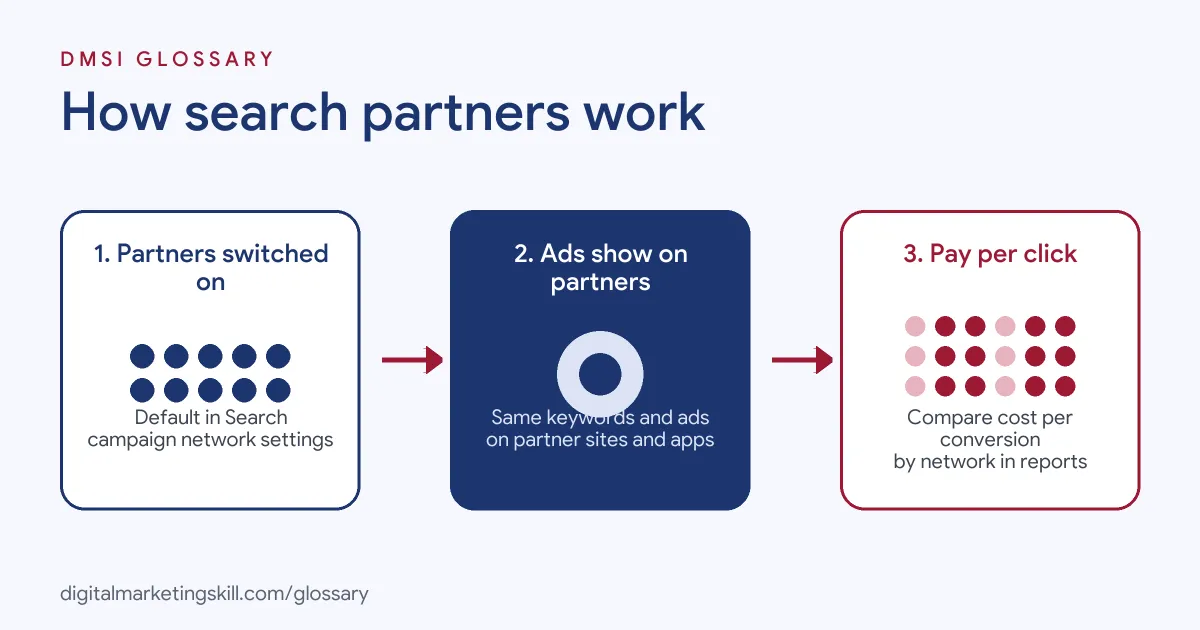
Search partners use the same keywords, ads and bids as your normal search ads. So you don’t build separate ads for them. Instead, Google decides when a partner search is a good match and shows your ad there.
Step 1: You Opt In
Google says, “When you create a campaign for the Search Network, search partners are included by default.” So most new Search campaigns already use partners. You can see and change this in the Networks section of your campaign settings.
Step 2: Ads Show on Partner Sites
Next, someone runs a search on a partner site or app. Then, if your keywords match, your ad can appear. Also, partners can adapt the look of ads. Google notes that “Search partners can customise ad appearance on their sites regarding placement, size, formatting and visual style”. In addition, partner ads may carry an “Ads by Google” label.
Step 3: You Pay Per Click
Then, if someone clicks, you pay. Also, Google states that “you are charged only when a user clicks on your ad.” So impressions on partner sites cost you nothing on their own. In addition, your bid and cost per click settings still apply.
Step 4: Results Feed Your Reports
Finally, partner clicks and conversions appear in your account data. However, they don’t change your Quality Score. Google says the “click-through rate (CTR) for ads on search partner sites doesn’t impact your Quality Score on Google.” Also, Smart Bidding can work on partner sites if you track conversions. In that case, Google says it “will aim to maximize conversions on Search Partners at a similar cost per conversion as Google Search.”
Rules, Quality and Reporting
Partners have to follow Google’s rules. In fact, Google says that “All Search Network partner sites are obligated to comply with our Google policies and restrictions.” If a site breaks them, Google says “the site will be removed from the Search Network.” So there is a basic quality check in place.
Still, you get less detail than on Google Search. For example, Google’s help page says that “Google Ads doesn’t provide information detailing the website where your ad was shown on the Search Network”. It makes an exception for Performance Max campaigns. As a result, you usually judge partners as one group, based on their totals in your network report.
Examples of Search Partners in Action
- A local plumber with a small budget. The owner leaves search partners on. Then she checks the network report each month. Partner clicks bring a few extra calls at a lower cost, so she keeps them.
- An online shop selling high-price items. The team sees many partner clicks but almost no sales. So they test a copy of the campaign without partners. After a few weeks, they turn partners off in the main campaign.
- A software company using Smart Bidding. The marketer has conversion tracking in place. As a result, the bidding system adjusts bids for partner traffic on its own. She reviews the cost per conversion by network every few weeks.
Search Partners vs Google Search and the Display Network
| Point | Google Search | Search Partners | Display Network |
|---|---|---|---|
| Where ads show | Google search results | Partner sites and apps in the Search Network | Websites, apps and videos across the web |
| What triggers the ad | A search that matches your keywords | A partner search that matches your keywords | Audiences, topics and content |
| Ad format | Text search ads | Search ads, sometimes styled by the partner | Image, video and responsive ads |
| Affects Quality Score? | Yes | No | Not for search |
| Default in Search campaigns | Always on | On, but you can switch it off | Optional, and you can switch it off |
How to Use Search Partners
- Check your settings. Open your Search campaign, go to settings and find Networks. Then look at the search partners box.
- Set up conversion tracking. Without it, you can’t judge partner traffic properly. Also, Smart Bidding needs it for partner sites.
- Segment your reports. Split campaign data by network. Then compare clicks, conversions and cost per conversion for Google Search and partners.
- Give it enough time. Wait until you have enough clicks to see a clear pattern. Small numbers can mislead you.
- Decide per campaign. Keep partners on where they convert at a fair cost. Otherwise, turn them off in that campaign only.
- Exclude problem placements. Google lets you “opt out of showing your ads on specific search partner websites or placements”. Use this where you can see a clear problem.
- Review on a schedule. Finally, check network results every month, since partner performance can change.
Best Practices for Search Partners
- Measure before you judge. Base the decision on conversions and cost per conversion, not just click-through rate.
- Use Smart Bidding where it fits. With good tracking, Smart Bidding can adjust bids for partner traffic.
- Test with care. If you are unsure, run a controlled test rather than switching partners off across the whole account.
- Watch lead quality. For lead forms, check how many partner leads turn into real sales, not just form fills.
- Keep campaigns separate by goal. Brand and high-value campaigns may need different partner settings from broad prospecting campaigns.
- Report problems. If a partner breaks the rules, use Google’s policy violation form.
Common Mistakes to Avoid
- Never checking the setting. Often, advertisers don’t realise partners are on by default.
- Judging on clicks alone. Cheap clicks mean little if they don’t convert.
- Turning partners off too early. Usually, a few days of data is not enough to decide.
- Blaming partners for Quality Score. In fact, partner CTR doesn’t affect your Quality Score on Google.
- Confusing partners with Display. They are separate networks with separate settings and different ad types.
- Running without tracking. Without conversion data, you are guessing about partner value.
Where You’ll Use Search Partners at Work
No current remote job listing we checked mentions search partners by name. However, the setting comes up in daily paid search work. For example, you’ll deal with it in these roles:
- PPC Specialist or Paid Search Manager. You set network options, read network reports and decide where partners stay on.
- Google Ads Account Manager. You explain partner traffic to clients and adjust settings to match their goals.
- Performance Marketing Analyst. You compare cost per conversion across networks and flag where you waste budget.
Learn It in the Google Ads and Analytics Track
You can learn how to manage search partners and the rest of your campaign settings in the AI-Powered Google Specialist track. Every track includes a U.S. Project Internship from day one, with unlimited 1-on-1 mentoring.
Frequently Asked Questions
Are search partners on by default?
Yes. Google includes search partners by default when you create a Search Network campaign. You can opt out in your campaign settings at any time.
Is YouTube a search partner?
Google’s help page lists YouTube search results and watch pages among search partner placements. So your search ads may show there when partners are on.
Do search partners cost more?
You pay only when someone clicks, as on Google Search. Costs and results can differ, so compare cost per conversion by network.
Do search partners affect Quality Score?
No. Google says the click-through rate on search partner sites doesn’t impact your Quality Score on Google.
Should I turn search partners off?
It depends on your results. For example, if partner traffic converts at a fair cost, keep it. If not, turn it off for that campaign.
Sources: Google Ads Help: About the Google Search Network; Google Ads Help: Search partners: Definition; Google Ads Help: Manual bidding in Search Partner Network.