
The Model Context Protocol (MCP) is an open-source standard that lets AI applications connect to outside tools and data, such as files, databases, calendars and business apps, in one consistent way. Instead of building a custom link for every pairing of AI tool and app, developers build one MCP server, and any MCP-ready AI app can use it. It matters for marketers because it is how AI assistants are starting to read your data and take actions in tools like CRMs, analytics and website builders.
Key Takeaways
- MCP is an open standard for connecting AI applications to external systems.
- Its official site compares it to “a USB-C port for AI applications”: one standard plug for many devices.
- An AI app (the host) connects to MCP servers through MCP clients, one client per server.
- Servers can offer tools (actions), resources (data) and prompts (reusable templates).
- Many AI assistants and development tools support it, including Claude, ChatGPT, Visual Studio Code and Cursor.
What Is the Model Context Protocol?
An AI assistant on its own only knows what it was trained on and what you type in. To be truly useful at work, it needs access to your real data and tools. Before MCP, each connection needed its own custom code. So linking many AI apps to many tools was slow and hard to keep up.
MCP solves this with one shared standard. Its documentation describes it as “an open-source standard for connecting AI applications to external systems.” Using it, AI apps “can connect to data sources (e.g. local files, databases), tools (e.g. search engines, calculators) and workflows (e.g. specialized prompts).”
Anthropic introduced the protocol and describes it as “a universal, open standard for connecting AI systems with data sources, replacing fragmented integrations with a single protocol.” It was created at Anthropic by David Soria Parra and Justin Spahr-Summers, and it is run as an open-source project.
How the Model Context Protocol Works
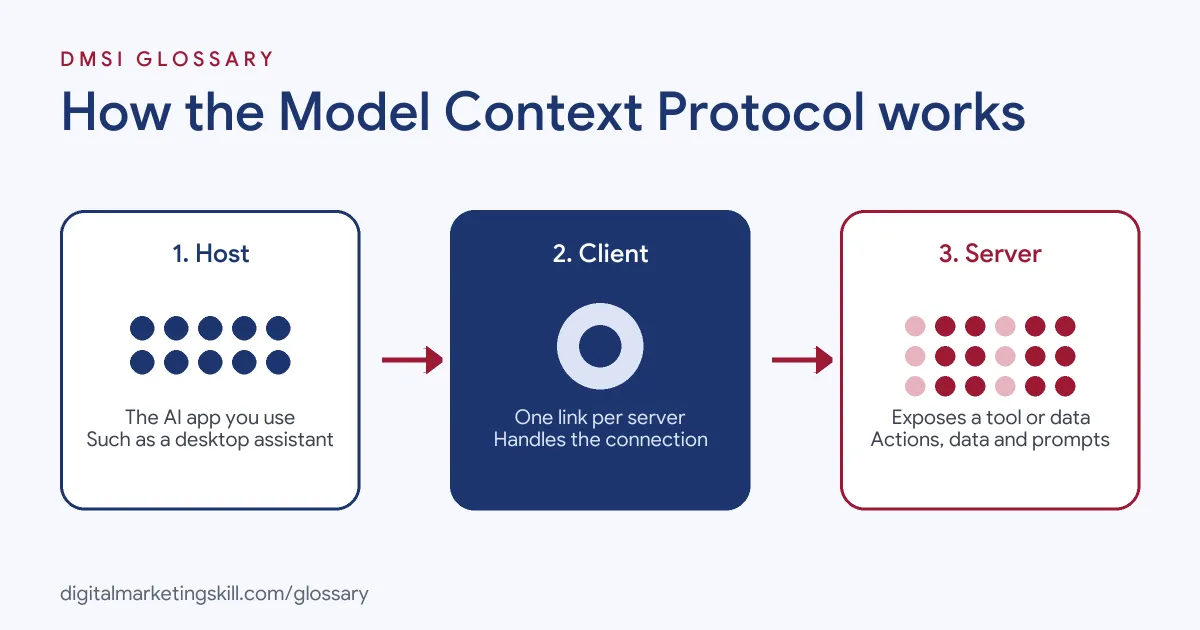
MCP uses a client-server design with three roles. First, the host is the AI app you use. Next, the host creates an MCP client for each connection. Finally, each client talks to an MCP server, which exposes a tool or data source.
Hosts, Clients and Servers
The architecture guide explains that “an MCP host — an AI application like Claude Code or Claude Desktop — establishes connections to one or more MCP servers.” It does this “by creating one MCP client for each MCP server.” Each client then “maintains a dedicated connection with its corresponding MCP server.”
Tools, Resources and Prompts
Servers offer three main kinds of capability. According to the documentation, these are “tools for AI actions, resources for context data, and prompts for interaction templates.” For example, a CRM server might offer a tool to create a contact, a resource listing recent deals and a prompt for writing a follow-up email.
Local and Remote Servers
Servers can run on your own computer or on the internet. Local servers “that use the STDIO transport typically serve a single MCP client.” By contrast, remote servers “that use the Streamable HTTP transport will typically serve many MCP clients.” Under the hood, messages follow a format called JSON-RPC 2.0.
Model Context Protocol Examples
Here are three examples. The first comes from the official documentation, and the other two are made-up marketing scenarios:
- Personal assistant: The documentation notes that agents “can access your Google Calendar and Notion, acting as a more personalized AI assistant.”
- Marketing report: A marketer connects an AI assistant to an analytics server and a spreadsheet server. Then they ask for a weekly traffic summary, and the assistant pulls the numbers and writes the report.
- Website updates: A content manager connects an assistant to their website builder. As a result, they can ask it to draft a new landing page section instead of building it by hand.
Marketing tools are adding support too. For instance, the Elementor plugin listing mentions a “native MCP connection” for linking AI tools to WordPress sites.
Why MCP Matters for Marketers
Most marketers use many tools each day. There is a CRM, an email tool, an ad account, a website and a spreadsheet or two. Moving data between them takes time. MCP lets one AI assistant reach several of these tools at once.
So you can ask a plain question, such as “Which campaign brought the most leads last week?” The assistant can then look in the right tools and give you an answer. It can also draft the next step, like a follow-up email, for you to check.
That said, the assistant is only as good as its access and your data. Clean data and clear limits still matter most.
MCP vs Other Ways to Connect AI
MCP is not the only way to link AI to other software. Here is how it compares:
| Approach | How it works | Good to know |
|---|---|---|
| MCP | One standard server that any MCP-ready AI app can use | Build once, use across many AI apps |
| Custom API integration | Code written for one AI app and one tool | Works, but each new pairing needs new code |
| No-code automation tools | Pre-built triggers and actions between apps | Great for fixed workflows rather than open-ended AI requests |
For the no-code route, see our glossary entry on Zapier.
How to Start Using the Model Context Protocol
- Choose an AI app that supports MCP, such as a desktop AI assistant.
- Decide which tool or data you want it to reach, such as files, a CRM or analytics.
- Find an existing MCP server for that tool, or ask a developer to build one.
- Add the server in your AI app’s settings and sign in where asked.
- Check which actions the server allows, and give it only the access it needs.
- Test with a simple request, such as “list my five most recent leads.”
- Review every action the assistant suggests before you let it change real data.
Best Practices
- Start read-only. Let the assistant read data first, then add write actions once you trust the set-up.
- Limit access. Connect only the tools and accounts a task really needs.
- Use trusted servers. Prefer official servers from the tool’s maker or well-known sources.
- Keep a human in the loop. Approve actions that send emails, change ads or edit live pages.
- Document your connections. Note which servers are connected and who owns them.
Common Mistakes to Avoid
Some teams connect every tool at once. That gives the assistant far more access than a task needs. Others add servers from unknown sources without checking what they do. Many also expect MCP to fix bad data, but the assistant can only use what the tools hold. Finally, some let an assistant act on live accounts with no review. Then it might send the wrong email or change the wrong setting.
Where You’ll Use the Model Context Protocol at Work
Today, most job listings that mention MCP are for technical roles. For example, recent remote listings ask for:
- “Experience building Model Context Protocol (MCP) servers or comparable interfaces that expose enterprise services and data to AI systems and agents” (Back-End Developer).
- “Familiarity with retrieval-augmented generation and Model Context Protocol, and the ability to discuss their use in artificial intelligence-enabled development.” (Senior Solutions Architect).
- “Knowledge of Model Context Protocol (MCP).” (Senior AI Engineer).
Marketers are more likely to be users than builders. Even so, as a Digital Marketing Manager or Growth Marketer, knowing what MCP is helps you choose AI tools and work with developers who set them up.
Learn It in the Full Stack Programme
AI fundamentals, including strategy and planning with AI tools, are part of every DMSI track. To see how AI connects across paid social, email, Google Ads and WordPress, the Full Stack (all four tracks) option covers all ten courses, with one portfolio project from each track. Every track is about 90% hands-on, with unlimited 1-on-1 mentoring and a U.S. Project Internship from day one.
For the bigger picture, read our glossary entry on the AI agent.
Frequently Asked Questions
What is the Model Context Protocol in simple terms?
It is a standard way for AI apps to plug into other tools and data. Think of it as a universal connector, so each tool needs only one connection that many AI apps can use.
Who created the Model Context Protocol?
It was created at Anthropic by David Soria Parra and Justin Spahr-Summers and is run as an open-source project.
Which apps support MCP?
The official documentation lists AI assistants like Claude and ChatGPT and development tools like Visual Studio Code and Cursor, among many others.
What is an MCP server?
It is a program that exposes a tool or data source to AI apps. It can offer tools for actions, resources for data and prompts for templates.
Do marketers need to code to use MCP?
Not usually. Many servers already exist, and you add them in an AI app’s settings. Building a new server, however, needs a developer.
Sources: MCP documentation: What is the Model Context Protocol?; MCP documentation: Architecture overview; Anthropic: Introducing the Model Context Protocol; Elementor plugin listing; remote job listings on Himalayas.