
An AI workflow is a planned series of steps in which an AI model handles one or more tasks, such as reading, sorting, summarising or writing, and passes its output to the next step. The path is planned in advance, so you decide what happens and in what order. It matters because it lets marketers use AI on repeat tasks in a way that is predictable, testable and easy to check.
Key Takeaways
- In a workflow, you set the steps. In an agent, the AI decides its own steps.
- Anthropic describes five common patterns: prompt chaining, routing, parallelisation, orchestrator-workers and evaluator-optimiser.
- Start simple. Anthropic recommends “finding the simplest solution possible” and adding complexity only when needed.
- Add checks between steps, so errors are caught before they reach a customer.
- Choose the model to fit each step. Simple tasks don’t need the most powerful model.
What Is an AI Workflow?
Anthropic, the company behind Claude, draws a clear line between two kinds of system. It says: “Workflows are systems where LLMs and tools are orchestrated through predefined code paths.” Agents, by contrast, “dynamically direct their own processes and tool usage.”
In other words, a workflow is like a recipe. Each step is written down, and the AI follows it. An agent is more like a chef who decides what to cook based on what’s in the fridge.
For example, a content team might build a three-step process. First, AI drafts a blog outline from a brief. Next, a check confirms the outline covers every required point. Finally, AI writes the draft from the approved outline. A person then edits and publishes it. Every run follows the same path.
How an AI Workflow Works
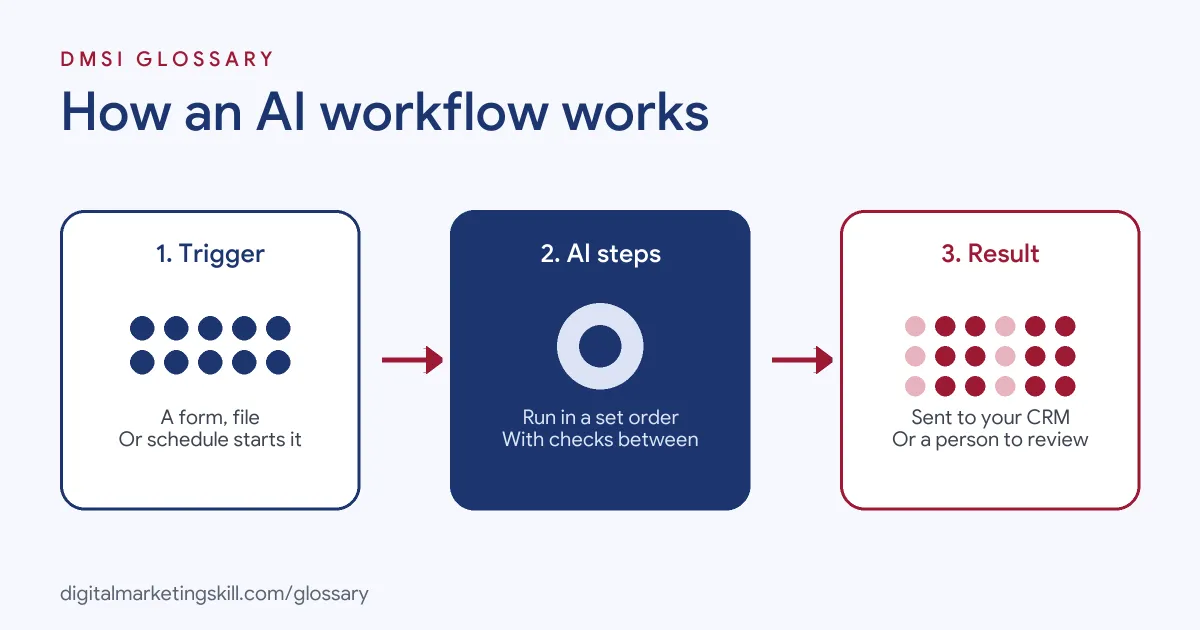
Most marketing workflows start with a trigger, such as a new form entry or a new file. Then one or more AI steps do their job. Finally, an action sends the result to the right place, such as a CRM, a document or a team chat.
Common AI Workflow Patterns
Anthropic’s guide to building effective agents describes five patterns:
- Prompt chaining: this “decomposes a task into a sequence of steps, where each LLM call processes the output of the previous one.” You can add checks between steps.
- Routing: this “classifies an input and directs it to a specialized followup task.” For instance, simple questions can go to a fast model and harder ones to a stronger model.
- Parallelisation: several AI calls work at once, either on separate subtasks or on the same task to compare answers.
- Orchestrator-workers: a central model breaks a task down, hands parts to worker models, then combines the results.
- Evaluator-optimiser: one call writes a response, while another gives feedback in a loop until it meets clear criteria.
AI Steps in No-Code Tools
You don’t need to code to build one. Zapier, for example, lets you add AI steps to automated workflows. It describes a standard AI step as one that “reasons, produces one output, and doesn’t touch your other apps.” Its guide shows AI reading a lead form, scoring the lead, then routing it to the right sales rep based on that score.
Zapier also notes that “You don’t even need a separate AI account to use AI steps.” That lowers the barrier for small teams. However, ease of set-up is not the same as quality. You still need clear prompts, good test data and a plan for what happens when the AI gets something wrong.
AI Workflow Examples
Here are three made-up marketing examples:
- Enquiry triage: A form submission triggers an AI step that tags the request and rates its urgency. Urgent leads go straight to sales, while others get a helpful email.
- Weekly report: Every Monday, a workflow pulls ad results into a sheet. AI writes a short summary of what changed, and a manager reviews it before it goes to the client.
- Content repurposing: A new blog post triggers AI to draft a newsletter intro and three social captions. An editor approves each one before scheduling.
Notice that a person checks the output in each case. That keeps quality and brand voice under control.
AI Workflow vs AI Agent
Both are useful, but they suit different jobs:
| Feature | AI workflow | AI agent |
|---|---|---|
| Who decides the steps | You, in advance | The AI, as it goes |
| Predictability | High; same path every time | Lower; the path can change |
| Best for | Well-defined, repeat tasks | Open-ended tasks where steps can’t be predicted |
| Cost and speed | Usually lower and faster | Often higher and slower |
Anthropic notes that agentic systems “often trade latency and cost for better task performance”. It adds that workflows “offer predictability and consistency for well-defined tasks.”
How to Build an AI Workflow
- Pick one repeat task that takes time each week.
- Write down every step a person takes to do it today.
- Mark which steps need judgement, such as reading or writing. These are your AI steps.
- Choose a tool, such as an automation platform, to connect the steps.
- Write a clear prompt for each AI step, with examples of good output.
- Add checks between steps, such as a format check or a human approval.
- Test with real past examples before you switch it on.
- Review results each week and improve the weakest step.
A Worked Example
Here is a made-up example. A marketing assistant spends three hours a week writing summaries of client ad reports. She builds a workflow: a scheduled trigger exports the data, an AI step drafts the summary, and a second AI step checks that every number in the draft matches the data. She then reviews and sends it. Her time drops to about 45 minutes a week, and errors fall too.
Best Practices for an AI Workflow
- Keep steps small. One clear job per step is easier to test and fix.
- Ask for structured output. A fixed format, such as a score or a list, makes the next step reliable.
- Match the model to the task. Zapier notes that standard models “work great for simple tasks.”
- Keep a person in the loop. Review anything that reaches customers.
- Mind the rules. The UK ICO applies extra safeguards to decisions that are “solely automated” and have “legal or similarly significant effects” on people.
Common AI Workflow Mistakes
Many teams try to automate a whole process at once, then can’t find where it breaks. Others write vague prompts and get inconsistent results. Some skip the checks between steps, so one bad output spoils everything after it. Another mistake is reaching for an agent when a simple, fixed workflow would do the job better. Finally, many never measure the time saved, so they can’t tell if the workflow is worth keeping.
Where You’ll Use AI Workflows at Work
Employers increasingly want marketers who can build AI into everyday work. For example, recent remote job listings ask candidates to:
- “Move administrative and repeatable work (reporting pulls, status updates, documentation, deck assembly) to AI workflows” (Senior Director, Client Strategy).
- “Leverage practical automation and AI workflows to improve operational speed, research depth, and reporting efficiency” (TikTok Affiliate Manager).
- Show “A history of automating your own routine work with AI, for example with reusable prompts, Claude Projects, AI-assisted workflows or simple scripts” (Business Development Representative).
So whether you aim to be a Digital Marketing Manager, a Growth Marketer or a Freelance Digital Marketer, expect to design workflows that save time without lowering quality.
Learn It in the Full Stack Track
AI fundamentals, including strategy and planning, are part of every DMSI track. The widest fit is the Full Stack option, which covers all four tracks. You take all ten courses and complete one portfolio project from each track, from a paid social campaign to an automated email sequence. You also work on a U.S. Project Internship from day one, with unlimited 1-on-1 mentoring.
Next, read our guides to AI marketing tools and an email automation workflow. You may also like our glossary entries on AI automation and AI agents.
Frequently Asked Questions
What is an AI workflow in simple terms?
It is a planned series of steps where AI handles some of the work, such as reading or writing, and passes the result on to the next step.
How is an AI workflow different from an AI agent?
In a workflow, you set the steps in advance. An agent decides its own steps and which tools to use as it goes.
Do I need to code to build one?
No. No-code automation tools let you add AI steps between triggers and actions. Coding helps for more complex set-ups.
What is prompt chaining?
It is a pattern where a task is split into steps, and each AI call works on the output of the previous one.
Should a person still check the output?
Yes, especially for anything a customer will see. Checks between steps and a final human review keep quality high.
Sources: Anthropic: Building effective agents; Zapier: AI by Zapier guide; ICO: Automated decision-making and profiling; remote job listings on Himalayas.