
HubSpot is a customer platform that combines a CRM with tools for marketing, sales, customer service and content, so a business can manage every stage of the customer relationship in one place. Its free CRM stores contacts, companies and deals, while paid “Hubs” add features such as email automation, lead scoring and help desks. It matters because it is one of the most common platforms in B2B and inbound marketing, so HubSpot skills show up in many marketing job listings.
Key Takeaways
- At its core sits a CRM that holds contacts, companies, deals and activity history.
- Products are grouped into Hubs, including Marketing Hub, Sales Hub, Service Hub, Content Hub and Data Hub.
- The company describes its free CRM as “100% free with no expiration date.”
- Paid tiers unlock more advanced features, such as AI-built lead scores on Marketing Hub Enterprise.
- Marketers use it for forms, email, landing pages, lead scoring, workflows and reporting.
What Is HubSpot?
Picture a single place where marketing captures a lead, sales follows up, and support answers that customer’s questions later, all on the same record. That’s the idea behind HubSpot. Each team sees the same history, so nobody has to ask the customer to repeat themselves.
The company calls this its customer platform. Its product page lists Marketing Hub, Sales Hub, Service Hub, Content Hub, Data Hub, Revenue Hub, Smart CRM and Agent Hub. You can start with free tools and add paid Hubs as your needs grow.
For the basic idea behind the platform, see our glossary entry on customer relationship management.
How HubSpot Works
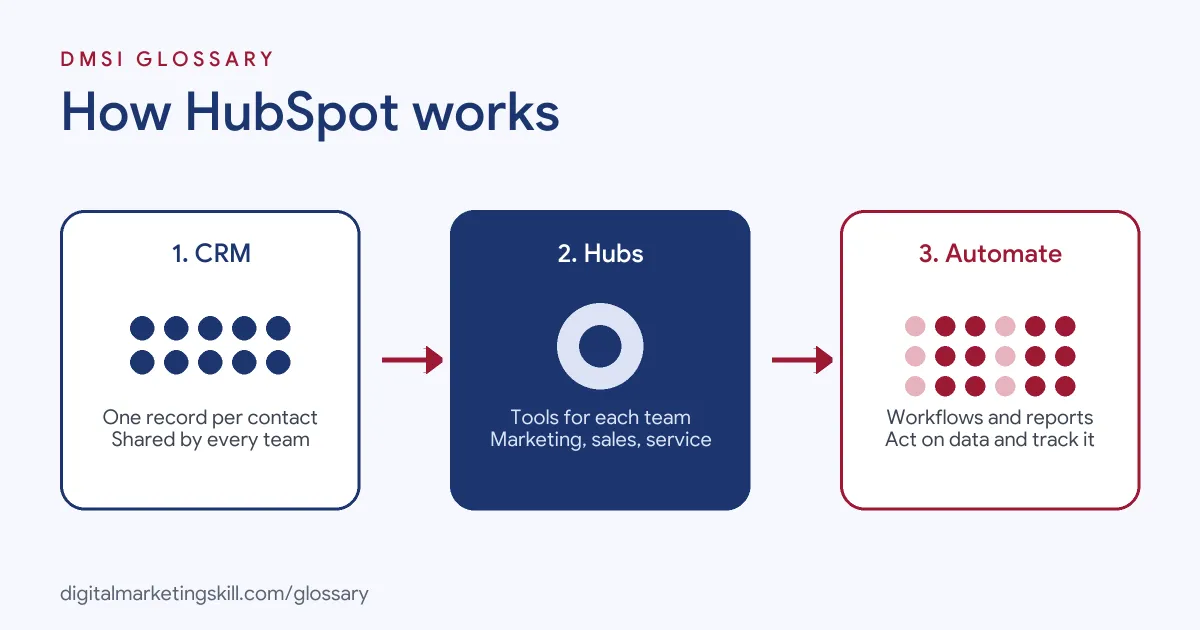
The platform works in three layers. First, the CRM stores every contact and interaction. Next, the Hubs add tools for each team, such as email for marketing and pipelines for sales. Finally, workflows and reports connect the two, so actions happen automatically and results are easy to see.
The Free CRM
The CRM is the foundation. HubSpot’s product page says its free CRM “unifies all your customer data on one platform.” It covers contact management, so you can “create contacts, keep records up to date, log sales activities, and view communication history, all in one place.” It also tracks deals and tasks.
The Hubs
Each Hub serves a different team. HubSpot describes Marketing Hub as “AI-powered marketing software that helps you generate leads and automate marketing.” Sales Hub is “easy-to-adopt sales software that leverages AI to build pipelines and close deals,” with premium features such as predictive lead scoring. Service Hub is “customer service software powered by AI to scale support and drive retention.” Meanwhile, Content Hub lists features such as landing pages, blog software and a website builder.
HubSpot Lead Scoring and Bots
Two features matter a lot to marketers. First, lead scoring. HubSpot’s knowledge base explains that engagement scores “qualify records based on their actions and interactions,” while fit scores use “demographic information through property values.” Second, chatbots. Its rule-based bot “can help qualify leads, book meetings, or create support tickets.”
HubSpot Examples
Here are three made-up examples of how teams might use the platform:
- Software company: A visitor downloads a guide through a HubSpot form. The contact gets a nurture email series, and when their score rises, a sales rep gets a task to call them.
- Agency: An agency tracks every client deal in a pipeline. As a result, it can see how much revenue is likely to close each month.
- Training provider: A website chatbot asks visitors what course they want, then books a call with an adviser and saves the details to the CRM.
In each case, marketing, sales and service work from the same records.
HubSpot Hubs Compared
Here is a quick guide to the main Hubs and who uses them:
| Hub | Main purpose | Typical user |
|---|---|---|
| Marketing Hub | Lead generation and marketing automation | Marketers and marketing operations |
| Sales Hub | Pipelines, sequences and forecasting | Sales reps and sales managers |
| Service Hub | Support, help desk and knowledge base | Customer service teams |
| Content Hub | Landing pages, blogs and website building | Content and web teams |
| Data Hub | Combining data and improving its quality | Operations and data teams |
Most businesses start with one or two Hubs. Then they add others as teams grow.
How to Set Up HubSpot for Marketing
- Create a free account and install the tracking code on your website.
- Import your existing contacts, making sure you have permission to email them.
- Set up contact properties for the details you care about, such as industry or lead source.
- Build a form and add it to a landing page or your site.
- Create a welcome email and a simple workflow that sends it after a form fill.
- Add lead scoring when you have enough data, so sales can see who is most engaged.
- Build a dashboard that shows leads, sources and conversions each week.
A Simple Lead Flow
Here is a made-up example of a basic flow a small team could build:
- A visitor fills in a form to get a free checklist.
- The form creates a contact and records the lead source.
- A workflow sends the checklist by email straight away.
- Two days later, a second email shares a short case study.
- If the contact opens both emails and visits the pricing page, their score goes up.
- Once the score passes a set level, the workflow creates a task for a sales rep.
As a result, sales only calls people who have shown real interest. Everyone else keeps getting helpful emails until they are ready.
Metrics to Watch
Reports are only useful if you check the right numbers. So start with these:
- New contacts by source: which channels bring people in.
- Form conversion rate: the share of visitors who fill in a form.
- Lead to customer rate: how many leads end up buying.
- Email clicks: which messages make people act.
- Deal stage time: how long deals sit at each stage of the pipeline.
Then fix the weakest step first. For example, if many people visit but few fill in the form, test a shorter form or a better offer.
Best Practices
- Keep data clean. Agree property names and lifecycle stages, so reports stay reliable.
- Start simple. One good form, one email and one workflow beat a messy set of half-built tools.
- Align with sales. Agree what counts as a qualified lead before you build scores.
- Check your tier. Some features need higher plans. For example, free and Starter users can’t add if/then branches to bot actions.
- Review reports weekly. Use dashboards to spot which channels bring the best leads.
Common Mistakes to Avoid
Many teams import every contact they have, including people who never opted in. Others create dozens of custom properties with no naming rules, so data becomes hard to use. Some build complex workflows before they understand their basic funnel. Finally, many skip the handover between marketing and sales, so good leads sit untouched. A clear process matters more than any single feature.
Where You’ll Use HubSpot at Work
HubSpot appears in many marketing, sales and operations job listings. For example, recent remote listings ask for:
- “HubSpot Administration: Manage and optimize HubSpot’s CRM and marketing automation platform, including contact management, lead scoring, and segmentation.” (HubSpot Specialist).
- “Familiarity with marketing automation and CRM tools (e.g., Marketo, HubSpot, Salesforce)” (Marketing Campaign Manager).
- The ability to “maintain accurate pipeline, forecasting and opportunity information in HubSpot.” (Enterprise Account Executive).
So as a Marketing Automation Specialist, Email Marketing Specialist or Lead Generation Specialist, you may build forms, workflows and reports in HubSpot every day.
Learn It in the Lead Generation and Email Track
You can learn CRM and automation skills in the AI-Powered Lead Generation and Email Automation track. It covers lead generation, email marketing and automation. Your portfolio project is to build a lead magnet and an automated email sequence that converts. You also get unlimited 1-on-1 mentoring and a U.S. Project Internship from day one.
To see how scores can be built with machine learning, read our entry on AI lead scoring.
Frequently Asked Questions
What is HubSpot used for?
It is used to manage contacts and customer relationships, run marketing campaigns, track sales deals and handle customer service, all from one platform.
Is HubSpot free?
It offers a free CRM, which the company says is free with no expiration date. However, many advanced features need a paid Hub.
What are HubSpot Hubs?
Hubs are product groups for different teams, such as Marketing Hub, Sales Hub, Service Hub, Content Hub and Data Hub.
Is HubSpot a CRM or a marketing tool?
Both. The CRM sits at the centre, and Marketing Hub adds tools such as email, forms, automation and lead scoring.
Is HubSpot good for small businesses?
It can be. The free CRM and free tools give small teams a starting point, and they can add paid features later.
Sources: HubSpot: Customer platform products; HubSpot: Free CRM; HubSpot Knowledge Base: Lead scoring tool; HubSpot Knowledge Base: Create a bot; remote job listings on Himalayas.