
AI transcription is the use of speech recognition software to turn spoken audio, such as a video, podcast, call or meeting, into written text automatically. Modern tools can handle many languages, add punctuation and produce captions in minutes. It matters because marketers can turn every recording into searchable text, captions, blog posts and social clips without typing it all out by hand.
Key Takeaways
- A speech recognition model listens to audio and predicts the words being spoken.
- OpenAI’s Whisper research trained models on 680,000 hours of multilingual audio and transcripts.
- YouTube uses speech recognition to create automatic captions, but says their quality may vary.
- Accents, dialects, mispronunciations and background noise can all cause errors.
- Always review the text, especially names, numbers and brand terms, before you publish it.
What Is AI Transcription?
Transcription used to mean a person listening to a recording and typing every word. It was slow and expensive. AI transcription does the same job with software, often in less time than the recording itself lasts.
The technology behind it is called automatic speech recognition. A model hears the sound waves, breaks them into small pieces and predicts the most likely words. Newer models also add punctuation and capital letters, so the result reads more like normal text.
For example, a marketing team might record a one-hour webinar. With AI transcription, it gets a full text version the same day. Then it can turn that text into a blog post, an email and several social posts.
How AI Transcription Works
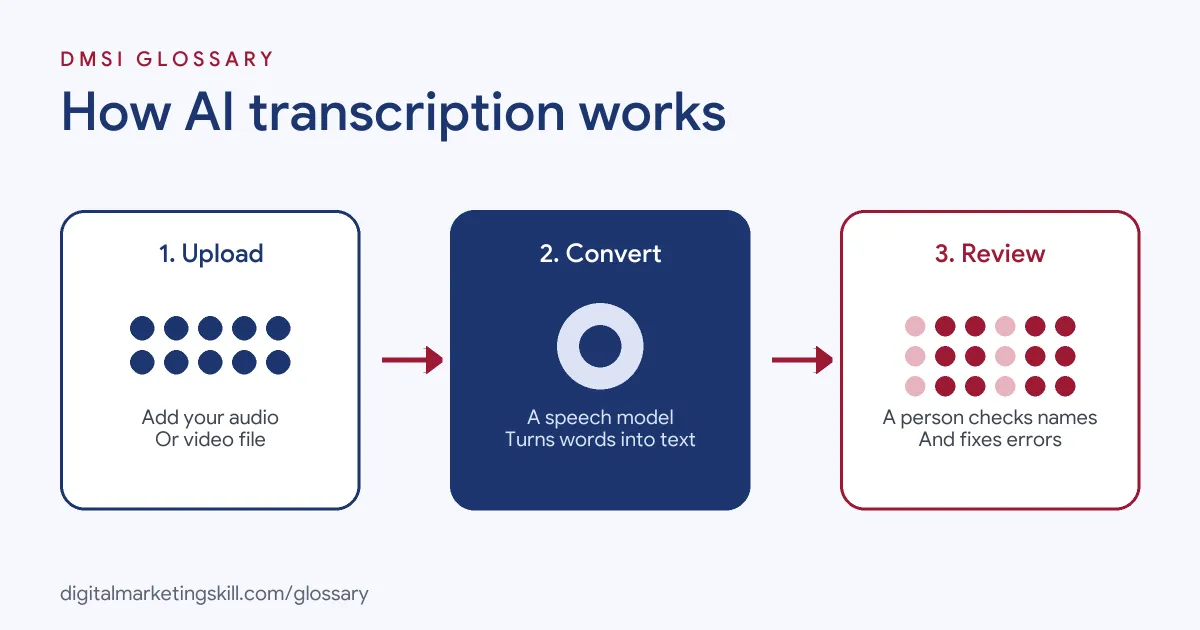
The process has three main steps. First, you upload or stream the audio. Next, the speech recognition model converts it into text. Finally, you review and edit the transcript before you use it.
How the Models Learn
Speech models learn from huge amounts of recorded speech paired with text. OpenAI’s Whisper paper describes models trained on “680,000 hours of multilingual and multitask supervision”. The authors report that the models “approach” human accuracy and robustness. That large, varied training is why modern tools cope with many accents and languages.
Uploading Audio
Each tool sets its own file rules. OpenAI’s speech-to-text guide, for instance, says “Files can be up to 25 MB”. It lists supported formats such as mp3, mp4, m4a, wav and webm. For live audio from a microphone or a call, it points to real-time transcription instead.
Reviewing the Text
No model is perfect. YouTube warns that automatic captions “might misrepresent the spoken content due to mispronunciations, accents, dialects or background noise”. OpenAI also suggests you can use a text model to fix spelling and terms afterwards. However, it adds that you should check corrections “against the original audio to avoid changing what the speaker said”.
Automatic Captions on YouTube
YouTube is the transcription tool many marketers meet first. It says it “can use speech recognition technology to automatically create captions for your videos”. If captions are available, they are published on the video automatically. However, they may not be ready straight after upload, because processing time depends on how complex the audio is.
For English videos, YouTube also supports expressive captions. These show the intensity of speech in capital letters and include sounds such as sighs and gasps, plus noises from the setting. As a result, viewers who watch without sound get more of the feeling of the video, not just the words.
AI Transcription Examples
Here are three made-up examples of how marketers use transcripts:
- Video captions: A brand uploads a product video to YouTube. Automatic captions appear, and the team edits a few product names before publishing.
- Content repurposing: A podcast host transcribes each episode. She then turns the best quotes into social posts and a weekly newsletter.
- Customer research: A team transcribes ten sales calls. Then it searches the text for common questions to use in ads and FAQs.
In each case, the transcript is a starting point. The value comes from what you do with it next. For instance, one clear quote from a customer call can become a headline, an ad hook and a testimonial.
AI Transcription Tools Compared
Here are common ways to get a transcript:
| Option | How it works | Good to know |
|---|---|---|
| YouTube automatic captions | Created after you upload a video | Available in many languages; quality varies, so review and edit |
| OpenAI speech-to-text API | Send an audio file and get text back | Files up to 25 MB; real-time option for live audio |
| Meeting and editing apps | Transcribe calls or recordings inside the app | Handy for notes; check privacy settings before you record |
| Human transcriber | A person types or corrects the text | Slower, but useful for legal, medical or high-stakes content |
Many teams combine options. For instance, they let AI create the first draft, then a person checks it.
How to Use AI Transcription in Marketing
Follow these steps to get clean, useful transcripts:
- Record clean audio. Use a decent microphone and a quiet room, since background noise causes errors.
- Check the file rules. Make sure your file type and size fit the tool, such as the 25 MB limit on OpenAI’s API.
- Run the transcription. Upload the file or use the tool’s built-in captioning.
- Fix names and terms. Correct brand names, product names, numbers and jargon.
- Check against the audio. Listen to unclear parts rather than guessing.
- Get consent for calls. Tell people when you record and transcribe a conversation.
- Repurpose the text. Turn it into captions, articles, emails or social posts.
After that, save a library of transcripts. Over time, it becomes a searchable record of what your customers and experts say.
Best Practices for AI Transcription
- Review before you publish. YouTube itself advises that you “always review automatic captions”.
- Prefer professional captions for key videos. YouTube encourages creators “to add professional captions first”.
- Keep the speaker’s meaning. Tidy filler words, but never change what someone actually said.
- Protect personal data. Calls and meetings can include private details, so store transcripts safely.
- Use captions for reach. Captions help people who watch without sound and make content more accessible.
Common Mistakes to Avoid
A common mistake is publishing raw transcripts without checking them. As a result, a wrong word or name can end up in captions or quotes. Another is recording in noisy rooms, which lowers accuracy. Some teams also let an AI “clean up” the text so much that it changes the meaning. Finally, many forget about consent. If you record calls with customers, tell them first and follow the rules where you work.
How to Check Transcript Quality
You do not need special tools to judge a transcript. Instead, pick three short sections, such as the start, the middle and the end. Listen to each one while you read the text. Count the errors, and note what kind they are: names, numbers, technical terms or missed words. If most errors are names, add a glossary step to your process. If they are missed words, improve the recording instead. In short, a quick spot check tells you where to focus.
Where You’ll Use AI Transcription at Work
Transcription skills appear in content and video roles. For example, remote job listings mention:
- “Professional captioning and transcription tools” (Video Editor, Healthcare and Social Content).
- Reviewing “AI-generated transcripts” and converting “them into a natural, readable text format by applying punctuation, capitalization, and formatting rules” (AI Text Validation Specialist).
So for a Content Creator or Social Media Manager, AI transcription is a daily time-saver. Employers expect you to use it quickly and to check its output carefully.
Learn It in the Social Media Track
You can learn to use AI transcription for captions and content in the AI-Powered Social Media Management and Advertising track. It covers AI fundamentals and content creation with graphics and video. You plan, create and run a paid social campaign for a real brand. In addition, you get unlimited 1-on-1 mentoring and a U.S. Project Internship from day one.
For more tools, read our guides to AI marketing tools and AI writing tools. You can also learn about natural language processing.
Frequently Asked Questions
What is AI transcription in simple terms?
It is software that listens to audio or video and writes down what people say, automatically.
How accurate is AI transcription?
Modern models can be very accurate, and Whisper’s authors say they approach human accuracy. Even so, accents, noise and names still cause errors.
Is YouTube’s automatic captioning good enough?
It is a useful start. However, YouTube says quality may vary and asks creators to review and edit automatic captions.
What file size can I upload to OpenAI’s transcription API?
OpenAI’s guide says files can be up to 25 MB, in formats such as mp3, mp4, m4a, wav and webm.
Can AI transcription handle other languages?
Yes. Whisper was trained on multilingual audio, and YouTube offers automatic captions in many languages.
Sources: Radford et al.: Robust Speech Recognition via Large-Scale Weak Supervision; OpenAI Docs: Speech to text; YouTube Help: Use automatic captioning; remote job listings on Himalayas.