
AI writing tools draft faster than any human, but they still need a human to check the result. Google says it does not penalise AI content for being AI content, only for adding no value. This guide explains how these tools actually work. It shows where each type earns its keep, and where it still fails without a careful edit.
Key Takeaways
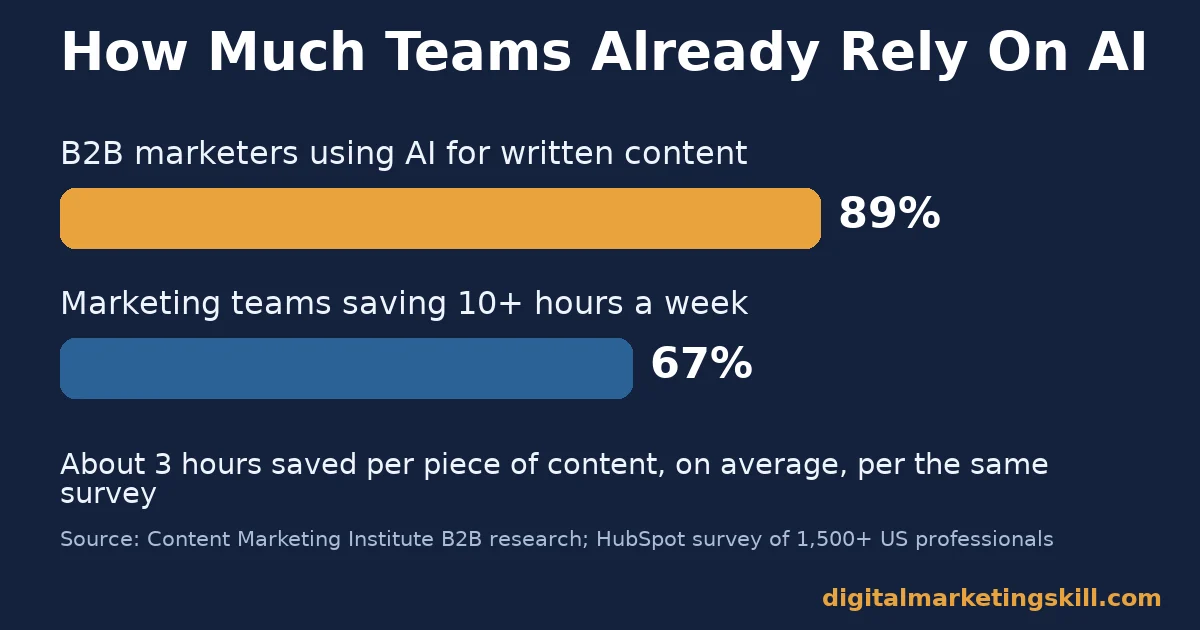
- Adoption is already high. The Content Marketing Institute found 89% of B2B marketers now use AI tools to help create written content.
- The time savings are real. HubSpot’s survey of over 1,500 US professionals found 67% of marketing teams save 10 or more hours a week using generative AI, and content creators save about 3 hours per piece.
- Detection tools are unreliable. A Stanford study of seven AI detectors found an average false-positive rate of 61.3% on real essays written by non-native English speakers, against near zero on native-speaker essays.
- Google rewards helpfulness, not origin. Google’s own guidance states that using generative AI to publish many pages without adding value for users violates its scaled content abuse policy, whoever or whatever wrote them.
- Unedited AI content has a real track record of errors. One publication corrected 41 of 77 AI-written finance explainers after readers and editors found mistakes, some described as substantial.
In this guide
- What Most “Best AI Writing Tools” Lists Get Wrong
- How AI Writing Tools Actually Work
- AI Writing Tools Split Into Three Different Jobs
- How to Get Real Value From Each Type
- Five Risks AI Writing Tools Still Carry
- How to Measure Whether AI Writing Tools Are Actually Helping
- The Most Useful Rule: No AI Draft Publishes Without a Named Human Check
- A Simple Workflow for Using AI Writing Tools Safely
- A Real Case: What Happened When One Publisher Skipped the Check
- Frequently Asked Questions About AI Writing Tools
- Start With One Category, Then Build the Habit
What Most “Best AI Writing Tools” Lists Get Wrong
Most lists of AI writing tools rank products by feature count and call it a day. That skips the harder question: which type of tool actually fits the job in front of you? And what will still go wrong, even with the best one?
This guide groups AI writing tools by what they are actually built to do. It shows where each type is strong and where it fails, and explains how to check the output before you publish it.
Ground rules first. The adoption and time-saving figures below are self-reported survey data. Read them as a snapshot of current behaviour, not a guarantee of your own results. The detector accuracy figures come from one named, peer-reviewed study and one vendor’s own claim. Treat the gap between them as a reason for caution, not a verdict on any single product.
How AI Writing Tools Actually Work
Every AI writing tool on the market sits on top of a large language model. Developers trained the model to predict the next word in a sequence, using huge amounts of existing text. It does not know facts the way a person does; it produces text that statistically resembles correct, well-written text.
What AI Writing Tools Do Well
These tools are genuinely strong at producing a first draft fast, rephrasing existing text, and generating variations of a headline or an ad. They rarely run out of ideas, and they do not get tired halfway through a list of 20 subject lines, the way a person drafting the same list by hand eventually does.
They also compress research time. A tool can summarise a long document or combine a few data points into a readable paragraph in seconds. That is real, measurable value, as long as the facts going in are correct to begin with. The HubSpot time-saving figures above reflect exactly this stage of the work: drafting and first-pass assembly, not final, publish-ready copy.
Where AI Writing Tools Still Fail
The model predicts plausible text rather than verified fact. So it can state a wrong number or a fabricated detail with exactly the same confidence as a correct one. Google’s own guidance on generative AI content warns that outputs “may contain inaccuracies (also known as hallucinations).” It says they must be fact-checked manually before publishing.
They also tend toward generic phrasing. They are built to produce the statistically likely sentence, not the specific, surprising one. Left unedited, that habit turns helpful source material into forgettable content. The fix is not to avoid these tools; it is to treat every output as a first draft that still needs your own facts, examples and judgment layered on top.
AI Writing Tools Split Into Three Different Jobs
Not every AI writing tool does the same job, even when the marketing pages all sound alike. Picking the wrong type for the task wastes more time than it saves, since you end up fighting the tool’s structure instead of using it.
General Assistants: Built for Broad, Flexible Drafting
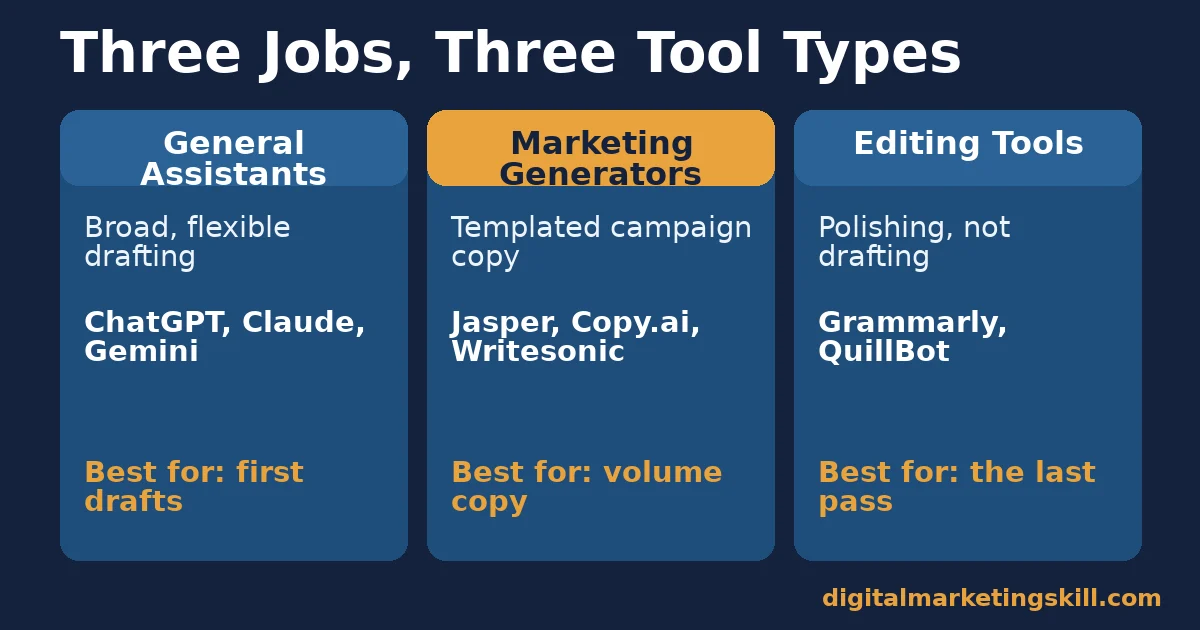
Tools such as ChatGPT, Claude and Gemini are general-purpose assistants. They can draft, summarise, brainstorm and answer follow-up questions in the same conversation. That makes them flexible, but also unpredictable in tone from one session to the next.
They have no built-in brand voice and no marketing-specific templates, so every output needs shaping before it is usable. Their strength is range, not consistency. They suit research, outlining and first drafts best, and suit polished final copy the least, without real editing on top.
Marketing Generators: Built for Templated Campaign Copy
Tools built specifically for marketing, such as Jasper, Copy.ai and Writesonic, work from templates for ads, product descriptions and email subject lines. They are faster for repetitive campaign copy because the structure is already decided.
That same structure is their limit. A templated tool struggles with a genuinely new format or a nuanced, long-form argument. Its template favours familiar, short patterns over original structure. These tools suit a team publishing many similar, short pieces, such as product listings or ad variations, rather than one writer producing a handful of long, original ones.
Editing Tools: Built for Polishing, Not Drafting
Grammarly, QuillBot and similar tools are not primarily generators. They check grammar, rephrase sentences and simplify wording in text a person, or another AI tool, already wrote.
Used alone, they cannot fix a factually wrong draft. They can only make the wrong sentence read more smoothly. Pairing an editing tool with a careful fact-check closes that gap, the same discipline our guide to copywriting skills that actually convert readers applies to human-written drafts. They are most useful as the last step in a workflow, never the only one.
How to Get Real Value From Each Type
Each category needs a different habit to pay off. Match the habit to the tool you are actually using, rather than applying one rule to all of them.
General Assistants: Lead With a Specific Brief
Give the assistant your actual facts, your audience and your intended tone in the prompt. Do not just ask it to “write a blog post about X.” A vague prompt produces vague, generic output almost every time.
Then treat the result as a rough draft, not a final one. Rewrite the opening and the conclusion yourself. Readers notice those parts first, and AI tools default to generic phrasing on both.
Marketing Generators: Lead With Your Own Proof
Feed the template your own numbers, your own product details and a real customer line if you have one. The template handles structure. Your own specifics are what stop the output from sounding like every other page built on the same template.
Generate several variations and pick the one that sounds like your brand, rather than publishing the first result. These tools are built for volume, so use that volume to choose, not to skip editing.
Editing Tools: Lead With a Fact-Check Pass First
Fact-check a draft before you polish it, not after. An editing tool makes an error read more convincingly. A clean, well-punctuated sentence looks more trustworthy than a rough one, whether or not it is actually correct.
Use these tools for tone and clarity on a draft you already trust, and read the final version aloud once. That single step catches most of the awkward phrasing that slips through automated checks.
Five Risks AI Writing Tools Still Carry
Before you lean on AI writing tools for anything published under your name, check your workflow against these five risks.
- Hallucinated facts. A model can state an invented statistic or a wrong date as confidently as a correct one. The error reads just as smoothly as the truth.
- Generic phrasing. Unedited output often reads like every other AI-written page on the same topic. That gives a reader no reason to trust it over a competitor’s page.
- Unreliable detection. The Stanford study above found detectors wrongly flagged real human writing more often than not. Do not rely on a detector score as proof either way.
- Thin, scaled publishing. Google’s spam policies target AI content published at volume with no added value, not AI use itself. Volume without substance is the actual risk.
- Undisclosed use. Readers who later discover AI was used without disclosure, especially after errors surface, trust the source less going forward.
Which Risk to Fix First
If your content covers facts, numbers or advice someone could act on, fix hallucination risk first with a mandatory fact-check step. If your content is high-volume and templated, fix the scaled-publishing risk by adding original detail to every piece before it goes live. Either way, never skip the human read-through.
How to Measure Whether AI Writing Tools Are Actually Helping
Track outcomes, not just output volume. The list below defines each metric in one sentence and explains how to read it.
Five Numbers Worth Tracking
- Edit time per piece. How long a human spends fact-checking and rewriting an AI draft before publishing. If this stays close to writing from scratch, the tool is not actually saving time.
- Factual error rate. The share of pieces where a fact-check catches a wrong claim. Track this for a month before trusting a tool with unsupervised publishing.
- Search performance. Organic clicks and rankings for AI-assisted pages compared with your past, human-written pages on similar topics.
- Engagement on the published piece. Time on page and scroll depth, the same signals that show whether any content is actually being read.
- Correction rate. How often a published piece needs a factual correction after the fact. A rising rate is the clearest sign your fact-check step is too light and needs more time, not less.
How to Read Them Together
Read edit time against factual error rate first. A short edit time with a high error rate usually means someone skipped the fact-check step under time pressure. It does not mean the tool failed. A long edit time with a low error rate means the tool is saving less than it looks like on paper, which is still useful to know before you expand its use further.
Review all five numbers monthly rather than per article. A single unlucky piece can skew one week’s figures, while a month of data shows whether your workflow is actually holding up under normal pressure, across different writers and topics.
Search performance and engagement tell you whether readers value the result at all, regardless of how it was drafted. A page that ranks and holds attention has passed the test that actually matters.
The Most Useful Rule: No AI Draft Publishes Without a Named Human Check
If you take one decision rule from this guide, make it this one. Every AI-assisted draft needs a named person who checked its facts before it goes live, not a general sense that “someone probably looked at it.”
Here is an illustrative example, with invented numbers. A small team publishes 20 AI-assisted articles a month with no formal fact-check step, and readers flag factual errors in three of them. They add a mandatory named-reviewer step before publishing. By the next month, with the same 20 articles, no readers flag a published error, though the team spends roughly 15 extra minutes per article on review.
That trade is usually worth it. A small, predictable time cost up front is cheaper than a correction or a lost reader’s trust. It is also cheaper than quietly teaching search engines that your site publishes unchecked content.
A Simple Workflow for Using AI Writing Tools Safely
You do not need a large team to build a safe habit around AI writing tools. This workflow fits a single writer or a small content team, and it takes roughly the same four steps every time, whichever category of tool you are using.
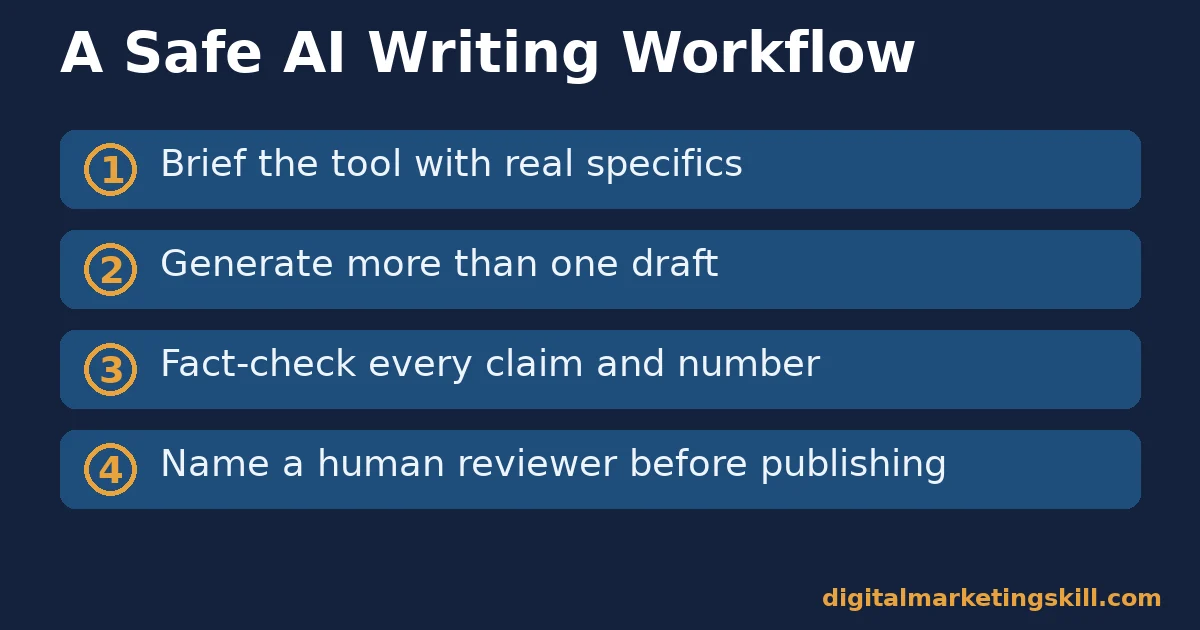
- Brief the tool with real specifics. Name your facts, your audience and your source material before you ask for a draft, instead of a generic topic prompt.
- Generate more than one draft. Produce two or three variations where the tool allows it, so you are editing the strongest starting point rather than the only one you happened to get.
- Fact-check every claim, number and date. Treat each one as unverified until you confirm it against a real source, even when the sentence reads confidently and the number looks plausible.
- Name a human reviewer before publishing. Assign one person to sign off on accuracy and tone, so responsibility never sits with “the AI” alone, even on a small team.
Consequently, the workflow adds a predictable amount of time to every piece, not an open-ended one. That predictability is what makes it realistic to keep using, instead of a safety step that quietly gets skipped under deadline pressure. Write the four steps down somewhere visible, so a new team member can follow them without being told twice.
A Real Case: What Happened When One Publisher Skipped the Check
The technology publication CNET quietly published dozens of finance explainer articles written by an AI tool. A reader had to hover over the byline to find out an AI tool wrote them.
According to reporting by Futurism, confirmed by CNET’s own editor-in-chief, the publication later corrected 41 of those 77 articles. Some corrections were substantial, including a compound-interest explanation that originally misstated how much a saver would actually earn.
Treat this as one documented case at one publisher, in one content category. It is not proof that AI writing always produces errors at this rate. But it is a real, named, checkable example of the exact failure mode this guide warns about: fast drafting published at volume, without a fact-check step.
Frequently Asked Questions About AI Writing Tools
Can Google tell if content was written by AI?
Google has not confirmed a reliable way to detect AI writing at scale. It also says it does not rank content down simply for being AI-generated. Its guidance instead targets content, AI-written or not, published at volume without adding value for readers.
Are AI content detectors accurate?
Independent research says no, not reliably. The Stanford study above found detectors flagged real, human-written essays by non-native English speakers as AI-generated 61.3% of the time on average. That is far higher than their error rate on native-speaker writing.
Which AI writing tool is best overall?
There is no single best tool, because general assistants, marketing generators and editing tools do different jobs. Match the type to the task, and judge any specific product by whether it fits that job, not by a generic feature list.
Do I need to disclose that I used an AI writing tool?
Google’s guidance recommends disclosure whenever readers would reasonably expect to know who or what wrote the content. Beyond the policy question, there is a trust cost too. Undisclosed AI use that later surfaces, especially alongside an error, tends to cost more trust than disclosing it upfront.
How much time do AI writing tools actually save?
HubSpot’s survey of over 1,500 US professionals found 67% of marketing teams save 10 or more hours a week, and content creators save about 3 hours per piece. Treat these as self-reported figures from one survey, not a guarantee for your own workflow.
Can an AI writing tool replace a writer entirely?
Not for anything you intend to publish without review. Every risk in this guide, from hallucinated facts to generic phrasing, comes from one habit: treating AI output as finished, rather than as a draft that still needs a human.
Should a small team use more than one AI writing tool?
Often, yes. A general assistant for drafting, a marketing generator for templated campaign copy, and an editing tool for polish cover three different jobs. Using one tool for all three usually means accepting weaker results on at least two of them. Start with whichever job is your biggest bottleneck. Add a second tool once that first workflow is solid and repeatable.
What is the single biggest mistake people make with AI writing tools?
Publishing the first draft unchanged. Every failure mode in this guide, from hallucinated facts to generic phrasing to detection risk, traces back to treating AI output as finished copy rather than a starting point that still needs a human pass.
Start With One Category, Then Build the Habit
AI writing tools pay off fastest when you match the right type to the task and build a fact-check step into every draft. Pick the category that matches your biggest content bottleneck, run it for a month, and track the five numbers above before expanding further.
For the wider set of tools around AI writing, our guide to content writing tools and how to pick by job, not hype covers the non-AI side of the stack. And if your main use case is search content, see our guide to SEO content writing practices that actually earn rankings.
If you want to build these skills properly, Digital Marketing Skill Institute teaches them hands-on. The Master Diploma in Digital & AI Marketing offers four AI-powered tracks, among them AI-Powered Lead Generation and Email Automation and AI-Powered WordPress and SEO Specialist. Together they total ten courses, with a Full Stack option for all four.
It comes with unlimited 1-on-1 mentoring and a U.S. Project Internship with a verified U.S. Work Reference Letter, and is dual US and UK accredited in more than 100 countries.
Study from anywhere in your country. Find more guides on the Digital Marketing Skill Institute blog, and see real outcomes on the reviews page. When ready, apply for the Master Diploma or start from the Digital Marketing Skill Institute homepage.
Every figure in this guide was checked against its original source before publication. Figures marked as illustrative are invented examples, not real results.
![9 Amazing Digital Marketing Skills to Make Money Online [With Proof]](https://digitalmarketingskill.com/wp-content/uploads/2019/07/9-Amazing-Digital-Marketing-Skills-to-Make-Money-Online-With-Proof-17.png)






