
Ecommerce SEO is the practice of optimising an online shop so its category and product pages rank in search results and bring in buyers. Most shoppers start with a search, so a store that ranks well gets free, steady traffic. As a result, good ecommerce SEO can lower how much you spend on ads. It also helps people find the exact product they want, faster.
Key Takeaways
- Ecommerce SEO focuses on category pages, product pages and site structure.
- Clear URLs help Google find and crawl products on a large store.
- Product structured data can help your pages show richer results in Google.
- Filters and sorting options can create endless URLs, so you need to control them.
- Strong product content answers buyer questions and matches what people search for.
What Is Ecommerce SEO?
An online shop has many more pages than a normal website. For example, a clothing store may have thousands of products, each in several sizes and colours. Also, it has category pages, brand pages and filter pages. Ecommerce SEO is the work of making all those pages easy for search engines to find, read and rank.
It uses the same base skills as wider search engine optimisation. However, it adds problems that only shops have. So you deal with product variants, out-of-stock items, duplicate descriptions and huge numbers of filter URLs.
Think of a big supermarket. If the aisles have clear signs, you find the pasta in seconds. In the same way, a well-built shop helps both shoppers and search bots reach the right product quickly.
Google even has a whole section of its documentation for online stores. On URL design, it says, “Well-designed URLs can help Google more efficiently locate and retrieve web pages on your ecommerce site.” So structure is not a detail. Instead, it is the base of the whole job.
Why It Matters
Why does this matter so much for a shop? Because buyers with high intent often search for a product by name. For instance, someone typing “men’s waterproof hiking boots” is close to buying. If your category page ranks for that search, you reach them at the right moment. On the other hand, a shop that relies only on paid ads stops getting traffic when the budget runs out. That is why many ecommerce brands treat SEO as a long-term growth channel.
In addition, the work builds on itself. A category page that ranks today can keep bringing visitors for years with light updates. By contrast, an ad stops the moment you pause it.
How Ecommerce SEO Works
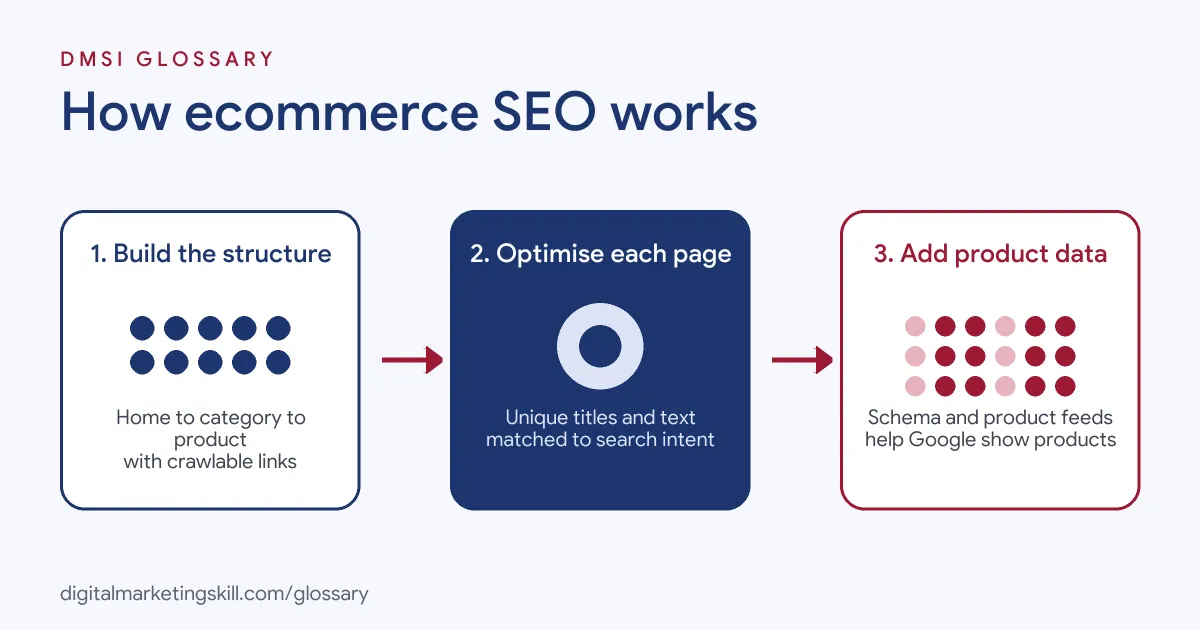
Ecommerce SEO works in three main layers. First you build a clear site structure, then you optimise each page, and finally you help Google understand your products with data. Each layer supports the next one.
Site Structure and Navigation
A good shop is built like a tree. The home page links to categories, categories link to sub-categories, and those link to products. Google advises you to “add links from menus to category pages, from category pages to sub-category pages.” Also, Google says, “It’s strongly recommended to link to all products that you wish indexed.” So a product that can only be reached through the search box may never be found.
Category and Product Pages
Next comes the content on each page. Category pages often target broad terms, such as “running shoes”. By contrast, product pages target specific terms, such as a model name and size. So you use keyword research to match each page to the right search. Then you write a unique title, a helpful description and clear headings for each one.
Structured Data and Product Feeds
Finally, you describe your products in a format machines can read. Product schema markup tells Google the price, stock level and reviews. Google uses merchant listing markup “for pages where customers can purchase products from you.” In addition, many shops send a product feed through Google Merchant Center. Together, these help your products appear in shopping results.
Filters and Crawling
Filters are handy for shoppers. However, every filter can create a new URL. Google warns that faceted navigation “can generate infinite URL spaces which harms the website.” As a result, bots may waste time on near-copies of the same page. So you decide which filter pages deserve to rank and block or tidy up the rest.
Reviews and Helpful Content
Shoppers want proof before they buy. So reviews, size guides and clear photos all help. Also, they add fresh, unique text to pages that would otherwise look the same as a rival’s. Google even has a guide on writing product reviews for this reason. In short, the more a page helps a buyer decide, the more value it gives both people and search engines. Then, over time, those helpful pages tend to earn links and repeat visits too.
Examples of Ecommerce SEO
- A home goods store. The team finds that its “oak dining tables” category has no text at all. So they add a short guide to sizes and materials. Then the page gives shoppers and Google more to go on.
- A fashion shop with colour variants. Each colour of a dress had the same URL, so Google saw only one version. After that, the developers give each variant its own URL. Google advises that “each variant can be identified by a separate URL.”
- A sports retailer with many filters. An audit shows bots crawling thousands of filter combinations. So the team blocks low-value filter URLs in robots.txt. As a result, crawlers spend more time on real product pages.
Ecommerce SEO vs Standard Website SEO
| Point | Ecommerce SEO | Standard Website SEO |
|---|---|---|
| Main pages | Category and product pages | Service pages and blog posts |
| Page count | Often thousands of pages | Usually tens or hundreds |
| Main risks | Duplicate content, filter URLs, stock changes | Thin content, weak links |
| Key extras | Product schema, product feeds | Article or local business schema |
| Search intent | Mostly commercial and buying intent | Often informational intent |
How to Do Ecommerce SEO
- Map your categories. Plan a simple tree from home page to category to product. Keep every product a few clicks from the home page.
- Research keywords for each level. Match broad terms to categories and specific terms to products. Also, check search intent for each one.
- Write unique page content. Avoid copying the maker’s description. Instead, add sizes, uses and answers to common questions.
- Set clean URLs. Use short, readable URLs. Give each important variant its own URL.
- Add product structured data. Mark up price, stock and reviews. Then test it with Google’s Rich Results Test.
- Control filter URLs. Choose which filter pages can rank. Block or canonicalise the rest.
- Handle out-of-stock items. Keep the page live if the item returns. If it is gone for good, redirect to the closest product or category.
- Track results. Watch rankings, clicks and sales from organic search. Finally, improve the pages that are close to page one.
Best Practices for Ecommerce SEO
- Start with categories. Category pages often rank for the biggest buying terms, so give them real content.
- Link to every product. Make sure each product you want indexed has a crawlable link from a category page.
- Write for buyers. Answer the questions shoppers ask before they buy, such as fit, size and delivery.
- Use one main URL per product. Use a canonical tag when the same product appears under several paths.
- Keep pages fast. Compress product images, because slow pages lose both rankings and sales.
- Show real reviews. Reviews add helpful content and can appear in search results when marked up.
Common Mistakes to Avoid
- Copying maker descriptions. Many shops use the same text, so your page adds nothing new.
- Leaving categories empty. A grid of products with no text gives Google little to understand.
- Letting filters run wild. Endless filter URLs waste crawl time and create duplicates.
- Deleting out-of-stock pages. Removing them without a redirect throws away links and rankings.
- Hiding products behind search. If a product is only reachable through the search box, bots may miss it.
- Ignoring mobile users. Most shoppers browse on phones. So test every template on a small screen.
Where You’ll Use Ecommerce SEO at Work
Ecommerce SEO shows up in SEO manager, analyst and digital marketing roles, often next to platform skills such as Shopify. For example, real remote job listings say:
- “Experience with Ecommerce SEO and Shopify SEO is a plus.” (SEO Manager).
- “Good To Have: Experience with local SEO or eCommerce SEO.” (Digital Marketing Executive-SEO).
- “Experience in Ecommerce SEO and Shopify SEO will be considered a plus.” (SEO Analyst SR).
Learn It in the WordPress and SEO Track
You can learn ecommerce SEO, including shop structure and product optimisation, in the AI-Powered WordPress and SEO Specialist track. Every track includes a U.S. Project Internship from day one, with unlimited 1-on-1 mentoring.
Frequently Asked Questions
What is the most important page type in ecommerce SEO?
Category pages are often the most valuable. They target broad buying terms and link down to many products.
Do I need unique text on every product page?
Ideally, yes. However, on huge stores, start with your best sellers and most searched products first.
Does structured data improve rankings?
Not directly. Instead, it helps Google understand your products and can make your results richer and more clickable.
What should I do with out-of-stock products?
Keep the page live if the product will return. If it is gone for good, redirect it to a close match or its category.
Is ecommerce SEO different on Shopify or WooCommerce?
The principles are the same on every platform. Still, each one has its own settings for URLs, canonicals and product data.
Sources: Google Search Central: Ecommerce URL Structure Best Practices; Google Search Central: Ecommerce Website Navigation Structure; Google Search Central: Intro to Product Structured Data; Google Crawling Infrastructure: Managing crawling of faceted navigation URLs; remote job listings on Himalayas, Himalayas and Himalayas.