
Ahrefs is an online SEO and marketing platform that shows you which websites link to a site, which keywords bring it traffic and which technical problems hold it back. It runs its own web crawler and builds a large database from what it finds. As a result, you can study any website, not just your own. That makes it a common tool for SEO specialists, content teams and agencies.
Key Takeaways
- Ahrefs is a paid SEO platform with a free plan for websites you verify.
- Its best-known tools include Site Explorer, Keywords Explorer, Site Audit and Rank Tracker.
- It collects data with its own crawler, called AhrefsBot.
- Domain Rating (DR) is its score for the strength of a site’s backlink profile.
- Its numbers are estimates, so pair them with your own data from Google.
What Is Ahrefs?
Ahrefs is a set of tools for search marketing. At its core, it crawls the web and records pages, keywords and links. Then it lets you search that data. For example, you can type in a competitor’s domain and see which pages earn them the most search traffic.
Think of it like a map of the web. Google Search Console shows you the roads that lead to your own house. By contrast, Ahrefs tries to show you the roads that lead to every house on the street. So you can learn from what works for others.
Ahrefs describes itself as “an all-in-one marketing intelligence platform used by marketers, businesses and agencies around the world.” In addition to classic SEO, its homepage lists tools for content, reporting, local SEO and visibility in AI search.
Ahrefs also offers a free plan, formerly called Ahrefs Webmaster Tools. It gives “Free website analytics, technical audit & SEO metrics for your verified websites.” However, the free plan only covers sites you can prove you own.
Why It Matters
Why do marketers use Ahrefs? Mainly, because SEO decisions need data. For instance, before you write a new article, you want to know if people search for the topic. Also, before you chase links, you want to know which sites link to your rivals. Ahrefs puts both answers in one place. As a result, you can plan content and link building with evidence rather than hunches.
Who Uses Ahrefs
Many different people use Ahrefs. For example, SEO specialists use it to audit sites and track rankings. Also, content writers use it to find topics people search for. In addition, outreach teams use it to find sites that might link to them. Agencies, meanwhile, use it to report on client progress. Even business owners use the free plan to check the health of their own site. So you don’t need to be an expert to get value from it. However, the more you understand SEO, the more you will get out of the data.
How Ahrefs Works
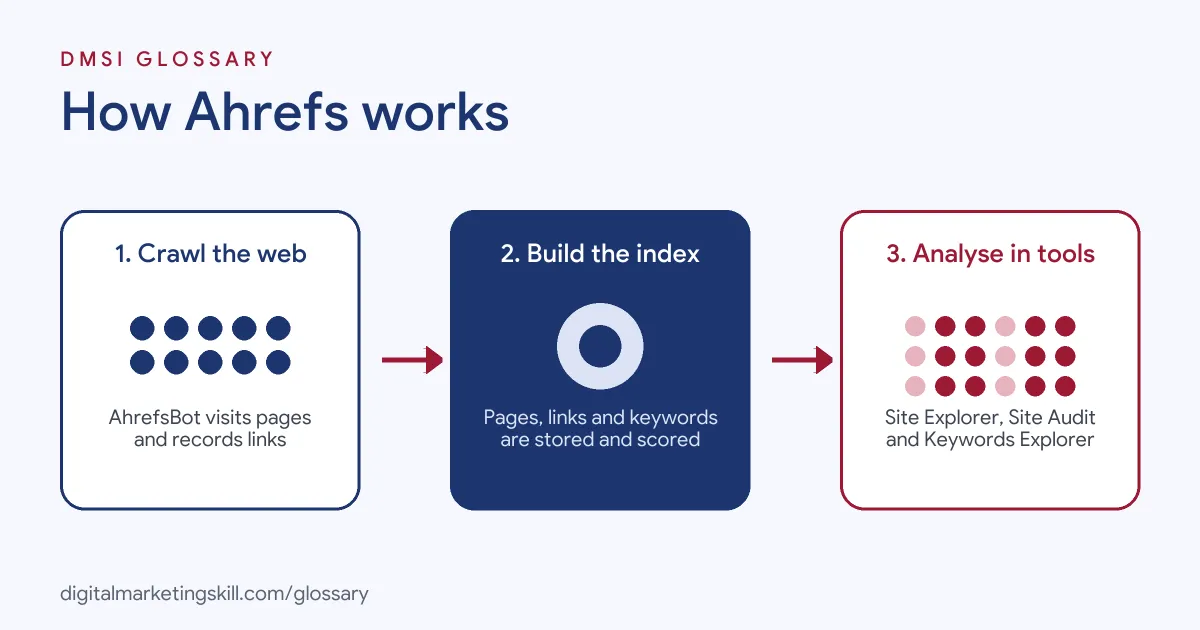
Ahrefs works in three main stages. First, it crawls the web. Then it builds an index of pages, links and keywords. Finally, its tools let you search and analyse that index.
Crawling the Web
Ahrefs runs a crawler called AhrefsBot. According to Ahrefs, it “indexes fresh, accurate information about websites and their content, and how they link to each other.” Even so, site owners can control it. For example, you can block it or slow it down with rules in your robots.txt file.
Building the Index
Next, Ahrefs stores what the crawler finds. It records each backlink, the page it points to and the anchor text used. In addition, it estimates how much search traffic each page gets and which keywords it ranks for. Note, though, that these traffic figures are models, not exact counts from Google.
Scoring Sites and Keywords
Then Ahrefs turns the data into scores. Its best-known score is Domain Rating. Ahrefs says “Domain Rating (DR) shows the strength of a website’s backlink profile compared to the others in our database on a 100-point scale.” Similarly, it gives each page a URL Rating (UR). For keywords, it shows search volume and a keyword difficulty score.
The Main Tools
Finally, you use the tools to answer questions. Site Explorer shows a site’s backlinks, top pages and organic keywords. Keywords Explorer helps with keyword research. Site Audit checks your site for technical and on-page issues. Also, Rank Tracker follows your positions for chosen keywords over time. On top of that, the platform lists tools for reporting, local SEO and tracking how brands appear in AI search.
Examples of Ahrefs in Use
- A small accounting firm. The owner enters a local rival’s site into Site Explorer. They find that the rival ranks for “tax return help”. So the firm writes a clearer guide on the same topic.
- An online pet supply shop. The SEO lead runs Site Audit and finds broken links and missing title tags. After that, the developer fixes the issues, and the next audit comes back cleaner.
- A marketing agency. The team checks which sites link to a client’s competitors. Then they build an outreach list of relevant blogs that don’t link to the client yet.
Ahrefs vs Google Search Console
| Point | Ahrefs | Google Search Console |
|---|---|---|
| Who owns the data | Ahrefs, from its own crawler | Google, from its own search data |
| Sites you can study | Any website | Only sites you verify |
| Traffic numbers | Estimates from models | Real clicks and impressions from Google |
| Backlink data | Large index with scores such as DR | A sample of links Google knows about |
| Cost | Paid plans, plus a free plan for verified sites | Free |
In practice, most SEOs use both. Google Search Console gives real data for your own site, while Ahrefs adds the view of competitors.
How to Use Ahrefs
- Create an account. Sign up on the Ahrefs site. If you only need data on your own site, start with the free plan.
- Verify your website. Add your site and follow the steps to verify it, so Ahrefs knows you own it.
- Run a Site Audit. Let it crawl your site. Then fix the most serious issues first.
- Check your backlinks. Open Site Explorer and review who links to you. Also, look for lost links you could win back.
- Study a competitor. Enter a rival’s domain and view their top pages and keywords. This is a quick form of competitor analysis.
- Find keywords. Use Keywords Explorer to check search volume and difficulty for new topics.
- Track your rankings. Add your main keywords to Rank Tracker and review progress each month.
Best Practices for Using Ahrefs
- Treat numbers as estimates. Traffic and volume figures are models, so compare them with your own analytics.
- Focus on trends. A rising or falling line tells you more than one number on one day.
- Don’t chase DR alone. DR is Ahrefs’ own score, not a Google ranking factor.
- Start with your own site. Fix audit issues before you spend time on competitor research.
- Pick a few key reports. The tool has many features, so learn the ones that match your goals first.
- Save your work. Use projects and saved lists, so your research is easy to repeat.
Common Mistakes to Avoid
- Thinking DR is a Google metric. Google doesn’t use Ahrefs scores, so a high DR doesn’t guarantee rankings.
- Trusting traffic estimates blindly. Your real traffic is in your analytics, not in a third-party model.
- Fixing every audit warning. Some issues matter far more than others, so prioritise by impact.
- Copying competitors exactly. Use their data for ideas. However, still write content that serves your own audience.
- Blocking AhrefsBot by accident. If you block it in robots.txt, Ahrefs may show less data about your site.
Where You’ll Use Ahrefs at Work
Ahrefs shows up in SEO, content and outreach roles, often listed next to other SEO tools. For example, real remote job listings ask for people who can:
- “Track and analyze performance using tools like Google Analytics, Search Console, SEMrush, Ahrefs, and Screaming Frog.” (SEO Specialist).
- “Perform a thorough audit and develop a strategy using Ahrefs and Semrush” (Outreach Specialist).
- “Familiarity with SEO tools (e.g., SEMrush, Ahrefs, Moz, or similar).” (SEO Internship).
Learn It in the WordPress and SEO Track
You can learn to use SEO tools such as Ahrefs in the AI-Powered WordPress and SEO Specialist track. Every track includes a U.S. Project Internship from day one, with unlimited 1-on-1 mentoring.
Frequently Asked Questions
Is Ahrefs free?
Ahrefs has paid plans. However, it also offers a free plan with site audit, analytics and SEO data for websites you verify.
What is Domain Rating in Ahrefs?
Domain Rating (DR) is Ahrefs’ score for the strength of a site’s backlink profile. It runs on a scale from 0 to 100.
Is Ahrefs data accurate?
Its link data comes from its own crawler, and its traffic numbers are estimates. So use them for comparison and trends, and check real results in your own analytics.
What is AhrefsBot?
AhrefsBot is the crawler Ahrefs uses to collect data about pages and links. You can control it with rules in your robots.txt file.
Do I need Ahrefs to do SEO?
No. You can start with free tools such as Google Search Console. Still, tools like Ahrefs make competitor and backlink research much faster.
Sources: Ahrefs: AI Marketing Platform Powered by Big Data; Ahrefs: Ahrefs Bots; Ahrefs Help Center: What is Domain Rating (DR)?; Ahrefs: Free SEO Tools to Grow Your Site; remote job listings on Himalayas, Himalayas and Himalayas.