Website optimisation skills are the abilities that help a site get found, load fast, work for every visitor and turn visits into sales or leads. The five core skills are technical SEO, page speed, mobile and accessibility, on-page content, and conversion optimisation. Learn them in the order your own site leaks visitors, not in the order a course lists them.
Key Takeaways
- Most sites fail the basics. The HTTP Archive Web Almanac found that only 48% of mobile websites and 56% of desktop websites pass all three Core Web Vitals.
- Accessibility is the widest gap. WebAIM’s scan of one million home pages found detected WCAG failures on 95.9% of them, with low-contrast text on 83.9%.
- Speed pays when it touches the sale. A Google-commissioned study of 37 brand sites found that a 0.1-second mobile speed gain lifted retail conversions by 8.4%.
- Mobile is half the web. StatCounter puts mobile at 49.36% of worldwide page views, and Google indexes the mobile version of your site first.
- Order beats effort. Website optimisation skills pay off fastest on the stage that loses the most visitors. That is the decision rule this guide teaches.
In this guide
- Why Most Advice on Website Optimisation Skills Gets the Order Wrong
- How a Website Turns a Search Into a Sale
- Five Website Optimisation Skills and What Each One Is Built For
- What to Lead With in Each Skill
- How to Measure Website Optimisation Skills in Action
- The Decision Rule: Fix the Leakiest Stage First
- What Real Results Look Like
- Frequently Asked Questions About Website Optimisation Skills
- Build Website Optimisation Skills With Guided Practice
Why Most Advice on Website Optimisation Skills Gets the Order Wrong
Most guides to website optimisation hand you a checklist of 20 or 30 tasks. Compress images, write meta descriptions, add alt text, test your buttons. Each task is sound. But the list never says which task matters most on your site. So beginners spend weeks on work that moves nothing.
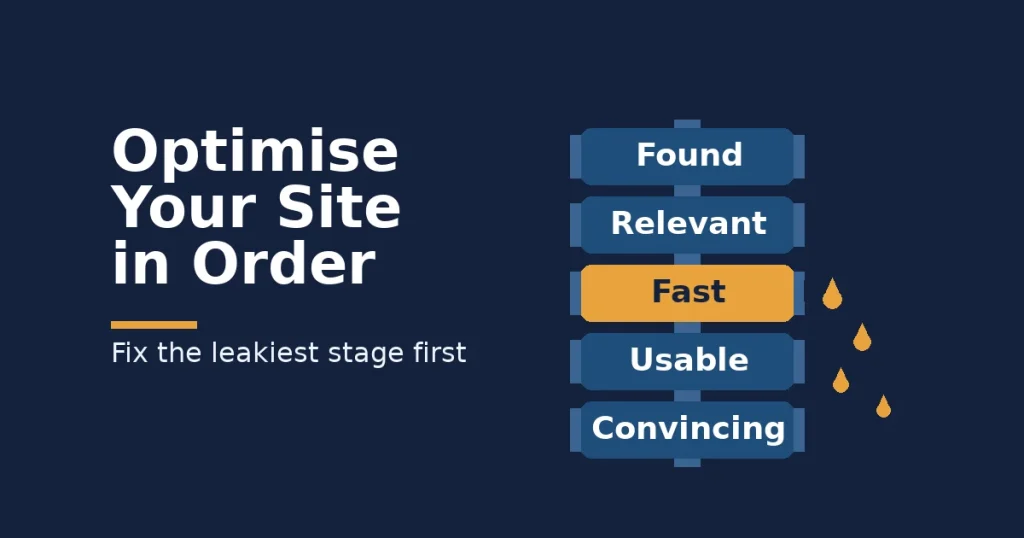
What is missing is a sequence. A website works like a chain, and a chain breaks at its weakest link. So the useful question is not “what are all the website optimisation skills?” Instead, ask “which stage is losing my visitors, and which skill fixes it?”
This guide fills that gap in five steps. First, it explains how a visit becomes a sale. Then it shows what each skill is built for, where to start in each one and how to measure it. Finally, it gives you one decision rule to choose where to start.
Ground Rules and Limits
Three limits apply to everything below. First, Google does not publish the weight of each ranking signal. So any claim about exact ranking gains is an informed inference, not a settled fact. Second, web-wide figures such as speed pass rates move over time. Treat them as a snapshot, not a permanent ranking.
Third, most speed and conversion studies come from large brands with heavy traffic. Their results show direction and size, but your own numbers will differ. That is why this guide pairs every tactic with a way to measure it on your own site.
How a Website Turns a Search Into a Sale
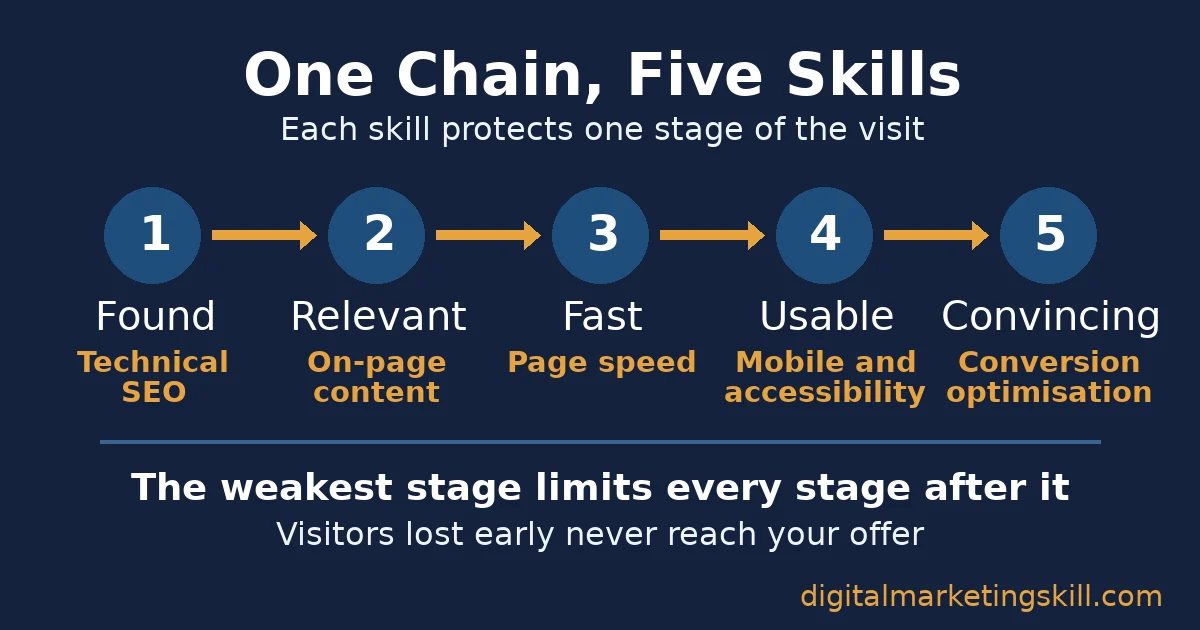
A website earns a result through five stages in a fixed order. Google’s guide to how Google Search works describes the first stage in three steps. Crawling means discovering pages, indexing means storing and understanding them, and serving means showing them in results. Google also states that it does not guarantee it will crawl, index or serve any page.
- Found: search engines can crawl and index the page, so it can appear at all.
- Relevant: the page answers the searcher’s real question, so it earns the click and the ranking.
- Fast: the page loads and responds quickly, so the visitor stays.
- Usable: the page works on a phone, with a screen reader and for every visitor, so nobody hits a wall.
- Convincing: the page makes the next step clear and safe, so the visitor buys, books or signs up.
The stages multiply rather than add, which is why website optimisation skills work best in order. If only half your visitors stay past the first screen, every later improvement works on half the traffic. That is why the weakest stage limits the whole site, and why fixing it first gives you the biggest return for the hours you have available each week.
Most Pages Fail Before Speed Ever Matters
Scale shows how rarely pages clear the first two stages. Ahrefs, an SEO tool company, studied about 14 billion pages. It found that 96.55% get no traffic from Google at all. It named three main reasons: no search demand for the topic, no backlinks and a mismatch with what searchers want. In other words, most pages fail at “found” or “relevant” before speed ever matters.
Five Website Optimisation Skills and What Each One Is Built For
Each of the five website optimisation skills protects one stage of the chain. That stage tells you when the skill deserves your time. So each heading below states what the skill is built for.
Technical SEO: Built for Being Found
Technical SEO covers the parts of a site that search engines read but visitors rarely see. It includes crawlable links, a clean sitemap, correct redirects and pages that are allowed into the index. Because Google indexes the mobile version first, it also includes content parity between phone and desktop.
Google’s mobile-first indexing documentation says that Google uses the mobile version of a site’s content for indexing and ranking. So if your mobile layout hides text or links that desktop shows, Google might never see them.
Page Speed: Built for Keeping the Visit
Page speed decides whether a visitor waits or leaves.
Google measures it with three Core Web Vitals. Largest Contentful Paint is how long the main content takes to appear. Interaction to Next Paint is how fast the page reacts to a tap, and Cumulative Layout Shift is how much the layout jumps. A page passes at 2.5 seconds, 200 milliseconds and 0.1, measured across most real visits.
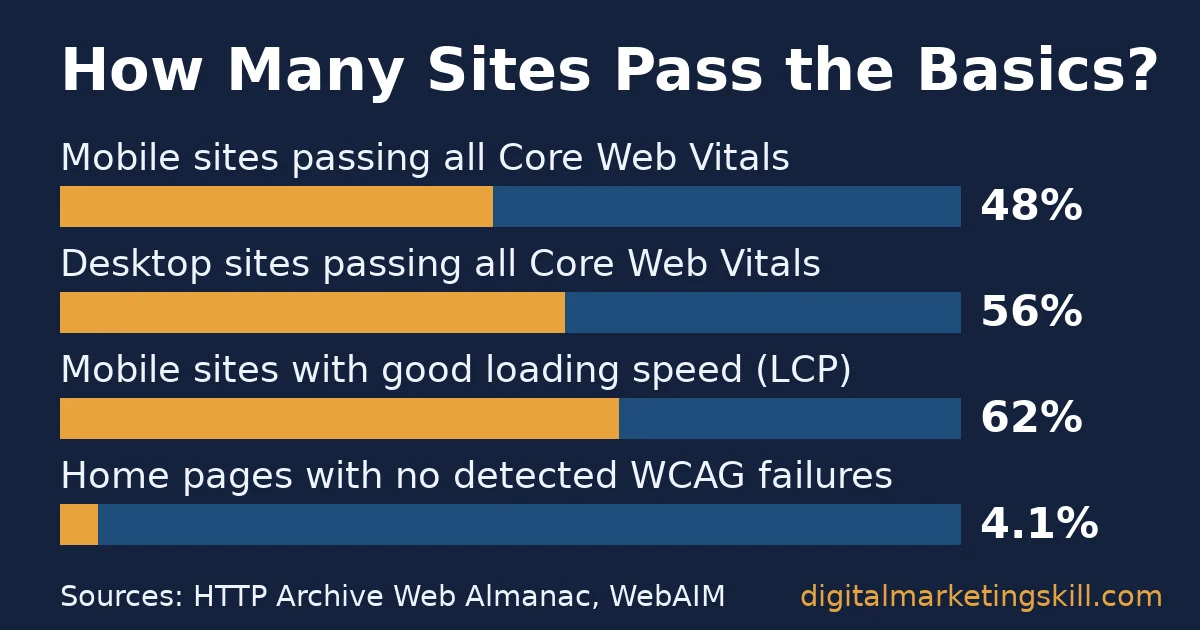
Most sites still miss that bar. The HTTP Archive Web Almanac analysed real Chrome user data across millions of websites. Only 48% of mobile sites and 56% of desktop sites pass all three metrics. Loading speed was the hardest one on mobile, where just 62% passed.
Mobile and Accessibility: Built for Every Visitor
This skill makes a page usable on any screen and for people who use assistive technology. It covers readable contrast, image alt text, labelled forms, thumb-sized tap targets and clear buttons.
StatCounter’s platform market share data shows mobile at 49.36% of worldwide page views. So a site that only works on desktop fails half its audience. Our guide to mobile-friendly SEO covers the layout checks that matter most on small screens.
Accessibility is where the web falls furthest short. The WebAIM Million scan of one million home pages found detected WCAG failures on 95.9% of them. The average page had 56.1 errors, and each one can block a real visitor who uses a screen reader, a keyboard or a small phone. Automated scans catch only some problems, so the real figure is likely higher, not lower.
Content and On-Page SEO: Built for Relevance
On-page SEO makes each page the best answer to one search. It starts with search intent, which means what the searcher actually wants. Then it covers titles, headings, internal links and depth. Our guide to the anatomy of an optimised page walks through each element.
Relevance also outranks speed in Google’s own words. Google’s page experience guidance says its systems always seek the most relevant content, even when page experience is sub-par. So a slow page that answers the question can still beat a fast page that does not.
Conversion Optimisation: Built for Turning Visits Into Action
Conversion rate optimisation, or CRO, raises the share of visitors who take the action you want. It covers clear offers, short forms, trust signals, honest pricing and testing one change at a time. Our conversion rate optimisation guide explains the testing method in more depth.
Checkout is where this skill earns the most. Baymard Institute, which studies e-commerce usability, reports an average documented cart abandonment rate of 70.22% across 50 studies. Its survey covers US online shoppers only. Among those who abandoned, 40% blamed extra costs such as shipping and fees, and 17% blamed a long or complicated checkout.
What to Lead With in Each Skill
Every skill has one task that usually moves the most, because it fixes the most common failure. Start with that task, measure it, and only then work down the longer list.
Technical SEO: Lead With the Indexing Report
Open the Page indexing report in Google Search Console and read the reasons pages are not indexed. Fix pages that you want in search but that are blocked, redirected or marked as duplicates.
Then submit a clean sitemap, so Google can find the pages you care about without wasting its crawl on old tags, test pages and duplicate archives. This takes an afternoon on a small site and protects every other skill.
Page Speed: Lead With Your Largest Image
On most pages, the main image is the element that sets Largest Contentful Paint. So resize it to its display width and compress it to a modern format such as WebP. Also, never lazy-load it. Our guide to increasing website page speed covers caching and scripts once the image is fixed.
A second study shows why this order works. Google commissioned 55 and Deloitte to run Milliseconds Make Millions. The study tracked 37 European and American brand sites across more than 30 million mobile sessions. A 0.1-second speed gain lifted retail conversions by 8.4% and travel booking rates by 10%. Google paid for the study, and it covers large brands, so read it as direction, not a promise.
Mobile and Accessibility: Lead With Contrast and Alt Text
WebAIM found that six error types cause 96% of detected problems. Low-contrast text appeared on 83.9% of home pages. Missing alt text hit 53.1%, and missing form labels hit 51%. So fix contrast, add alt text that describes each image and label every form field before anything else. Then test the page on a real phone with your thumb, because a desktop preview hides most tap problems.
Content and On-Page SEO: Lead With Search Intent
Search your target phrase and read the top results before you write a word. If they are all guides, a sales page will struggle. If they are all product pages, a long essay will struggle.
Match the format first, then beat the results on depth and clarity by answering the follow-up questions that the top pages leave out or only half answer. After that, rewrite the title and opening so they answer the question in the first two sentences.
Conversion Optimisation: Lead With the Checkout or Form
Walk through your own checkout or contact form on a phone. Count every field and every surprise. Show full costs early, allow guest checkout and remove any field you do not use. Baymard estimates that better checkout design alone could lift the average large e-commerce site’s conversion rate by 35.26%. That estimate covers large retailers, not small sites. Still, it shows where the leverage sits.
How to Measure Website Optimisation Skills in Action
You prove website optimisation skills with numbers, not with a green score in a plug-in. Track one metric for each stage of the chain. Check it before you change anything, then compare the same period afterwards.
- Indexed pages: the count of your important pages that Google has stored. Read it in the Search Console Page indexing report; it should match the pages you want found.
- Impressions and click-through rate: how often your pages appear in results, and the share of views that earn a click. Rising impressions mean better relevance, while rising click-through means better titles.
- Core Web Vitals pass rate: the share of your pages that meet all three thresholds for real visitors. Read the Search Console Core Web Vitals report by device, because mobile usually fails first.
- Engagement rate: the share of sessions that count as engaged. In Google Analytics, an engaged session lasts over 10 seconds, has a key event or includes two or more page views.
- Accessibility errors: the number of automated errors on your key templates. Aim for zero on the home page, product pages and forms, then check the rest by hand.
- Conversion rate: the share of sessions that complete your main goal, such as a sale, booking or lead. This is the number that pays for every other fix.
Read the Numbers Together, Not One at a Time
Read these metrics as a chain, not as separate scores, because website optimisation skills work on the whole chain.
For example, if engagement rises but conversions stay flat, the leak has simply moved down to your offer or form. A falling engagement rate after a redesign usually points to speed or usability, so check the Core Web Vitals report for the same pages before you blame the content. Also give search changes time. Google’s own starter guide says some changes take effect in hours, while others take several months.
The Decision Rule: Fix the Leakiest Stage First
This is the most useful idea in the guide, so it gets its own section. Website optimisation skills pay back fastest on the stage that loses the largest share of its visitors.
Decision rule: measure the pass rate at each stage of your chain. Find the stage furthest below a sensible target, and fix it until it stops being the weakest link.
A Worked Example
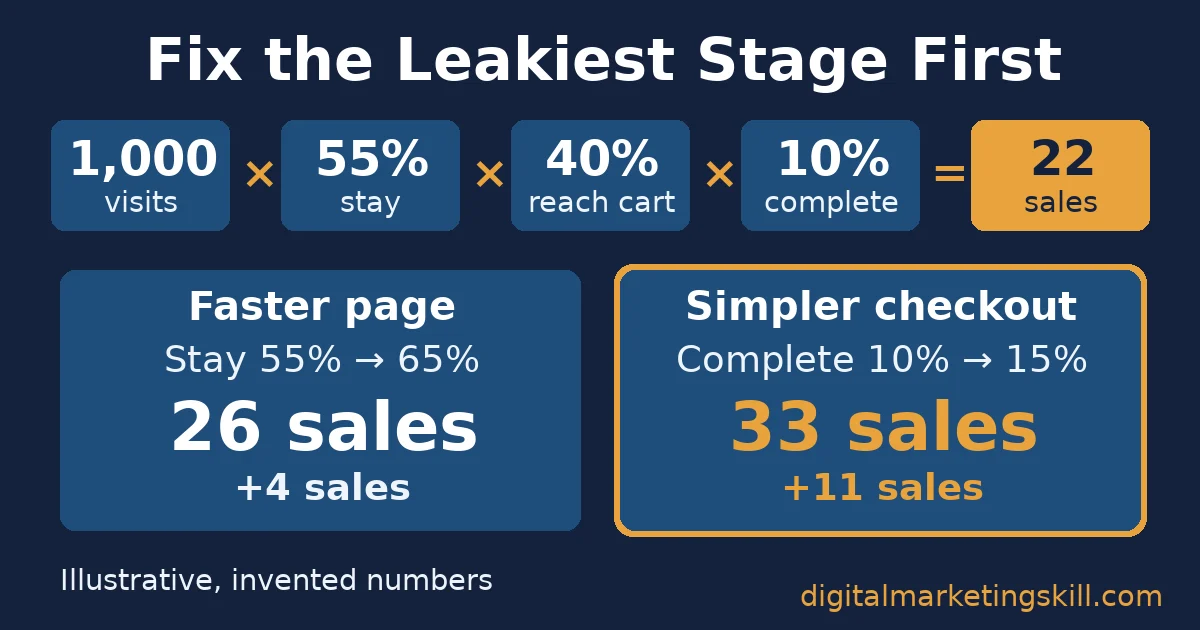
Here is an illustrative, invented example. A small online shop gets 1,000 visits a month from search. Of those, 55% stay past the first screen, 40% of those reach the checkout and 10% of those complete it. So the shop makes 1,000 × 0.55 × 0.40 × 0.10 = 22 sales.
Now compare two fixes. A faster page that lifts the stay rate from 55% to 65% gives 26 sales, a gain of four. A simpler checkout that lifts completion from 10% to 15% gives 33 sales, a gain of 11. So the checkout comes first, even though speed work feels more technical and impressive.
The same logic works in reverse. If only 20% of visitors stayed past the first screen, speed and mobile usability would come first instead. The skill to learn next is always the one that fixes your weakest stage.
What Real Results Look Like
Vodafone ran one of the cleanest public tests of this chain, and Google published it as a web.dev case study. It split paid traffic 50/50 between an optimised landing page and the original. The team rendered key HTML on the server, cut render-blocking JavaScript and compressed images.
As a result, Largest Contentful Paint improved by 31%. The faster page produced 8% more sales, 15% more leads per visit and 11% more cart visits.
The limits matter. Vodafone redacted its absolute numbers, and one other speed metric actually got 15% worse on the optimised page. The test covers one large brand’s paid landing page. So it shows that speed can move sales, not how much it will move yours.
Our own students show the same website optimisation skills at a smaller scale. Esther Elueme wrote on our student reviews page about building a website within a month. They also ran scheduled ads and optimised a page for keyword search on Google.
Another student, Abimbola Fafiolu, wrote that they could “build a functioning website that rank in google”. These are self-reported student comments, not audited results, and your outcome depends on your own effort and market.
Frequently Asked Questions About Website Optimisation Skills
What are website optimisation skills?
Website optimisation skills help a website get found in search, load quickly, work for every visitor and convert visits into sales or leads. The five core areas are technical SEO, page speed, mobile and accessibility, on-page content, and conversion rate optimisation.
Which website optimisation skill should a beginner learn first?
A beginner should first learn to read Google Search Console and Google Analytics. Those tools show which stage of a site loses visitors. After that, learn the skill that fixes the weakest stage, often content for new sites and checkout design for shops.
Is website optimisation the same as SEO?
No, SEO is one part of website optimisation. SEO helps a page get found and ranked. Website optimisation also covers speed, usability, accessibility and conversion, which decide what happens after the click.
Do Core Web Vitals affect Google rankings?
Yes, Google states that its ranking systems use Core Web Vitals, but it also says it always seeks to show the most relevant content even when page experience is poor. So speed helps most when your content is already as relevant as your competitors’ pages.
How long does website optimisation take to show results?
Speed and conversion fixes can show results within a few weeks of normal traffic, because you measure them on visitors you already have. Search ranking changes are slower, and Google says some take hours while others take several months.
Do I need to code to optimise a website?
You do not need to code for most tasks, because content management systems like WordPress handle titles, images, redirects and forms through settings and plug-ins. Coding helps for deeper speed work, such as reducing JavaScript or rendering pages on the server.
Build Website Optimisation Skills With Guided Practice
The fastest way to build website optimisation skills is to practise them on a real site with someone checking your work. That is exactly how the Master Diploma in Digital & AI Marketing at Digital Marketing Skill Institute works. Its nine practical courses include AI-Powered WordPress Website and eCommerce Development, AI-Powered Search Engine Optimisation and Content Marketing, and AI-Powered Google Analytics.
You also get unlimited 1-on-1 coaching and mentoring, plus real project work inside a U.S. company. The diploma is dual US and UK accredited, recognised in more than 100 countries and 100% online, so you can study from anywhere in your country. Wherever you live, the method stays the same: find your weakest stage, fix it and measure it.
Start with one site and one stage, then expand. When you are ready, apply for the Master Diploma, read more guides on the Digital Marketing Skill blog, or see how an SEO expert proves their skills. You can also explore every programme from the Digital Marketing Skill Institute home page.
How We Checked This Guide
Digital Marketing Skill Institute wrote this guide from primary sources: Google’s own documentation, the HTTP Archive Web Almanac, WebAIM, StatCounter and published case studies. We opened each source before quoting it, and we name each study’s size, sponsor and limits next to its figures.
Every figure in this guide was checked against its original source before publication. Figures marked as illustrative are invented examples, not real results.
![9 Amazing Digital Marketing Skills to Make Money Online [With Proof]](https://digitalmarketingskill.com/wp-content/uploads/2019/07/9-Amazing-Digital-Marketing-Skills-to-Make-Money-Online-With-Proof-17.png)