
Content writing tools are software built to help with one or more stages of writing. They can generate ideas, draft, edit, optimize for search, or organize a workflow. The right set speeds up the work without flattening your voice. This guide groups tools by the job they do, not by a ranked popularity list, so you can pick tools that fit your actual bottleneck.
Key Takeaways
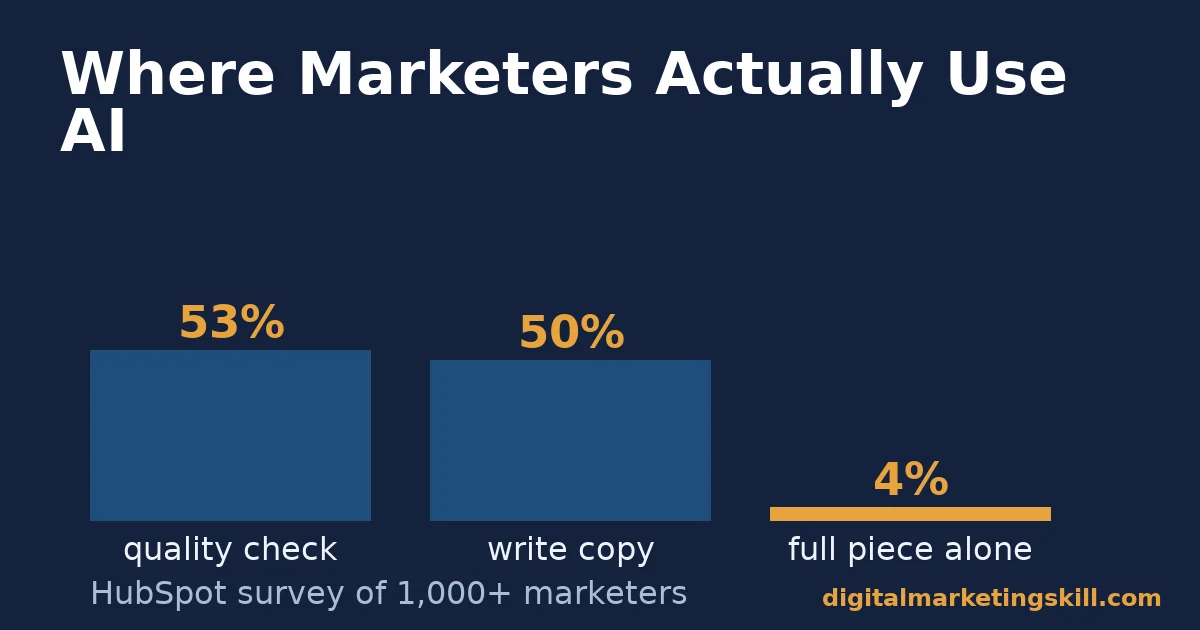
- Most marketers already use AI tools, but narrowly. HubSpot’s survey of over 1,000 marketing professionals found 52% use generative AI for text-based content. Only 4% let it write a full piece unsupervised.
- Quality checking is the most common AI use case. The same survey found 53% use AI specifically for quality assurance, such as spellcheck, accessibility review or writing recommendations. That is ahead of drafting itself.
- Confidence in AI output is low. Only 46% of surveyed marketers feel confident identifying inaccurate information an AI tool produced. Human review still matters most at the editing stage.
- Long-form content still needs real research tools. Backlinko’s analysis of 912 million blog posts found 94% of posts earn zero external links. That tracks with content that skips genuine research in favor of speed.
- A tool is worth paying for only if it fixes your actual bottleneck. The categories below map directly to the five places most writing workflows slow down: ideas, drafts, edits, optimization and organization.
In this guide
- What Most “Best Content Writing Tools” Lists Get Wrong
- How Content Writing Tools Fit the Writing Process
- Content Writing Tools Change By What Stage They Solve
- How to Evaluate a Tool in Each Category
- Common Mistakes Teams Make When Buying Content Writing Tools
- Free vs Paid Content Writing Tools
- Organization Tools: The Category Most Lists Skip
- How to Measure Whether a Content Writing Tool Is Worth Paying For
- The One Rule: Buy for the Bottleneck You Actually Have
- A Worked Example: When Editing Tools Cannot Fix a Structure Problem
- Frequently Asked Questions About Content Writing Tools
- Put This Into Practice
What Most “Best Content Writing Tools” Lists Get Wrong
Most roundups rank tools by brand recognition or affiliate payout, not by the actual writing problem they solve. That approach ages badly. Software features, pricing and quality change faster than any list can track. A tool that was best in class a year ago may have fallen behind. A newer entrant may now do the same job for less.
This guide skips the ranking and focuses on categories instead. It covers what job each type of tool does, how to judge whether a specific tool in that category is worth adopting, and what to measure once you have one. Treat specific product names here as examples of a category, not a permanent recommendation, because the market shifts constantly and your own workflow is the real test.
How Content Writing Tools Fit the Writing Process
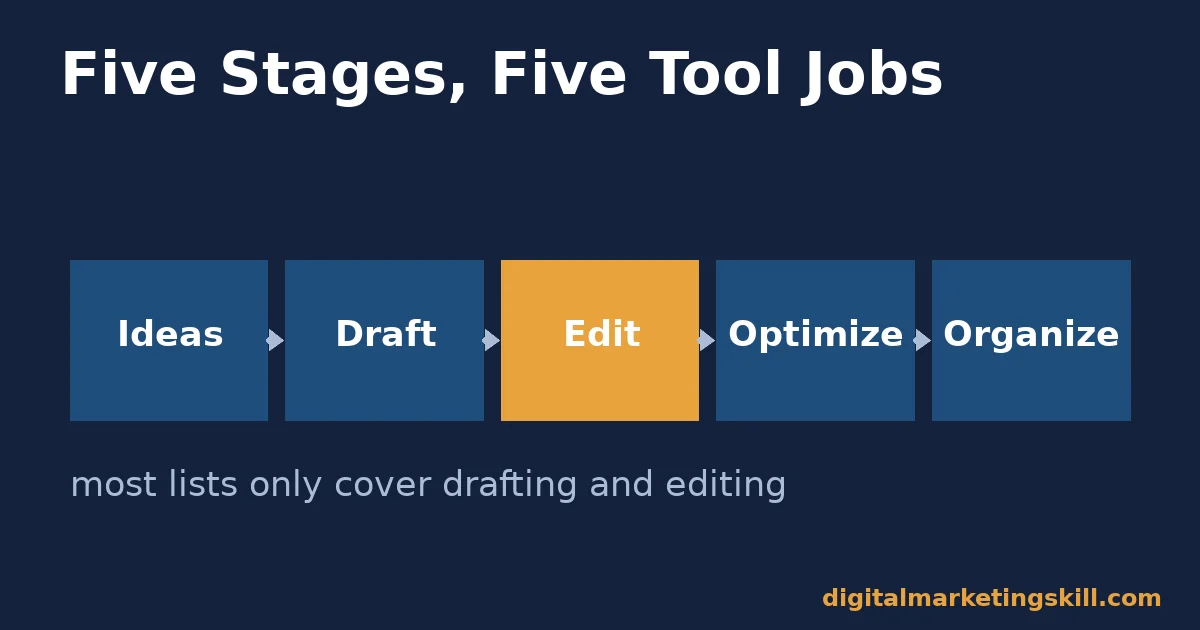
Writing is not one task. It is five, done in sequence. You generate ideas, draft, edit, optimize for the reader and the search engine, and organize the output so it actually gets published on schedule. A tool built for one stage rarely does another stage well. That is why a single “best” list across all five stages misleads more than it helps.
Each stage also fails differently when it is skipped. Skipping ideation means writing confidently about a topic nobody searches for. Skipping editing lets small errors undercut an otherwise strong argument. Without organization, even excellent drafts never make it to publication on a predictable schedule. Knowing which stage you tend to skip is often more useful than knowing which tool is popular this month.
Matching a tool to its stage also controls cost. Paying for an all-in-one suite to solve a problem that only shows up in one stage, usually editing, wastes budget on four stages you did not need help with. Diagnose the actual bottleneck first, the same way you would diagnose a slow process anywhere else in the business, before buying anything. A clear content brief often removes the ideation bottleneck entirely, before any tool purchase is needed.
Content Writing Tools Change By What Stage They Solve
Not every writer needs the same stack. A solo blogger, a small content team and an SEO-focused agency each hit different bottlenecks first. Splitting tools into categories keeps the choice matched to the actual problem, instead of the one that gets the most marketing attention.
Ideation Tools: Built to Beat the Blank Page
These tools surface topics, angles and questions real searchers ask. They pull from search data, forums or AI pattern-matching, and they solve the problem of not knowing what to write about. Writing it well is a separate problem they do not solve.
Drafting and AI Assistants: Built for Speed, Not Final Copy
These generate a first pass: an outline, a few paragraphs, or a full rough draft to edit against. HubSpot’s data shows only 4% of marketers trust AI to write a finished piece alone. Treat drafting tools as a starting point. A human still has to rewrite and verify the output against Google’s own standard for people-first content.
Editing and Grammar Tools: Built to Catch What You Missed
These check grammar, clarity, tone and readability. They flag what a tired human eye skips on the fifth read-through. They are the most commonly used AI category in HubSpot’s data, ahead of drafting itself. Catching errors is a narrower, more reliable job for software than generating original ideas.
SEO and Optimization Tools: Built to Match Search Intent
These check keyword usage, readability scores, internal linking and technical SEO signals against what ranks right now. Tools such as Semrush’s keyword research toolkit and Ahrefs’ keyword generator fall in this category. They do not write the content. They tell you where a finished draft falls short of what a search engine and a reader both expect.
How to Evaluate a Tool in Each Category
Each category above needs a different test before you pay for it. The sections below mirror the four categories. They turn the diagnosis into a specific question to ask during a trial.
Ideation Tools: Test Whether It Surfaces Real Demand
Run your actual topic area through the tool. Check whether the suggestions match real search volume and genuine reader questions, not just generic variations of your seed keyword. A good ideation tool should surface at least a few angles you had not already considered.
Drafting Tools: Test How Much Rewriting It Actually Saves
Generate a draft on a topic you know well. Time how long the rewrite takes, compared with writing from scratch. If the edit takes nearly as long as an original draft would, the tool is not saving the time its price assumes.
Editing Tools: Test It Against Your Own Known Mistakes
Run a piece you already know has a specific weakness, a passive-voice habit, or a long-sentence problem, through the tool. See whether it catches that exact issue. A tool that only flags spelling misses most of what actually weakens B2B or technical writing.
SEO Tools: Test It Against a Page You Know Ranks
Run a competitor page you know ranks well through the tool. See whether its scoring matches reality. A tool that scores a top-ranking page poorly is measuring the wrong signals for your niche.
Common Mistakes Teams Make When Buying Content Writing Tools
Most wasted tool budgets fail for one of a few repeated reasons, not a long and varied list of problems. That is useful news, because a short audit of your current stack usually finds the actual waste faster than a full re-evaluation would. Check your own stack against each one below before you add anything new.
- Buying the most talked-about tool first. The loudest tool in your feed is not necessarily the one that fixes your actual bottleneck. Diagnose the slow stage before you shop.
- Stacking three tools that do the same job. It is common to end up paying for two editing tools or two keyword tools that overlap almost completely. Audit your subscriptions against the five categories above and cut the duplicates.
- Trusting AI drafts without verification. Only 46% of marketers in HubSpot’s survey feel confident spotting inaccurate AI output, so an unverified AI draft is a liability, not a finished asset.
- Never retiring a tool once it stops earning its cost. Subscriptions renew quietly. Review the stack on a fixed schedule, not only when a bigger problem forces the question.
- Choosing a tool for features you will never use. An all-in-one suite priced for twenty features, when your team only needs three, is rarely the cheaper option it first looks like.
Free vs Paid Content Writing Tools
Every category above has a free tier worth trying before you pay for anything. Free content writing tools are usually rate-limited rather than feature-limited: a free grammar checker catches most of the same errors a paid one does, just with a cap on how much text you can run through it per day.
The gap widens as volume grows. A single writer publishing a few pieces a month rarely hits those limits. A team publishing daily will, and that is the point where paid content writing tools usually earn their cost, through higher limits, team collaboration features, or deeper analysis the free tier withholds. Test the free tier against your real workload first, rather than assuming the paid version is automatically worth it.
Watch for a specific trap with free tiers: a tool that is free today because it is still building a user base may introduce a paywall once your workflow depends on it. Before building a process around any single tool, check whether a reasonable alternative exists in the same category. That protects the workflow if pricing changes later, without forcing a rebuild from scratch.
Organization Tools: The Category Most Lists Skip
A fifth category rarely makes these lists, but it decides whether any of the others get used consistently. Workflow and calendar tools track what is due, who owns it, and what stage it is in. Without this, even a great drafting or editing tool only gets used sporadically, because nothing forces the writing to actually happen on schedule.
Our guide to building a content calendar covers setting this up without over-engineering it. A simple shared calendar beats an elaborate project-management system that nobody updates.
How to Measure Whether a Content Writing Tool Is Worth Paying For
A subscription is only worth it if it changes an outcome you can actually track. Measure the tool against your workflow before renewing it.
Four Metrics That Separate a Useful Tool From a Habit
- Time from brief to published draft. Track this per piece for a month before and after adopting a tool. A real drafting or editing tool should visibly shorten this, not just feel faster.
- Edit distance between the tool’s output and the final version. For AI drafting tools specifically, track roughly how much of the generated text survives into the published piece. A low survival rate means the tool is producing a false head start.
- Readability and error counts before and after. For editing tools, compare a sample of pieces run through the tool against a sample that was not. If the gap is small, the tool is not catching much your own proofreading would not.
- Search performance of optimized pieces. For SEO tools, compare rankings and impressions in Google Search Console for pieces built with the tool’s guidance against pieces written without it. Track this over at least a full quarter, because rankings move slowly.
Read these against the category, not against each other. A drafting tool that saves time but produces text that barely survives editing is not actually saving time, once you count the rewrite. An SEO tool with great scores but no ranking movement is optimizing for the wrong signal. Running a periodic content audit is a useful way to check whether a whole tool stack, not just one piece, is pulling its weight.
The One Rule: Buy for the Bottleneck You Actually Have
If you take one decision rule from this guide, make it this one. Identify which of the five stages, ideation, drafting, editing, SEO or organization, is genuinely slowing your output before buying anything. Most teams default to buying the flashiest AI drafting tool, even when their real bottleneck is an inconsistent publishing schedule a calendar tool would fix for a fraction of the cost.
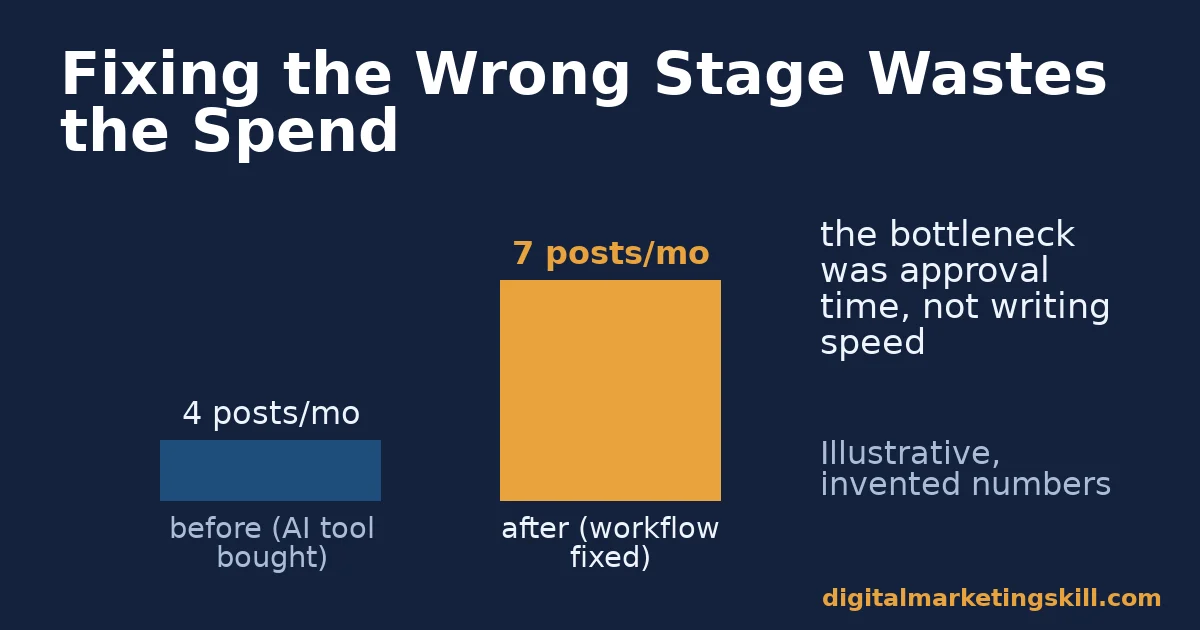
Here is an illustrative example, with invented numbers. A two-person content team publishes four articles a month and wants to double output. They buy an AI drafting tool first, assuming writing speed is the bottleneck. Output barely moves, because the real delay was an approval process that took eight days per article. They then fix the review workflow with a shared calendar and firm deadlines. Output rises to seven articles a month, without spending anything on new writing software.
The lesson generalises beyond this one team. A tool only fixes the stage it was built for, so buying it does nothing for a bottleneck sitting somewhere else in the process. Diagnosing the real stage first is cheaper than buying software and hoping.
A Worked Example: When Editing Tools Cannot Fix a Structure Problem
Here is a second illustrative example, again with invented numbers, because it shows a different failure mode than the budget example above. A solo blogger’s posts read cleanly at the sentence level. Every piece passes the editing tool with a near-perfect score, yet traffic stays flat month after month.
The blogger eventually runs a page that is already ranking well through the same editing tool. It also scores well, which rules out writing quality as the real gap. The actual problem turns out to be structure: competing pages answer the reader’s question in the first two sentences, while this blogger’s posts build up to the answer through several paragraphs of background first.
No editing tool was ever going to catch that, because sentence-level grammar and page-level structure are different problems. The blogger switches to an SEO tool that compares heading structure and opening-paragraph content against top-ranking pages, and traffic begins moving within a few weeks of applying the fix.
The lesson generalises past this one blogger. Pick the tool category that matches the actual gap, not the one you already own, because the right category for one weakness is often the wrong category for another. Running the diagnosis before the purchase, every time, is the habit that separates a stack that earns its cost from one that just accumulates subscriptions.
Frequently Asked Questions About Content Writing Tools
What are the best free content writing tools?
Free tiers exist across every category: basic grammar checkers, free keyword research tools with limited queries, and free-tier AI drafting assistants. They work well for occasional use. Most serious content teams eventually hit usage limits that make a paid tier worthwhile for at least one category.
Can AI writing tools replace a human writer?
Not reliably yet. HubSpot’s survey found only 4% of marketers trust AI to produce a finished piece without human rewriting. Just 46% feel confident spotting inaccurate AI output. Treat AI drafting as a starting point a person still verifies and rewrites.
Do I need separate tools for editing and SEO?
Usually yes, because they test different things. An editing tool checks grammar, clarity and readability. An SEO tool checks keyword usage and how a page compares with what ranks right now. A piece can read beautifully and still miss the search intent it needed to match.
How much should a small business spend on content writing tools?
Start with one tool for your single biggest bottleneck, rather than a full suite. Most of the value in a stack comes from the tool addressing your actual weak stage. The rest is often underused.
Are AI content writing tools accurate?
Not consistently. AI drafting tools can generate confident-sounding claims that are wrong. HubSpot’s data shows under half of marketers feel sure they can catch those errors. Always verify any statistic or claim an AI tool produces against its original source before publishing.
What is the difference between content writing tools and SEO content writing itself?
Content writing tools are the software that supports the process. SEO content writing is the skill and practice of structuring and writing content so it ranks. Our guide to SEO content writing covers that practice directly, independent of which tools you use.
Put This Into Practice
Content writing tools earn their cost only when they fix a bottleneck you have actually diagnosed. Audit your own five stages, ideation, drafting, editing, SEO and organization. Find the one that is genuinely slow, and trial one tool against that specific stage before buying a bundle.
If you want structured, hands-on practice across the whole process, the Digital Marketing Skill Institute teaches this inside its Master Diploma in Digital & AI Marketing. The program is built around four AI-powered tracks totalling ten courses, including the AI-Powered WordPress and SEO Specialist track, which covers content creation and optimization tools directly. Pick the Full Stack option to complete all four tracks under one additional certificate. Every track includes unlimited 1-on-1 coaching and mentoring, plus a U.S. Project Internship that ends with a verified U.S. Work Reference Letter. The diploma is dual US and UK accredited and recognised in more than 100 countries, and the whole program runs 100% online, so you can study from anywhere in your country.
Browse more guides on the Digital Marketing Skill Institute blog, or when you are ready, apply for the Master Diploma directly from digitalmarketingskill.com.
Every figure in this guide was checked against its original source before publication. Figures marked as illustrative are invented examples, not real results.
![9 Amazing Digital Marketing Skills to Make Money Online [With Proof]](https://digitalmarketingskill.com/wp-content/uploads/2019/07/9-Amazing-Digital-Marketing-Skills-to-Make-Money-Online-With-Proof-17.png)






