
Lead scoring is a way of ranking your leads by giving them points for who they are and what they do, so you can see who is most likely to buy. A lead who fits your ideal customer and keeps engaging rises to the top, while a poor fit sinks. It matters because sales teams have limited time, and a clear score tells them which people to call first.
Key Takeaways
- Lead scoring adds or subtracts points based on a lead’s details and actions. The total shows how ready they are.
- Most systems use two kinds of score: fit, which looks at who the lead is, and engagement, which looks at what they do.
- Salesforce calls the fit side “grading” and the activity side “scoring”, then combines the two.
- HubSpot lets engagement points fade over time through score decay, so old activity counts for less.
- A score is only useful if sales and marketing agree on the threshold that triggers a hand-off.
What Is Lead Scoring?
Imagine you run a software company and 500 people download your free guide this month. Some are students. Others are managers at firms that could become big customers. You can’t call them all, so you need a quick way to sort them.
That’s the job of a scoring model. You decide which traits and actions matter, and you give each one a value. For example, a job title that matches your buyer might earn 15 points. Visiting your pricing page might earn 10. Unsubscribing from your emails might cost 20. Then the system adds everything up for each person.
Salesforce’s own guide gives a simple example of this logic. A lead who downloads a product demo should receive a higher score than one who only visited the home page. In other words, actions that show buying intent are worth more.
How Lead Scoring Works
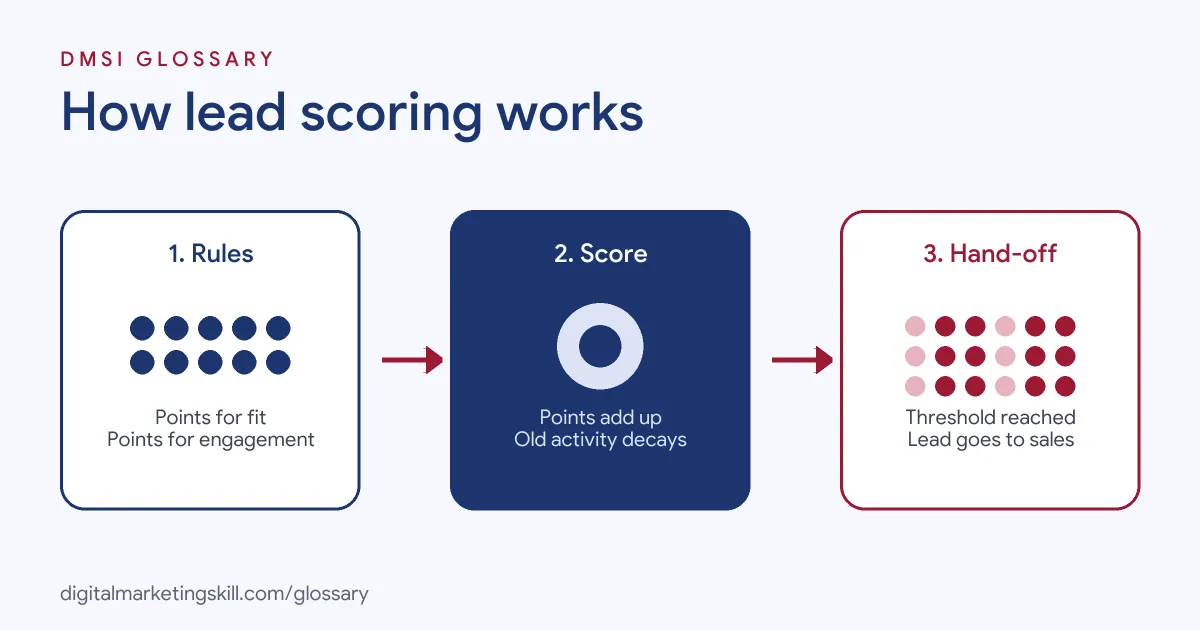
Most models follow the same three steps. First, you set rules for fit and engagement. Next, the system tracks each lead and updates the score as data comes in. Finally, when a lead crosses a set threshold, the system flags them or passes them to sales.
Fit and Engagement
HubSpot’s knowledge base describes two main types. Fit scores qualify records based on property values, such as job title, company size or country. Engagement scores qualify records based on actions, such as email clicks, form fills and page views. HubSpot also offers combined scores, which use both.
Salesforce uses different words for the same idea. Its Trailhead training explains that a score estimates interest, while a grade estimates fit, based on the prospect’s fields. For instance, it gives the example of raising a grade by one letter when the job title matches a target role.
Points, Limits and Decay
In HubSpot, each rule can add or subtract points. You can also set a score limit, which is the most points a record can earn, and group limits for each set of rules. These stop one type of action from taking over the total.
Engagement can also fade. HubSpot’s score decay reduces the value of an event based on how long ago it happened, with intervals of 1, 3, 6 or 12 months. As a result, someone who was active a year ago doesn’t look as hot as someone active this week.
Thresholds and Hand-offs
A score needs a cut-off point to be useful. According to Trailhead, once prospects reach a threshold, the system can assign them to a sales rep automatically. HubSpot gives a similar workflow example, which assigns an owner to unworked contacts who score over 50.
Lead Scoring Examples
- B2B software: A company gives 20 points for a job title such as “Head of Marketing” and 10 for a pricing-page visit. It sends anyone above 60 to sales for a demo call.
- Training provider: A school scores enquiries on country, course interest and webinar attendance. Leads who attend a live session and open three emails go to an adviser first.
- Agency: A marketing agency subtracts points for personal email addresses and student job titles. This keeps its sales team focused on businesses that can actually hire it.
These examples use made-up point values. Your own numbers should come from your data on which leads actually became customers.
Fit Score vs Engagement Score vs Combined Score
| Score type | What it measures | Typical inputs |
|---|---|---|
| Fit (or grade) | How closely a lead matches your ideal customer | Job title, industry, company size, location |
| Engagement (or score) | How interested the lead seems right now | Email clicks, page views, form fills, event attendance |
| Combined | Both at once | HubSpot labels these A1 to C3, where the letter shows fit and the number shows engagement |
In HubSpot’s combined labels, an A1 lead is a strong fit and highly engaged. That person is usually the first one sales should call.
How to Set Up Lead Scoring
- Study past customers. Look at who bought and what they did before buying. This gives you real evidence for your rules.
- Agree on definitions. Sit down with sales and agree what a qualified lead looks like.
- List fit criteria. Choose three to five traits, such as job title and company size, and give each a value.
- List engagement actions. Give more points to high-intent actions, such as a demo request, and fewer to light ones, such as a blog visit.
- Add negative points. Subtract points for poor signals, such as unsubscribing or working for a competitor.
- Set a threshold. Pick the score at which a lead goes to sales, and build a workflow to route it.
- Review results. Check whether high scorers really convert, then adjust the rules.
How to Check Your Model Works
A model is only a guess until you test it. So compare leads above the threshold with leads below it. If high scorers don’t turn into customers more often, your rules need work. Next, look at the leads sales rejected and ask why. Their answers often point to a missing fit rule or an action that earns too many points. Finally, check how quickly sales contacts high scorers, because a great score is wasted if nobody follows up.
Best Practices for Lead Scoring
- Start simple. A few clear rules are easier to test and explain than a long list.
- Use decay. Old activity should count less than recent activity, so scores reflect current interest.
- Keep fit and interest separate. A keen student and a quiet buyer need very different follow-ups.
- Get sales feedback. Salesforce recommends regular reviews and feedback from sales teams.
- Pair scores with nurture emails. Leads below the threshold still need useful content until they are ready.
Common Mistakes to Avoid
A common mistake is to give points for every click, which rewards curious browsers over real buyers. Another is to guess at values without checking past customer data. Many teams also forget negative scoring, so poor-fit leads still drift upwards. Finally, some set the model up once and never revisit it, even as products and markets change.
Where You’ll Use Lead Scoring at Work
Lead scoring is a core skill in marketing operations, automation and demand generation roles. For example, remote job listings ask candidates to:
- “Design, maintain, and refine lead scoring models, lifecycle stage definitions (MQL, SAL, SQL), and conversion handoffs between Marketing and Sales” (Manager Marketing Ops, Analytics and ABM).
- “Manage and optimize HubSpot’s CRM and marketing automation platform, including contact management, lead scoring, and segmentation” (HubSpot Specialist).
- Define “lead stages, lead scoring, routing, qualification criteria, service-level expectations, and feedback loops” (Demand Generation Manager).
So if you want to work as a Marketing Automation Specialist or Lead Generation Specialist, you will need to build scoring rules, connect them to workflows and prove they help sales.
Learn It in the Lead Generation Track
You can practise lead scoring in the AI-Powered Lead Generation and Email Automation track. There, you build a lead magnet and an automated email sequence that converts. You also work on a U.S. Project Internship from day one, with unlimited 1-on-1 mentoring.
For related reading, see our guide to lead conversion strategies and our article on how to capture, qualify and respond to leads fast. You can also read the basics of lead generation.
Frequently Asked Questions
What is lead scoring in simple terms?
It is a points system that ranks leads by how well they fit your ideal customer and how engaged they are, so sales can focus on the best ones first.
What is the difference between lead scoring and lead grading?
In Salesforce’s terms, a score measures interest from a lead’s activity, while a grade measures fit from details such as job title and company size.
What is a good lead score?
There is no universal number. Each business sets its own threshold, based on the score at which leads tend to become customers.
Can lead scores go down?
Yes. Rules can subtract points for poor signals, and HubSpot’s score decay lowers the value of older activity over time.
Which tools offer lead scoring?
Many CRM and automation platforms do, including HubSpot and Salesforce Marketing Cloud Account Engagement.
Sources: HubSpot Knowledge Base: Understand the lead scoring tool; Salesforce Trailhead: Explore lead qualification models; Salesforce: Lead scoring and grading; remote job listings on Himalayas.