
Apple Mail Privacy Protection is a privacy feature in Apple’s Mail app that hides a reader’s IP address and loads email content privately, so senders can’t tell when or where a message was opened. For email marketers, this changes how much you can trust open data. Many opens from Apple Mail users now show up whether or not a person read the email. As a result, you need other signals to judge how well your emails perform.
Key Takeaways
- Apple Mail Privacy Protection (often called MPP) hides a reader’s IP address and Mail activity from senders.
- Mail downloads remote content, such as tracking pixels, in the background through private relays.
- So emails can register as “opened” even if the person never reads them.
- Open rates become less reliable, while clicks and conversions become more important.
- Many email platforms now let you filter out machine or bot opens in reports.
What Is Apple Mail Privacy Protection?
Most marketing emails contain a tiny, invisible image called a tracking pixel. When the image loads, your email platform logs an open. It can also see the reader’s IP address, which hints at their location. For years, this was how marketers measured opens.
Apple Mail Privacy Protection changes that for people who use the Mail app on Apple devices. Apple says it hides “your IP address so email senders can’t determine your location.” In addition, Apple describes the aim as “preventing email senders from learning information about your Mail activity.” In the Mail settings, the option appears as Protect Mail Activity.
Here’s an everyday example. Imagine you send a newsletter at 9am. A reader’s iPhone downloads the images in the background soon after it arrives. Your platform logs an open, even though the reader is still asleep. Later, they delete the email unread. Yet your report still counts that open.
Why It Matters
Many people read email in Apple’s Mail app. So part of your list may show inflated opens. That affects more than one number. For example, it can mislead A/B testing of subject lines. It can also confuse automations that act on opens. Similarly, re-engagement rules may keep sending to people who never actually read your emails. In short, you have to rethink how you measure success.
How Apple Mail Privacy Protection Works
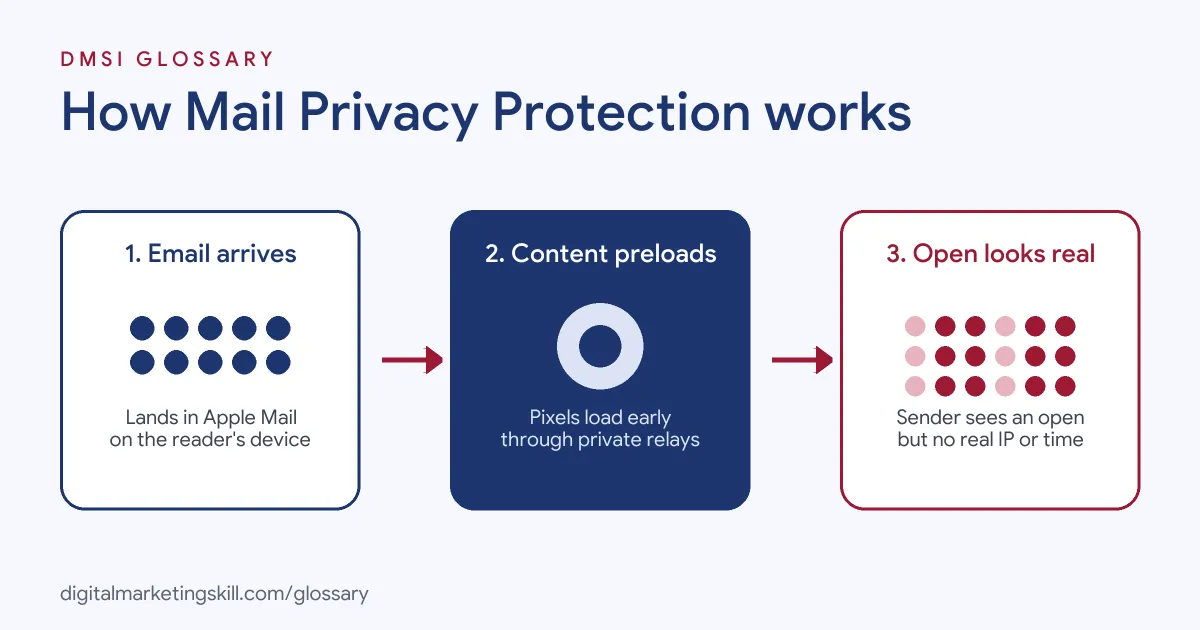
Apple Mail Privacy Protection works by fetching email content on the reader’s behalf. Instead of loading images when the email is opened, Mail loads them privately and early. Then it shows the stored copy when the reader opens the message.
Background Downloads
First, an email arrives in the Apple Mail app. Then Mail downloads its remote content in the background. According to Apple, this happens “regardless of whether you engage with the email.” So the tracking pixel loads even if the reader never opens it. As a result, your platform may record an open within minutes of sending.
Private Relays
Next, Apple routes that content through relays. Apple says remote content passes “through two separate relays operated by different entities.” The first relay knows the reader’s IP address but not the content. By contrast, the second knows the content but not the IP address. Therefore, no single party can link the reader to their location.
What Senders See
Finally, your email platform receives the request. However, it sees a relay’s IP address, not the reader’s. It also can’t tell if a real person opened the email. So open times, locations and device details from these readers become unreliable. Mailchimp lists Apple’s Mail Privacy Protection among the sources that can inflate “Open and click rates” and “Total opens.”
Who It Affects
MPP applies to people who read email in Apple’s Mail app with the feature turned on. This includes readers whose accounts are hosted elsewhere, as long as they use Apple Mail to read them. On the other hand, people who read the same account in a different app, or in a browser, are not covered.
What It Doesn’t Change
MPP doesn’t stop your emails from arriving. Also, it doesn’t hide the reader’s email address from you, so your list stays the same. In addition, a link click still takes the reader to your website. There, your normal site analytics can record the visit. So clicks, form fills and purchases remain useful signals. That is why many email teams now judge emails by what readers do after they open.
Examples of Apple Mail Privacy Protection
- An online shop’s weekly newsletter. Open rates jump soon after a large share of the list starts using Apple Mail with MPP. However, clicks and sales stay flat. So the team switches its main success metric from opens to clicks.
- A software company’s onboarding emails. The automation sends a follow-up to anyone who opened email one. Because MPP opens trigger it, people get emails out of order. Then the team changes the rule to trigger on clicks.
- A charity’s list clean-up. The charity removes people with no opens in six months. However, MPP opens make inactive readers look active. So they add click and donation data to their rules.
Apple Mail Privacy Protection vs Traditional Open Tracking
| Point | With Mail Privacy Protection | Traditional open tracking |
|---|---|---|
| When the pixel loads | In the background, often soon after delivery | When the reader opens the email |
| IP address | Hidden behind relays | Visible to the sender |
| Open data | Inflated and less reliable | A rough signal of real reading |
| Location and time | Not accurate | Usually available |
| Better metrics | Clicks, replies, conversions | Opens plus clicks |
How to Adapt to Apple Mail Privacy Protection
- Check your reports. See if your platform marks or filters machine opens. For example, Mailchimp offers bot filtering in its analytics settings.
- Change your main metric. Use clicks, click-to-open rate with care, and conversions to judge success.
- Review your automations. Find any rule that triggers on opens. Then switch it to clicks or site actions where you can.
- Update list clean-up rules. Base inactivity on clicks, purchases or replies, not opens alone.
- Rethink subject line tests. Test with clicks as the winning metric, or exclude machine opens.
- Ask for preferences. Invite readers to tell you what they want, so you rely less on tracking.
- Keep watching trends. Compare results over time, and note when changes in reading apps may affect your numbers.
Best Practices for Apple Mail Privacy Protection
- Treat opens as a rough guide. Your open rate still shows broad trends, but it no longer proves someone read the email.
- Focus on actions. Clicks, replies and sales show real interest much better than opens.
- Write for clicks. Use clear links and a single strong call to action in each email.
- Use filtered reports. Turn on machine or bot open filtering where your platform offers it.
- Collect stated preferences. Zero-party data, such as survey answers, doesn’t depend on pixels.
- Protect deliverability. Keep good list hygiene, so inflated opens don’t hide inactive contacts.
Common Mistakes to Avoid
- Celebrating higher open rates. A sudden jump may come from MPP, not better emails.
- Running open-based tests. Subject line tests judged on opens can pick the wrong winner.
- Using open-time send optimisation blindly. Background downloads can distort when readers really engage.
- Trusting open locations. Relay IP addresses don’t show where readers really are.
- Keeping inactive contacts. Readers who never click may still look engaged, which can hurt your sender reputation.
- Ignoring the change. If you don’t adjust, every report built on opens becomes less useful.
Where You’ll Use Apple Mail Privacy Protection at Work
We found no current remote job listings that name Apple Mail Privacy Protection directly. Still, it shapes daily work in many email roles. For example, email marketing managers and CRM specialists use it when they choose success metrics. Lifecycle and automation specialists also need it when they build flows that react to reader behaviour.
In addition, email analysts and agency account managers explain it to clients. So if a client asks why opens jumped, you’ll know the likely cause. Finally, deliverability specialists factor it into list clean-up and engagement rules.
Learn It in the Lead Generation and Email Track
You can learn email metrics, automation and deliverability in the AI-Powered Lead Generation and Email Automation track. Every track includes a U.S. Project Internship from day one, with unlimited 1-on-1 mentoring.
Frequently Asked Questions
Does Apple Mail Privacy Protection block tracking pixels?
Not exactly. Instead, it loads them early and privately through relays. So the pixel fires, but it no longer shows when or where a real person opened the email.
Are open rates useless now?
No, but they are less reliable. You can still watch broad trends. However, clicks and conversions are better signs of real interest.
Does MPP affect Gmail users?
It depends on the app. It covers people who read their email in Apple’s Mail app, even with a Gmail account. By contrast, people using the Gmail app are not covered.
Can I tell which opens come from MPP?
Some platforms can flag or filter machine opens. Check your email platform’s reporting settings to see what it offers.
What should I measure instead of opens?
Focus on clicks, replies, conversions and revenue. Also, track list growth and unsubscribes to see how readers respond.
Sources: Apple: Mail Privacy Protection and Privacy; Apple Support: If you see ‘Unable to load remote content privately’ at the top of an email; Mailchimp: Apple Mail Privacy Protection (MPP) FAQs.