
List hygiene is the regular work of cleaning your email list, so it only holds real, reachable people who want your emails. It means removing bad addresses, handling bounces and unsubscribes, and dealing with subscribers who have stopped engaging. It matters because a clean list protects your sender reputation, keeps more emails out of spam and stops you paying for contacts who never read.
Key Takeaways
- Good list hygiene covers bounces, unsubscribes, spam complaints and inactive subscribers.
- Yahoo advises senders to “remove invalid recipients from your list promptly” and to watch hard and soft bounces.
- Google tells bulk senders to keep spam rates below 0.10% and avoid ever reaching 0.30%.
- Try to win back quiet subscribers first, then remove or archive those who still don’t respond.
- Mailchimp notes that removing inactive subscribers can lower your subscriber count and costs.
What Is List Hygiene?
Every email list decays over time. People change jobs, abandon old inboxes or simply lose interest. Some addresses were typed wrongly from the start. If you keep sending to all of them, your results get worse and mailbox providers start to trust you less.
List hygiene is the habit of fixing this. You check your list on a schedule, remove addresses that can’t receive mail, respect every opt-out and decide what to do with people who never open or click.
It’s closely tied to inbox placement. Mailbox providers watch how your recipients behave. So a list full of dead or uninterested addresses can drag down delivery for everyone on it, including your best customers.
It also affects cost. Most email platforms charge by the number of contacts. Mailchimp, for example, says that “removing inactive subscribers can lower your subscriber count and costs.”
How List Hygiene Works
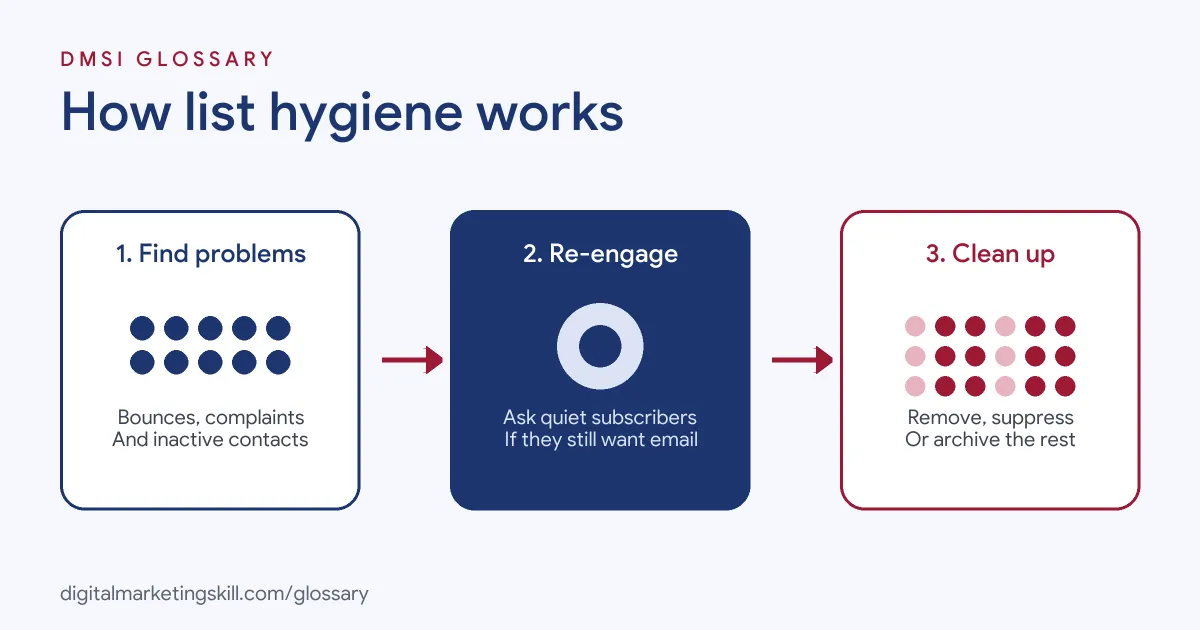
The process has three parts. First, you find the problem addresses, such as bounces, complaints and long-term inactive contacts. Next, you try to re-engage the quiet ones. Finally, you remove, suppress or archive anyone who still can’t be reached or doesn’t respond.
Hard and Soft Bounces
When an email can’t be delivered, it bounces. A hard bounce usually means the address doesn’t exist, so you should stop sending to it. A soft bounce is often temporary, such as a full inbox. However, repeated soft bounces can also point to a dead address. Yahoo’s sender guidance tells you to “monitor hard and soft bounces as well as inactive recipients.”
Unsubscribes and Spam Complaints
Opt-outs must be handled fast. Yahoo asks bulk senders to “honor unsubscribes within 2 days.” Google requires bulk senders’ marketing messages to support one-click unsubscribe. Spam complaints matter even more. Google advises keeping the spam rate in Postmaster Tools “below 0.10%” and avoiding “ever reaching a spam rate of 0.30% or higher.”
Inactive Subscribers
Finally, some people stay on your list but never engage. Yahoo suggests you “consider sending a reconfirmation email to inactive subscribers periodically.” Mailchimp’s help centre recommends creating a segment “based on email activity or contact rating” to find them. Then you can try to win them back or archive them.
List Hygiene Examples
Here are three made-up examples:
- Example 1, the online shop: A shop finds 4% of its list hard-bounced on the last send. It removes those addresses straight away, and its next campaign has fewer delivery errors.
- Example 2, the training school: A school segments subscribers who haven’t opened or clicked in a long time. It sends them a short “Do you still want to hear from us?” series, then archives anyone who doesn’t respond.
- Example 3, the B2B firm: A software company adds a confirmation step to its sign-up form. As a result, fewer fake and mistyped addresses reach the list in the first place.
List Hygiene Actions Compared
Each type of problem needs a different response:
| Problem | What it means | What to do |
|---|---|---|
| Hard bounce | The address can’t receive mail | Remove or suppress it straight away |
| Repeated soft bounce | A temporary issue that keeps happening | Watch it, then suppress if it continues |
| Unsubscribe | The person has opted out | Stop sending promptly; Yahoo asks for within 2 days |
| Spam complaint | The person marked your email as spam | Stop sending and review why it happened |
| Long-term inactive | No opens or clicks for a long period | Send a re-engagement series, then archive or remove |
How to Clean Your Email List
- Export your engagement data. Pull bounces, unsubscribes, complaints and last activity dates from your email platform.
- Remove hard bounces. Most platforms suppress these automatically, but check that this setting is switched on in your account.
- Check that opt-outs work. Test your unsubscribe link and one-click unsubscribe. Then confirm that opt-outs stop all marketing emails.
- Define “inactive”. Pick a time window that suits how often you send. For instance, a daily sender might use a shorter window than a monthly sender.
- Run a re-engagement series. Send inactive contacts two or three emails asking if they still want to hear from you.
- Archive or remove non-responders. Mailchimp lets you archive inactive contacts, so they stop counting towards your audience.
- Repeat on a schedule. Finally, make this a routine, for example every month or quarter, rather than a one-off clean-up.
Stop Bad Data at the Door
Prevention is easier than cleaning. A double opt-in asks new subscribers to confirm their address, which filters out typos and fake sign-ups. You can also add simple checks to forms, such as flagging obvious typos in common email domains. Above all, never buy, borrow or rent email lists. Those addresses didn’t ask to hear from you, so they bounce and complain far more often.
How to Measure List Health
Track a few simple numbers after every send. First, check the bounce rate, and look for sudden jumps that point to a bad import or form. Next, watch your spam rate in Google’s Postmaster Tools against the 0.10% guideline. Then follow your unsubscribe rate, which often rises when content drifts from what people signed up for. Finally, measure the share of your list that clicked or bought recently. If that share keeps shrinking, your list hygiene routine needs attention.
Best Practices for List Hygiene
- Clean little and often. A regular routine is safer than a huge purge once a year.
- Look beyond opens. Google says it doesn’t track open rates and can’t verify open rates reported by third parties. So use clicks, replies and purchases as well.
- Segment before you delete. Send less often to quiet subscribers before you decide to remove them.
- Keep a suppression list. Make sure removed or unsubscribed addresses don’t get re-imported by mistake.
- Watch your sign-up sources. If one form brings lots of bounces, fix that form.
Common Mistakes to Avoid
A common mistake is keeping every address because a big list looks impressive. Another is deleting inactive people without trying to win them back first. Some teams also re-import old spreadsheets that include unsubscribed contacts. Others never check spam complaints, even though they matter more than bounces. Lastly, many judge activity only by opens, which can be unreliable.
Where You’ll Use List Hygiene at Work
Email and CRM roles often name this task directly. For example, remote job listings ask candidates to:
- “Monitor deliverability, maintain list hygiene, and run A/B tests to improve performance” (Klaviyo Specialist).
- “Maintain list hygiene, including managing unsubscribes, bounces, and deliverability” (Email Marketing Specialist).
- Own “Segmentation, list hygiene, lead scoring, UTMs, links, and forms” (Senior Marketing Manager).
So if you want to work as an Email Marketing Specialist or Marketing Automation Specialist, expect to own list health as well as campaigns.
Learn It in the Lead Generation and Email Track
You can learn to build and maintain healthy lists in the AI-Powered Lead Generation and Email Automation track. There, you build a lead magnet and an automated email sequence that converts. You also get unlimited 1-on-1 mentoring and a U.S. Project Internship from day one.
For more, read our guide to email list building and our article on email deliverability.
Frequently Asked Questions
What is list hygiene in simple terms?
It is the routine of cleaning your email list, so it only contains real people who can receive and want your emails.
How often should I clean my email list?
There is no single rule. Many teams check bounces and complaints after every send and review inactive subscribers monthly or quarterly.
Should I delete inactive subscribers?
Try to win them back first with a short re-engagement series. Then archive or remove those who still don’t respond.
Does list hygiene improve deliverability?
It helps. Fewer bounces and complaints support a better sender reputation, which mailbox providers weigh when they decide where email goes.
What is the difference between a hard and soft bounce?
A hard bounce usually means the address doesn’t exist. A soft bounce is usually temporary, such as a full mailbox.
Sources: Yahoo Sender Hub: Best practices; Google Workspace Admin Help: Email sender guidelines; Mailchimp Help: Re-engage inactive subscribed contacts; remote job listings on Himalayas.