
Community management is the work of building and looking after the relationships between a brand and the people who follow, comment on and talk about it online. It covers replying to comments and messages, keeping talks safe and starting chats that bring people together. It matters because an active, well-run community turns followers into loyal customers and gives you a steady stream of feedback.
Key Takeaways
- Community management is about relationships, not just posting. Replies and conversations matter as much as content.
- The core tasks are responding, moderating, engaging and reporting what you learn.
- Platforms offer moderation tools. YouTube, for example, can hold potentially inappropriate comments for review.
- Clear house rules make moderation fair.
- It works hand in hand with social listening, which looks at wider conversations beyond your own channels.
What Is Community Management?
Buffer describes a community manager as someone “responsible for building and nurturing relationships between a brand and its audience.” It adds that they “create an inclusive environment where people feel connected to the brand and each other.”
In practice, the work is a mix of care and judgement. You thank people for kind words, answer questions, calm frustrated customers and remove spam or abuse. You also start conversations, such as asking followers for tips or opinions. Over time, people start talking to each other, not just to the brand.
For example, a home fitness brand has a busy Instagram account and a private online group. Its community manager replies to comments within a few hours, shares members’ progress photos with permission, and runs a weekly “ask the coach” thread. As a result, members feel seen and keep coming back.
How Community Management Works
Most of the work falls into four repeating tasks. You respond, you moderate, you engage and you report.
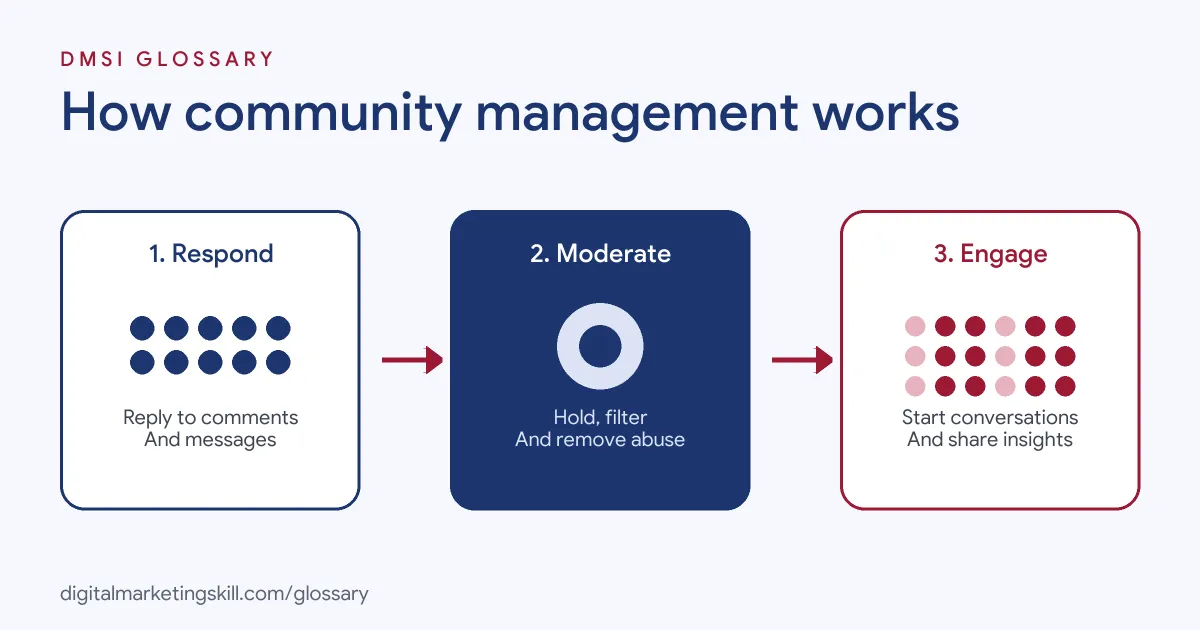
Responding
This is the part people see most. Sprout Social says monitoring means tracking the messages and comments that are about your brand and “responding to those engagements.” Fast, kind replies show people that a real person is there.
Moderating in Community Management
Moderation keeps spaces safe and useful. Most platforms offer tools to help. YouTube, for instance, lets creators choose to hold comments for review, with options from “Basic: Hold potentially inappropriate comments” to “Strict: Hold a broader range of potentially inappropriate comments.” Held comments are kept in YouTube Studio for up to 60 days and aren’t visible unless you approve them.
You can also add a list of blocked words and phrases. YouTube explains that comments containing or closely matching these words can be held for review. In addition, you can mark trusted users as approved, so their comments publish without filtering.
Engaging
Good community managers don’t just wait for comments. They start conversations. Buffer notes that their work ranges “From moderating conversations to sparking engagement.” That might mean polls, questions, live sessions or sharing posts from members.
Reporting What You Learn
Finally, they pass on what they learn. Common questions point to gaps in your website. Repeated complaints flag product issues. Popular topics suggest new content. Sharing these with the wider team is where the role adds the most value.
A Typical Day
So what does the job look like day to day? Here is a simple, made-up example. In the morning, you check new comments and messages. You reply to questions and thank people for kind words. Next, you hide a few spam posts. At lunch, you post a question to get people talking. In the afternoon, you join a live chat with the product team. Before you log off, you note the top three things people asked about. Then you share them with your manager. None of these tasks is hard on its own. The skill is doing them well, every day, in a voice that fits the brand.
What to Measure
Track a few simple numbers. How fast do you reply? How many comments and messages come in each week? Are people mostly happy, neutral or upset? Which posts get people talking? These numbers show if your work is paying off.
Community Management Examples
Here are three made-up examples:
- Software company: It runs a user forum where staff answer questions and members share tips. The most helpful members get a “community expert” badge.
- Local café: It replies to every review and comment, and asks followers to vote on the next seasonal drink.
- YouTube channel: A cooking creator uses held-for-review settings and a blocked words list. Then a moderator approves good questions and answers them in the next video.
Community Management vs Social Listening vs Customer Support
These roles overlap, but each has its own focus:
| Area | Main focus | Typical tasks |
|---|---|---|
| Community management | Relationships on your own channels | Replying, moderating, starting conversations |
| Social listening | Wider conversations about your brand and industry | Tracking mentions, spotting trends, reporting sentiment |
| Customer support | Solving individual problems | Answering tickets, fixing orders, handling refunds |
In smaller teams, one person often does all three. In larger ones, they work closely together and share what they find.
How to Set Up Community Management
- List the places your community gathers, such as social accounts, groups, forums and review sites.
- Write simple community guidelines that explain what’s welcome and what isn’t.
- Agree a tone of voice and a target reply time.
- Set up moderation tools, such as held comments and blocked word lists.
- Prepare saved replies for common questions, but personalise each one.
- Plan regular conversation starters, such as weekly questions or live sessions.
- Agree when to pass issues to support, legal or senior staff.
- Report monthly on themes, sentiment and response times.
Handling Negative Comments
Not every comment is kind. A simple approach helps. First, decide whether it’s a genuine complaint, a misunderstanding or abuse. Next, reply calmly to genuine issues and offer to move the chat to private messages if details are needed. Then correct misunderstandings with facts. Finally, remove or hide abuse in line with your guidelines. Handled well, a public complaint can show everyone else how much you care.
Best Practices
- Reply like a person. Use names and avoid copy-and-paste answers. Short and warm beats long and stiff.
- Be consistent. Apply your guidelines the same way to everyone, fans and critics alike.
- Use platform tools. Held comments and blocked words save time and protect your space.
- Celebrate members. Share their posts, wins and ideas, with permission. It makes others want to join in.
- Close the loop. Tell people when their feedback leads to a change.
Common Community Management Mistakes
Many brands post content but ignore the comments. Others reply only to praise and avoid complaints, which looks evasive. Some delete criticism instead of addressing it. Another mistake is having no house rules, so it feels random when you remove a post. Finally, many treat it as a junior side task, even though it shapes how thousands of people see the brand.
Where You’ll Use Community Management at Work
This skill appears in many social media roles. For example, recent remote job listings ask candidates to:
- “Create social content from concept through to copywriting, publishing, community management and performance optimisation” (Digital Events and Social Media Executive).
- “Monitor comments, tags, mentions, hashtags and direct messages” (Social Media Manager).
So if you want to work as a Social Media Manager, Paid Social Specialist or Content Creator, expect to manage conversations every day, not just publish posts.
Learn It in the Social Media Track
You can learn to run social channels in the AI-Powered Social Media Management and Advertising track. It covers AI fundamentals, content creation with graphics and video, social media marketing and analytics, and social media advertising. Your portfolio project is a paid social campaign that you plan, create and run for a real brand. You also get unlimited 1-on-1 mentoring and a U.S. Project Internship from day one.
Next, read our guide to social listening and our social media marketing checklist. You may also like our glossary entries on social media managers and social listening.
Frequently Asked Questions
What does a community manager do?
They build relationships between a brand and its audience by replying to people, moderating conversations, starting discussions and sharing feedback with the team.
Is community management the same as social media management?
Not quite. Social media management covers planning and posting content. Community work is about the talk and the bonds that grow around that content.
How fast should you reply to comments?
As fast as you can. Set a target reply time that fits your team, and stick to it. People notice when you are quick.
Should you delete negative comments?
Usually not. Reply calmly to genuine complaints. Only remove comments that break your guidelines, such as spam or abuse.
What tools help with moderation?
Most platforms offer built-in tools. YouTube, for example, can hold comments for review and filter blocked words.
Sources: Buffer: What is a community manager?; YouTube Help: Comment settings and moderation; Sprout Social: Social media monitoring vs social listening; remote job listings on Himalayas.