
Dark posts are social media ads that run as sponsored posts but never appear on the brand’s own Page or profile feed. On Meta, they are known as unpublished Page posts, and on LinkedIn the same idea is called Direct Sponsored Content. As a result, you can show different messages to different audiences without filling your Page with near-identical posts. They are a core tool for testing ads and targeting with care.
Key Takeaways
- A dark post is an ad that looks like a normal post but stays off your Page’s public feed.
- Only the audience you target sees it in their feed, along with anyone who finds it in an ad library.
- Dark posts let you test many versions of copy and creative at the same time.
- Most ads you build from scratch in Meta Ads Manager are dark posts by default.
- Dark posts are not secret: Meta’s Ad Library lets anyone view active ads.
What Are Dark Posts?
When you post on your Page, everyone who visits it can see that post. However, a dark post works differently. It is created for an ad and delivered only to the people you choose. So it never shows on your Page timeline.
Meta’s developer docs explain it plainly. They say “Unpublished Page posts are treated the same as published Page posts except that they do not appear in /feed.” They also confirm that “Unpublished posts can be used in ads.” In other words, the post is real, but it lives only inside your ads.
Think of a shop that sends different flyers to different streets. Families get a flyer about school bags. Meanwhile, office workers get one about laptop cases. The shop window stays the same for everyone. In the same way, your Page stays tidy while each audience sees its own message.
The name sounds sneaky, but it is not. “Dark” simply means the post isn’t on your public feed. In fact, the ads are still labelled as sponsored, and they still follow the platform’s ad rules.
Why It Matters
Dark posts solve a real problem in paid social. If you posted ten test versions on your Page, followers would see the same offer again and again. That looks messy and can annoy people. With dark posts, by contrast, you can run ten versions and keep your Page clean. Also, you can speak to each audience in its own language, with its own image and offer. As a result, your ads feel more relevant, and you learn faster what works.
When to Use Dark Posts
So when should you reach for a dark post? First, use one when you want to test ideas. For example, creative testing often needs several versions running side by side. Second, use one when you sell to more than one type of customer. In that case, each group can get its own message. Also, dark posts help with short offers that don’t suit your main feed. Finally, they help when several teams share one Page. That way, each team can run its own ads without crowding the feed. On the other hand, if a post is great for everyone, a normal post may serve you better.
Are Dark Posts Hidden?
No. This is a common myth. For example, Meta runs a public Ad Library. Shopify describes it as “a digital database containing information about ads currently running across Facebook, Instagram, WhatsApp, Threads, Messenger” and more. Also, you don’t need an account for basic searches. So anyone can look up your active ads, including dark posts. Therefore, never put anything in a dark post that you wouldn’t want the public to see.
How Dark Posts Work
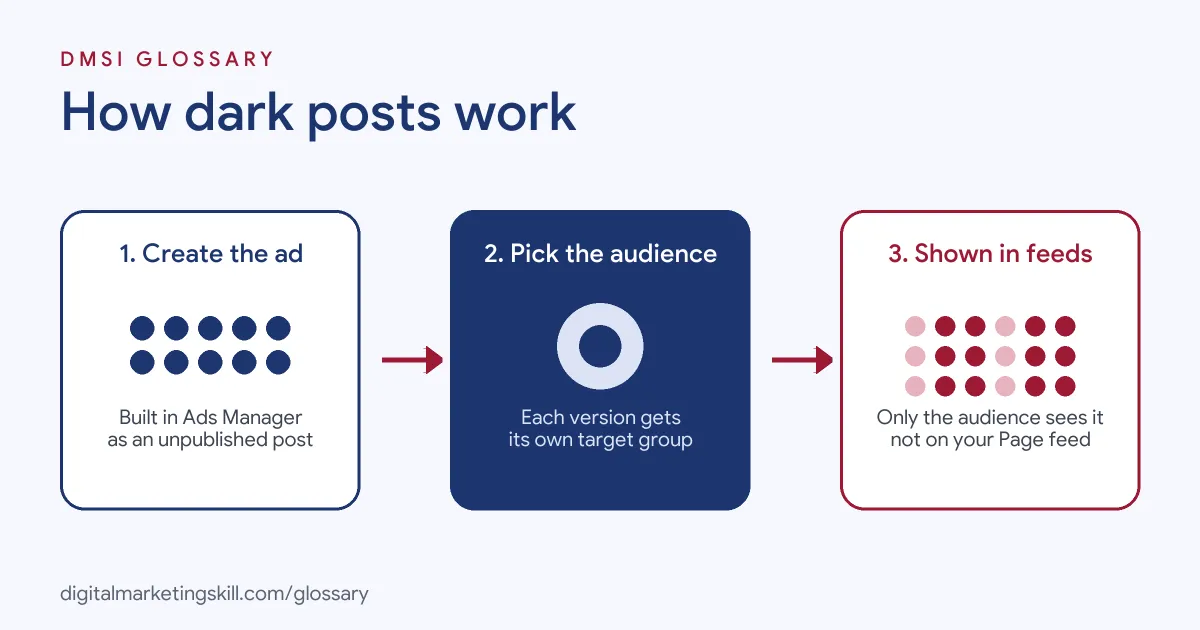
A dark post follows a simple path. First you create the ad content, then you choose an audience, and finally the platform shows it only to that audience. Each step is set inside the platform’s ads tool.
Creating the Post
In Meta Ads Manager, you can build a new ad from scratch. When you do, Meta saves the creative as an unpublished Page post. Alternatively, you can use an existing post from your Page. In that case, it is not a dark post, because it already sits on your feed. Some social tools can also create unpublished posts for you. For instance, Sendible lets you “send an unpublished Facebook post to one of your Pages and later convert it into ads.”
Targeting the Audience
Next, you choose who sees the ad. You might target by location, age or interests. Also, you can use a custom audience, such as past website visitors. Because each dark post is separate, you can match each message to one audience.
Delivery and Engagement
Then the platform delivers the ad in feeds, Stories or other placements. After that, people can like, comment and share it, just like a normal post. However, the comments stay on the ad, not on your Page. So you need to check your ads for comments and reply to them.
Dark Posts on Other Platforms
LinkedIn offers the same idea through Direct Sponsored Content. MarTech reported that these ads “don’t get published to a company’s LinkedIn page.” Similarly, other platforms let you create ad-only content in their ad managers. The labels differ, but the principle stays the same.
Examples of Dark Posts
- A fitness studio. The studio runs one dark post for new parents and another for students. Each one has its own photo, offer and opening line. Meanwhile, its Page shows only class news and member stories.
- An online clothing shop. The team tests four headlines for the same jacket as four dark posts. After a week, it moves budget to the best one and pauses the rest.
- A software company on LinkedIn. The marketing team runs separate Direct Sponsored Content for finance leaders and IT managers. As a result, each group sees a message about its own problems.
Dark Posts vs Boosted Posts vs Organic Posts
| Point | Dark post | Boosted post | Organic post |
|---|---|---|---|
| Shows on your Page | No | Yes | Yes |
| Paid | Yes | Yes | No |
| Where you create it | Ads Manager or ad tools | Your Page or app | Your Page or app |
| Targeting options | Full ad targeting | Simpler targeting | Followers and their networks |
| Best for | Testing and tailored messages | Giving a good post more reach | Everyday brand updates |
Learn more about the middle option in our guide to the boosted post.
How to Create Dark Posts on Meta
- Open Ads Manager. Start a new campaign and pick your objective.
- Set up the ad set. Choose your audience, budget, schedule and placements.
- Create the ad from scratch. At ad level, set up a new ad instead of using an existing post.
- Add your creative. Upload the image or video, then write the primary text, headline and call to action.
- Duplicate to test. Make copies of the ad and change one thing in each, such as the headline.
- Publish the campaign. Meta reviews the ads. After approval, they run without appearing on your Page.
- Check results and comments. Watch performance in Ads Manager. Also, reply to comments on each ad.
Best Practices for Dark Posts
- Change one thing at a time. Clean A/B testing shows you what made the difference.
- Match message to audience. Write each dark post for one clear group of people.
- Name your ads clearly. Use names that show the audience and version, so reports stay readable.
- Refresh creative often. Swap in new versions before ad fatigue sets in.
- Keep claims consistent. Prices and promises should match across every version and your website.
- Moderate comments. Reply to questions on each ad, because they won’t show on your Page.
Common Mistakes to Avoid
- Thinking dark means private. Active ads are visible in Meta’s Ad Library.
- Too many versions with a small budget. Each version needs enough spend to give useful results.
- Ignoring ad comments. Unanswered questions on ads can cost you sales and trust.
- Contradicting your Page. A dark post offer that your Page or site doesn’t mention confuses people.
- Testing too many changes at once. If you change the image, text and audience together, you can’t tell what worked.
Where You’ll Use Dark Posts at Work
Dark posts are everyday work for paid social specialists, social media managers and performance marketers. For example, you’ll use them when you run Meta or LinkedIn campaigns for an agency or in-house team. You’ll also use them for creative testing, audience tests and campaigns aimed at several customer groups at once. In job listings, this skill usually appears under wider terms such as Meta Ads, paid social or creative testing.
Learn It in the Social Media and Paid Social Track
You can learn dark posts, ad testing and audience targeting in the AI-Powered Social Media Management and Advertising track. Every track includes a U.S. Project Internship from day one, with unlimited 1-on-1 mentoring.
Frequently Asked Questions
Why are they called dark posts?
Because they don’t appear on your public Page feed. Only the targeted audience sees them in their feeds.
Are dark posts allowed?
Yes. They are a normal ad format, and they must follow the platform’s ad policies like any other ad.
Can people find my dark posts?
Yes. Anyone can search active ads in Meta’s Ad Library. So treat every dark post as public.
What is the difference between a dark post and a boosted post?
A boosted post already sits on your Page, and you pay to show it to more people. A dark post, by contrast, exists only as an ad.
Does LinkedIn have dark posts?
Yes. LinkedIn calls them Direct Sponsored Content. They run as ads but don’t appear on your company page.
Sources: Meta for Developers: Page Feed reference; MarTech: LinkedIn Launches Direct Sponsored Content, Enables Testing With “Dark Posts”; Sendible Support: Publish Facebook ads by converting dark (unpublished) posts; Shopify: Meta Ads Library guide.