
Cost per result is the average amount you pay for each outcome an ad campaign was set up to deliver, found by dividing total spend by the number of results. In Meta Ads Manager, a “result” can be a purchase, a lead, a link click or a video view, depending on your settings. So the same metric can mean very different things in two campaigns. As a result, you need to know what counts as a result before you judge the number.
Key Takeaways
- Cost per result equals amount spent divided by the number of results.
- What counts as a result depends on your campaign objective and performance goal.
- The attribution setting also changes which results are counted.
- You can only compare cost per result fairly between ad sets with the same goal and settings.
- A lower cost per result is good, but only if the results bring real value to the business.
What Is Cost per Result?
When you run paid social ads, you pick a goal. For example, you may want sales, leads or more people watching a video. Each time the ad achieves that goal, the platform counts one result. Then cost per result tells you the average price of each one.
The idea is simple. However, the meaning changes with your set-up. As the PPC Land glossary puts it, “a result is whatever the ad set was told to optimize for.” So one ad set might show a high cost per result for purchases. Meanwhile, another might show a low cost per result for landing page views. Neither number is wrong, but they measure different things.
Think of buying fruit at a market. A price of two pounds sounds cheap for a bag of apples. By contrast, it sounds expensive for a single grape. In the same way, a cost per result only makes sense when you know what the “result” is.
Cost per result is close to other cost metrics you may know. For instance, cost per click measures the price of one click. Also, cost per acquisition measures the price of one customer or sale. Cost per result is a flexible label that becomes one of these, based on your goal.
Why It Matters
Why should you track it? Because it ties your budget to the outcome you care about. For example, if you pay for leads, you want to know what each lead costs. Then you can compare that with what a lead is worth to the business. In short, it helps you decide where to spend more and where to cut back.
Where You Find It
In Meta Ads Manager, cost per result sits in the default columns next to Results and Amount spent. Also, you can see it at campaign, ad set and ad level. So you can spot which single ad is pulling the average up or down.
Other platforms use similar ideas with different names. For example, TikTok Ads Manager reports cost per conversion, which it defines as the “Average amount spent per conversion.” In addition, LinkedIn and Google show cost per lead or cost per conversion. Because of this, it helps to learn the core formula once. Then you can read the same idea on any platform, whatever the label says.
How Cost per Result Works
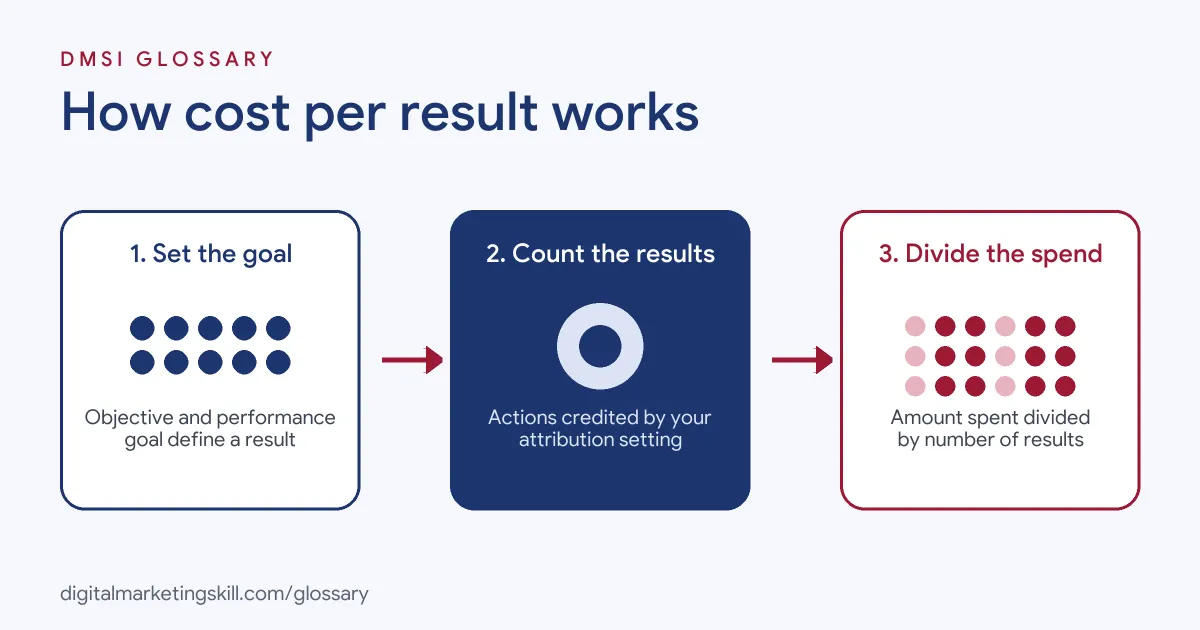
The maths is short: amount spent divided by results. For example, if you spend 200 pounds and get 50 leads, your cost per result is 4 pounds. However, three settings decide what goes into the “results” part.
Campaign objective
First, you choose a campaign objective in Meta Ads Manager, such as Sales, Leads or Awareness. This sets the broad aim of the campaign. So a Leads campaign will usually count leads, while an Awareness campaign may count reach.
Performance goal
Next, at the ad set level, you pick a performance goal. This narrows the objective to a specific action. For instance, a Sales campaign might aim for purchases or for landing page views. Because the goal changes, the result changes too.
Attribution setting
Then the attribution setting decides which actions get credit. It sets how long after a click or a view an action still counts. So a longer attribution window may report more results, which lowers cost per result on paper.
Cost per result goal
Finally, you can tell Meta what you would like to pay. With the Highest Volume bid strategy, you can add a cost per result goal. Jon Loomer explains that “It’s not a hard cap, but a goal the algorithm will consider.” In other words, Meta aims near your target, but the real figure can land above or below it.
Examples of Cost per Result
- A local gym running lead ads. The performance goal is leads from an instant form. So each submitted form is one result. The team then checks how many leads actually book a trial.
- An online shop running sales ads. The goal is purchases, tracked by the Meta pixel. As a result, cost per result shows the average ad cost for each sale. The team compares it with the average order value.
- A charity promoting a video. The goal is video views. Here, cost per result is very low, because a view is a small action. So the team does not compare it with its fundraising campaigns.
Cost per Result vs CPC, CPA and CPM
| Metric | What it measures | Formula | Changes with your goal? |
|---|---|---|---|
| Cost per result | Price of each outcome you optimise for | Spend ÷ results | Yes |
| Cost per click (CPC) | Price of each click | Spend ÷ clicks | No |
| Cost per acquisition (CPA) | Price of each sale or customer | Spend ÷ acquisitions | No |
| Cost per mille (CPM) | Price of 1,000 impressions | Spend ÷ impressions × 1,000 | No |
How to Use Cost per Result
- Pick the right goal. Choose an objective and performance goal that match a real business outcome.
- Set up tracking. Install the pixel or Conversions API, so purchases and leads are counted correctly.
- Know your break-even. Work out the most you can pay per result and still make a profit.
- Check the results column. In Ads Manager, look at what the Results column is counting for each ad set.
- Compare like with like. Only compare ad sets that share the same goal and attribution setting.
- Give it time. Let new ad sets gather enough results before you judge them.
- Act on the numbers. Then shift budget towards ad sets with a healthy cost per result and good quality.
Best Practices for Cost per Result
- Define the result first. Write down what one result means before you share any report.
- Look beyond the cheapest number. Cheap leads that never buy are not a win, so track lead quality too.
- Use it with ROAS. For sales campaigns, pair it with return on ad spend to see value, not just cost.
- Watch it over time. A rising cost per result can be an early sign of ad fatigue.
- Set realistic goals. A cost per result goal that is too low may stop your ads from spending.
- Label your reports. Name each column clearly, such as “cost per lead”, so clients understand it.
Common Mistakes to Avoid
- Comparing different goals. A cost per view and a cost per purchase are not the same thing.
- Ignoring attribution changes. If you change the attribution setting, past and new numbers won’t match.
- Optimising for easy actions. A goal like link clicks can look cheap but bring few sales.
- Judging too early. A few results in the first days can swing the average a lot.
- Trusting broken tracking. If the pixel misses events, cost per result will look higher than it is.
Where You’ll Use Cost per Result at Work
Cost per result is a daily number in paid social and media buying roles. Job ads usually name the specific result, such as cost per lead or cost per acquisition. For example, real remote job listings ask you to:
- “Monitor budgets, pacing, and delivery to ensure efficient cost per lead (CPL) and cost per acquisition (CPA).” (Senior Paid Ads Specialist).
- “Identify opportunities to reduce Cost Per Lead (CPL) while improving lead quality.” (LinkedIn Ads Specialist).
- “Strong understanding of CPL, CTR, CVR, CAC, cost per booked call, and cost per SQL.” (Meta Ads Media Buyer & Creative Strategist).
Learn It in the Social Media and Paid Social Track
You can learn how to set goals, read cost per result and scale campaigns in the AI-Powered Social Media Management and Advertising track. Every track includes a U.S. Project Internship from day one, with unlimited 1-on-1 mentoring.
Frequently Asked Questions
How do you calculate cost per result?
Divide the total amount spent by the number of results. For example, 300 pounds spent for 100 results gives 3 pounds per result.
What is a good cost per result?
There is no single good number. Instead, a good cost per result is one that stays below what each result is worth to your business.
Why is my cost per result going up?
Common reasons include ad fatigue, more competition, a narrow audience or tracking problems. So check each one in turn.
Is cost per result the same as CPA?
Not always. If your goal is purchases, they can be very close. However, if your goal is clicks or views, cost per result measures something else.
Can I set a target cost per result?
Yes. In Meta, you can add a cost per result goal to the Highest Volume bid strategy. It works as a target, not a hard cap.
Sources: PPC Land: Cost per result; Jon Loomer Digital: Cost Per Result Goal; TikTok Ads Manager: Basic metrics and definitions; remote job listings on Himalayas, Himalayas and Himalayas.