
UTM parameters are short tags you add to the end of a link so that analytics tools can tell where a visit came from, such as a newsletter, a social post or a paid ad. Each tag is a name and a value, like utm_source=newsletter, joined to the URL after a question mark. They matter because without them, many visits from your campaigns show up with a vague source, so you can’t tell which ones actually worked.
Key Takeaways
- UTM parameters are tags on a URL that describe the source, medium and campaign behind a click.
- Google Analytics supports nine of them. Google says you should always use utm_source, utm_medium and utm_campaign.
- Values are case sensitive, so “google” and “Google” count as two different sources.
- In Google Analytics 4, the data shows in the Traffic acquisition report under dimensions such as Session source/medium.
- For Google Ads, auto-tagging with the GCLID is the usual choice. In GA4, auto-tagging takes priority over manual tags.
What Are UTM Parameters?
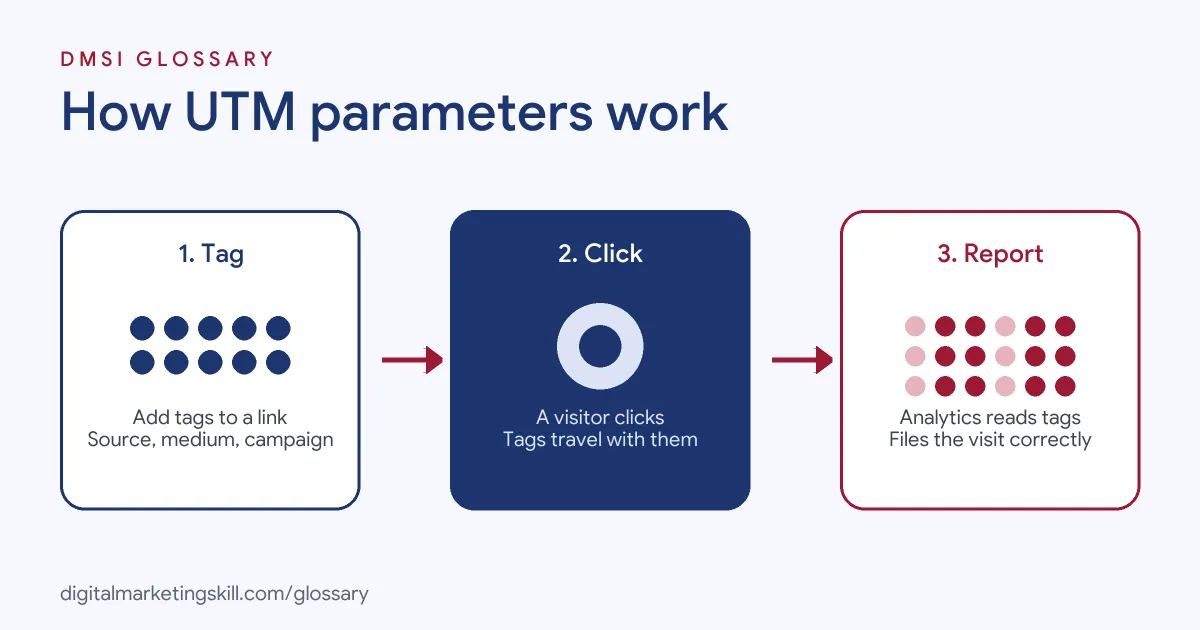
Think of UTM parameters as a label you stick on a link before you share it. When someone clicks, the label travels with them to your site. Your analytics tool reads it and files the visit under the right campaign.
Here is the example Google gives in its help centre:
https://www.example.com/?utm_source=summer-mailer&utm_medium=email&utm_campaign=summer-sale
In this link, the source is “summer-mailer”, the medium is “email” and the campaign is “summer-sale”. As a result, every visit from that link is grouped together in your reports. That’s why marketers tag links in emails, social posts, QR codes and partner sites. Our guide to Google Analytics campaign tracking shows the bigger picture.
How UTM Parameters Work
The process has three steps. First, you add tags to a link. Next, someone clicks it and lands on your site with the tags still in the address. Finally, your analytics tool reads the tags and records the visit under that source, medium and campaign.
The Main Parameters
Google Analytics supports nine UTM parameters. They are utm_id, utm_source, utm_medium, utm_campaign, utm_term, utm_content, utm_source_platform, utm_creative_format and utm_marketing_tactic. However, you rarely need all of them.
Google’s advice is clear: “you should always use utm_source, utm_medium, and utm_campaign.” It also recommends utm_id and utm_source_platform, because missing values lead to “(not set)” in reports. Meanwhile, Google notes that utm_creative_format and utm_marketing_tactic aren’t currently reported in Google Analytics properties.
How GA4 Groups Your Traffic
GA4 uses your source and medium to place each visit in a channel. For example, its default rules put a visit in the Email channel when the source or medium is “email”. Similarly, a medium of “affiliate” goes to Affiliates, and a medium of “referral” goes to Referral. For Paid Social, the source must match a known social site and the medium must match a paid pattern, such as “ppc” or “paid”.
So the words you choose for utm_medium decide where your traffic lands. If you write “e-blast” instead of “email”, GA4 may not file it under Email at all.
UTM Parameters and Auto-Tagging
Google Ads has its own method, called auto-tagging. It adds “a parameter called GCLID, short for ‘Google click identifier'” to your ad links. You can tag Google Ads links with UTM parameters instead. However, Google says that in GA4, “auto-tagging is prioritised over manual tagging.” In practice, most advertisers keep auto-tagging on for Google Ads and use UTM tags for everything else.
UTM Parameters Examples
Here are three made-up examples of tagged links:
- Newsletter (example): A bakery adds utm_source=newsletter, utm_medium=email and utm_campaign=spring-offer to every link in its spring email.
- Organic social (example): A gym tags a link in its Instagram bio with utm_source=instagram, utm_medium=social and utm_campaign=free-trial.
- Two versions of an ad (example): A shop runs two Facebook ads and uses utm_content=video and utm_content=carousel, so it can compare them in GA4.
In each case, the tags answer one question: where did this visit come from?
UTM Parameters Compared
Here are the five most common tags and what each one records:
| Parameter | What it records | Example value |
|---|---|---|
| utm_source | The site, platform or list that sent the visit | newsletter, facebook |
| utm_medium | The type of channel | email, social, cpc |
| utm_campaign | The campaign or promotion name | spring-sale |
| utm_content | Which link or ad version was clicked | header-button, video |
| utm_term | The paid keyword, if there is one | running-shoes |
In short, source says who sent the visit, medium says how, and campaign says why.
How to Create UTM Parameters
- Agree a naming plan. Write down the exact values your team will use, such as “email” for every email.
- Use lower case. Because values are case sensitive, pick one style and stick to it.
- Open a URL builder. Google offers a Campaign URL Builder, which adds the tags for you.
- Enter the page address. Then fill in source, medium and campaign, plus content if you need it.
- Test the link. Click it and check that the page loads and the tags appear in the address bar.
- Shorten it if needed. Long tagged links look messy in posts, so a link shortener can help.
- Check your reports. In GA4, open Traffic acquisition and look for your source and campaign.
For app ads on Android, Google points to a separate Play Campaign URL Builder instead.
Here is a made-up naming plan for a small team. Every email uses utm_medium=email, every organic post uses utm_medium=social, and every paid social ad uses utm_medium=paid-social. Sources are always the platform name in lower case, such as facebook or linkedin. Campaign names follow one pattern, such as product-offer-month. With rules like these, anyone can build a link that lands in the right report.
Best Practices for UTM Parameters
- Keep a shared sheet. List every tagged link, its values and the date you created it, so the whole team stays consistent.
- Match GA4’s channel rules. For instance, use “email” for email and “social” for organic social.
- Tag only external links. Links between your own pages don’t need campaign tags.
- Use utm_content for tests. It lets you compare two buttons or two ad versions.
- Avoid personal data. Never put names or email addresses in a tag.
Common Mistakes to Avoid
The most common mistake is inconsistent naming. For example, one person writes “Facebook” and another writes “facebook”, so the data splits in two. Another mistake is skipping utm_medium, which leaves traffic in the wrong channel or “(not set)”. Some people also add UTM tags to Google Ads links while auto-tagging is on, then wonder why GA4 ignores them. Others forget to test, so a typo breaks the link. Finally, many tag a campaign but never check the report.
Where You’ll Use UTM Parameters at Work
Tagging links is a basic skill in analytics, paid media and marketing operations. For example, real remote job listings ask candidates to:
- “Support campaign tracking through UTM parameters, campaign codes and agreed analytics” (Digital Marketing and Advanced Graphic Design Specialist).
- Be “Knowledgeable in UTM parameters, pixel setup, and using Google Tag Manager for tracking.” (Lead Paid Media Specialist).
- “Own UTM taxonomy, campaign tagging, and tracking setup to ensure clean, consistent attribution across HubSpot and Salesforce.” (Demand Generation Associate Manager).
So if you want to work as a Web Analytics Specialist or PPC Specialist, employers will expect clean tagging and reports they can trust.
Learn It in the Google Specialist Track
You can learn campaign tracking in the AI-Powered Google Specialist track. It covers Google Ads across Search, Display, Discovery, Gmail and YouTube, plus Google Analytics. Your portfolio project is a Google Ads campaign that you launch and measure with conversion tracking. You also get unlimited 1-on-1 mentoring and a U.S. Project Internship from day one.
Next, read our guide to Google Analytics traffic sources to see where tagged visits appear.
Frequently Asked Questions
Where do I see UTM data in GA4?
Open the Traffic acquisition report. There, you can view dimensions such as Session source/medium and Session campaign.
Which UTM parameters are required?
Google says you should always use utm_source, utm_medium and utm_campaign. The others are optional, although utm_id is strongly recommended.
Are UTM parameters case sensitive?
Yes. Google Analytics treats “Email” and “email” as different values, so always use the same style.
Should I use UTM tags on Google Ads?
Usually not. Auto-tagging handles Google Ads, and GA4 gives it priority over manual tags.
Do UTM parameters affect SEO?
They are meant for links in campaigns, not for links inside your own site. Keep internal links clean and tag only links you share elsewhere.
Sources: Google Analytics Help: Collect campaign data with custom URLs; Google Analytics Help: Default channel group; Google Ads Help: About auto-tagging; remote job listings on Himalayas.