
Gated content is content that people can only access after they give something in return, usually their name and email address in a short form. Common examples are ebooks, templates, reports, webinars and free tools. Businesses use it to turn anonymous visitors into leads they can follow up with, while visitors get something useful in exchange.
Key Takeaways
- The “gate” is usually a form. The reward is a resource valuable enough to be worth the details.
- It is a lead generation tool. Ungated content, by contrast, builds reach and trust.
- Google says gating is not cloaking if Googlebot can see the full content behind it, just as a signed-in user can.
- Google offers structured data to mark paywalled or gated sections of a page.
- In the UK, the ICO says you need specific consent to send marketing emails to individuals, with a limited soft opt-in exception.
What Is Gated Content?
Think of a free tasting at a market stall. The stallholder offers a sample, and in return asks if you would like to join their mailing list. You get something now; they get a way to stay in touch.
Gated content works the same way online. A visitor finds a useful-looking guide. To download it, they fill in a short form. The business then sends the guide, plus follow-up emails that build the relationship.
This idea is closely linked to the lead magnet, which is the free resource itself. The gate is the form and page that stand between the visitor and that resource.
How Gated Content Works
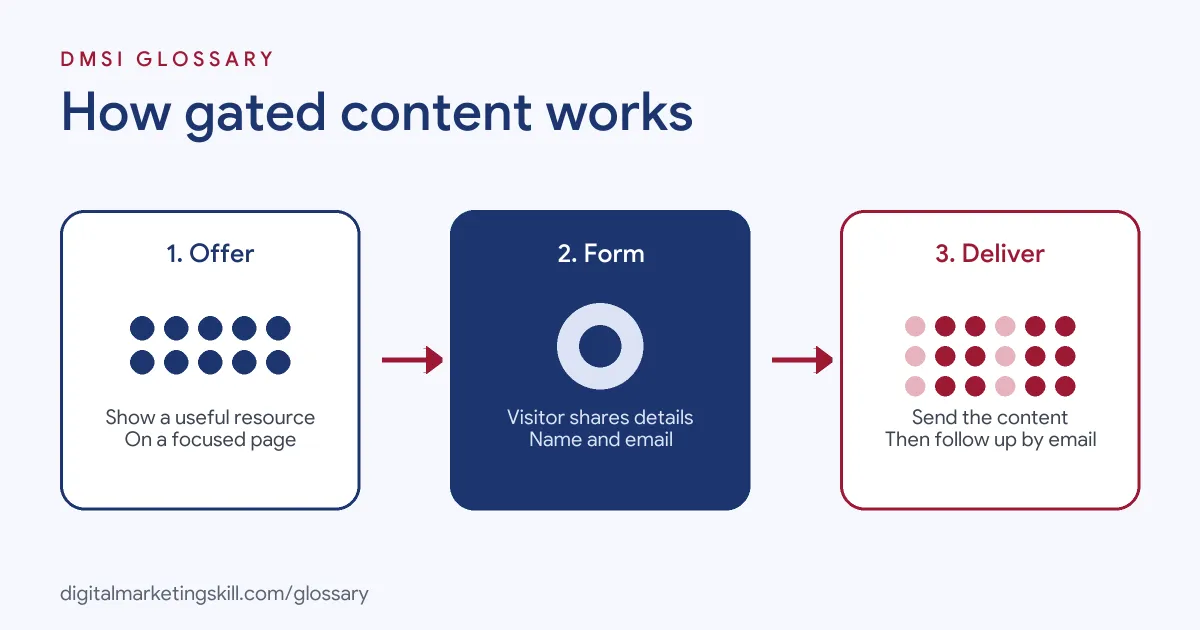
Most set-ups follow three steps. First, a visitor lands on a page that describes the resource. Next, they fill in a form. Finally, the system delivers the content and adds the contact to an email list or CRM.
The Landing Page
The page explains what the resource is, who it is for and what the reader will learn. A clear headline, a short list of benefits and a preview image usually help. Many marketers use a focused squeeze page with no other links, so the form is the only next step.
The Form
The form is the gate. Shorter forms tend to get more sign-ups, while longer forms collect more detail for sales. So most teams start with name and email, then add fields only if sales truly needs them.
Consent matters here. The UK Information Commissioner’s Office (ICO) says “you must not send marketing emails or texts to individuals without specific consent.” There is a limited exception, known as the soft opt-in, for your own previous customers. It also notes that you can send marketing emails to companies, though keeping a “do not email” list is good practice. So be clear on the form about what people are signing up for.
Delivery and Follow-Up
After the form, the system sends the content, often by email. Then a short follow-up sequence shares more value and, later, an offer. This is where the gate pays off. Without follow-up, you have collected an email address but built no relationship.
A good sequence is short and helpful. For example, the first email delivers the resource. The second shares a quick tip on using it. The third tells a short customer story. Only then does a later email make a clear offer. Because each message adds value, more people stay subscribed and read the next one.
Gated Content Examples
Here are three made-up examples:
- Software company: A project tool offers a free “planning templates” pack. Visitors enter their name and work email to download it, then receive a five-email series.
- Training provider: A school runs a free webinar on starting a career in marketing. Registration needs a name and email, and attendees get the recording afterwards.
- Consultancy: A firm publishes a research report. The summary is free on the blog, while the full report sits behind a short form.
In each case, the business gives real value first, then follows up. The resource does the persuading, and the emails keep the conversation going.
Gated vs Ungated Content
| Factor | Gated | Ungated |
|---|---|---|
| Access | Behind a form | Free for anyone |
| Main goal | Collect leads | Build reach, trust and search traffic |
| Best for | Templates, reports, toolkits, webinars | Blog posts, videos, social posts, guides |
| Trade-off | Fewer people see it | No contact details collected |
Most strong strategies use both. Ungated content attracts and teaches. Then gated offers turn the most interested readers into leads. This balance also matters for demand generation, which relies on content that many people can see.
Gated Content and SEO
Search engines can only rank what they can read. If the content sits fully behind a form, Google may not see it. Some publishers show a preview and gate the rest. Others let Google see the full text while users see a form.
That second approach can look like cloaking, which breaks Google’s spam policies. However, Google states it does not consider a paywall or content-gating mechanism to be cloaking “if Google can see the full content of what’s behind the paywall just like any person who has access.” To make this clear, Google offers structured data that marks the gated section. Its documentation says this markup “helps Google differentiate paywalled content from the practice of cloaking.”
How to Create Gated Content
- Pick a real problem. Choose something your audience urgently wants to solve.
- Create a resource worth the swap. Templates, checklists and original data work well.
- Build a focused landing page. Explain the benefit in one headline and a few bullets.
- Keep the form short. Ask only for what you will actually use.
- Be clear about consent. Tell people what emails they will receive, and make opting out easy.
- Deliver instantly. Send the resource straight away, by email or on a thank-you page.
- Follow up. Set up a short email sequence that adds more value before any sales pitch.
- Measure and improve. Track page conversion rate, cost per lead and how many leads become customers.
Best Practices for Gated Content
- Gate only your best material. If people feel cheated, they will not trust your next offer, however good it is.
- Show a preview. A sample page or contents list proves the value before the form.
- Use double opt-in where it helps. It confirms the email address is real and wanted.
- Connect it to your CRM. Tag each lead with the resource they chose, so follow-ups stay relevant.
- Review results regularly. Retire resources that no longer convert or are out of date.
For ideas on what to offer, see our guide to lead magnet ideas.
Common Mistakes to Avoid
First, teams gate thin content, such as a short blog post turned into a PDF. Second, they ask for too many details, so few people finish the form. Third, they collect emails without clear consent. Finally, they never follow up, so the leads go cold. Each mistake wastes the effort that went into making the resource. So before launch, check the offer, the form, the consent wording and the follow-up together.
Where You’ll Use Gated Content at Work
Gated offers are common in B2B and lead generation roles. For example, remote job listings mention:
- “Managing and creating gated content and sales collateral (such as ebooks or infographics)” (Marketing Operations Specialist).
- “Managing and Creating gated content and Sales collateral (such as ebooks or infographics)” (Content Marketing Strategist).
So if you aim to be a Lead Generation Specialist, Email Marketing Specialist or Growth Marketer, you will plan, build and measure gated offers. Employers will want to see the full chain: the resource, the page, the form and the follow-up.
Learn It in the Full Stack Programme
Gated offers link content, landing pages, email and analytics, so the best fit is the Full Stack programme (all four tracks). You take all ten courses and complete one portfolio project from each track, including a lead magnet with an automated email sequence. You also get unlimited 1-on-1 mentoring and a U.S. Project Internship from day one.
Frequently Asked Questions
What is gated content in simple terms?
It is content you can only get after filling in a form, usually with your name and email. Ebooks, templates and webinars are common examples.
Is gated content bad for SEO?
It can be if Google cannot see it. Showing a preview, or using Google’s paywall structured data, helps search engines understand the page.
What is the difference between gated content and a lead magnet?
The lead magnet is the free resource. Gating is the act of putting it behind a form.
How long should a gated content form be?
As short as possible. Many teams ask only for name and email, then learn more through follow-up emails.
Should all content be gated?
No. Most content should stay free to build reach and trust. Gate only your most valuable resources.
Sources: Google Search Central: Subscription and paywalled content; Google Search Central: Spam policies; ICO: Electronic mail marketing; remote job listings on Himalayas.