
A squeeze page is a short landing page with one job: to get a visitor’s email address in exchange for something they want. It usually has a clear headline, a few lines of text and a form with just one or two fields. It matters because it turns paid or social traffic into contacts you can follow up with, instead of visitors who leave and never come back.
Key Takeaways
- This type of landing page exists only to collect email addresses.
- The offer does the “squeezing”: a free guide, a discount or access to something useful.
- Less is more. One headline, short text and a form with one or two fields.
- What happens after the sign-up matters just as much, from the thank-you page to the first email.
- In the UK, you need specific consent to send marketing emails. Pre-ticked boxes don’t count.
What Is a Squeeze Page?
Unbounce, a landing page software company, defines it as “a type of landing page marketers use to collect just email addresses from visitors with an opt-in form.” The name comes from the idea that you “squeeze” the visitor gently. You do that by presenting a special offer, gating valuable content or restricting access.
Picture a yoga teacher who runs Instagram ads. The ad promises a free seven-day beginner plan. When people tap the ad, they land on a page with a bold headline, three short bullet points and a box for their email. There is no menu, no blog and no other link. So the only real choice is to sign up or leave.
That focus is the whole point. In other words, a squeeze page removes every distraction between the visitor and the form.
How a Squeeze Page Works
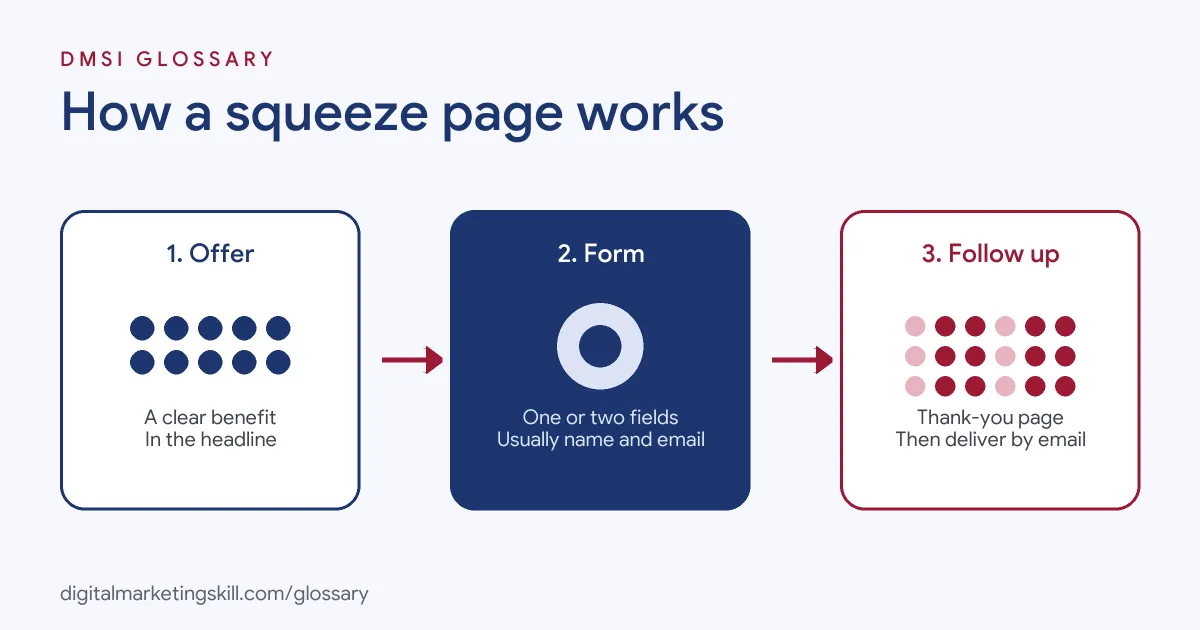
Every page of this kind follows the same three-step flow. First, the visitor sees a clear offer. Next, they fill in a short form. Then they get what they were promised, usually by email.
The Offer and Headline
According to Unbounce, these pages almost always include a headline that “clearly communicates the benefit.” Below it, there is supporting text that gives just enough detail for the visitor to decide. For example, “Get the 10-minute meal planner that saves you two hours a week” tells people exactly what they get.
The Form
The form is the heart of the page. Unbounce says it should include “just one or two fields,” typically name and email address. That’s because every extra field adds effort, and effort makes people leave. If you need more details, you can ask for them later by email.
Where Visitors Come From
Unbounce points out a key difference from pop-ups. You send traffic to this page on purpose, while pop-ups convert people who came to your site for another reason. In practice, that traffic often comes from paid social ads, search ads, a link in your bio or a link in a video description. Because those visitors arrive with one idea in mind, the page should continue the same message.
What Happens After the Sign-Up
The page’s job doesn’t end when someone clicks the button. Unbounce recommends four follow-up steps. First, deliver the offer quickly. Second, show a thank-you page that explains what happens next. Third, send the lead into your CRM. Finally, send an immediate email so the new contact hears from you while they still remember you.
Squeeze Page Examples
Here are three common ways businesses use this kind of page:
- Free guide: An accountant runs search ads for “self-employed tax tips.” The squeeze page offers a free checklist in exchange for an email.
- Discount code: An online shop offers a first-order discount. Visitors enter their email and the code arrives straight away.
- Quiz or tool: A health brand asks a few questions in an interactive quiz. To see the result, the visitor shares an email address.
In each case, the offer is specific and useful. That is what makes people willing to share their details.
Squeeze Page vs Landing Page vs Pop-Up
These three often get confused, so here is a quick comparison based on Unbounce’s guidance:
| Option | Main goal | Typical form | Traffic |
|---|---|---|---|
| Squeeze page | Collect email addresses | One or two fields | Sent to the page on purpose, often from ads |
| Landing page | Any single action, such as a sign-up, demo or purchase | May have several fields, or just a button | Sent to the page on purpose |
| Pop-up or sticky bar | Collect emails from people already browsing | Usually one field | Visitors who came to your site for another reason |
In short, every squeeze page is a landing page, but not every landing page is a squeeze page. Unbounce compares it to “a very specific type of apple.”
So which should you pick? Use a pop-up when people already visit your site in good numbers. Use a full landing page when you need more detail, such as a company name for a sales call. Then choose the short, single-offer page when you send cold traffic from ads or social posts and want the simplest path to an email.
How to Create a Squeeze Page
You can build one in WordPress, an email platform or a landing page builder. The steps are the same:
- Choose one offer. Pick something your ideal customer wants right now, such as a checklist, template or discount.
- Write a benefit-led headline. Say what the visitor gets, not what you sell.
- Add short supporting text. Two or three bullet points are often enough.
- Keep the form short. Ask for an email, and perhaps a first name.
- Add a clear consent statement. Explain what emails people will receive, and leave any tick box unticked.
- Remove distractions. Hide the main menu and extra links.
- Set up the follow-up. Connect a thank-you page, your CRM and an automatic welcome email.
After that, send a small amount of traffic to the page. Then check the sign-up rate before you spend more.
Best Practices for a Squeeze Page
- Match the ad to the page. If the ad promises a free planner, the headline should say “free planner” too.
- Make the offer specific. “5 email templates for cafés” beats “marketing tips.”
- Keep it mobile-friendly. Many visitors will arrive on a phone, so test the page on one.
- Be honest. Above all, deliver exactly what you promised, or people will unsubscribe.
- Test one change at a time. For example, try a new headline while you keep the rest of the page the same.
Common Mistakes to Avoid
Many beginners ask for too much. A form with six fields feels like hard work, so fewer people finish it. Another mistake is a vague offer that doesn’t solve a real problem. Some pages also leave the full site menu in place, which pulls people away. Finally, consent is often handled badly. The ICO says you “must not send marketing emails or texts to individuals without specific consent,” and its guidance on valid consent says pre-ticked boxes should not count. So write a clear consent line, and give people an easy way to unsubscribe.
Where You’ll Use a Squeeze Page at Work
Job listings rarely use the term itself. However, the skill sits at the centre of lead generation and email roles. As an Email Marketing Specialist, you might build the page that grows a newsletter list. As a Marketing Automation Specialist, you would connect the form to your CRM and set up the welcome sequence. Meanwhile, a Lead Generation Specialist tests offers, headlines and traffic sources to lower the cost per lead.
In each role, employers want proof. That means a live page, a real sign-up rate and an email sequence you can show them.
Learn It in the Lead Generation Track
You can learn to build and test a squeeze page in the AI-Powered Lead Generation and Email Automation track. It covers AI fundamentals, lead generation, and email marketing and automation. In fact, your portfolio project is to build a lead magnet and an automated email sequence that converts. You also join a U.S. Project Internship from day one, with unlimited 1-on-1 mentoring.
To go further, read our guide to landing page design that converts and our comparison of popups, landing pages and inline forms. You can also read our glossary entry on the lead magnet.
Frequently Asked Questions
What is a squeeze page in simple terms?
It is a short web page that offers something useful in exchange for your email address. It has one goal and very few distractions.
What is the difference between a squeeze page and a landing page?
A squeeze page is one type of landing page. It focuses only on collecting email addresses, while other landing pages may ask for a demo, a purchase or more details.
How many form fields should it have?
Usually one or two, such as name and email. Fewer fields make it easier for people to sign up.
Do I need consent to email people who sign up?
In the UK, yes. You need specific consent for marketing emails to individuals, and you must give people a simple way to opt out.
Are squeeze pages still effective?
They can be, when the offer is specific and the page matches the ad. Test your own sign-up rate rather than relying on general claims.
Sources: Unbounce: What is a squeeze page?; ICO: Electronic mail marketing; ICO: What is valid consent?.