
WhatsApp marketing is the use of WhatsApp to send customers updates, offers and support messages, and to hold one-to-one conversations that lead to sales. Businesses use the free WhatsApp Business app or the WhatsApp Business Platform to message people who have agreed to hear from them. It matters because many customers already use WhatsApp every day, so a message there can feel more personal and get a faster reply than an email.
Key Takeaways
- You may only message people who have given you their number and opted in to hear from you.
- Small businesses often start with the WhatsApp Business app. Larger teams use the Business Platform, which connects to other software.
- Messages you start yourself must use approved templates, sorted into marketing, utility and authentication categories.
- When a customer messages you, a 24-hour customer service window opens, and free-form replies in that window are free.
- Good campaigns are short, useful and easy to opt out of. Spammy messages break the rules and damage trust.
What Is WhatsApp Marketing?
At its simplest, WhatsApp marketing means treating WhatsApp as a channel, like email or SMS. You collect opted-in contacts, send them useful messages and reply when they write back. However, unlike a newsletter, the channel is built for conversation. So customers often ask questions, send photos or place orders right inside the chat.
Businesses use it for three main jobs. First, they send updates, such as order confirmations or delivery alerts. Second, they share offers and product news with people who asked for them. Third, they answer questions and close sales one-to-one.
For a wider look at tactics, see our guide to WhatsApp marketing strategy.
How WhatsApp Marketing Works
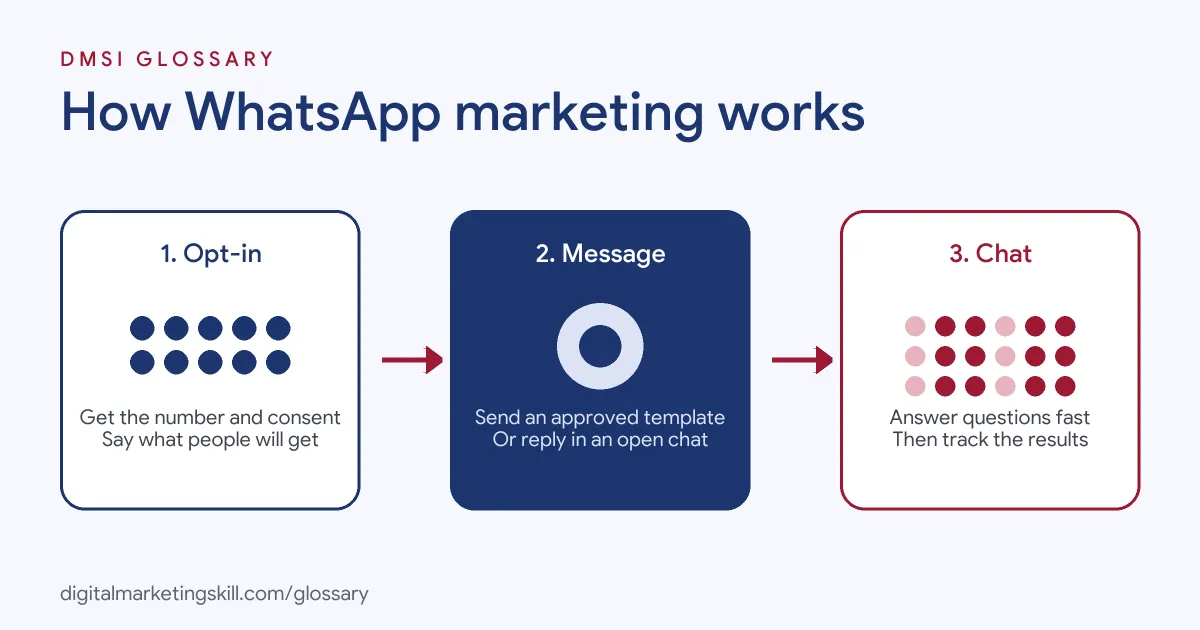
Every campaign follows the same basic flow. First, you collect a phone number and clear permission. Next, you send a message, either a pre-approved template or a reply inside an open chat. Finally, you handle the conversation and track what happens next.
Opt-In and Permission
Permission is the foundation. WhatsApp’s Business Messaging Policy says you may only contact people if “they have given you their mobile phone number” and you have “received opt-in permission from the recipient confirming that they wish to receive subsequent messages.” It also says you are “solely responsible for determining the method of opt-in.”
The policy goes further. You “must respect all requests (either on or off WhatsApp) by a person to block, discontinue, or otherwise opt out.” In addition, it asks you to give clear instructions on how people can opt out of specific categories of messages.
Templates and Message Categories
On the Business Platform, a message you start must use a template. Meta’s developer documentation sorts templates into three categories: marketing, utility and authentication. A marketing template might share an offer. A utility template might confirm an order, while an authentication template sends a one-time passcode.
The 24-Hour Window and Pricing
When a customer messages you, a 24-hour customer service window opens. Inside that window, you can reply with normal messages. Meta’s pricing page says “all non-template messages are free,” and utility templates sent within an open window are free too. Meanwhile, Meta charges on a per-message basis for other templates, so check its rate card before a big send.
WhatsApp Marketing Examples
Here are three made-up examples of how a business might use the channel:
- Restaurant: A takeaway adds a “Message us on WhatsApp” button to its site. Customers send orders in the chat, and staff confirm the time and price in reply.
- Online shop: A shoe store asks for WhatsApp opt-in at checkout. It then sends a utility message with tracking details, and later a marketing template about a sale to people who chose offers.
- Training provider: A course provider runs click-to-WhatsApp ads. Interested people start a chat, ask about start dates and get a reply from an adviser.
In each case, the customer chose to be there. That choice is what makes the channel work.
WhatsApp Business App vs Business Platform
There are two main ways to run WhatsApp marketing. Here is a quick comparison:
| Option | Who it suits | Key detail |
|---|---|---|
| WhatsApp Business app | Sole traders and small teams | A free app on your phone with a business profile, catalogue and quick replies |
| WhatsApp Business Platform | Larger teams and brands | Connects to CRMs, chatbots and help desks; uses templates and per-message pricing |
| Email marketing | Most businesses | Better for long content and newsletters, but replies are slower and less personal |
To learn the app’s features in detail, read our guide to the WhatsApp Business app.
How to Start WhatsApp Marketing
These steps work for most small and mid-sized businesses:
- Choose the app or the Business Platform, based on your message volume and team size.
- Set up a business profile with your name, logo, hours and website.
- Add opt-in points, such as a checkbox at checkout or a sign-up form, and say what people will receive.
- Write templates for your key messages, then submit them for approval if you use the Platform.
- Plan a schedule. For example, send order updates as they happen and offers no more than you promised.
- Set up quick replies or a chatbot for common questions, with an easy way to reach a person.
- Track replies, clicks and sales, and remove anyone who opts out straight away.
WhatsApp Marketing Best Practices
- Ask for permission clearly. The policy suggests an opt-in that covers the different message types you will send, such as order updates and offers.
- Keep it short. People read chats on their phones, so lead with the point and add one clear call to action.
- Personalise with care. Use the person’s name and past orders, but never share data they did not expect you to use.
- Reply fast. A chat feels like a conversation, so slow replies cost you sales.
- Never surprise people. The policy says: “Do not confuse, deceive, defraud, mislead, spam, or surprise people with your communications.”
How to Measure Results
You can’t improve what you don’t track. So pick a few simple numbers and check them each week:
- Opt-ins: how many new people join your list, and where they came from.
- Replies: how many people write back after a message. A reply shows real interest.
- Clicks: how many people tap the link in a message. Use UTM tags, so your analytics tool can see the source.
- Sales or leads: how many chats end in an order, a booking or a sign-up.
- Opt-outs and blocks: how many people leave. If this number jumps, send fewer or better messages.
Then compare one message with another. For example, test two opening lines on two small groups, and keep the one that gets more replies.
Common Mistakes to Avoid
Many businesses make the same few errors. First, they upload a bought or old list and message people who never opted in. Second, they send too many offers, so people block the number. Third, they use a marketing template when a simple reply inside the open window would be free. Finally, they forget to plan for replies, so customers wait hours for an answer. Each of these hurts trust, and every one is easy to avoid with a simple plan.
Where You’ll Use WhatsApp Marketing at Work
WhatsApp shows up in CRM, retention and lead generation roles. For example, recent remote job listings describe work such as:
- Helping “plan, launch, and optimize player communications across Email, WhatsApp, SMS, Push, and in-app” (CRM Marketing Specialist).
- Setting up AI assistants that “answer customers on WhatsApp, Telegram and email, write quotes, book meetings and follow up” (Flexible Remote Lead Generation Specialist).
So as a Digital Marketing Manager, Growth Marketer or Freelance Digital Marketer, you may plan WhatsApp campaigns alongside email, social and ads. Employers will want proof that you can grow an opted-in list and turn chats into results.
Learn It in the Full Stack Programme
WhatsApp marketing draws on several skills at once: lead generation, messaging, automation and paid social. That’s why it fits the Full Stack (all four tracks) option, which covers all ten courses and includes one portfolio project from each track. Every track is about 90% hands-on, with unlimited 1-on-1 mentoring and a U.S. Project Internship from day one.
Frequently Asked Questions
Is WhatsApp marketing legal?
Yes, when you follow WhatsApp’s policies and local privacy laws. Above all, you need the person’s number and their opt-in before you message them.
Is the WhatsApp Business app free?
Yes, the app itself is free to download and use. The Business Platform, by contrast, charges on a per-message basis for template messages.
Can I send bulk messages on WhatsApp?
On the Business Platform, you can send approved templates to many opted-in contacts. However, sending offers to people who never agreed breaks the policy.
What is the 24-hour window on WhatsApp?
It is the period that opens when a customer messages you. During that time, you can reply with normal free-form messages instead of templates.
Is WhatsApp marketing better than email?
Neither is better for everything. WhatsApp suits short, timely and personal messages, while email suits longer content. Most businesses use both.
Sources: WhatsApp Business Messaging Policy; Meta for Developers: Pricing on the WhatsApp Business Platform; remote job listings on Himalayas and Himalayas.