
Klaviyo is a marketing platform for email and SMS that online shops use to send campaigns and automated messages based on customer data. It pulls in data such as orders, browsing and sign-ups, then lets you target people with lists, segments and automated flows. It matters because it is one of the most common tools in eCommerce email jobs, so knowing it well can make you more useful to online brands.
Key Takeaways
- Klaviyo combines customer data with email and SMS, so you can send messages based on what people do.
- Flows are automated sequences, such as a welcome series or an abandoned cart email, triggered by an event.
- Lists are static and fill through sign-up forms or imports. Segments are dynamic and update based on conditions.
- Being on a list does not by itself mean a person has consented to marketing, so you still need clear opt-in.
- The help centre suggests setting up the welcome series, abandoned cart, post-purchase and winback flows first.
What Is Klaviyo?
Think of Klaviyo as an email tool with a memory. A basic newsletter tool knows only a subscriber’s email address. By contrast, Klaviyo can also know what they bought, what they looked at and when they last opened an email. You can then use those details to choose who gets each message and what it says.
Most users run online stores. They connect their shop, and order and product data flow into Klaviyo. After that, the platform can send a reminder when someone leaves items in their cart, or a thank-you email after a first order.
It handles two main types of sending. Campaigns are one-off sends, such as a sale announcement. Flows, meanwhile, are automated messages that run in the background for each person who qualifies.
How Klaviyo Works
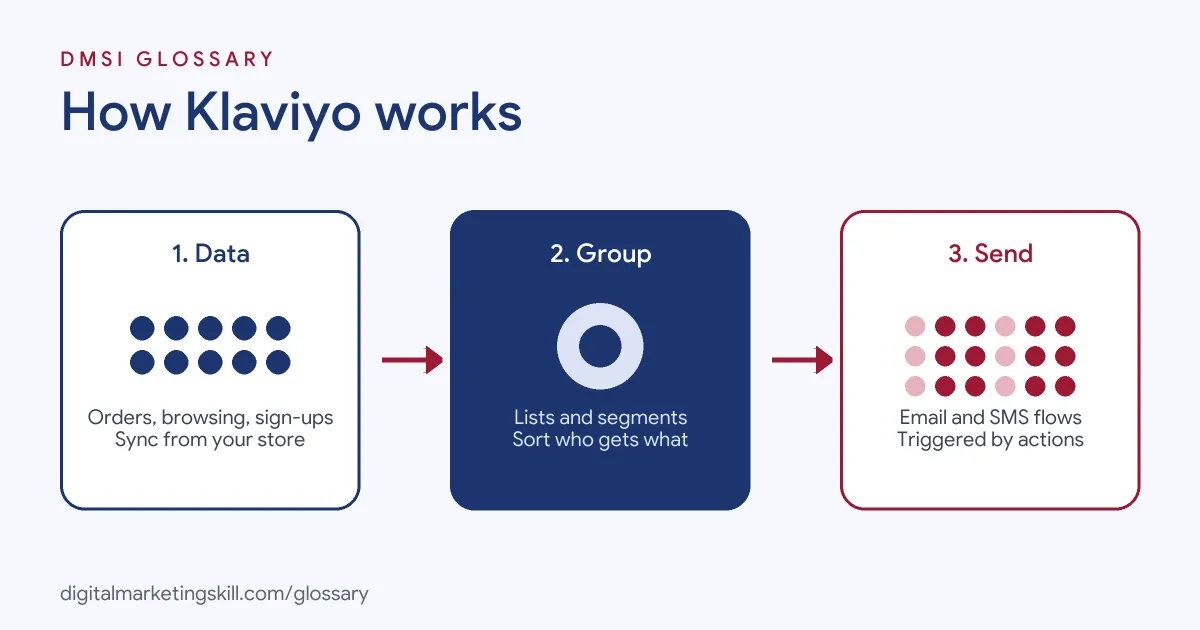
The platform works in three layers. First, data comes in from your store, forms and other tools. Next, you group people into lists and segments. Finally, you reach them with campaigns and flows, and Klaviyo reports on the results.
Klaviyo Lists and Segments
This is the first thing to understand. According to the Klaviyo help centre, lists “are static, meaning their membership is not determined by a set of conditions.” People join through sign-up forms, or you add them by hand or by import.
Segments work differently. They “are defined by a set of conditions,” such as everyone who has ever purchased or visited your site last week. Segments are dynamic, so they “grow and shrink based on customer behavior.” However, you can’t add people to a segment by hand, by import or through a sign-up form.
The help centre also warns that “being in a list does not by itself mean a profile has consented to marketing.” So consent needs its own clear record.
Klaviyo Flows
A flow, in Klaviyo’s words, “is a sequence of automated actions (e.g., sending messages) triggered by a behavior or event.” For example, a welcome series starts when someone subscribes. Then it sends several messages over time that introduce the brand.
Flows can start from several kinds of trigger. Depending on your account and data, the help centre lists list, segment, metric, date property, price drop and low inventory triggers. Inside a flow, you can add time delays and splits. A multi-branch split can route people down as many as 20 paths, based on conditions you set.
Klaviyo Examples
Here are three made-up examples of how a shop might use the platform:
- Welcome series: A skincare brand offers a guide in a pop-up form. New subscribers join a list, which triggers three emails over a week that explain the range.
- Abandoned cart: A shoe store’s metric-triggered flow sends an email a few hours after someone starts checkout without buying. A second email follows the next day if they still haven’t ordered.
- Winback: A coffee shop builds a segment of customers who have not ordered in 90 days. That segment then triggers a flow with a reminder and a new product.
In each case, the message goes to the right person at the right moment, without anyone pressing send.
Klaviyo vs Other Email Platforms
Many tools send email. Here is how Klaviyo’s approach compares with two common alternatives:
| Tool type | Typical strength | Common users |
|---|---|---|
| Klaviyo | Deep store data, segments and behaviour-triggered email and SMS | Online shops and eCommerce brands |
| General email tools | Simple newsletters, forms and basic automation | Small businesses, creators and charities |
| All-in-one CRMs | Sales pipelines, lead scoring and marketing in one place | B2B and service companies |
The right choice depends on the business. In short, a shop with lots of order data gets the most from a store-focused tool, while a B2B firm may need a CRM.
How to Set Up Klaviyo
Here is a sensible order for a new account:
- Connect your store, so order, product and browsing data start to sync.
- Create one main list per channel. The help centre recommends a single main list for each channel, such as email and SMS.
- Add a sign-up form to your site and make the opt-in wording clear.
- Build your first flows in the suggested order: welcome series, abandoned cart, post-purchase and winback.
- Review, customise and preview every default message before you set a flow live.
- Create a few useful segments, such as engaged subscribers and repeat buyers.
- Send your first campaign to a segment, then check opens, clicks and revenue.
For the strategy behind these steps, see our guide to email marketing strategy.
Klaviyo Best Practices
- Start with flows. Flows keep working after you build them, so they often bring steady results with little upkeep.
- Send campaigns to segments. A segment of engaged people usually beats a blast to everyone.
- Keep consent clean. Track who opted in to email and SMS separately.
- Use splits wisely. For instance, send first-time buyers a different message from repeat customers.
- Test and review. Check each flow’s results regularly, and update old messages and offers.
Metrics to Watch
Good email work is measured, not guessed. So track a small set of numbers for every flow and campaign:
- Click rate: the share of people who click a link. It shows whether the message made them act.
- Conversions and revenue: the orders that follow a message. For a shop, this is usually the number that matters most.
- Unsubscribes: how many people leave after a send. A sudden rise means the message missed the mark.
- Flow performance over time: compare each flow month by month, so you spot messages that need a refresh.
Then improve one thing at a time, such as a subject line or a delay, and compare the results.
Common Mistakes to Avoid
New users often send every campaign to the whole list, which hurts engagement. Others leave the default flow messages unchanged, even though the help centre says to review and customise them first. Some treat list membership as consent, which it isn’t. Finally, many build lots of segments but never use them, so the data adds little value. A simple plan with a few strong flows and well-chosen segments usually beats a complex set-up.
Where You’ll Use Klaviyo at Work
Klaviyo appears often in eCommerce, email and retention job listings. For example, recent remote listings ask for:
- “Experience with Klaviyo or another email marketing platform.” (Shopify Store Specialist).
- “Practical experience with email marketing, CRM platforms, and marketing automation, such as HubSpot, Klaviyo, ActiveCampaign, or equivalent tools.” (Marketing Lead).
- One email agency states simply: “Our tool of choice is Klaviyo.” (Email Designer).
So as an Email Marketing Specialist or Marketing Automation Specialist, you may build flows, design campaigns and report on revenue from email and SMS.
Learn It in the Lead Generation and Email Track
You can learn email platforms like this in the AI-Powered Lead Generation and Email Automation track. It covers lead generation, email marketing and automation. Your portfolio project is to build a lead magnet and an automated email sequence that converts. You also get unlimited 1-on-1 mentoring and a U.S. Project Internship from day one.
For one of the most useful flows, read our glossary entry on the abandoned cart email.
Frequently Asked Questions
What is Klaviyo used for?
It is used to send email and SMS campaigns and automated flows, mainly by online shops. It uses customer data, such as orders and browsing, to target each message.
What is a flow in Klaviyo?
A flow is an automated sequence of actions, such as sending messages, that starts when a person does something or meets a condition. For example, a welcome series is a flow.
What is the difference between a list and a segment?
Lists are static, and people join through forms, imports or manual adds. By contrast, a segment is dynamic, so it updates itself based on conditions you set.
Can Klaviyo send text messages?
Yes. It supports SMS as well as email, and the help centre recommends one main list for each channel.
Is Klaviyo only for Shopify stores?
No. For example, one email agency’s job listing says it serves brands “that use Shopify or WooCommerce,” with Klaviyo as its main tool.
Sources: Klaviyo Help Center: Getting started with flows; Klaviyo Help Center: The difference between segments and lists; remote job listings on Himalayas and Himalayas.