
Facebook Ads Manager is Meta’s free tool for building, running, and tracking ads. It covers Facebook, Instagram, Messenger, and Audience Network. Most new advertisers still waste budget inside it. The fix is matching objective, format, and frequency to the actual stage of your buyer.
Key Takeaways
- Traffic campaigns average $0.70 cost per click, the cheapest of the six objectives, while Leads campaigns average $1.92 (Adamigo benchmark data). Picking the wrong objective can double your cost before you change anything else.
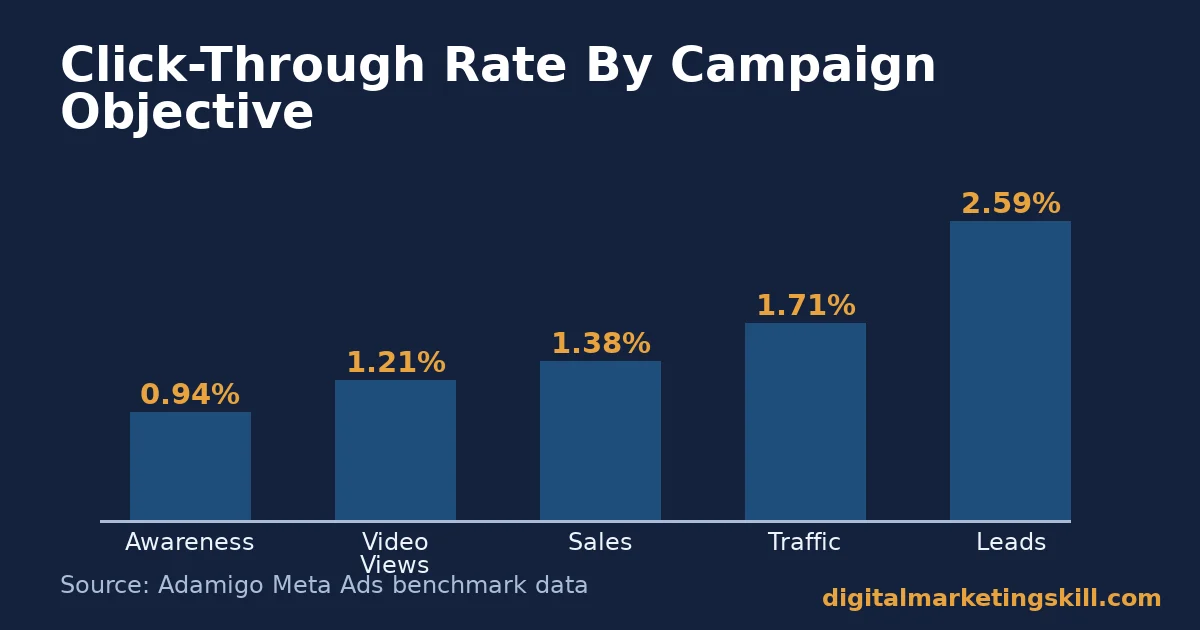
- Leads campaigns average a 2.59% click-through rate, more than double the 0.94% for Awareness campaigns (Adamigo). A higher click rate does not always mean a cheaper result, so read both numbers together.
- Sales campaigns report an average return on ad spend of 2.8 to 3.0, with top accounts reaching 3.0 to 5.0 or higher (Adamigo). Most accounts have real room to improve before they need a bigger budget.
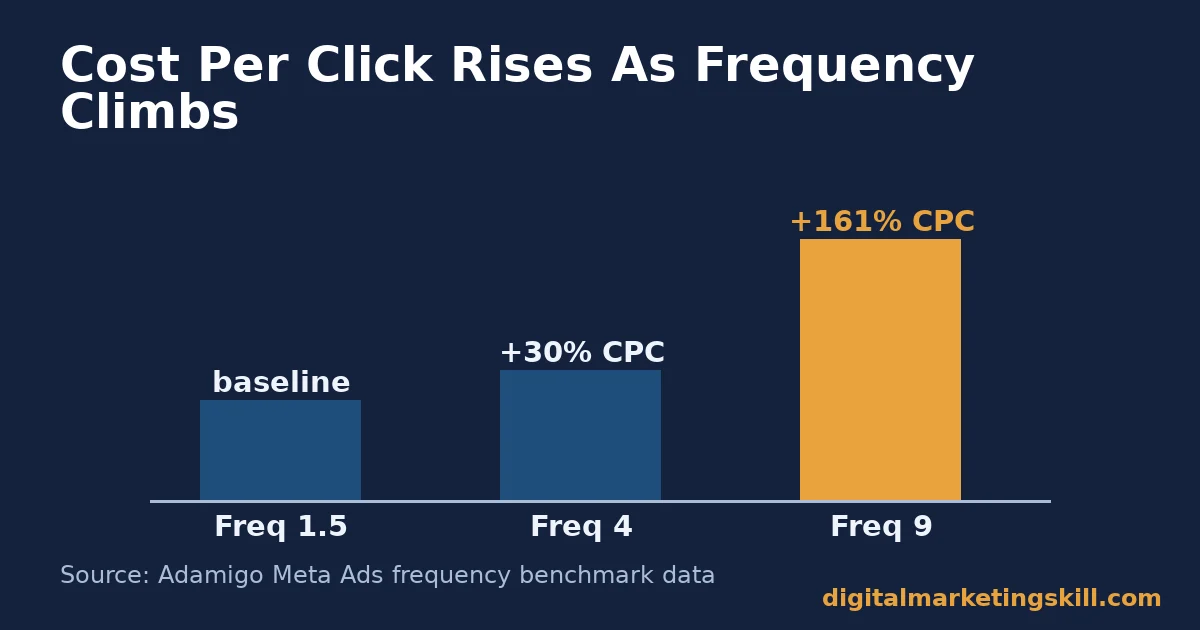
- Cost per click can spike by around 161% once frequency reaches 9 views per person, compared with a fresh audience (Adamigo). Creative fatigue, not audience size, is often the real limit on scaling.
- Click-through rate falls by roughly 50% after a person sees the same ad 5 to 8 times (Adamigo). Refreshing creative on a schedule protects performance more reliably than adding budget.
In this guide
- Why Most Facebook Ads Manager Campaigns Waste Budget
- Facebook Ads Manager: How the Structure Actually Works
- Facebook Ads Manager: What Differs By Campaign Objective
- How to Get More From Each Facebook Ads Manager Objective
- Where Your Facebook Ads Manager Ads Can Appear
- How to Measure a Facebook Ads Manager Campaign
- The One Rule for Scaling vs. Refreshing
- A Real Case: A Small Budget, Tightly Targeted
- Common Facebook Ads Manager Mistakes to Avoid
- Frequently Asked Questions About Facebook Ads Manager
- Learn Facebook Ads Manager and Paid Social With Expert Support
Why Most Facebook Ads Manager Campaigns Waste Budget
Most guides to Facebook Ads Manager list the buttons to click. That is not the hard part. The hard part is choosing the right objective, budget, and creative lifespan for where your audience actually is. Facebook Ads Manager will happily spend an unlimited budget on the wrong settings, with no warning that anything is wrong.
This is an informed framework, not a guarantee. The benchmark figures below come from publicly reported industry data, not a promise for your account. Your own numbers depend heavily on your industry, audience size, and creative quality. Treat every figure here as a comparison point, and verify it against your own Ads Manager data.
With that ground rule in place, this guide covers how Facebook Ads Manager is structured. It also covers what changes by objective, where your ads can appear, how to measure results, and the one rule for deciding when to scale versus when to refresh.
Facebook Ads Manager: How the Structure Actually Works
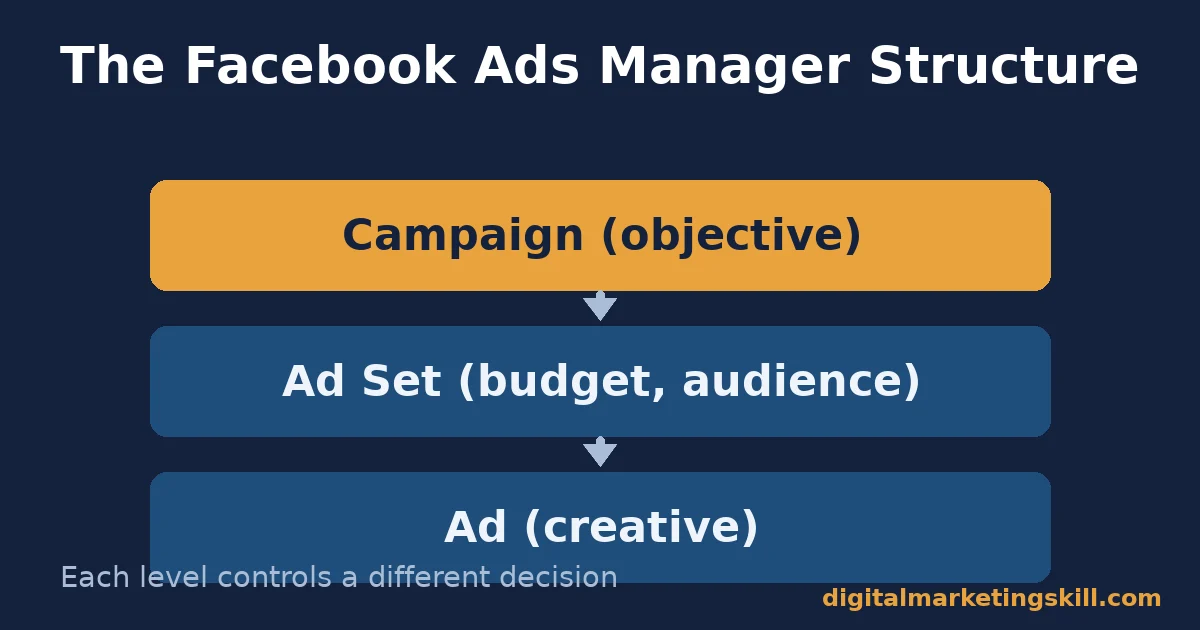
Every campaign in Facebook Ads Manager follows the same three-level structure. Understanding it first makes every later decision easier. Skip this step, and every setting choice later on will feel random instead of deliberate.
Campaign
The campaign level is where you set your objective: Awareness, Traffic, Engagement, Leads, App Promotion, or Sales. This choice tells Facebook what outcome to optimise for. It cannot be changed once the campaign is live. Pick it to match your actual business goal, not the objective that sounds the most important.
Every ad set and ad you build afterward inherits this objective. Choosing it badly at the start forces you to rebuild the whole campaign later, rather than just tweaking a setting.
Ad Set
The ad set level controls budget, schedule, audience, and placement. Here you decide who sees your ad, based on a clearly identified target audience. You also set how much you spend per day or over the campaign’s life.
You can run several ad sets inside one campaign, each testing a different audience or budget. This is the level where most early-stage testing should happen, before you commit real budget to a single approach.
Ad
The ad level is the creative itself: the image or video, the headline, the body text, and the call to action. This is the layer you will refresh most often. Creative wears out long before an objective or audience does.
Build two or three ad variations inside each ad set from the start. Facebook will show each one to a slice of your audience and favour the one performing best, saving you from guessing which version to trust.
Facebook Ads Manager: What Differs By Campaign Objective
The three-level structure above stays the same for every campaign. What changes is how you should set it up, depending on where your objective sits in the buying journey.
Awareness Objectives: Built For Reach, Not Clicks
Awareness and Video Views campaigns are judged on how many people see and remember your ad, not on clicks. A 0.94% click-through rate here is normal, not a failure (Adamigo). Judging an Awareness campaign by its click rate is the single most common mistake new advertisers make.
These objectives suit new businesses, product launches, and anyone with no audience data yet. Use them to build a base before you ask for a harder action. Think of them as planting, not harvesting.
Traffic and Engagement Objectives: Built For Volume at Low Cost
Traffic campaigns are the cheapest objective to run, averaging $0.70 per click (Adamigo). That makes them useful for building a retargeting audience cheaply. Engagement campaigns work similarly, but optimise for likes, comments, and shares instead of link clicks.
Treat both as a bridge, not a destination. Their real value is the warm audience they hand off to a later, harder-working campaign.
Leads and Sales Objectives: Built For a Specific Action
Leads and Sales campaigns cost more per click. Facebook is optimising for a harder action here, not just attention. A $1.92 cost per click for a lead, against a $27.66 cost per lead (Adamigo), only makes sense once you know what a lead is worth to your business.
Work out that lead value before you launch, not after. Without it, you cannot tell a good result from a bad one.
How to Get More From Each Facebook Ads Manager Objective
These fixes mirror the three groups above. Start with the one that matches your current campaign.
Awareness Objectives: Lead With Frequency Caps
Cap your frequency. Refresh creative before it climbs past 4 views per person. Since clicks are not the goal here, judge success by reach and recall, not by a cost-per-click number that was never the point.
Set the cap at the ad set level, not by checking back manually. A hard rule beats remembering to look.
Traffic and Engagement Objectives: Lead With a Clear Landing Page
A cheap click that lands on a slow or unclear page is a wasted click. Before scaling a Traffic campaign, confirm the landing page loads fast. Make the next step obvious.
Test the link yourself on a phone, on a slow connection, before you spend a cent on traffic to it. Most broken funnels fail here first.
Leads and Sales Objectives: Lead With Your Pixel
Install the Meta Pixel before you spend a meaningful budget on Leads or Sales campaigns. Without it, Facebook is optimising blind, guessing at who is likely to convert instead of learning from your actual results.
Each Leads or Sales campaign is really just one stage of a wider sales funnel. Budget it accordingly, rather than judging it in isolation from the stages before and after it.
Where Your Facebook Ads Manager Ads Can Appear
Facebook groups ad locations into “placements.” You can let Facebook choose automatically, or pick manually for more control.
Automatic Placements
Automatic placement lets Facebook find the most efficient spot for your budget. Meta recommends this for most advertisers, and it usually performs well. It is the simpler starting point if you are new to Facebook Ads Manager.
Manual Placements
Manual placement lets you opt out of specific spots, such as Audience Network or in-stream video. Choose this once you have enough data to know which placements actually convert for your offer. Picking manually too early, with no data yet, usually just narrows your reach for no real benefit.
Ad Formats
Facebook Ads Manager offers five main ad formats. A single image is the simplest and most common. Video tends to catch attention faster, though people scroll past it quickly on mobile.
Carousels show up to ten images or videos in one ad, each with its own link, which suits a product range. Collection format lets shoppers browse several products in a full-screen view after tapping the ad.
Match the format to the objective, not the other way round. A Sales campaign showing one specific product usually works better as a single image or video than a crowded carousel.
How to Measure a Facebook Ads Manager Campaign
You cannot judge a campaign you are not measuring correctly. These are the core metrics, each defined in one sentence.
- CTR (click-through rate): the percentage of people who saw your ad and clicked it. Compare it against your specific objective’s benchmark, not a generic average.
- CPC (cost per click): how much you pay, on average, for each click. A rising CPC with a flat CTR usually signals creative fatigue, not a worse audience.
- CPM (cost per thousand impressions): what it costs to show your ad 1,000 times. It is the clearest read on how competitive and expensive your audience is right now.
- CPA or CPL (cost per acquisition or lead): how much you pay for one completed action. This is the number that actually connects ad spend to business value.
- ROAS (return on ad spend): revenue earned for every dollar spent on ads. A ROAS of 3 means three dollars back for every dollar spent, before other costs.
- Frequency: the average number of times one person has seen your ad. It is the single best early warning sign for creative fatigue.
Facebook Ads Manager lets you customise which of these columns you see. Build a saved report with the ones that matter for your objective, instead of reading the default view.
Reading These Metrics Together
No single metric tells the full story on its own. A low CPC next to a high CPA often means cheap, low-quality clicks. A high CTR next to a falling ROAS often means curiosity clicks that never convert. Always read cost, engagement, and outcome metrics side by side.
The One Rule for Scaling vs. Refreshing
If frequency is climbing past 4 and CTR is falling, refresh the creative before you touch the budget. If frequency is still low and CTR is falling, the problem is the audience or the offer, not fatigue.
Illustrative, invented numbers: imagine a Leads campaign at frequency 2.1, with a 2.6% CTR and a $25 cost per lead. Two weeks later, frequency has climbed to 5.8. CTR has dropped to 1.3%, and cost per lead has risen to $52.
Cost per click can spike by around 161% once frequency nears 9 (Adamigo). This campaign is already deep into fatigue territory. The fix is a new ad, not a bigger budget.
Now imagine a second campaign that never leaves frequency 1.5, yet still shows a falling CTR over two weeks. Fatigue cannot explain that drop, since each person has barely seen the ad once. Here the problem is the audience, the offer, or the landing page, and no amount of creative refreshing will fix it.
A Real Case: A Small Budget, Tightly Targeted
Ayooluwa Osemi, a Digital Marketing Skill Institute graduate, spent $14 on Facebook and Instagram ads and generated $878 in returns within a short timeframe, as published on the Institute’s reviews page. The campaign used a narrow, specific audience, closer to a clear customer avatar than a broad crowd, and one clear offer, rather than the wide targeting many beginners default to inside Facebook Ads Manager.
This is one published, named result, not a typical outcome; see the earnings disclaimer for the Institute’s full position on income claims. The lesson is structural: a small, well-matched audience inside Facebook Ads Manager can outperform a larger, vaguer one at a fraction of the spend.
Notice what the case does not claim. It does not promise this result for every account, every product, or every budget. It shows one mechanism working: narrow targeting plus one clear offer, inside the same tool anyone can open today.
Common Facebook Ads Manager Mistakes to Avoid
Most wasted budget inside Facebook Ads Manager traces back to one of these five habits. None of them require a bigger budget to fix. Each one is a setting or a habit you can correct this week, often inside a single existing campaign rather than a new one.
Picking an Objective That Does Not Match the Goal
An Awareness campaign judged on sales, or a Sales campaign judged on reach, will always look like it is failing. Match the objective to the actual outcome you need, and judge it only on that.
Changing Budget or Creative Too Often
Facebook Ads Manager needs a learning period after any major change to budget, audience, or creative. Editing a campaign daily resets that learning repeatedly, which usually makes performance worse, not better.
Targeting Too Broadly, Too Early
A broad audience with no clear definition wastes budget showing your ad to people who were never going to buy. Narrow first, and widen only once you know what is working.
Skipping the Pixel
Running Leads or Sales campaigns without the Meta Pixel installed means Facebook cannot learn who actually converts. You end up paying to reach a guess, instead of a pattern built from real data.
Ignoring Frequency Until Performance Has Already Dropped
By the time cost per click has visibly spiked, the campaign has often been fatigued for days. Check frequency on a schedule, not only after results get worse.
Frequently Asked Questions About Facebook Ads Manager
Is Facebook Ads Manager free to use?
Yes. Facebook Ads Manager itself is free. You only pay for the ad budget you set, based on your chosen daily or lifetime spend.
What do I need before I can use Facebook Ads Manager?
You need a personal Facebook account, a Facebook Business Page, an ad account set up inside Business Manager, and a valid payment method. A Meta Pixel on your website is optional but strongly recommended.
Can I run ads from my personal Facebook profile?
No. You need a Facebook Business Page to access Facebook Ads Manager and run ads. A personal profile alone is not enough.
Why did my ad’s cost per click suddenly rise?
Rising CPC alongside a falling CTR usually points to creative fatigue from a high frequency. Check your frequency metric first before assuming your audience or offer has stopped working.
What is the difference between Facebook Ads Manager and Business Manager?
Facebook Ads Manager is built specifically for creating and tracking ad campaigns. Business Manager is the broader tool for managing Pages, ad accounts, and team access across your whole business.
Should I choose automatic or manual placements in Facebook Ads Manager?
Start with automatic placements if you are new. Switch to manual only once you have enough data to see which specific placements are actually converting for your offer.
How long does Facebook take to review a new ad?
Review typically takes between one and twenty-four hours. Facebook checks every ad against its advertising policies before it goes live.
How much budget do I need to start with Facebook Ads Manager?
There is no fixed minimum that works for everyone. Start small enough to afford testing two or three creative variations, and scale the one that performs, rather than committing your full budget to a single untested ad.
What is a good click-through rate in Facebook Ads Manager?
It depends entirely on your objective. Expect around 0.94% for Awareness, 1.71% for Traffic, and 2.59% for Leads (Adamigo). Compare your number against the right objective, not a single flat benchmark.
Why does Facebook Ads Manager say my campaign is still learning?
The learning phase happens after setup or a major edit, while Facebook gathers enough data to optimise delivery. Avoid editing budget, audience, or creative during this window, since every change can restart the clock.
Learn Facebook Ads Manager and Paid Social With Expert Support
Reading about Facebook Ads Manager is one thing. Running real campaigns with a real budget, under guidance, is another. A mentor who has watched hundreds of accounts move through fatigue, scaling, and objective mistakes will catch problems weeks before a beginner notices them alone.
The Master Diploma in Digital & AI Marketing at Digital Marketing Skill Institute includes an AI-Powered Social Media Management and Advertising track, one of four AI-powered tracks built from ten execution-first courses in total, with a Full Stack option covering all four.
Every track includes unlimited one-on-one coaching and mentoring, a U.S. Project Internship with a verified U.S. Work Reference Letter, and a dual US and UK accredited diploma recognised in more than 100 countries. The program runs 100% online, so you can build and test real Facebook ad campaigns for a real project anywhere in your country.
If you are ready to put Facebook Ads Manager to work, wherever you live, you can apply here, browse more guides on the blog, read more student results, or start from the Digital Marketing Skill Institute homepage.
Every figure in this guide was checked against its original source before publication. Figures marked as illustrative are invented examples, not real results.
![9 Amazing Digital Marketing Skills to Make Money Online [With Proof]](https://digitalmarketingskill.com/wp-content/uploads/2019/07/9-Amazing-Digital-Marketing-Skills-to-Make-Money-Online-With-Proof-17.png)





