
Third-party cookies are small files set in your browser by a website other than the one you are visiting, usually through an embedded ad, video or widget. Because the same outside company can appear on many sites, its cookie can recognise you as you move around the web. They matter because ad platforms have long used them to track people, retarget them and measure ads, and that is changing as browsers and privacy laws tighten up.
Key Takeaways
- A first-party cookie comes from the site in your address bar. A third-party cookie comes from a different domain.
- They support cross-site tracking, retargeting, ad counting and shared sign-ins.
- Firefox and Safari limit them by default. Chrome doesn’t block them by default, and Google has said it will keep offering users a choice.
- In the UK, you must tell people about non-essential cookies and get their consent.
- Smart marketers reduce their reliance on them by building first-party data.
What Are Third-Party Cookies?
A cookie is a small text file that a website stores on your device. The UK’s Information Commissioner’s Office (ICO) says it lets a site recognise your device and remember your preferences or past actions.
What makes a cookie “third-party” is who sets it. MDN, the web documentation from Mozilla, explains it simply. If the cookie’s domain matches the page in your address bar, it is a first-party cookie. If the domain is different, it is a third-party cookie. MDN adds that “cross-site cookies” is arguably a more accurate name.
For example, you read a recipe on a food blog. The page includes an ad from an ad network. That network can set its own cookie in your browser. Later, on a news site that uses the same network, the cookie can recognise you and show you a cooking ad.
How Third-Party Cookies Work
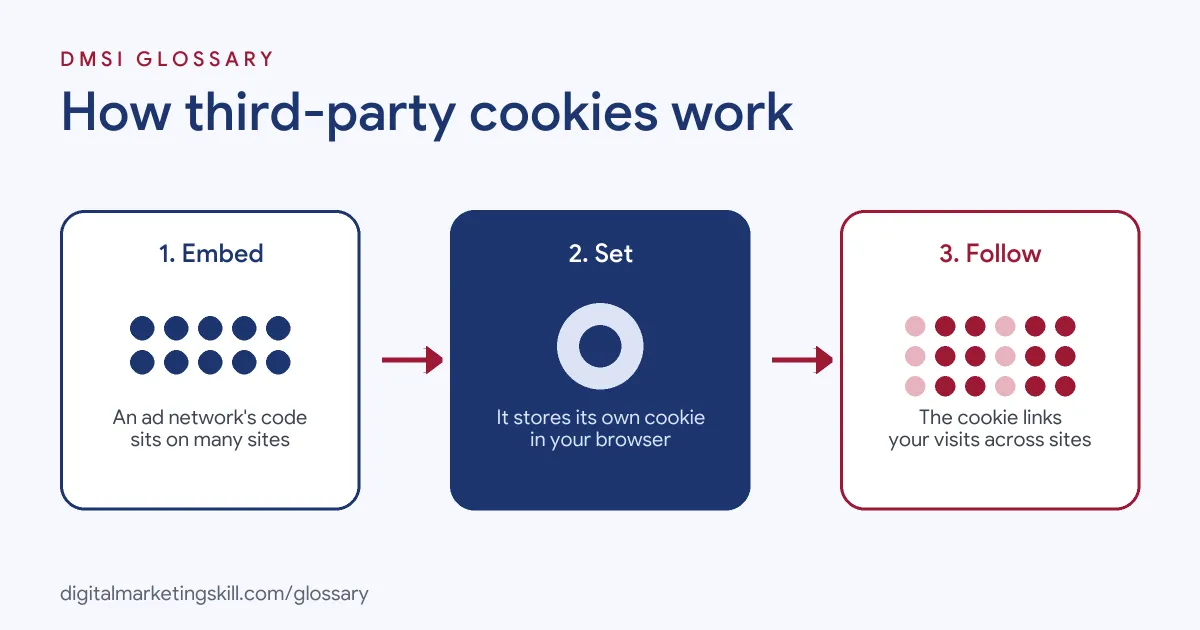
The key is embedded content. When a page loads an image, script or iframe from another domain, that domain can set and read its own cookie. As a result, one company can link your visits across every site where its content appears.
Common Uses
MDN lists several legitimate uses:
- Tracking affiliate links, so a partner earns commission on a sale.
- Keeping you signed in across related sites with a shared sign-in widget.
- Sharing preferences or themes across several sites.
- Collecting analytics across multiple sites.
- Counting ad impressions and recording interests so ad platforms can show more relevant ads.
The Privacy Problem
The same tools can be misused. MDN warns that third-party cookies can be used without consent to “chase users around the web” with targeted ads. Worse, third-party servers can combine information from cookies across many sites to build a detailed profile of a person. That is why browsers and regulators have stepped in.
Third-Party Cookies by Browser
Browsers treat them differently. According to MDN, here is how major browsers handle them by default:
| Browser | Default approach |
|---|---|
| Firefox | Total Cookie Protection gives each site its own separate cookie jar, blocking cross-site tracking |
| Safari | Intelligent Tracking Prevention applies similar protections by default |
| Chrome | Doesn’t block them by default, only in Incognito or when users choose to |
| Edge | Blocks trackers from unvisited sites and known harmful trackers |
| Brave | Blocks tracking cookies by default |
Google has said that Chrome will keep its current approach of offering users a choice about third-party cookies. It has also retired several Privacy Sandbox technologies that were built as alternatives, such as Topics and Protected Audience, after low adoption.
Third-Party Cookies Examples
Here are three made-up examples of how they affect marketing:
- Retargeting (example): A shop’s ad network tags visitors with a third-party cookie. On browsers that block it, many of those visitors never see the shop’s retargeting ads, so the audience is smaller than expected.
- Frequency caps (example): A brand caps display ads at three views per person per day. Google notes that its display frequency caps use third-party cookies by default, and fall back to first-party cookies when they aren’t available.
- Affiliate sales (example): A blogger links to an online store. If the tracking cookie is blocked, the store may not credit the sale to the blogger, unless it uses another method.
In each case, losing the cookie means losing some tracking, so marketers need back-up methods.
First-Party vs Third-Party Cookies
The difference comes down to who sets the cookie:
| Feature | First-party cookie | Third-party cookie |
|---|---|---|
| Set by | The site you are visiting | A different domain, through embedded content |
| Typical use | Logins, baskets, site analytics | Cross-site tracking, ad targeting, ad measurement |
| Browser limits | Generally allowed | Limited by default in several browsers |
In short, first-party cookies help one site work, while third-party cookies connect activity across many sites.
What the UK Consent Rules Ask
The ICO’s cookie guidance sets out a basic rule with three parts. You must tell people the cookies are there. You must explain what they do and why. Then you must get consent before you store them. That consent has to be given actively and clearly, so a pre-ticked box won’t do.
There is one main exception. You don’t need consent for cookies that are essential to a service someone asked for, such as remembering what is in a basket. Ad and tracking cookies don’t fit that exception.
The rules also go beyond cookies. The ICO says they cover any technology that stores or reads information on a person’s device. So pixels and similar tools need the same care.
How to Reduce Your Reliance on Third-Party Cookies
Follow these steps to protect your marketing:
- Audit your tags. List every tool on your site that sets cookies, and note which ones are third-party.
- Get consent right. The ICO says you must tell people about cookies, explain what they do and get consent, except for strictly necessary ones.
- Build first-party data. Grow email lists, accounts and loyalty schemes so you can reach people directly.
- Use server-side and first-party tools. Set up platform tools that rely on your own data, such as customer list uploads.
- Improve measurement. Use features like enhanced conversions that work with hashed first-party data.
- Test contextual ads. Target by page content, which doesn’t need to track people.
Best Practices
A few habits help you stay effective and compliant:
- Keep your cookie banner honest. Explain each type of cookie in plain words, and make it easy to say no.
- Review consent when tools change. The ICO notes you may need fresh consent if your cookie use changes.
- Don’t rely on one browser. Test tracking in Safari and Firefox, not just Chrome.
- Measure what you can prove. Compare platform reports with your own sales data.
Common Mistakes to Avoid
First, many site owners load ad tags before visitors have given consent. Second, they assume every visitor can be tracked, and so they overestimate their audiences. Third, they treat a cookie banner as a box-ticking exercise. Finally, they put off building first-party data. Each of these leaves them exposed to both legal and performance risks.
Where You’ll Use Third-Party Cookies at Work
Listings rarely name third-party cookies directly. Instead, ad tech roles talk about what replaces them. For example, one current remote listing asks the candidate to:
- “Educate prospects on cookieless targeting, first-party data, and audience solutions” (Sales Director, AdTech).
- Show buyers “how first-party data and cookieless solutions support their marketing objectives” (Sales Director, AdTech).
So as a Digital Marketing Manager or Growth Marketer, you’ll need to explain these changes to clients and build plans that don’t depend on them. A strong base of first-party data is the best place to start.
Learn It in the Full Stack Programme
To plan tracking and targeting across every channel, the Full Stack programme covers all four DMSI tracks and all ten courses, with one portfolio project from each. That includes Google Analytics, conversion tracking and paid social. You also get unlimited 1-on-1 mentoring and a U.S. Project Internship from day one.
To see how cookies power ad follow-ups, read our guide to retargeting ads.
Frequently Asked Questions
What are third-party cookies in simple terms?
They are cookies set by a website other than the one you are on, usually through ads or embedded content, so a company can recognise you across many sites.
Is Chrome removing third-party cookies?
Google has said Chrome will keep its current approach of letting users choose. By default, Chrome doesn’t block them, unlike Firefox and Safari.
Do I need consent for third-party cookies?
In the UK, yes, for non-essential cookies. The ICO says you must tell users, explain the cookies and get clear consent.
What is the difference between first-party and third-party cookies?
A first-party cookie comes from the site you are visiting. A third-party cookie comes from a different domain, often an ad network.
How can marketers prepare for fewer third-party cookies?
Build first-party data, get consent right, use privacy-friendly measurement and test contextual targeting.
Sources: MDN: Third-party cookies; ICO: Cookies and similar technologies; Google Privacy Sandbox: Update on plans; Google Ads Help: Frequency capping; remote job listings on Himalayas.