
The WhatsApp Business App lets small businesses sell and support customers directly inside chat, for free. Over 200 million businesses use it monthly. This guide shows how to actually use it for marketing, not just how to download it.
Key Takeaways
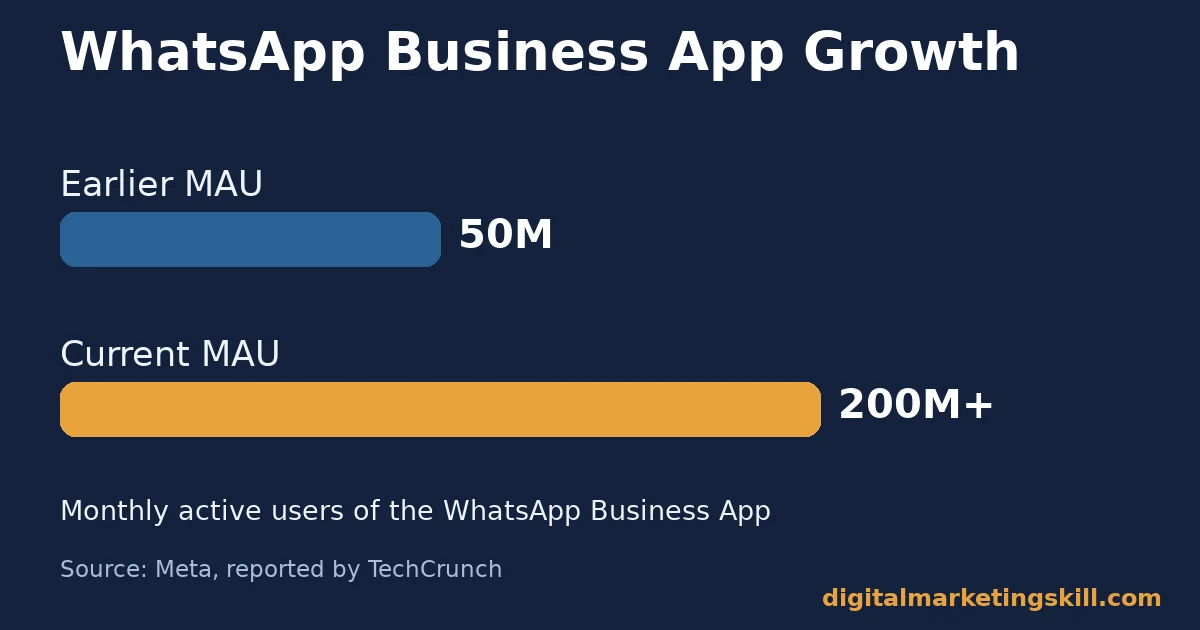
- The WhatsApp Business App has grown to 200 million monthly active users, up from 50 million (Meta, reported by TechCrunch).
- WhatsApp is used by 54.4% of internet users worldwide, the most-used messaging platform measured (DataReportal).
- One billion people message a business every week across WhatsApp, Messenger and Instagram Direct (Meta Newsroom).
- About 40% of Meta’s more than 4 million advertisers use click-to-message ads. These open directly into WhatsApp or Messenger (AdExchanger, citing Meta).
- Business-initiated messages outside the active customer service window must use pre-approved message templates, per Meta’s own developer documentation.
In this guide
- Why Most WhatsApp Business App Guides Stop at Setup
- How the WhatsApp Business App Actually Works for Marketing
- What Differs Between the Free App and the Business API
- How to Lead With Each WhatsApp Business Option
- Broadcast Lists, Groups and Status: What Each One Is For
- Setting Up a Catalog That Actually Sells
- Message Templates and the Customer Service Window
- Connecting WhatsApp to the Rest of Your Marketing
- How to Measure Whether the WhatsApp Business App Is Working
- The One Rule for Choosing App vs API
- A Real Case: What Meta’s Own Growth Numbers Show
- Using the WhatsApp Business App for Customer Support, Not Just Sales
- What the WhatsApp Business App Actually Costs
- Common Mistakes That Undermine WhatsApp Business App Marketing
- Frequently Asked Questions About the WhatsApp Business App
- Getting Started: A First-Week Checklist
- The WhatsApp Business App Works the Same Way Wherever You Are
- Turning Chat Into a Real Marketing Channel
Why Most WhatsApp Business App Guides Stop at Setup
Most WhatsApp Business App guides explain how to download the app, build a profile, and send a broadcast. That’s the easy part. Few explain what actually drives replies and sales once the profile is live.
This is an informed framework, not a fixed formula, because messaging behavior shifts by region, industry and audience. Treat every figure here as a snapshot, not a permanent ranking.
The real gap is this: the WhatsApp Business App only works as a marketing channel once a business treats it like a storefront. A broadcast list alone won’t do it. Catalog, labels and quick replies matter more than message volume.
How the WhatsApp Business App Actually Works for Marketing
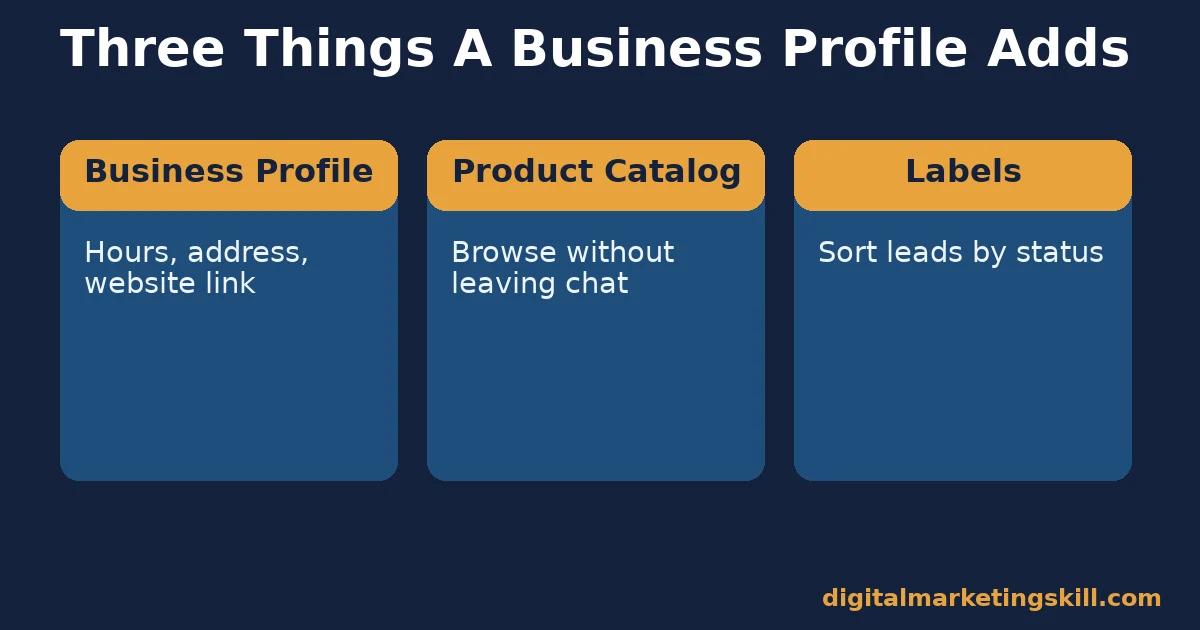
The app gives a business three things a personal WhatsApp account doesn’t have. First, a verified business profile, with hours, address and a website link. Second, a product catalog, so customers browse without leaving the chat. Third, labels, which sort conversations by status, like “new lead” or “paid.”
Marketing value comes from how these three pieces connect. A customer finds the business profile. They browse the catalog. They ask a question. The conversation gets labeled for follow-up. Most businesses only use the first piece. They skip the catalog and labels entirely.
That’s a real gap. The WhatsApp Business App has grown to 200 million monthly active users, up from 50 million. More businesses now compete for attention inside the same chat window.
Think about two businesses on the same street. One treats WhatsApp as a text inbox. The other builds a full catalog and labels every lead. Over a few months, the second business closes more sales from the same number of chats. The tools were free for both. Only the setup differed.
What Differs Between the Free App and the Business API
The WhatsApp Business App and the WhatsApp Business Platform, often called the API, solve different problems.
The WhatsApp Business App: Built for One Person, One Phone
The free app works for a solo business owner or a small team sharing one device. It handles catalog, labels, quick replies and basic automated greetings.
The ceiling is real. One phone number. Limited automation. No integration with a CRM or helpdesk. Once a business outgrows one person answering chats, the app starts to strain.
The WhatsApp Business Platform: Built for Scale and Integration
Meta’s own developer documentation describes the API differently. It supports message templates, approval workflows and quality scoring. Larger teams can send structured messages at volume while staying compliant.
It needs a developer or a messaging provider to set it up. Most usage carries a cost per conversation, unlike the free app.
How to Lead With Each WhatsApp Business Option
Once you know which tier fits your business, the setup priority changes.
Free App: Lead With Catalog and Labels
Build the catalog before sending a single broadcast. A customer who can browse products in chat converts faster than one who has to ask for a price list.
Use labels starting on day one. That way no lead gets lost once volume grows past a handful of chats a day.
API: Lead With Templates and a Clear Use Case
Start with one well-defined use case. Order confirmations work well. So do appointment reminders. Avoid a general marketing blast as a first use case.
Templates need Meta’s approval. Vague, overly promotional templates slow down launch and risk rejection.
Broadcast Lists, Groups and Status: What Each One Is For
The app offers three different ways to reach multiple people, and confusing them is a common early mistake.
A broadcast list sends one message to many contacts individually. Each person sees it as a normal chat. Replies only go back to you, not to everyone on the list. This is the closest thing to email marketing inside WhatsApp. It only reaches contacts who have saved your number.
A group puts everyone in one shared conversation. Replies are visible to the whole group. Groups work well for a small, engaged community. However, they get noisy fast and are rarely the right tool for cold marketing.
Status updates work like a 24-hour story. They’re useful for quick announcements, behind-the-scenes content, or a limited-time offer. Unlike a broadcast message, a status update doesn’t interrupt anyone’s chat inbox. A customer sees it only if they choose to check it.
Most small businesses only use broadcast lists and never touch status updates, even though status often gets seen by contacts who’d ignore a direct message.
Setting Up a Catalog That Actually Sells
A catalog is the single highest-leverage feature in the free app, because it turns a chat into a storefront. However, most small businesses set it up once and never update it again.
Each product listing needs a clear photo, a price, and a short description that answers the question a customer would otherwise type out. For example, a bakery listing should state size, flavor options and lead time, not just a product name. As a result, fewer customers need to ask basic questions before buying, which frees up time for conversations that actually need a human reply.
Quick replies matter here too. A saved reply for “What are your hours?” or “Do you deliver?” saves real time once conversation volume grows, and it keeps answers consistent across whoever is replying that day. Review and update both the catalog and quick replies at least once a month.
Message Templates and the Customer Service Window
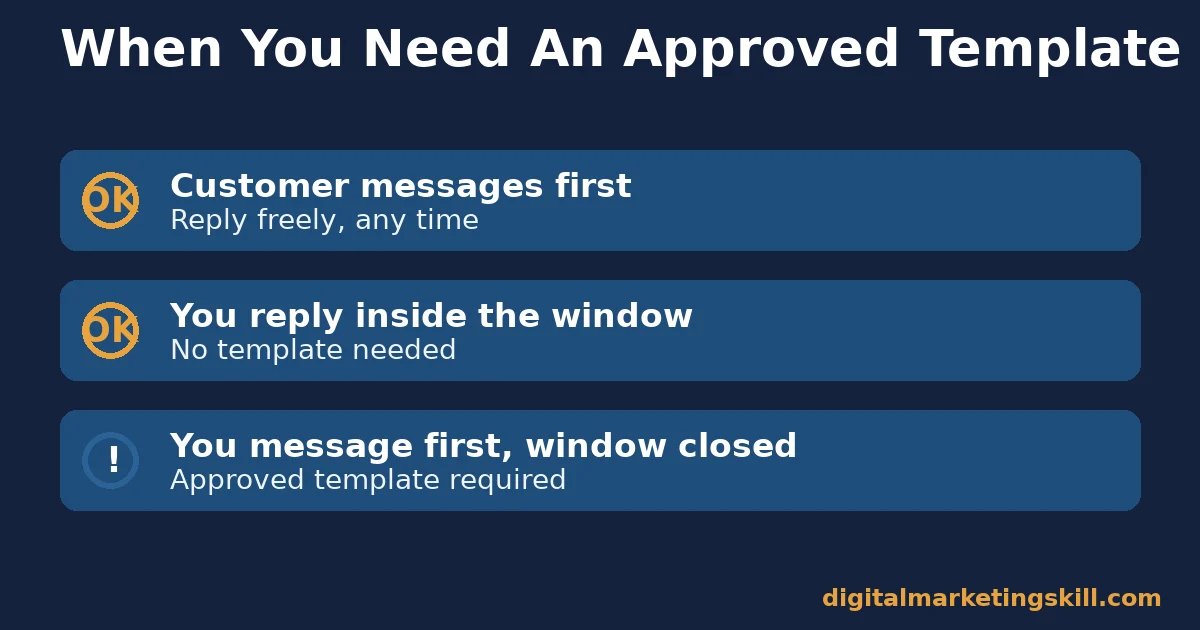
This is the part most marketing guides skip. It’s also the part that gets accounts restricted. Meta’s developer documentation is clear on this point. Templates are the only type of message a business can send to a customer outside the active customer service window.
A business can reply freely once a customer messages first. Initiating contact afterward requires an approved template instead.
Templates go through Meta’s review and quality scoring before anyone can use them. Low-quality templates get penalized over time. Treat template approval like ad approval. Expect a review step. Don’t write a template you wouldn’t want flagged as spam.
This rule exists because WhatsApp is built around opt-in conversations, not cold outreach. A business that ignores it risks losing the entire number, not just one campaign.
Connecting WhatsApp to the Rest of Your Marketing
WhatsApp rarely works best alone. Instead, it performs best as the final step after a customer has already seen your brand somewhere else, because trust transfers from that first touchpoint into the chat.
A business already working on a broader social media marketing strategy can route warm leads from Instagram or Facebook straight into WhatsApp with a click-to-message ad, so the conversation starts with context instead of a cold “hi.” This also makes measurement easier, since the ad platform reports how many clicks actually opened a chat.
Email still has a role too. A business running email marketing campaigns can mention a WhatsApp number as an alternative contact channel, since some customers simply prefer chat over email for quick questions.
How to Measure Whether the WhatsApp Business App Is Working
Track a small number of numbers, not total messages sent.
- First-response time: how long a customer waits before a human or automated reply. Chat is a real-time channel. Slow replies cost more trust here than on email.
- Catalog click-through: how many conversations include a catalog view. A low rate usually means the catalog isn’t visible or isn’t current.
- Label-to-close rate: the share of labeled leads that actually convert. This number exposes which stage of the conversation loses the most customers.
- Template approval rate: for API users, how many submitted templates pass review on the first try. A low rate means templates read as promotional spam, not useful updates.
None of these numbers require special software to start tracking. A simple spreadsheet, updated weekly, is enough to spot which one needs attention first.
The One Rule for Choosing App vs API
Decision rule: stay on the free app until one phone number and one person can no longer keep up with conversation volume. Move to the API only then. Start with one use case.
Illustrative, invented numbers: a business handles 40 WhatsApp conversations a day on the free app with one person. At 150 conversations a day, replies start slipping past an hour. Labels stop getting updated. That’s the real signal to move to the API. A fixed subscriber count or revenue figure isn’t.
A Real Case: What Meta’s Own Growth Numbers Show
Meta’s own reported numbers show real growth. The WhatsApp Business App grew from 50 million to more than 200 million monthly active users.
Meta’s Newsroom reports that one billion people now message a business every week across WhatsApp, Messenger and Instagram Direct combined. Separately, AdExchanger reports, citing Meta, that roughly 40% of Meta’s more than 4 million advertisers now use click-to-message ads. Those ads open directly into a WhatsApp or Messenger chat.
The limit: these are Meta’s own self-reported platform numbers, not an independent audit. “Monthly active users” doesn’t mean every business uses the app effectively. What the numbers do show reliably is that chat-based commerce has become a mainstream channel, not a niche one. That’s exactly why catalog and response-time discipline matter more now than a few years ago.
Using the WhatsApp Business App for Customer Support, Not Just Sales
Marketing and support overlap more on WhatsApp than on most channels, because a single chat thread often moves between the two. A customer who messages about an order status today might ask a product question tomorrow, in the same conversation.
This overlap is exactly why clear labels matter so much for any team sharing one number. A conversation labeled “support” shouldn’t get the same promotional broadcast as one labeled “new lead.” Mixing the two erodes trust quickly, since a customer waiting on a support answer doesn’t want a sales message instead. Reviewing labels weekly keeps this distinction accurate as conversations move between stages.
Away messages help set expectations here. A simple, honest away message, stating normal reply hours, reduces frustration far more than silence does, even though it doesn’t solve the underlying wait. Pairing an away message with a clear catalog link also lets a customer keep browsing while they wait for a human reply.
What the WhatsApp Business App Actually Costs
The app itself is free to download and use. There’s no subscription fee for the core features: catalog, labels, quick replies, and basic automated messages.
Costs appear once a business moves to the API. Pricing there is typically per conversation, not per message, and rates vary by country and message category.
Because of this, a business should confirm current rates directly with Meta or a messaging provider before committing, rather than relying on any fixed number from an older source. Budgeting a small test amount first is usually safer than committing to a large monthly volume before seeing real conversation costs.
Common Mistakes That Undermine WhatsApp Business App Marketing
Three mistakes repeat across small businesses using the WhatsApp Business App.
The first is leaving the catalog empty or outdated, so customers have to ask for basic information the app was built to show automatically. The second is broadcasting promotional messages too often, which drives customers to block the business number entirely. A third common mistake is ignoring labels, which turns a growing lead list into an unsearchable wall of chats.
Fixing even one of these three usually improves response speed and conversion more than adding a new marketing tactic. Most businesses find that one of these mistakes explains the majority of their stalled leads, once they actually go looking for it.
Frequently Asked Questions About the WhatsApp Business App
Is the WhatsApp Business App free?
Yes, the core app is free to download and use for one phone number. The WhatsApp Business Platform, the API version built for larger teams, typically carries a cost per conversation.
How is the WhatsApp Business App different from regular WhatsApp?
It adds a verified business profile, a product catalog, labels for organizing chats, and basic automated greeting and away messages, none of which exist on a personal WhatsApp account.
Can I send marketing broadcasts on the WhatsApp Business App?
Yes, to contacts saved in your phone who have opted in, but sending too often risks customers blocking the number. Business-initiated messages outside an active conversation generally need to follow Meta’s messaging and template rules.
Do I need the WhatsApp Business API instead of the app?
Only once one phone number and one person can’t keep up with conversation volume, or you need integration with a CRM, helpdesk or e-commerce platform the free app doesn’t support.
What is a WhatsApp message template?
A pre-approved message format businesses must use to contact a customer outside the active customer service window, reviewed by Meta before it can be sent.
How many people actually use WhatsApp for business messaging?
WhatsApp is used by 54.4% of internet users worldwide, and Meta reports one billion people message a business every week across WhatsApp, Messenger and Instagram Direct combined.
Does the WhatsApp Business App work for ecommerce?
Yes. The built-in catalog lets customers browse and ask about products directly in chat, and click-to-message ads can send shoppers straight into a WhatsApp conversation from Facebook or Instagram.
How do I keep customers from blocking my WhatsApp Business number?
Only message contacts who have opted in, keep promotional messages infrequent, and make sure every broadcast offers real value. A number that only sends sales pitches gets blocked quickly, and a blocked number is far harder to recover than a slow week of sales.
Can I automate replies on the WhatsApp Business App?
Yes, the free app supports basic automated greeting messages and away messages, plus quick replies for common questions. More advanced automation usually requires the API.
What’s the difference between a broadcast list and a group on WhatsApp?
A broadcast list sends a message to many contacts individually, with replies going only to you. A group puts everyone in one shared conversation, where replies are visible to the whole group.
Should I use the WhatsApp Business App for customer support?
Yes, many small businesses use the same number for sales and support. The key is labeling conversations correctly, so a customer waiting on support doesn’t receive an unrelated promotional broadcast.
Getting Started: A First-Week Checklist
A business opening the WhatsApp Business App for the first time doesn’t need every feature on day one. A simple first week covers the fundamentals.
On day one, download the app, verify the business phone number, and complete the profile with hours, address and a website link. On day two, add at least five core products or services to the catalog, with real photos and prices. By day three, write two or three quick replies for the most common questions customers ask.
Set up an away message for outside business hours around day four. Then, on day five, create one label set, such as “new lead,” “in progress” and “closed,” and apply it to any existing conversations. By the end of the week, the basics are in place. Every new conversation after that builds on a working system instead of a blank app.
The WhatsApp Business App Works the Same Way Wherever You Are
The mechanics in this guide don’t change by country. Catalog, labels and the customer service window work the same way whether your customers are local or anywhere in your country.
What changes is adoption. DataReportal’s global survey data puts WhatsApp usage at 54.4% of internet users worldwide, but that figure varies significantly by region. Always check whether your specific customers are actually on WhatsApp before building a strategy around it, rather than assuming global averages apply to your market.
Turning Chat Into a Real Marketing Channel
In short: the WhatsApp Business App rewards businesses that treat it like a storefront with a catalog, clear labels and fast replies, not a free broadcast list. Start with the first-week checklist above, then measure the numbers that matter.
If you want structured help building skills in chat commerce, lead generation and paid social that feeds channels like WhatsApp, the Digital Marketing Skill Institute’s Master Diploma in Digital & AI Marketing is built around four AI-powered tracks: AI-Powered Social Media Management and Advertising, AI-Powered Lead Generation and Email Automation, AI-Powered Google Specialist, and AI-Powered WordPress and SEO Specialist.
That’s ten courses in total, with a Full Stack option for completing all four. The program includes unlimited 1-on-1 coaching and mentoring, plus a U.S. Project Internship with a verified U.S. Work Reference Letter. It’s dual US and UK accredited and recognised in more than 100 countries, 100% online, so you can study wherever you live.
No results are guaranteed by any course, tool or platform described here. See our earnings disclaimer for details.
Explore the Master Diploma program, browse more guides on the digital marketing blog, read student reviews, or apply to get started from anywhere in your country. Learn more at digitalmarketingskill.com, and visit digitalmarketingskill.com again to see the full curriculum.
Every figure in this guide was checked against its original source before publication. Figures marked as illustrative are invented examples, not real results.
![9 Amazing Digital Marketing Skills to Make Money Online [With Proof]](https://digitalmarketingskill.com/wp-content/uploads/2019/07/9-Amazing-Digital-Marketing-Skills-to-Make-Money-Online-With-Proof-17.png)






