
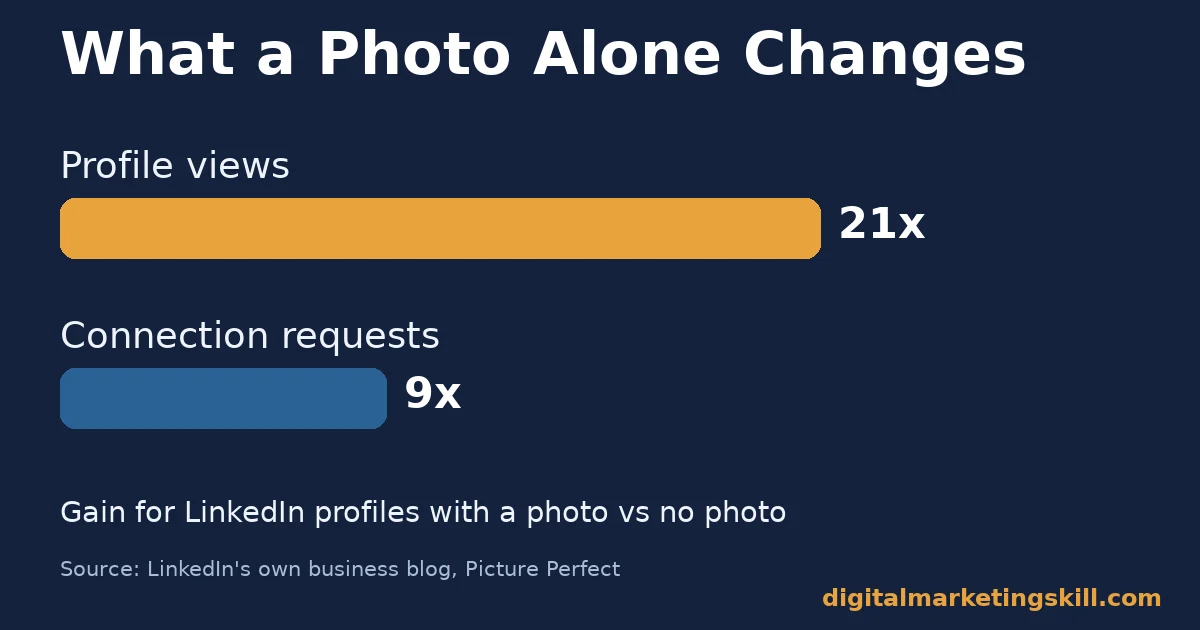
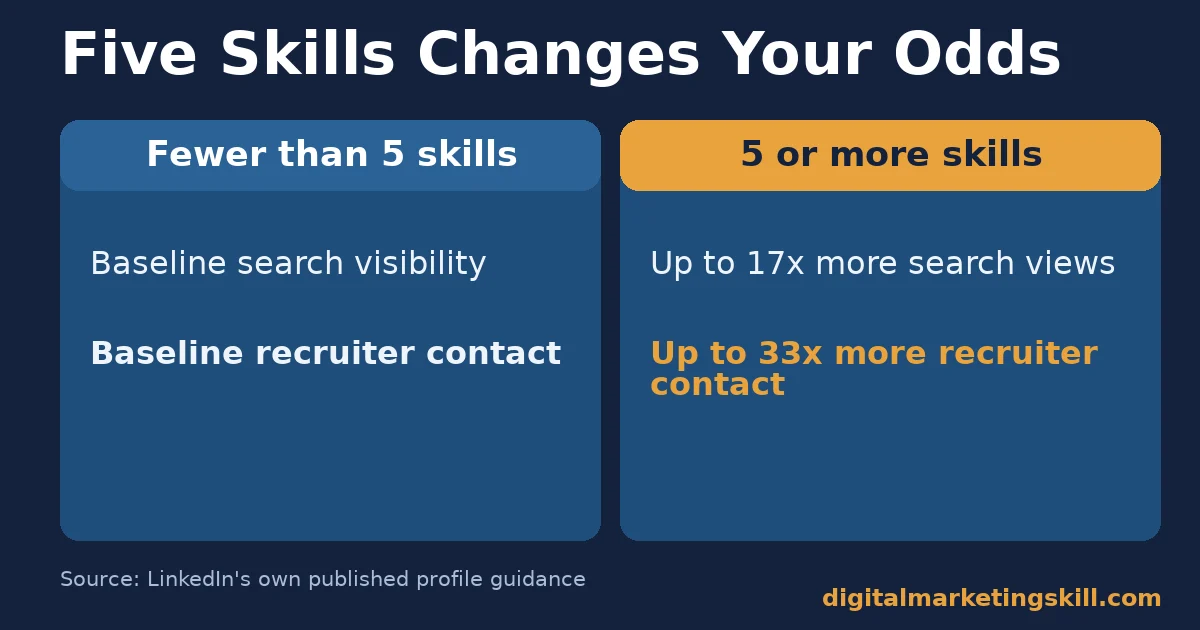
LinkedIn optimization means rebuilding your profile so search, recruiters and connections can find and trust it. It is not just filling in blanks. LinkedIn’s own data shows a photo alone brings 21 times more profile views. Members who list five or more skills get contacted up to 33 times more by recruiters. This guide shows what to fix first and how to measure it.
Key Takeaways
- A photo changes everything first. LinkedIn’s own business blog reports that profiles with a photo get 21 times more views and 9 times more connection requests than profiles without one.
- Skills drive recruiter contact. LinkedIn’s own published profile guidance ties five or more listed skills to search visibility and recruiter outreach gains.
- Most recruiters check before they decide. Jobvite’s social recruiting survey found that most recruiters review a candidate’s online profile before deciding.
- The headline is the most searched field. LinkedIn’s own profile help documentation confirms the headline carries more search weight than any other single field.
- The platform is large and searchable. LinkedIn’s newsroom reports more than 1.3 billion members and over 42,000 listed skills, so a thin profile competes inside a huge, searchable pool.
In this guide
- What Most LinkedIn Optimization Advice Gets Wrong
- How LinkedIn Search and Profile Views Actually Work
- LinkedIn Optimization Differs by What You Are Trying to Do
- How to Fix Each Profile for Its Actual Goal
- Do Not Skip the Visual Fields: Banner and Custom URL
- A Four-Week LinkedIn Optimization Plan
- How to Measure Whether Your LinkedIn Optimization Worked
- Five Common LinkedIn Optimization Mistakes
- The Most Useful Rule: Fix What LinkedIn Actually Indexes First
- A Worked Example: Rewriting One Headline
- Check How Your Profile Reads on Mobile
- A Real Case: Why LinkedIn Treats Completeness as a Ranking Signal
- Frequently Asked Questions About LinkedIn Optimization
- Start With One Field, Measure It, Then Expand
What Most LinkedIn Optimization Advice Gets Wrong
Most LinkedIn optimization advice reads like a checklist. Add a photo. Write a headline. Fill in your experience. None of that is wrong. But it skips the part that actually changes outcomes: how LinkedIn’s search and a recruiter’s eyes behave once your profile is complete.
This guide explains that mechanism. It covers what to change if you are job hunting, freelancing or building a business presence. It also shows how to measure whether your changes worked. Treat every figure here as a snapshot from the source that published it, not a permanent ranking. LinkedIn’s search behaviour and member counts shift constantly.
Here are the ground rules. LinkedIn’s own published numbers describe LinkedIn’s own platform, so they are reliable for what they measure. But LinkedIn does not publish its exact search algorithm. Where a tactic in this guide is a reasonable inference rather than a documented rule, this guide says so plainly.
How LinkedIn Search and Profile Views Actually Work
LinkedIn search works like most search engines. It matches query keywords against indexed text. Then it ranks results partly by relevance and partly by network proximity to the searcher. Your indexed text comes mostly from four fields: headline, current job title, skills and your about section.
LinkedIn’s own help documentation confirms your headline is the single most searched field on your profile. It carries more weight than your summary or past job titles. That is why a headline packed with real job titles and 4-5 relevant skills consistently beats a vague tagline like “passionate professional.”
Skills Are a Direct Search and Recruiter Signal
Skills do double duty for LinkedIn optimization. They feed LinkedIn’s keyword index. They also appear as filters recruiters use directly inside LinkedIn Recruiter. LinkedIn’s own guidance ties listing five or more skills to being discovered far more often in search and contacted far more often by recruiters than members who list fewer.
So the fastest, lowest-effort move most people skip is simple. Add real, specific skills, not generic ones like “teamwork.” Then order your top three to match the roles or clients you actually want.
A Photo Is a Trust Signal Before It Is a Search Signal
A photo does not change your keyword relevance. But it changes whether a human clicks through. LinkedIn’s own business blog states it plainly: members with a photo receive “21 times more profile views and 9 times more connection requests.” That gap exists because an anonymous grey silhouette reads as an inactive or fake account, to both recruiters and connections.
LinkedIn Optimization Differs by What You Are Trying to Do
A job seeker, a freelancer and a business owner all optimize the same four fields. But each wants a different outcome. A job seeker wants to surface in recruiter searches for a job title. A freelancer wants client searches for a skill to find them instead. A business owner needs posts and a company page to reach warm prospects. Treating all three the same way wastes effort.
Job Seekers: Built to Match a Recruiter’s Search Filters
Recruiters search LinkedIn Recruiter by job title, skill and location filters. They rarely read free-text summaries first. Jobvite’s recruiter survey found that most recruiters review a candidate’s online profile before deciding whether to move forward. An incomplete or outdated profile can cost you a conversation you never knew you were close to.
Freelancers: Built to Match a Client’s Problem, Not a Job Title
Clients searching for a freelancer type a problem, not a title. They search “email automation specialist,” not “marketing coordinator.” A freelancer’s headline and skills should mirror the exact words a client would type. The about section should open with the specific result you deliver, not a career history.
Business Owners: Built on Consistent Posting, Not a Static Profile
A business owner’s profile matters less than their posting pattern. LinkedIn’s newsroom reports that close to 100% of Fortune 500 companies keep a presence on the platform. Competition for attention in the feed never stops. A static, unposted profile is close to invisible, no matter how well its fields are filled in.
How to Fix Each Profile for Its Actual Goal
Once you know which of the three goals applies to you, the fix for each field changes. The headline, the about section and your activity pattern each need a different emphasis.
Job Seekers: Lead With the Title and Skills Recruiters Search
Write your headline as your current or target job title, a vertical bar, then 3-4 skills a recruiter would search for. Fill in every past role with specific outcomes, not duties. Recruiters scan quickly, and specifics are what stop a scroll. Then list at least five accurate, specific skills. That is the threshold LinkedIn’s own guidance ties to real search and recruiter-contact gains.
Freelancers: Lead With the Result You Deliver
Open your about section with the specific result you produce for clients, in one sentence, before any biography. Use your headline for the service plus the audience you serve, such as “Email automation for small e-commerce brands.” A generic title will not do the same work. Add a featured section with one or two work samples. Clients searching LinkedIn are evaluating proof, not résumé history.
Business Owners: Lead With a Consistent Posting Rhythm
Set a realistic, sustainable posting rhythm, even once a week, and keep it. Use real numbers or a clear takeaway in each post, rather than generic motivational text. Specific posts earn a second look in a crowded feed. Pair your personal profile activity with your company page, so prospects researching your business see activity on both.
Do Not Skip the Visual Fields: Banner and Custom URL
The headline and skills carry the most search weight. But two visual fields still shape whether a visitor trusts what they find. Fix both once your text fields are solid.
Your Banner Image Sets the First Impression
LinkedIn’s default banner is a plain blue pattern. Everyone has seen it, so it signals an untouched profile. A simple banner naming your role, service or company gives a visitor something concrete in the first second, before they read a single word of your headline.
A Custom URL Looks More Credible Off-Platform
LinkedIn assigns every new member a long default URL full of random numbers. Editing it to your name, through the profile settings, costs two minutes. It will not move your search ranking. But it looks far more professional on a résumé, email signature or business card than a string of digits.
A Four-Week LinkedIn Optimization Plan
Spread the work across four short weeks instead of one long session. Momentum compounds, and each week builds on the last.
Week one: rewrite your headline and photo, and add or edit at least five specific skills. This is the highest-leverage LinkedIn optimization step, so do it first.
Week two: rewrite your about section with the single-sentence result or value statement at the top, then edit your three most recent roles for specific outcomes instead of duties.
Week three: request two or three recommendations from people who can speak to your actual work, and add one featured post, article or work sample.
Week four: publish your first post using a real number or a clear takeaway. Then check your profile views and search appearances against where you started. Keep whichever habit moved the numbers, and drop the rest.
How to Measure Whether Your LinkedIn Optimization Worked
LinkedIn gives you several native metrics. Each one tells you something different. Read them together, rather than chasing any single number.
Four Metrics and What Each One Actually Shows
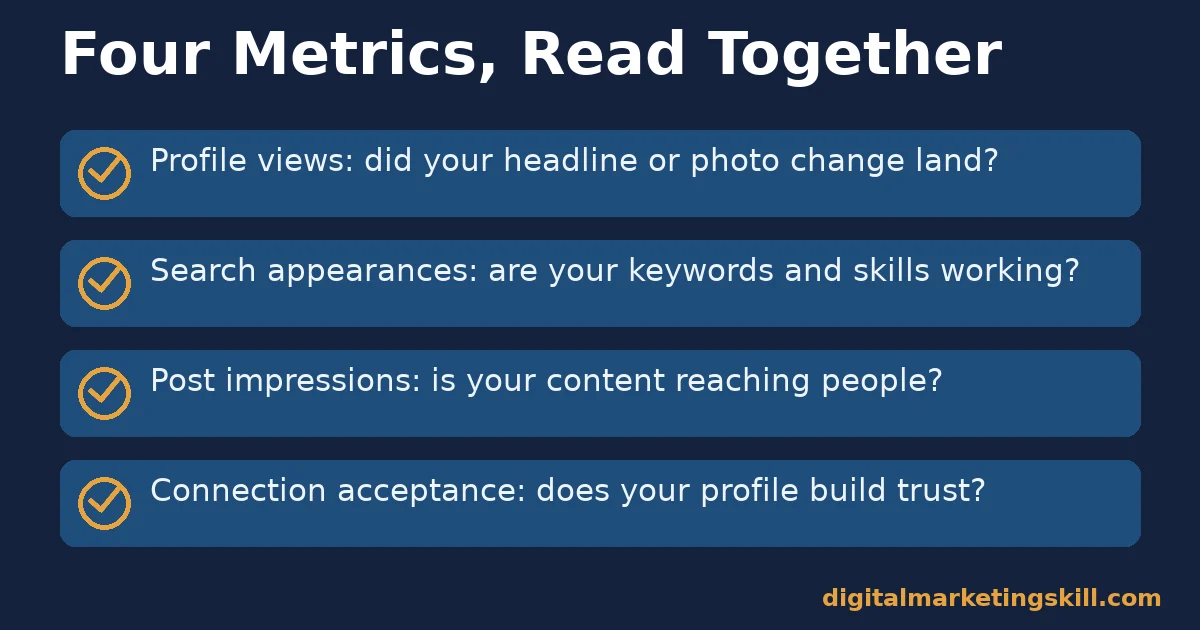
Profile views show how many people looked at your profile in a given period. A rising trend after you add a photo or rewrite your headline is the clearest early signal of success.
Search appearances show how often your profile surfaced in results. This reflects your keyword and skills work more directly than profile views do. Post impressions show how far your content reached. This depends on your posting rhythm and how specific your content is.
Connection acceptance is not a native metric LinkedIn reports as a number. But tracking it informally tells you whether your profile reads as credible to strangers once they arrive. Watch it over a few weeks, not day to day.
Reading the Numbers Together
If search appearances rise but profile views do not, your keywords are working. Your headline or photo is not converting the click. If profile views rise but connection acceptance stays flat, your profile earns attention but does not build trust once people arrive. That usually points back to a thin about section or missing recommendations.
Five Common LinkedIn Optimization Mistakes
These mistakes show up again and again on profiles that otherwise look complete. Each one quietly undoes the gains the rest of this guide describes.
Mistake One: A Generic, Title-Only Headline
LinkedIn fills your headline with your current job title by default. Leaving it there wastes the single most searched field on your profile. Add the skills and outcomes a recruiter or client would actually type into search.
Mistake Two: Leaving Your Most Recent Role Blank or Outdated
An outdated current role signals an inactive profile, even if you post regularly elsewhere. Update it the same week your situation changes, not months later.
Mistake Three: Listing Skills You Do Not Actually Use
Padding your skills list can backfire. A recruiter or client who contacts you expecting a skill you cannot demonstrate wastes both your time and theirs. Keep the list accurate, even if that means keeping it short.
Mistake Four: Treating the Profile as a One-Time Project
LinkedIn optimization is not a single afternoon of edits. A profile that never changes again looks exactly as stale in a year as it does today. Revisit your headline and skills every few months, especially after a new role, project or certification.
Mistake Five: Claiming Results Without Any Proof Nearby
A bold claim in your about section, with no recommendation, work sample or specific number backing it up, reads as unverified. Add at least one piece of concrete evidence near every claim you make about your own work.
The Most Useful Rule: Fix What LinkedIn Actually Indexes First
If you only have twenty minutes, spend all of them on your headline and your skills list. Skip your about section and your banner image for now. Those two fields carry the most search weight and the most documented engagement gain, so they return the most result per minute spent. Everything else compounds on top of that foundation. It cannot replace it.
A Worked Example: Rewriting One Headline
Illustrative, invented numbers. Picture a marketing coordinator whose headline reads only “Marketing Coordinator at a growing company.” Rewrite it as “Marketing Coordinator | Email Campaigns, SEO Content, HubSpot | Helping B2B Teams Grow Pipeline.” The new version carries four searchable skill terms instead of zero.
If this change behaves the way LinkedIn’s own published skills data suggests, search appearances could plausibly multiply within a few weeks. The exact size of that gain depends on the person’s existing network and posting activity, not the headline alone. Treat this as a direction, not a guarantee.
Check How Your Profile Reads on Mobile
Most LinkedIn traffic happens on a phone, not a desktop. On a small screen, only your photo, headline and current title show before a visitor taps to expand anything. If your headline is a vague job title alone, mobile visitors never see the skills or outcomes further down the page.
Open your own profile on your phone once a month. Confirm the first screen still makes sense on its own, without any scrolling or tapping. This single check catches more LinkedIn optimization problems than almost any other habit.
A Real Case: Why LinkedIn Treats Completeness as a Ranking Signal
LinkedIn’s own profile guidance ties completeness directly to visibility. That is why the platform nudges every member toward what it calls an “All-Star” profile strength before onboarding ends. LinkedIn’s own published figures, that a photo alone returns far more views and that five or more skills return far more recruiter contact, are the clearest evidence that completeness is not cosmetic.
It is the single lever LinkedIn itself has confirmed moves outcomes. That gives it a stronger basis for prioritizing your time than most third-party advice offers, including this guide’s own tactical suggestions where they go beyond LinkedIn’s published data.
Frequently Asked Questions About LinkedIn Optimization
How long does LinkedIn optimization take to show results?
Changes to your headline and skills can affect search appearances within days. LinkedIn re-indexes profile text quickly. Trust-building changes, like recommendations and a steady posting rhythm, take longer. They depend on other people acting, not just your own edits.
Do I need a professional photographer for my profile photo?
No. LinkedIn’s own data on the photo gain compares having any clear, friendly photo against having none at all. It does not compare professional photography against a phone photo. A well-lit phone photo against a plain background satisfies the requirement.
How many skills should I actually list?
List as many accurate, specific skills as genuinely apply, but clear five at minimum. That is the threshold tied to LinkedIn’s published search and recruiter-contact gains. Order your top three to match the roles, clients or topics you most want to be found for.
Does posting content matter if I am just job hunting?
It matters less for a direct recruiter search, since that relies on your profile fields. But it matters for passive visibility. An active profile reads as more current and credible than a static one, when a recruiter does take a look.
Should I change my headline for every role I apply to?
Yes, within reason. Your headline is the most heavily searched field on your profile. It should reflect the specific title and skills you want to surface for right now, not a permanent career summary.
What is a custom LinkedIn URL and does it matter?
Your custom URL is the shortened link to your profile, edited from LinkedIn’s default string of numbers to your name. It does not meaningfully affect search ranking. But it looks far more credible on a résumé, email signature or business card.
Can I do LinkedIn optimization without paying for Premium?
Yes. Every tactic in this guide, your headline, skills, photo, about section and posting rhythm, is available on a free LinkedIn account. Premium adds extra search filters and messaging credits, but it does not change how your free profile is indexed.
Start With One Field, Measure It, Then Expand
Rewrite your headline and add five specific skills this week. Then check your search appearances and profile views after two weeks, before touching anything else. That single change carries the most documented weight of anything in this guide. Measuring it first tells you whether your version of LinkedIn optimization is actually working, before you invest in posting content or redesigning your about section.
If you want structured help building and growing a professional profile that supports real lead generation, look at the Institute’s Master Diploma in Digital & AI Marketing. It is offered at digitalmarketingskill.com. It includes an AI-Powered Lead Generation and Email Automation track. A separate AI-Powered Social Media Management and Advertising track suits anyone building a posting presence instead. Both sit inside ten courses across four AI-powered tracks, with a Full Stack option for completing all four.
The program includes unlimited 1-on-1 coaching and mentoring. It also includes a U.S. Project Internship with a verified U.S. Work Reference Letter. It is dual US and UK accredited and recognised in more than 100 countries, 100% online, so you can build these skills anywhere in your country.
Learn more about the Master Diploma program, read outcomes on the reviews page, or browse the blog hub for more guides. Go straight to the application page to start, wherever you live. Visit digitalmarketingskill.com again to explore the full curriculum.
Every figure in this guide was checked against its original source before publication. Figures marked as illustrative are invented examples, not real results.
![9 Amazing Digital Marketing Skills to Make Money Online [With Proof]](https://digitalmarketingskill.com/wp-content/uploads/2019/07/9-Amazing-Digital-Marketing-Skills-to-Make-Money-Online-With-Proof-17.png)






