
Social media management tools centralize scheduling, listening and reporting. They let one person or a small team run several networks without switching between apps all day. The right type depends on team size. Solo marketers need a scheduler. Growing teams need shared approval workflows. Brands with high message volume need listening and routing. Pick by workload, not by feature count, and check afterward whether the tool actually saved time.
Key Takeaways
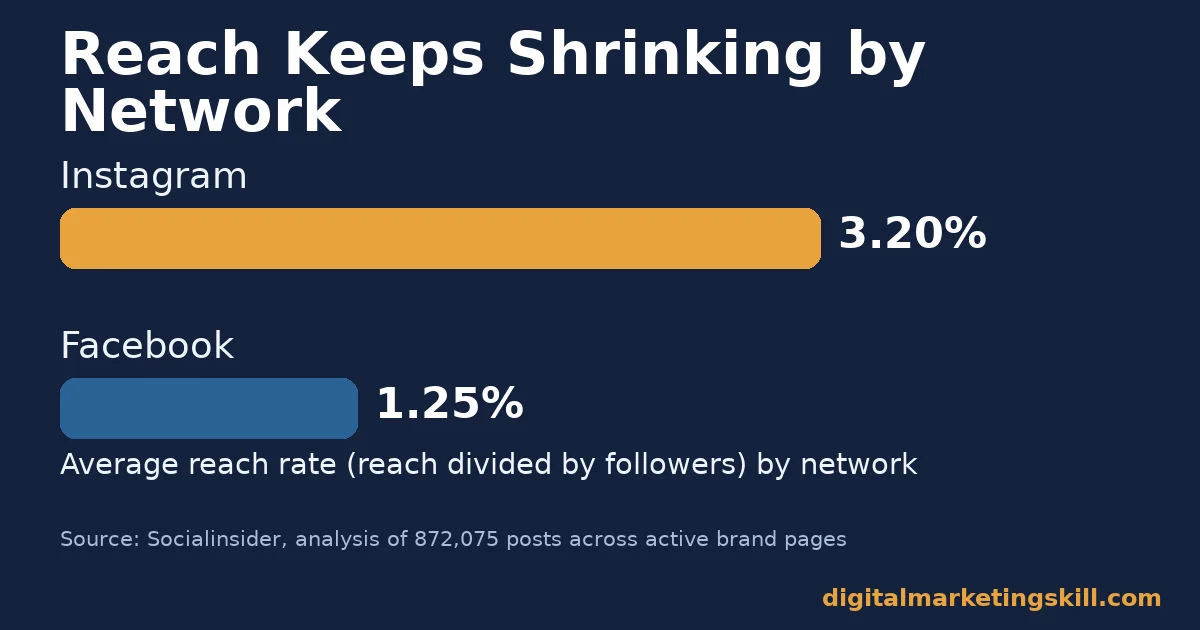
- Reach keeps falling, so good tools matter more. Socialinsider’s analysis of 872,075 posts found Instagram’s average reach rate at 3.20% of followers, against 1.25% on Facebook. Consistent, well-timed posting now does more of the work that reach once did.
- Most teams juggle several accounts at once. SocialBee studied 12,291 users managing more than 9.3 million posts. The average account holder runs 4.5 social profiles at the same time, and 17% run seven or more.
- Response speed has a real price. Sprout Social’s Index surveyed 900 full-time social practitioners and 322 marketing leaders. It found that 73% of social users say they will buy from a competitor if a brand ignores them on social.
- Scheduling saves measurable time, not just effort. A Forrester study commissioned by Sprout Social surveyed its customers. Teams reported roughly 60% time savings on scheduling and publishing, and about 80% on reporting.
- Ranking systems reward consistency, not one viral post. Meta’s own Transparency Center describes Instagram’s feed ranking as a prediction model built on a viewer’s past engagement, not a single trigger. Steady, relevant posting compounds over time.
In this guide
- What Most Advice on Social Media Management Tools Misses
- How Social Media Management Tools Actually Work
- Social Media Management Tools Come in Three Working Categories
- How to Pick the Right Tool for Each Situation
- How to Measure Whether Your Social Media Management Tool Is Working
- The Most Useful Rule: Size the Tool to This Month’s Workload, Not Next Year’s Plan
- A Real Case: Why Engagement Became the Metric That Mattered
- A Four-Week Rollout for Any Social Media Management Tool
- Frequently Asked Questions About Social Media Management Tools
- Start With One Category, Prove It, Then Expand
What Most Advice on Social Media Management Tools Misses
Most comparisons of social media management tools rank them by feature count. More networks, more AI captions, more charts. That misses the real decision: matching a tool’s design to your team’s actual workload.
This guide groups social media management tools by the job each type solves. It names the metric each type should move, and gives one rule for choosing between them. The scope covers three categories. Scheduling and publishing tools, all-in-one platforms with team workflows, and listening or customer-care platforms for higher message volume.
A few ground rules first. Reach and engagement figures below are snapshots from named studies, not permanent rankings, because platforms change their ranking signals often. Vendor-reported figures on time savings and ROI are directional evidence from the vendor’s own customers, not an independent audit, and are marked as vendor-commissioned where that applies.
How Social Media Management Tools Actually Work
A social media management tool connects to each network’s official API. That connection gives you one interface to draft, schedule, publish and read results across every connected account, instead of repeating the same steps inside each network’s own app. The scheduling layer queues a post and releases it at a set time. Comments, mentions and keywords get picked up by the listening layer. Then the reporting layer pulls metrics back from each platform’s own analytics system.
None of this changes how a platform ranks your content. Meta’s Transparency Center explains that Instagram’s feed recommendation system narrows eligible posts to a few hundred candidates. It then ranks them using signals like a viewer’s engagement history, the content format, and how recently you posted.
A scheduling tool cannot override that ranking model. It can only make sure your post exists, in the right format, at the right time, every time. That consistency is the real value of social media management tools.
They remove the manual steps: logging into five apps, copying captions by hand, resizing images, checking separate inboxes. A tool that adds steps instead of removing them is the wrong tool for your team, no matter how many features it lists on its pricing page.
Why Scale Makes a Social Media Management Tool Worth Using
Scale makes the case for using one of these tools at all. DataReportal’s global social media user figures put the worldwide total at roughly 5.79 billion social media identities.
That is more than two in three people on Earth, growing by about 294 million in the past year. A brand trying to reach even a small slice of that audience across several networks needs a system, not a set of browser tabs.
Social Media Management Tools Come in Three Working Categories
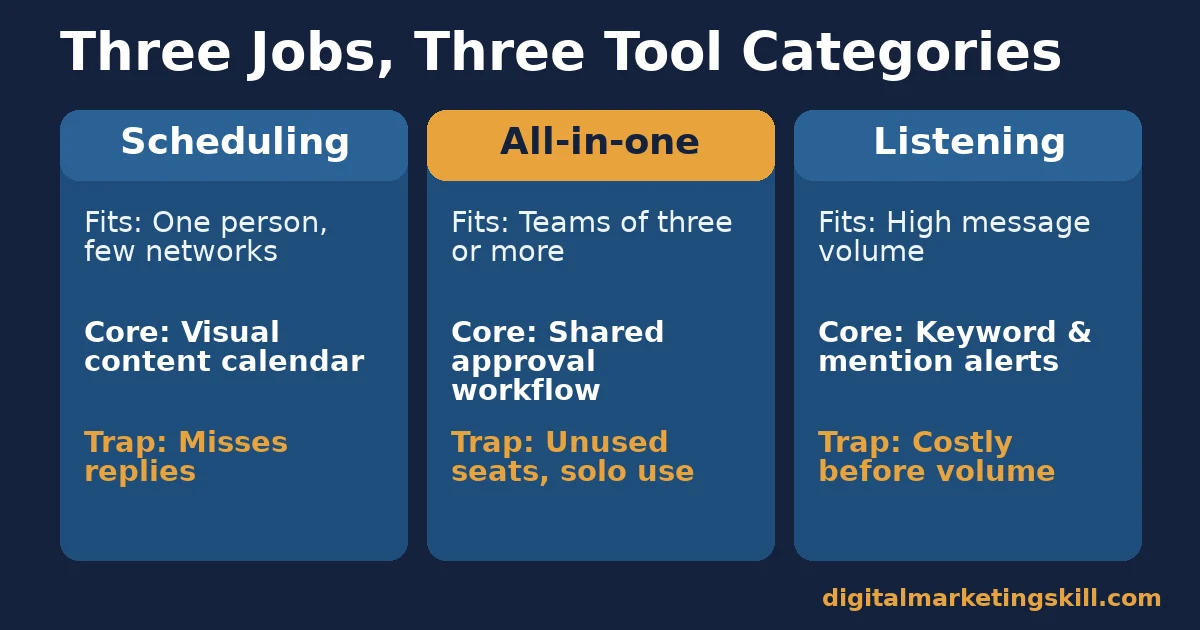
Almost every social media management tool on the market fits one of three jobs. Publish on schedule, coordinate a team, or listen and respond at volume. Knowing which job you actually need narrows a crowded market fast.
Scheduling Tools: Built For Speed and Consistency
Scheduling-first social media management tools, such as Buffer or Later, exist to queue content across networks from one calendar. They suit a single marketer or a very small team that needs to stop logging into each app separately. The core feature is a visual content calendar with drag-and-drop rescheduling, built for speed over depth.
The trap: a scheduler alone does not catch a reply, a comment or a direct message. A brand using only a scheduler can look responsive in its public feed while customer messages sit unanswered in five separate inboxes.
All-In-One Platforms: Built For Team Collaboration
All-in-one social media management tools, such as Hootsuite or Sprout Social, add approval workflows, shared calendars, role permissions and combined reporting across every connected account. They suit teams of three or more people, or agencies managing several clients, where one person drafts and another approves before anything goes live.
The trap: the collaboration features that justify the higher cost go unused by a one-person team. A solo marketer paying for an all-in-one platform is usually paying for seats and workflows nobody else touches.
Listening and Care Platforms: Built For Volume
Listening and customer-care social media management tools, such as Brandwatch or Sprinklr, are built around monitoring. They track brand mentions, keywords and sentiment across public posts, then route messages to the right person, often with a case or ticket number attached. They suit brands with enough inbound volume that comments and messages need a queue, not an inbox.
The trap: this category costs the most and is the hardest to justify early. Adopting it before message volume is actually high mostly buys dashboards nobody reads yet.
How to Pick the Right Tool for Each Situation
Matching the category to your current workload, not your ambitions, is the fastest way to avoid paying for unused features in a social media management tool you will soon outgrow.
Scheduling Tools: Lead With a Content Calendar You Will Actually Keep
If you are the only person posting, start with a scheduler. Build a simple content calendar with a repeating weekly rhythm, such as one educational post, one behind-the-scenes post and one promotional post, rather than a blank calendar you fill in late each night. Batch a week of drafts in one sitting, then schedule them. The daily task becomes replying to comments, not writing from scratch.
Check whether the scheduler previews how each post will actually render. A caption that looks fine in the editor can still get cut off or reformatted once it is live. Catch formatting problems before they go live, not after.
All-In-One Platforms: Lead With Shared Approval Workflows
If more than one person touches a post before it goes live, build the approval step inside the tool, not over chat or email. Every post then carries a record of who drafted it and who approved it. This matters most for regulated industries or any brand where one wrong post is costly to walk back.
Use the platform’s combined reporting to compare networks side by side, instead of pulling a separate report from each app. That comparison is usually the one feature that justifies the higher subscription cost over a basic scheduler.
Listening Platforms: Lead With Keyword and Mention Alerts
If you adopt a listening platform, start with three or four keyword alerts: your brand name, your main product names, and one or two competitor names. That way you catch conversations even when nobody tags your account directly. Route each alert type to the person who should actually answer it.
Track one number every week: average first-response time on social messages. Sprout Social’s Index found that close to three-quarters of social users expect a reply within 24 hours or sooner. A rising first-response time is an early warning, well before it shows up as lost sales.
How to Measure Whether Your Social Media Management Tool Is Working
A social media management tool is only as good as what you check afterward, week over week, not just in the first excited month of use. These are the metrics that show whether social media management tools are actually saving time and improving results, not just moving the same work to a new dashboard.
Six Metrics That Show Real Progress
- Reach rate is the share of your followers who actually saw a post, calculated as reach divided by followers. Socialinsider found Instagram posts averaging a 3.20% reach rate against 1.25% on Facebook, so compare your own numbers against the platform, not a flat target.
- Engagement rate is interactions (likes, comments, shares, saves) divided by reach or followers. It shows whether the people who saw a post found it worth acting on, separate from how many saw it.
- First-response time is how long a comment or message waits before a reply. Track the average and the worst case, because one very slow reply can do more damage than several fast ones.
- Posting consistency is the share of scheduled weeks where your planned posts actually went out on time. A calendar that looks full but keeps slipping is not actually being used.
- Time spent per post is the hours your team spends drafting, approving and publishing one piece of content, tracked before and after adopting a tool. This number proves, or disproves, any time-savings claim a vendor makes.
- Click-through rate is clicks divided by impressions for any post containing a link. It shows whether social traffic is converting into visits worth measuring further on your site.
Reading These Numbers Together
No single metric tells the full story. A high reach rate with a low engagement rate suggests the post reached the wrong audience, or gave it no reason to interact. A fast first-response time paired with a falling engagement rate suggests your team answers comments well, but the content itself is not earning attention. Read reach and engagement together. Read response time next to actual message volume, never alone.
The Most Useful Rule: Size the Tool to This Month’s Workload, Not Next Year’s Plan
Pick the simplest social media management tool that fully covers your current workload. Upgrade only when a specific, named gap appears, such as a second approver joining the team or inbound messages outgrowing one inbox. Buying ahead of that gap means paying for unused seats and workflows. Buying behind it means missed replies and slipping calendars.
Illustrative, invented numbers to show the logic: a solo marketer posting to three networks with no team review needs only a scheduler. A ten-person marketing team covering six networks for one brand, with a legal approval step, needs an all-in-one platform with workflows.
A consumer brand receiving hundreds of social messages a day needs a listening and routing layer on top of that. Each upgrade should follow a workload change you can point to, never a feature you saw in someone else’s demo.
A Real Case: Why Engagement Became the Metric That Mattered
For years, many brands optimized social posting around follower counts and raw reach, because those numbers were easy to report. Sprout Social’s own Content Benchmarks analysis found that even as average reach kept declining, brands saw a 20% year-over-year jump in average inbound engagements. Audiences did not disappear. They became more selective about what they interacted with.
The limit on this case: it comes from one vendor’s aggregated customer data, not an independent industry census, and it does not break results out by industry or company size. Still, the direction matches the Socialinsider reach figures above. Chasing reach alone is no longer a reliable strategy, so any social media management tool’s reporting should surface engagement and response metrics at least as prominently as reach.
A Four-Week Rollout for Any Social Media Management Tool
Adopting new social media management tools fails most often because teams try to use every feature on day one. A short, staged rollout fixes that. It also gives you real numbers to check against the vendor’s own claims before you renew.
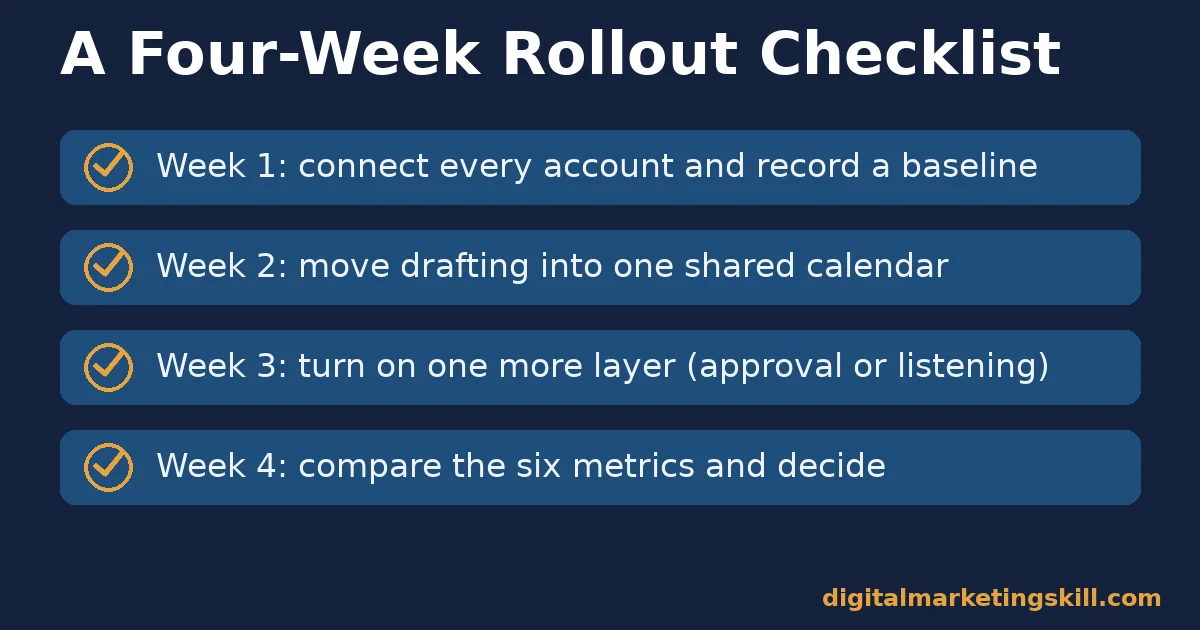
- Week one: connect and audit. Link every account the team actually posts from, then pull a baseline for the six metrics above using whatever data each network already shows. You cannot prove a tool helped if you never recorded the “before” numbers.
- Week two: build one calendar. Move all drafting into the tool’s calendar, even if some posts are still written elsewhere first. The goal is one shared source of truth, not a finished content plan.
- Week three: turn on the next layer. If you started with a scheduler, add an approval step or a single listening keyword. If you started with an all-in-one platform, test its reporting against last month’s manual numbers.
- Week four: compare and decide. Check the six metrics again. A social media management tool that is working shows a falling time-spent-per-post number and a steady or rising engagement rate. One that is not working usually shows the same workload, just inside a new interface.
Repeat the comparison every few months, not just once. Networks change their ranking systems, teams grow, and a tool that fit a five-person team can fall behind a fifteen-person one without anyone noticing until a deadline is missed.
The Most Common Rollout Mistake
The most common mistake is skipping week one’s baseline. Without a “before” number for time spent, response speed and engagement, any social media management tool looks like an improvement simply because it is new.
A genuine comparison needs the same six metrics measured the same way, before and after, on the same accounts.
Frequently Asked Questions About Social Media Management Tools
Do I need a social media management tool if I only post to one network?
Not necessarily. A single network with light posting volume can often be managed with that platform’s own native scheduler. A dedicated tool earns its cost once you manage two or more networks, or once a second person needs to draft or approve posts.
What is the difference between scheduling and full social media management?
Scheduling is one feature inside social media management. Management also covers listening for mentions, routing messages to the right person, approving content before it goes live, and reporting results back to the team, all from one connected system.
Can a scheduling tool improve my reach on its own?
No single tool controls a platform’s ranking system. What a scheduler can do is remove missed posting windows and formatting mistakes, so your content gets a fair chance inside whatever ranking model the platform is running that month.
How many social accounts does the average team manage?
SocialBee’s analysis of 12,291 accounts found the average user manages 4.5 social profiles at once, with 17% managing seven or more. That is one reason most growing teams eventually move from a single-network native scheduler to a multi-network tool.
Is a more expensive tool always the better choice?
No. The three categories above are priced roughly in order of complexity. Scheduling tools cost the least. All-in-one platforms cost more for collaboration features. Listening platforms cost the most because they are built for volume. Paying for a higher tier without the matching workload wastes budget instead of improving results.
How fast should my team respond to a comment or message?
Sprout Social’s Index found that close to three-quarters of social users expect a response within 24 hours or sooner, and 73% say they will consider a competitor if a brand ignores them. Treat 24 hours as a maximum, not a target, for any message that needs a reply.
Should a small business start with a free tool?
A free or low-cost scheduler is a reasonable starting point for building a consistent posting rhythm. Move to a paid tool once you can point to a specific limit, such as a network cap, a missing approval step, or a reporting gap that is costing real time every week.
What happens if customers do not get a reply at all?
The cost is measurable. A Zendesk customer experience survey of nearly 5,100 consumers across 22 countries found 63% would switch to a competitor after a single bad experience. On social media, silence often reads as a bad experience.
Start With One Category, Prove It, Then Expand
Choose the single category of social media management tools that matches your team’s current size and message volume. Run it for a full month. Track the six metrics above before adding another layer of software. This order works anywhere in your country: schedule first, add workflows once a second person joins, add listening once volume actually demands it.
If you want structured practice choosing and running social media management tools inside real marketing work, the Institute’s Master Diploma in Digital & AI Marketing covers social media strategy alongside content, SEO, analytics and six other practical courses. It includes unlimited one-on-one coaching and mentoring, plus real project work inside a U.S. company. The program is dual US and UK accredited, recognised in more than 100 countries, and delivered 100% online, so you can study wherever you live.
Related guides on the skills a social media manager needs and common social media marketing challenges go deeper on the people side of this work. Our roundup of digital marketing tools covers the categories beyond social.
Browse more guides on the digital marketing blog, read real outcomes on the reviews page, or see the full program and apply at digitalmarketingskill.com. Wherever you live, those free guides at digitalmarketingskill.com are a reasonable place to start before you commit to any paid social media management tool.
Every figure in this guide was checked against its original source before publication. Figures marked as illustrative are invented examples, not real results.
![9 Amazing Digital Marketing Skills to Make Money Online [With Proof]](https://digitalmarketingskill.com/wp-content/uploads/2019/07/9-Amazing-Digital-Marketing-Skills-to-Make-Money-Online-With-Proof-17.png)






