
WordPress SEO plugins handle the technical layer of a store: structured data, redirects, sitemaps and meta control. They do not write your product copy. They do not fix a confusing layout either. This guide explains what WordPress SEO plugins actually do, which one fits a WooCommerce store, and what no plugin can fix for you.
Key Takeaways
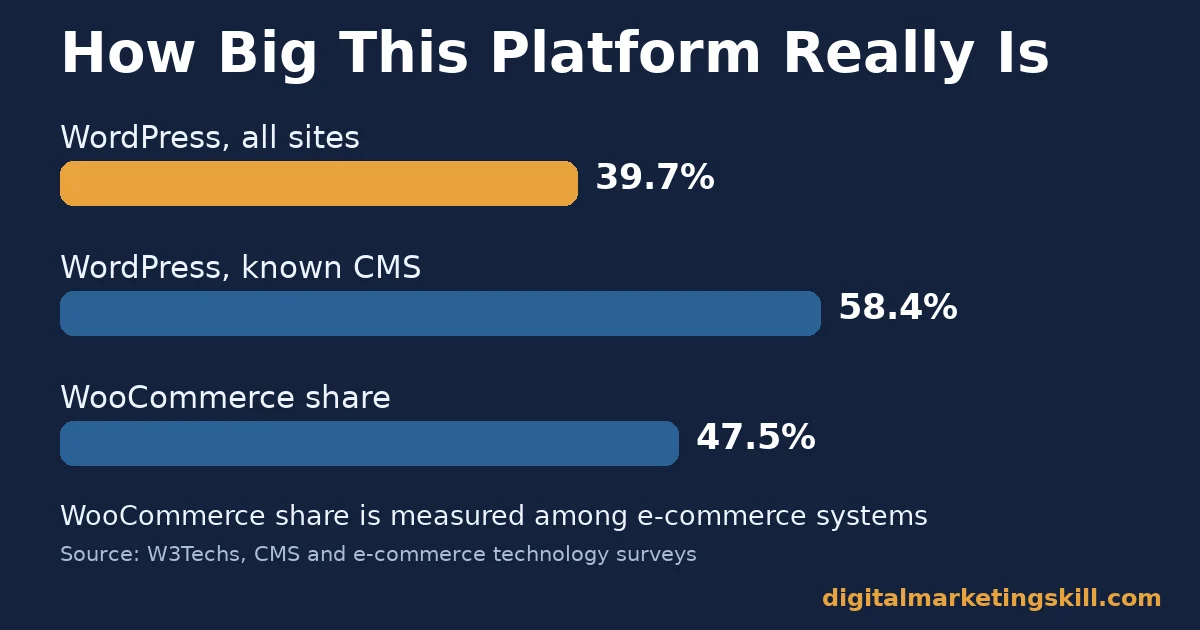
- WordPress still runs most of the content web. W3Techs reports WordPress powers 39.7% of all websites, and 58.4% of sites whose content management system is known.
- WooCommerce leads WordPress eCommerce by far. W3Techs puts WooCommerce at 47.5% of all e-commerce systems it tracks, which is 7.8% of all websites.
- Yoast SEO is the most downloaded option. The WordPress.org plugin directory shows Yoast SEO downloaded more than 1 billion times, against more than 200 million for Rank Math.
- Cart abandonment dwarfs most SEO gains. Baymard Institute’s aggregate of 50 studies puts average cart abandonment at 70.22%, a bigger lever than most plugin settings.
- No plugin substitutes for a working product page. Google’s own documentation on product rich results says to provide as much accurate product information as available, not to rely on a plugin to invent it.
In this guide
- What Most WordPress SEO Plugin Roundups Get Wrong
- What WordPress SEO Plugins Actually Do
- What Differs Between the Main WordPress SEO Plugins
- How to Configure Each WordPress SEO Plugin for a Store
- How to Measure Whether a WordPress SEO Plugin Is Working
- The One Decision Rule: Fix the Product Template First
- A Real Case: A WooCommerce Technical SEO Cleanup
- Frequently Asked Questions About WordPress SEO Plugins
- Start With the Template, Then Pick the Plugin
What Most WordPress SEO Plugin Roundups Get Wrong
Most “best plugins” lists rank tools by feature count. More features sound better. But a store owner does not need every feature. They need the handful of WordPress SEO plugin features that actually move rankings and revenue for a WooCommerce catalog.
This guide skips the feature race. It explains what WordPress SEO plugins do under the hood, and where the three major options genuinely differ. It also covers the content and structure work that happens outside any plugin entirely.
Treat every figure here as a current signal, not a permanent ranking of one plugin over another. For the fundamentals this guide assumes, see our on-page SEO guide. Plugin choice only matters once the page itself is worth optimising, and that order rarely changes regardless of which store platform sits underneath it.
What WordPress SEO Plugins Actually Do
A WordPress SEO plugin does three jobs. It outputs structured data, so Google can read your products as products. It also controls meta titles, meta descriptions and canonical tags at scale. Technical housekeeping is the third job: XML sitemaps, redirects and robots directives.
None of these jobs write content. A plugin can mark a page as a Product. But it cannot invent an accurate price, a real review, or a description that answers a buyer’s question. That work still belongs to you, not to any WordPress SEO plugin.
Where Plugins End and Content Begins
Google’s own documentation on product structured data says to provide as much rich product information as is actually available. It adds this advice without worrying about which exact feature will use it. That is a content instruction, not a plugin instruction. The plugin only outputs what you give it.
This distinction matters because most WooCommerce SEO problems are not plugin problems. Thin product descriptions are a store-management issue. So are duplicate variation URLs and missing alt text. A plugin can expose these issues. It rarely fixes them on its own. Treat every WordPress SEO plugin warning as a prompt to check your content, not as a job the plugin will finish for you.
The Three Jobs, Ranked by Impact
Of the three jobs, structured data usually matters most for a store. It is the one job a theme cannot do well on its own. Meta control comes second, since titles and descriptions influence click-through once you already rank. Technical housekeeping matters most at scale, on stores with thousands of product and variation URLs.
Why This Confuses New Store Owners
New store owners often install a WordPress SEO plugin expecting an instant ranking boost. That expectation sets up disappointment. The plugin is infrastructure, similar to a payment gateway. It makes correct behaviour possible. It does not replace the product research, pricing and copywriting work that actually earns a sale once a visitor arrives.
The confusion is understandable. Plugin marketing pages often show a percentage score climbing toward 100 as you fill in fields, which can feel like a ranking promise. That score measures whether the plugin has the information it needs, not whether Google will rank the page well. The two are related, but they are not the same thing.
What Differs Between the Main WordPress SEO Plugins
Three plugins cover most WordPress SEO installs today: Yoast SEO, Rank Math and All in One SEO. Each one handles the same three jobs. But each takes a different default approach to doing them.
Yoast SEO: Built for Guided Editing
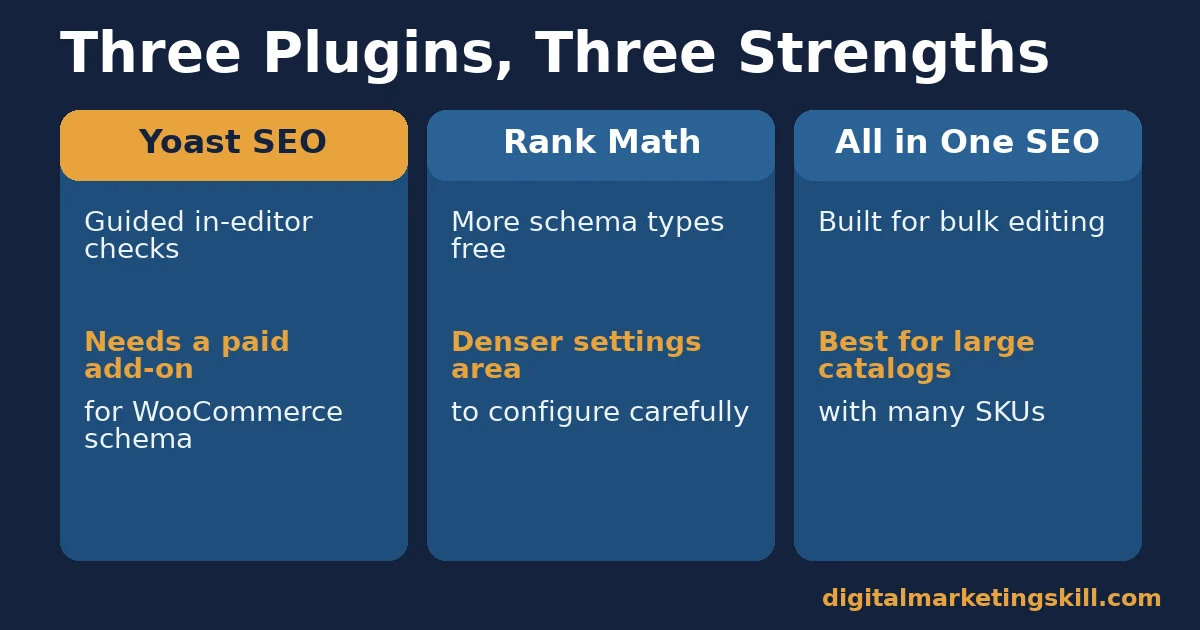
Yoast SEO leans on a traffic-light content analysis inside the editor. It checks keyphrase use, readability and internal linking as you write. It also ships a dedicated WooCommerce SEO add-on for product schema, breadcrumbs and image SEO on variable products.
This guided approach suits a small team without a dedicated SEO specialist. The in-editor checklist teaches good habits over time, even if some checks feel rigid on pages that genuinely do not need every box ticked.
Rank Math: Built for Built-In Schema Variety
Rank Math bundles more schema types into its free tier. Several product-adjacent types come without a paid add-on, unlike Yoast’s split model. It also ships a built-in 404 monitor and redirection manager, which Yoast splits into a separate plugin.
This wider free tier suits a technically confident store owner who wants more control without paying for multiple add-ons. The trade-off is a denser settings area, since more capability means more screens to configure correctly.
All in One SEO: Built for Simplicity at Scale
All in One SEO favours a lighter settings surface. Its TruSEO scoring system works in a similar spirit to Yoast’s traffic lights. Its WooCommerce module focuses on bulk editing meta titles and descriptions across large catalogs, which smaller plugins handle one product at a time.
This bulk-first design suits a store with hundreds or thousands of SKUs, where editing each product individually is not realistic. Smaller stores may find the bulk tools unnecessary for their catalog size, and may prefer a plugin built around one product at a time instead.
Where WordPress SEO Plugins Converge
Despite their different defaults, all three major WordPress SEO plugins agree on the basics. Each one writes an XML sitemap automatically. Each one lets you set a canonical URL to stop duplicate variation pages from competing with each other. All three also hook into the WordPress REST API cleanly enough that most themes do not need custom code to work with it.
This overlap matters for decision-making. If you are choosing between WordPress SEO plugins purely on sitemaps or canonical tags, the choice barely matters, since all three get those basics right. The real differences sit in schema depth, bulk editing and add-on structure, covered above.
Free Tier or Paid Add-On?
A small catalog rarely needs a paid tier of any WordPress SEO plugin. Most of what moves rankings for a new store, structured data, clean meta tags and a working sitemap, ships free across Yoast SEO, Rank Math and All in One SEO alike.
Paid tiers earn their price at scale: bulk redirect management across thousands of URLs, multiple keyphrase tracking per page, or advanced schema for niche product types. Add a paid module only once you can name the specific gap it closes, not because a settings screen recommends it.
How to Configure Each WordPress SEO Plugin for a Store
These steps mirror the three plugins above. Pick the one you already run. Work through its section before you touch anything else.
Yoast SEO: Turn On the WooCommerce Add-On First
Install the separate Yoast WooCommerce SEO add-on before changing any other setting. Without it, Yoast still writes basic meta tags. But product-specific schema, breadcrumbs and variation handling stay incomplete without the add-on installed.
Rank Math: Enable Only the Modules You Need
Rank Math ships dozens of modules switched on by default. Disable anything you are not using. A store with no physical location does not need the local SEO module, since unused modules still add settings screens and database queries.
All in One SEO: Set the Schema Type Per Product Category
Configure the default schema type at the product-category level rather than per product. This keeps new products correctly typed automatically. It removes the need for someone to set the type by hand every time a product is added.
A Short Checklist for Switching Plugins Safely
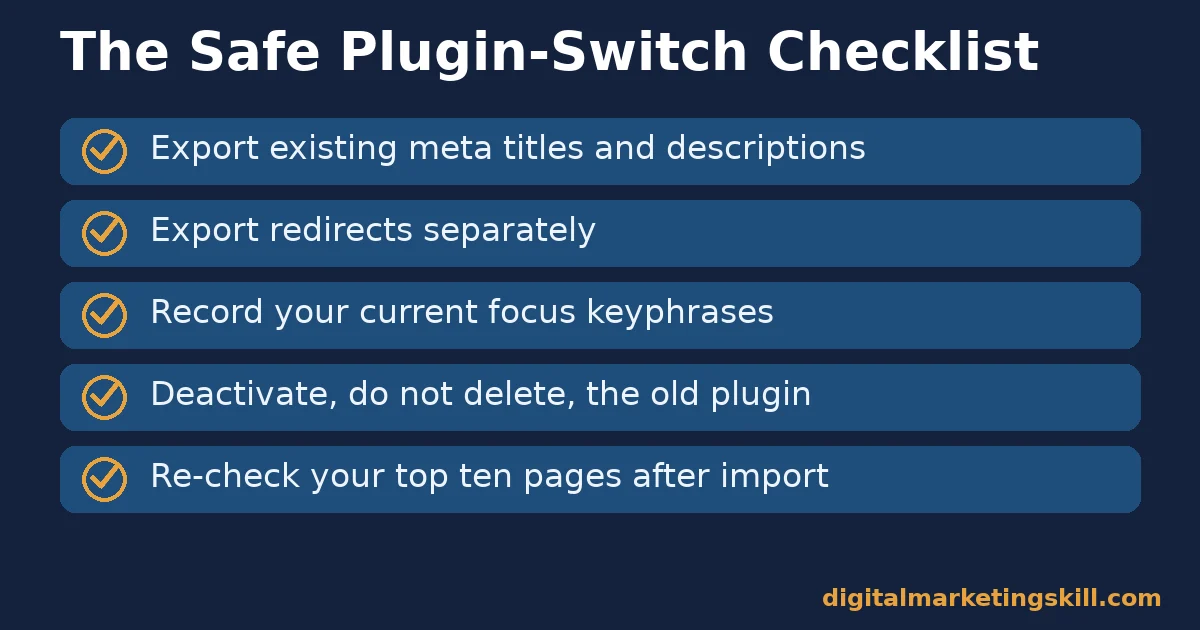
If you decide to switch, work through this list before deactivating the plugin you are leaving. It protects the meta data and redirects you have already built, regardless of which WordPress SEO plugins are involved.
- Export existing meta titles and descriptions. Most plugins offer a built-in export, usually as a CSV or XML file, before you touch anything else.
- Export redirects separately. Redirect rules often live in their own database table and need their own export step.
- Note your current focus keyphrases. Some import tools skip this field, so record it manually for your highest-traffic pages.
- Deactivate, do not delete, the old plugin first. Keep it available in case the new plugin’s import tool misses something on the first pass.
- Re-check your top ten pages after import. Confirm titles, descriptions and schema markup all carried over correctly before you delete the old plugin for good.
How to Measure Whether a WordPress SEO Plugin Is Working
A WordPress SEO plugin is working if it changes what Google shows for your products. That matters more than what the plugin’s own internal score says. Track these from Search Console and your analytics tool, not from the plugin’s dashboard.
Four Metrics That Show Real Progress
- Rich result impressions. In Search Console’s Performance report, filter by a product-rich-result search appearance. A rising count means your structured data is valid and showing.
- Product page click-through rate. Compare clicks against impressions for your top product pages. A jump after a schema or meta change suggests it is working.
- Crawl errors on product URLs. Search Console’s Pages report should show a falling count of excluded product and variation URLs over time, not a rising one.
- Core Web Vitals on product templates. Google’s web.dev documentation sets Largest Contentful Paint at 2.5 seconds or less as the “good” threshold, measured at the 75th percentile of real page loads.
Our guide on increasing website page speed covers the fixes behind that last metric. Heavy product-gallery plugins are a common cause of slow product pages, independent of which SEO plugin you run.
Setting Up the Right Search Console View
Most store owners check Search Console at the domain level and miss what matters for products specifically. Create a filtered view, or a saved segment, that isolates URLs under your product path before you judge whether a WordPress SEO plugin is helping.
Compare that filtered view month over month, not day over day. Product-page search performance moves slowly, since it depends on crawl frequency and re-indexing, so daily swings usually reflect noise rather than a real signal from your plugin changes.
Reading the Numbers Together
Start with rich result impressions, since that is the most direct sign your structured data works at all. Check validity first when impressions stay flat. When impressions rise but clicks do not follow, the problem has shifted to your titles and descriptions, not your plugin’s schema output.
The One Decision Rule: Fix the Product Template First
If you only remember one rule, make it this one. Fix your product page template, including its schema output, meta pattern and speed, before you consider switching plugins. Most switching decisions are really template decisions in disguise.
Here is an illustrative example, with invented numbers. A store runs 400 products through a theme that omits structured data on variable products. The team fixes the template so every product variation outputs valid Product schema. Rich-result impressions for those pages roughly double within two months, without any plugin change at all.
The lesson generalises. A WordPress SEO plugin can only output what the template gives it. Fix the template first, and the plugin’s job becomes far easier, regardless of which one you run.
A Related Risk: Variable Product URLs
WooCommerce stores carry a specific structured-data risk that simpler sites do not: variable products. A single T-shirt listing with five colours and four sizes can generate twenty combinations, and each one needs correct, non-duplicated structured data rather than twenty copies of the same schema block.
Most WordPress SEO plugins handle the base product correctly but need an explicit setting, or a theme-level fix, to avoid stamping identical schema across every variation URL. Check this specifically on your highest-selling variable product, since it is the page most worth fixing first if something is wrong.
A Real Case: A WooCommerce Technical SEO Cleanup
A published WooCommerce case study compared two consecutive six-month windows for one store after a round of technical SEO and structured data cleanup work. Search Console clicks rose from about 12.5 thousand to about 15.1 thousand between the two periods. Impressions rose from about 2.08 million to about 2.65 million over the same stretch.
The case study is explicit about its limits. The comparison documents a change in search performance. It does not isolate which single fix produced that change. The author states plainly that it does not guarantee a similar result for another store. Treat it as one data point showing that technical and structured-data cleanup can move the numbers, not as proof of a fixed percentage gain.
The practical lesson still holds regardless of the exact cause. A store that audits its templates, fixes its schema and cleans up crawl errors tends to see search performance move in a positive direction over a comparable stretch of time. No WordPress SEO plugin alone produces that result; the audit and the fixes do the work, and the plugin simply carries the output.
Frequently Asked Questions About WordPress SEO Plugins
Which WordPress SEO plugin is best for a WooCommerce store?
There is no single best option for every store. Yoast SEO suits teams that want guided, in-editor content checks. Rank Math suits teams that want more schema types without a paid add-on. All in One SEO suits large catalogs that need fast bulk editing.
Do I need a separate WooCommerce SEO add-on?
For Yoast SEO, yes. Its WooCommerce-specific schema, breadcrumbs and variation handling live in a separate add-on, not the core free plugin. Rank Math and All in One SEO build more of this directly into their main plugin.
Can I run two WordPress SEO plugins at once?
No. Running two SEO plugins together usually causes duplicate meta tags, conflicting sitemaps or duplicate structured data. That confuses search engines rather than helping them. Deactivate and fully remove one before installing another.
Does a WordPress SEO plugin improve my search rankings by itself?
Not by itself. A plugin outputs structured data and controls meta tags correctly. But rankings still depend on your product content, page speed, and the links pointing to your store from elsewhere.
What is Product structured data and why does it matter?
It is markup that tells Google your page describes a specific product, including its price, availability and reviews. Google’s own documentation says this information can appear directly in search results, which can influence click-through rates.
How do I check if my product schema is actually valid?
Fetch the live product page and inspect its structured data directly with a server-side testing tool. Then compare the fields present against what your theme and plugin are supposed to output together.
Will switching WordPress SEO plugins hurt my rankings?
Not if you migrate carefully. Export your existing meta titles, descriptions and redirects first. Most major plugins offer an import tool specifically to avoid losing this data during a switch.
Do free versions of these plugins cover a small store’s needs?
Often, yes. A small catalog rarely needs every paid add-on. Start on the free tier of whichever plugin matches your workflow, and add a paid module only once you can point to a specific gap it fills.
Do WordPress SEO plugins slow down a WooCommerce store?
A well-built plugin adds a small, measurable load on each page, not a large one. If your store feels slow after installing one, check for conflicting modules switched on by default or a caching plugin that is not configured to work alongside it, rather than assuming the SEO plugin itself is the cause.
Start With the Template, Then Pick the Plugin
WordPress SEO plugins are worth getting right, but they are the second decision, not the first. Audit your product page template for structured data and speed before you compare plugin feature lists.
Our guide on keyword research tools covers the step that should come even before that: knowing which product terms are worth optimising for in the first place.
If you want to build this kind of technical SEO skill properly, Digital Marketing Skill Institute teaches it hands-on inside the Master Diploma in Digital & AI Marketing. The diploma runs across four AI-powered tracks totalling ten courses, including the AI-Powered WordPress and SEO Specialist track, with a Full Stack option for completing all four.
Every student gets unlimited 1-on-1 coaching and mentoring. Every student also completes a U.S. Project Internship with a verified U.S. Work Reference Letter. The diploma is dual US and UK accredited, and it is recognised in more than 100 countries. For more WordPress fixes beyond plugins, see our WordPress SEO guide.
The programme is 100% online, so you can apply what you learn anywhere in your country. Browse more guides on the Digital Marketing Skill Institute blog, or when you are ready, apply for the Master Diploma from Digital Marketing Skill Institute.
Every figure in this guide was checked against its original source before publication. Figures marked as illustrative are invented examples, not real results.
![9 Amazing Digital Marketing Skills to Make Money Online [With Proof]](https://digitalmarketingskill.com/wp-content/uploads/2019/07/9-Amazing-Digital-Marketing-Skills-to-Make-Money-Online-With-Proof-17.png)






