

Website hosting services fall into four main types: shared, VPS, cloud and managed WordPress. Each one trades price against speed, control and support. Choose by your traffic level and technical skill, not the lowest renewal price, because a slow host quietly costs you visitors and rankings.
Key Takeaways
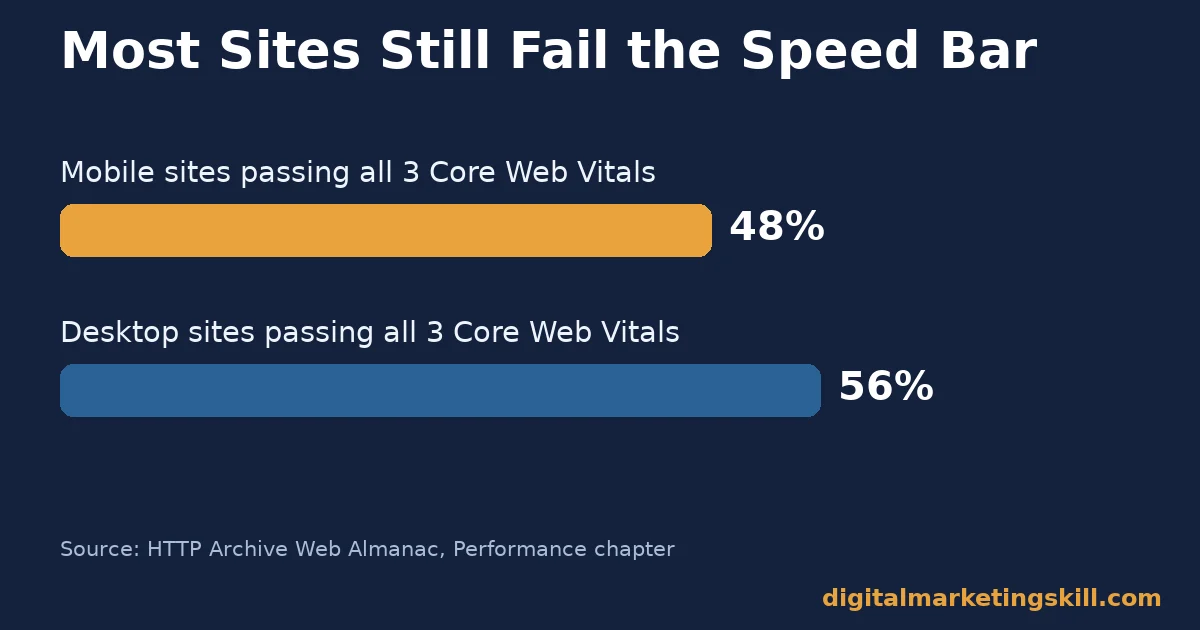
- Most sites still fail Google’s speed bar. The HTTP Archive Web Almanac found only 48% of mobile sites and 56% of desktop sites pass all three Core Web Vitals thresholds.
- Speed is a ranking factor, not just a nicety. Google’s own page experience documentation states that Core Web Vitals are used by its ranking systems.
- Hosting changes can move real revenue. Vodafone Italy reduced its Largest Contentful Paint by 31% through server and front-end performance work, and saw 8% more sales, according to a published web.dev case study.
- One company now hosts a third of the web. W3Techs reports Cloudflare Server is used by 32.2% of websites whose web server is known, ahead of Nginx and Apache.
- A content delivery network changes where content comes from, not what it is. MDN defines a CDN as servers spread across many locations that keep service fast even under high traffic.
In this guide
- What Most “Best Website Hosting Services” Lists Get Wrong
- How Website Hosting Services Affect Real Visitors
- Four Types of Website Hosting Services
- How to Choose the Right Website Hosting Service
- How to Measure Whether Your Host Is Actually Good
- The One Decision Rule: Match Hosting to Traffic, Not Price
- A Real Case: What Vodafone Italy’s Speed Fix Showed
- Frequently Asked Questions About Website Hosting Services
- Start With Your Current Traffic, Not a Top-10 List
What Most “Best Website Hosting Services” Lists Get Wrong
Most lists of website hosting services rank providers by price and storage. Those numbers date quickly. A cheap plan that cannot handle your traffic is not actually cheap, once you count the lost visitors and rankings.
This guide skips the ranked list. It explains the four main types of website hosting services, what each is actually built for, and how to choose between them.
Use your own traffic and technical skill to decide, not a marketing page. Each section follows the same shape: what a type is built for, then when to choose it, then how to measure whether it is actually working. None of this requires deep technical knowledge; it only requires knowing your own site’s traffic pattern before you compare website hosting services at all.
A quick ground rule first. The HTTP Archive and W3Techs figures below are large, automated scans of millions of real websites, not surveys. Read them as a snapshot of the whole web, not a guarantee for any single site. The Vodafone Italy case is one published result, not a universal promise.
How Website Hosting Services Affect Real Visitors
A host decides how fast your server responds to the very first request. That happens before a single image or script loads. That delay compounds, because a slow first response pushes back every Core Web Vital that follows.
A visitor rarely blames the host directly. They just leave, or hesitate before clicking a button, without ever knowing why the page felt slow. The cause often sits one layer below the page they can see.
Largest Contentful Paint is the metric that measures how soon the main content appears. Google defines a good score as LCP at or under 2.5 seconds, INP at or under 200 milliseconds, and CLS at or under 0.1, measured at the 75th percentile of visits.
The HTTP Archive Web Almanac scanned millions of real sites. It found only 48% of mobile pages and 56% of desktop pages pass all three Core Web Vitals at once. So most of the web is still slower than Google’s own bar for a good experience.
Speed Is Also a Ranking Signal
Google’s own page experience documentation confirms that Core Web Vitals “are used by our ranking systems.” It also notes that Google still prioritises relevant content even when page experience is weaker. So speed helps rather than replaces good content.
Hosting is not the only input to Core Web Vitals. Theme code, image sizes and plugin count all matter too. But a slow host sets a floor that no amount of front-end tuning can fix on its own.
Think of hosting as the ceiling on how fast a site can ever be. Good front-end work still matters, but it cannot outrun a server that takes too long to answer the first request.
Four Types of Website Hosting Services
Each type below suits a different stage of a website’s life. Match the type to where your site actually is today, not where you hope it will be in a year. All four count as website hosting services in the broad sense, but they are built for very different jobs.
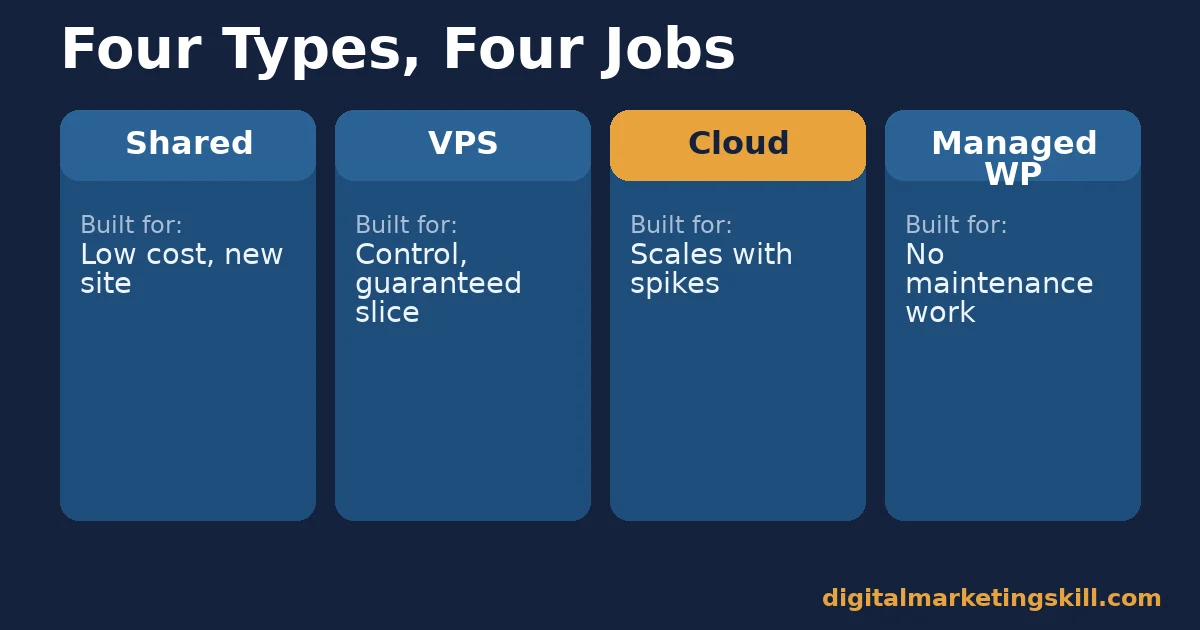
Shared Hosting: Built for Low Cost and Simplicity
Shared hosting puts many websites on one physical server. It splits the cost between all of them, which is why it is the cheapest option. The trade-off is that one noisy neighbour’s traffic spike can slow your own site down, since resources are shared, not reserved.
Most shared plans also limit which software you can install, trading flexibility for simplicity. That is a reasonable trade for a first website, and a frustrating one for a site that has outgrown it.
VPS Hosting: Built for Control Without Full Ownership
A virtual private server partitions a physical machine into isolated slices. Each slice gets its own guaranteed resources. You get far more control over software and configuration than shared hosting allows, without the cost of renting an entire physical server.
That extra control comes with extra responsibility. A VPS plan without management support expects you, or someone on your team, to handle security patches and server configuration directly.
Cloud Hosting: Built to Handle Traffic Spikes
Cloud hosting spreads a site across a network of servers. That network can scale up automatically when traffic rises. It suits sites with unpredictable or seasonal traffic, where a fixed amount of server capacity would either sit wasted most of the time or run out during a spike.
The flexibility usually comes with a less predictable bill. Usage-based pricing can reward a quiet month and penalise a busy one, so it rewards owners who actually watch their usage dashboard.
Managed WordPress: Built to Remove Maintenance Work
Managed WordPress hosting bundles updates, backups, security scanning and WordPress-specific speed tuning into the plan. It costs more than generic shared hosting. In exchange, it removes most of the maintenance tasks a site owner would otherwise do by hand.
It also tends to include caching tuned specifically for WordPress, which can lift Core Web Vitals scores without any extra work from the site owner.
How to Choose the Right Website Hosting Service
Each section below mirrors the type above, in the same order. Work down the list until one description matches your site today, then stop comparing and commit. Picking slowly among website hosting services costs more in lost momentum than picking a slightly imperfect option and moving on.
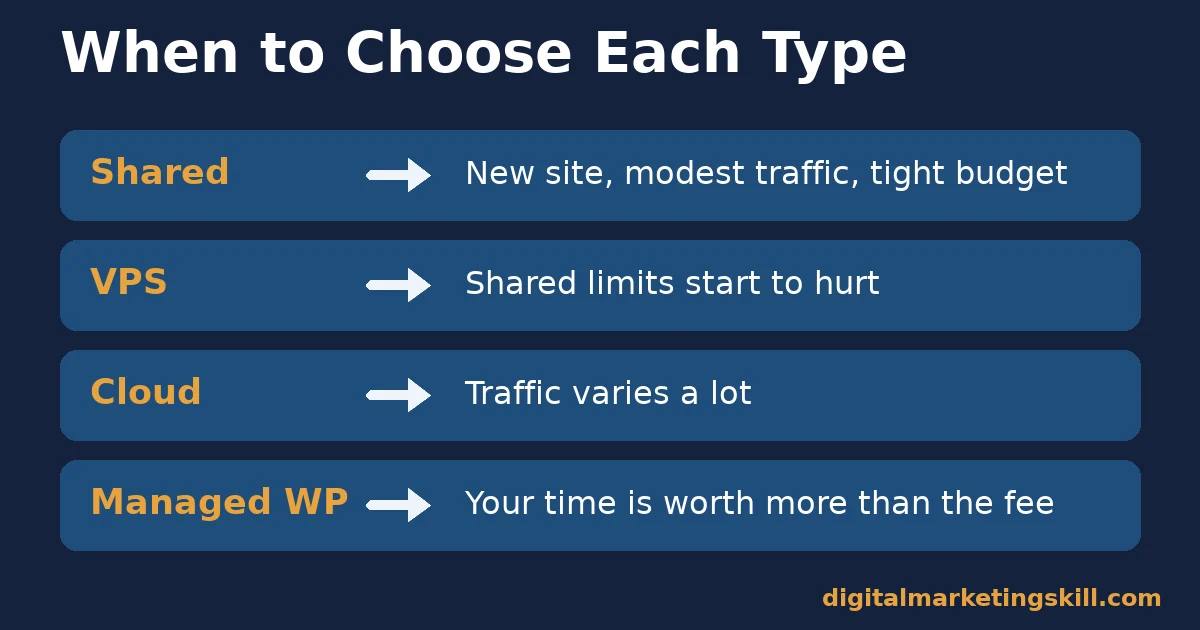
Shared Hosting: Choose It for a New, Low-Traffic Site
Choose shared hosting if your site is new, your budget is tight, and your monthly traffic is modest. Confirm the plan includes a content delivery network, or easy CDN integration. That is one of the simplest ways to offset shared hosting’s shared-resource limits.
Set a calendar reminder to revisit this choice in six months. Among website hosting services, shared plans are the easiest to outgrow quietly, since the slowdown often arrives gradually rather than all at once.
VPS Hosting: Choose It When Shared Limits Start to Hurt
Move to VPS hosting once you notice slowdowns during normal traffic, not just rare spikes. Also move up once you need software shared hosting does not allow. The jump in cost is usually smaller than the lost conversions a consistently slow site produces.
If your team has no one comfortable managing a server directly, look for a managed VPS plan instead of an unmanaged one. The extra fee buys back the time you would otherwise spend learning server administration under pressure.
Cloud Hosting: Choose It for Unpredictable Traffic
Choose cloud hosting when your traffic genuinely varies a lot, such as a seasonal retailer or a site that occasionally gets a large referral spike. Confirm the pricing model first. Some cloud plans charge by usage, which can surprise an owner expecting a flat monthly fee.
Set a spending alert if your provider offers one. It is the simplest way to catch a runaway bill from a traffic spike before the invoice arrives, rather than after.
Managed WordPress: Choose It to Save Time, Not Money
Choose managed WordPress hosting when your time is worth more than the price difference. It rarely wins on raw cost. But it removes update, backup and security tasks that otherwise eat into the hours you could spend on the site itself.
It also suits owners who want one company accountable for the whole stack. When something breaks, there is a single support line to call, rather than a guessing game between host, theme and plugin vendors.
How to Measure Whether Your Host Is Actually Good
Marketing pages describe hosting in adjectives. Your own numbers describe it in facts. The five metrics below are defined in one sentence each, with a note on how to read them. Check them once during a trial period, then again a month after you commit, so you catch any gap between the sales page and the real service.
Keep a simple record of each number, even a basic spreadsheet. A single bad week can be noise, but a slow drift over several months across any of these five numbers usually means it is time to look at other website hosting services.
Five Numbers That Reveal Hosting Quality
- Time to First Byte (TTFB). This is how long the browser waits for the first byte of a response. A consistently slow TTFB, even on a simple page, usually points to the host rather than your site’s own code.
- Largest Contentful Paint (LCP). This measures how soon the main content of the page becomes visible. Google’s threshold for a good score is 2.5 seconds or under, at the 75th percentile of real visits.
- Uptime percentage. This is the share of time your site was reachable. A 99.9% uptime figure still allows about 8.76 hours of downtime across a full year, so compare the exact decimal, not just the headline number.
- Support response time. This is how long a host takes to meaningfully respond to a support ticket, not just send an automated reply. Test it before you commit, by asking a real technical question during a trial period.
- Backup frequency and restore test. This is how often backups run, and whether you have actually tested restoring one. An untested backup is not a real safety net.
The One Decision Rule: Match Hosting to Traffic, Not Price
If you take only one decision rule from this guide, make it this one. Choose your website hosting service to match your current traffic and technical skill, not the lowest advertised renewal price. An underpowered host costs more in lost visitors than it ever saves in fees.
This rule matters most right after a traffic-driving win, such as a press mention or a successful campaign, because that is exactly when an underpowered host fails most visibly. Plan ahead of that moment rather than reacting to it, since a hosting migration under pressure is far riskier than one done on a calm week.
Here is an illustrative example, with invented numbers. A small online store on a budget shared plan gets a sudden traffic spike from a social media mention. The site slows to a crawl. Checkout times out for some shoppers, and a share of that traffic is lost before it converts. The owner had chosen that plan a year earlier purely on price, without checking whether it could handle a spike.
Moving the same store to a cloud plan a month later, at a modestly higher monthly cost, changes the outcome. It lets the store absorb the next spike without losing a single sale.
The lesson is about matching capacity to demand, not chasing the cheapest listed price. Among website hosting services, a host that fits your real traffic pattern is cheaper in practice than one that merely looks cheaper on paper.
A Real Case: What Vodafone Italy’s Speed Fix Showed
Vodafone Italy, a telecommunications company, is a published case study on web.dev showing what a Core Web Vitals improvement can do. The company reduced its Largest Contentful Paint by 31% through server-side rendering, less render-blocking JavaScript and image optimisation. It saw 8% more sales after the change.
The case is useful here because the improvement came from front-end and server-side performance work together, not either alone. Treat it as one published company result, not a guaranteed outcome for every site, since Vodafone Italy’s starting point, audience and market differ from a smaller site’s.
The underlying lesson still transfers to a much smaller site. A faster first response, whatever produces it, tends to show up in both engagement and revenue, even if the exact percentages will differ.
Frequently Asked Questions About Website Hosting Services
What type of website hosting service is best for a beginner?
Shared hosting, for a new site with modest traffic and a tight budget. Add a content delivery network if the plan supports one. Plan to move up once traffic or performance needs grow past what shared hosting comfortably handles.
How many website hosting services should I compare before choosing?
Two or three within the type that already matches your traffic and skill is enough. Comparing a dozen plans across every type usually wastes more time than it saves, since the type decision matters more than the brand.
Can I switch website hosting services later without losing my site?
Yes, migrations are routine and most hosts offer a free migration service or a plugin-based tool for WordPress sites. Back up your site fully before any migration, and keep the old host active until you confirm the new one works correctly.
Does website hosting affect SEO rankings?
Yes, indirectly. Google’s page experience documentation confirms Core Web Vitals are used by its ranking systems. Hosting quality directly affects Time to First Byte and Largest Contentful Paint, two of the biggest levers behind those scores.
How much uptime should I expect from a good host?
Look for 99.9% or higher, and check the exact decimal rather than just the headline figure. At 99.9%, a site can still be down for about 8.76 hours across a year. A 99.95% or 99.99% figure matters more than it looks on the page.
Is cloud hosting always better than shared hosting?
No. Cloud hosting suits unpredictable or spiky traffic. It is often unnecessary cost for a small, steady-traffic site that shared hosting handles comfortably. Match the type to your actual traffic pattern, not to whichever option sounds most advanced.
What is managed WordPress hosting, and is it worth the extra cost?
It is hosting that bundles WordPress-specific updates, backups, security and speed tuning into the plan. It is worth the extra cost mainly when your time is worth more than the price difference, since it removes maintenance work rather than adding raw server power.
How do I test a host before committing to it?
Open a free trial or short-term plan. Measure Time to First Byte and Largest Contentful Paint on a real page. Send a genuine technical support question to see how long a useful reply takes. Numbers beat marketing claims every time.
Does the web server software a host uses actually matter?
It can, though the plan and configuration around it usually matter more. W3Techs reports Cloudflare Server now runs 32.2% of websites whose server is known, ahead of Nginx and Apache, largely because of built-in caching and edge delivery rather than the server software name alone.
Start With Your Current Traffic, Not a Top-10 List
Website hosting services are a match-making problem, not a leaderboard. Look at your current traffic, your technical comfort level and your budget.
Then pick the type of hosting built for that stage, rather than chasing whichever provider tops a ranked list this month.
If you want structured practice improving site speed, technical SEO and the Core Web Vitals that hosting choices affect, Digital Marketing Skill Institute teaches these skills hands-on inside the Master Diploma in Digital & AI Marketing.
The AI-Powered WordPress and SEO Specialist track covers hosting, speed and technical SEO directly, and the AI-Powered Google Specialist track covers the measurement side with Google’s own tools. You can combine all four tracks through the Full Stack option.
Both tracks include unlimited 1-on-1 coaching and mentoring plus a U.S. Project Internship with a verified U.S. Work Reference Letter. The diploma is dual US and UK accredited and recognised in more than 100 countries.
The programme is fully online, so you can study and apply these fixes from anywhere in your country. Browse more guides on the Digital Marketing Skill Institute blog, including our guide to increasing website page speed and our walkthrough on how to build a WordPress website.
Read more real results on the reviews page, and when you are ready, apply for the Master Diploma or start from the Digital Marketing Skill Institute homepage.
Every figure in this guide was checked against its original source before publication. Figures marked as illustrative are invented examples, not real results.
![9 Amazing Digital Marketing Skills to Make Money Online [With Proof]](https://digitalmarketingskill.com/wp-content/uploads/2019/07/9-Amazing-Digital-Marketing-Skills-to-Make-Money-Online-With-Proof-17.png)






